

 carbon-design-system
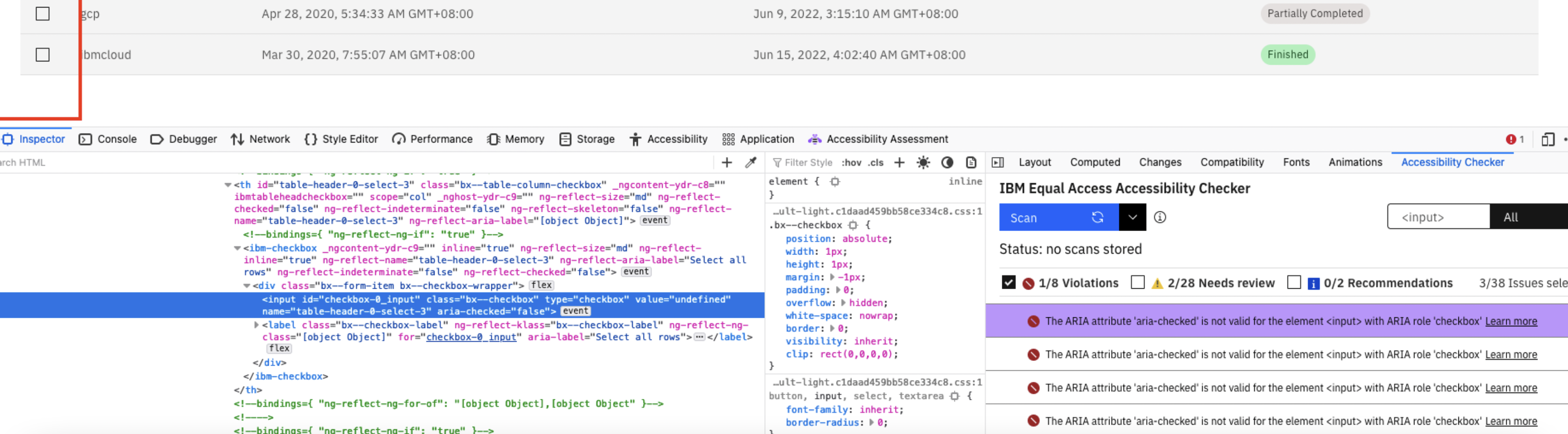
[Accessibility]: The ARIA attribute 'aria-checked' is not valid for the element <input> with ARIA role 'checkbox'
[Accessibility]: The ARIA attribute 'aria-checked' is not valid for the element with ARIA role 'checkbox'
Detailed description
Describe in detail the issue you're having.
This issue is specific to the <checkbox> element which is used within <ibm-table> component.
Some HTML elements or attributes have native semantics that map, by default, to implied ARIA semantics. For predictable interaction and behaviour of UI controls, these implicit semantics should only be overridden as defined in the ARIA in HTML Document conformance requirements for use of ARIA attributes in HTML specification.
If a native HTML attribute fits the intended behaviour, use that instead of adding ARIA markup; Or, update the attributes on the element using the guidance in the Document conformance requirements for use of "ARIA" attributes in HTML section of the ARIA in HTML specification. This reference provides details of valid ARIA markup on native HTML elements.
Is this a feature request (new component, new icon), a bug, or a general issue?
Bug
Is this issue related to a specific component?
<ibm-table>
What did you expect to happen? What happened instead? What would you like to see changed?
ARIA attributes must be valid for the element and ARIA role to which they are assigned
What browser are you working in?
Firefox 101.0(64-bit)
What version of the Carbon Design System are you using?
[email protected]
[email protected]
What WCAG 2.1 checkpoint does the issue violate?
IBM 4.1.2 Name, Role, Value ARIA in HTML - Document conformance requirements for use of ARIA attributes in HTML
Additional information
- Screenshots or code

Hi @yashgarg1719, I think this problem was resolved. Checked the PR: https://github.com/IBM/carbon-components-angular/pull/2175 Try to update your carbon-components-angular library to the latest version.

