

 caprover
Give insight into the container state
Is your feature request related to a problem? Please describe.
I ran into an issue where Graylog takes 5+ minutes to spin up after being deployed. This also happens when you updated an ENV variable etc. I was thinking it would be very useful to know the state of the container ( ie.. starting .. healthy .. unhealthy) Right now I have to ssh into the box and do a docker container list to see the container and know when it's done spinning up
Describe the solution you'd like On the app page I'd like to see a list of the containers and their states
Describe alternatives you've considered SSH'ing into the box and running docker commands
Additional context It seems like this could be related to the task here: https://github.com/caprover/caprover/projects/1#card-6002776
If this task is to show the number of running containers, maybe it can show them and their current states which would be very useful

I certainly like this. Now that we have the application logs in the app panel, it makes sense to fetch the information regarding the state of the container from Docker API as well so we can show this.
Having said that, we want to make sure that we don't port over too many fields over. For a thin Docker GUI, there is always better choices compared to CapRover, like Portrainer.

Yea I agree. I was reluctant to offer it as a feature but then I saw you were planning on doing something where it could fit in. Most docker containers I've used so far start up really quickly, so when troubleshooting Graylog it took me a bit to figure out that the old container was sticking around while the new container spent 5 mins spinning up. I also ran into stuff like the new container being in a spin up/unhealthy/remove/spin up loop that there's no way to get insight into through the current UI.
So this is where things get a little muddy. CapRover "cleverly" decides whether to use start-first or stop-first when updating a service. If there is a mounted volume, in order to be safe, it uses stop-first and otherwise it uses start-first in order to support next to zero downtime during deployment:
https://github.com/caprover/caprover/blob/6c133f0b8776fd793c0ad2dbdadfeb9e5f4800b1/src/docker/DockerApi.ts#L1397-L1400
So depending on this flag, you might have multiple containers alive at the same time... Reflecting this fact without overwhelming the end user is a tricky thing IMO.
Here's one option
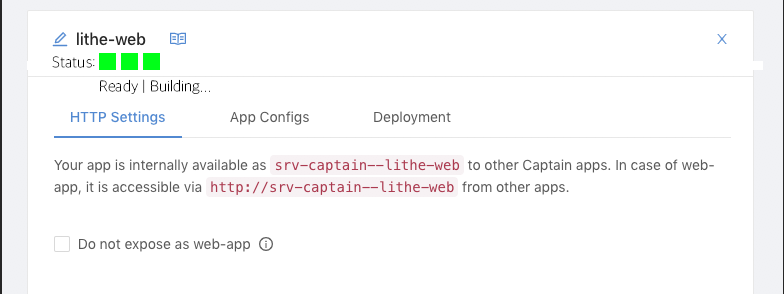
You would have a status under the title which could be: Ready - This is the status when you first create the app Building - during your first deployment Green | Yellow | Red squares for each container and their state with a tooltip over the square that gives more details on the color

I think this would be very helpful - I just did some config changes to a MariaDB app and CapRover kept trying to restart it, but continuously failed. It would be great to see that in the UI.
