

 capacitor-community
importFromJson not importing all values
Describe the bug
When using the function importFromJson() only part of the data contained in the JSON is imported.
A simple illustrated example:
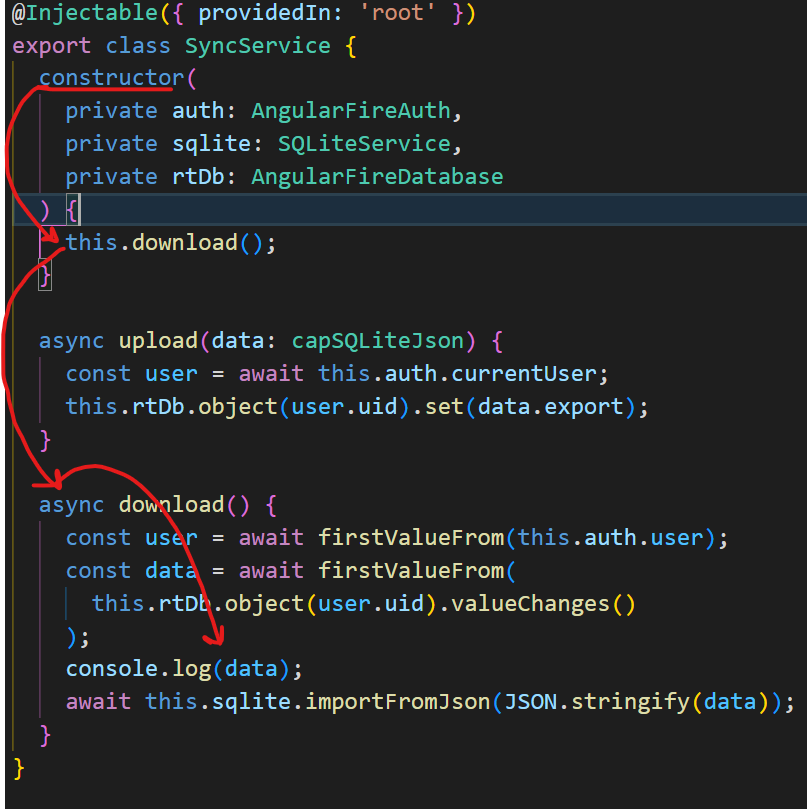
I have a service called SyncService. Upon instantiation the SyncService should retrieve a stored version of the DB (previously obtained calling the exportToJson('full') method and stored on a remote DB) and import its content using the importFromJson() method.
Screenshot 1 shows what I just described, notice that before importing data, I log it to the console.
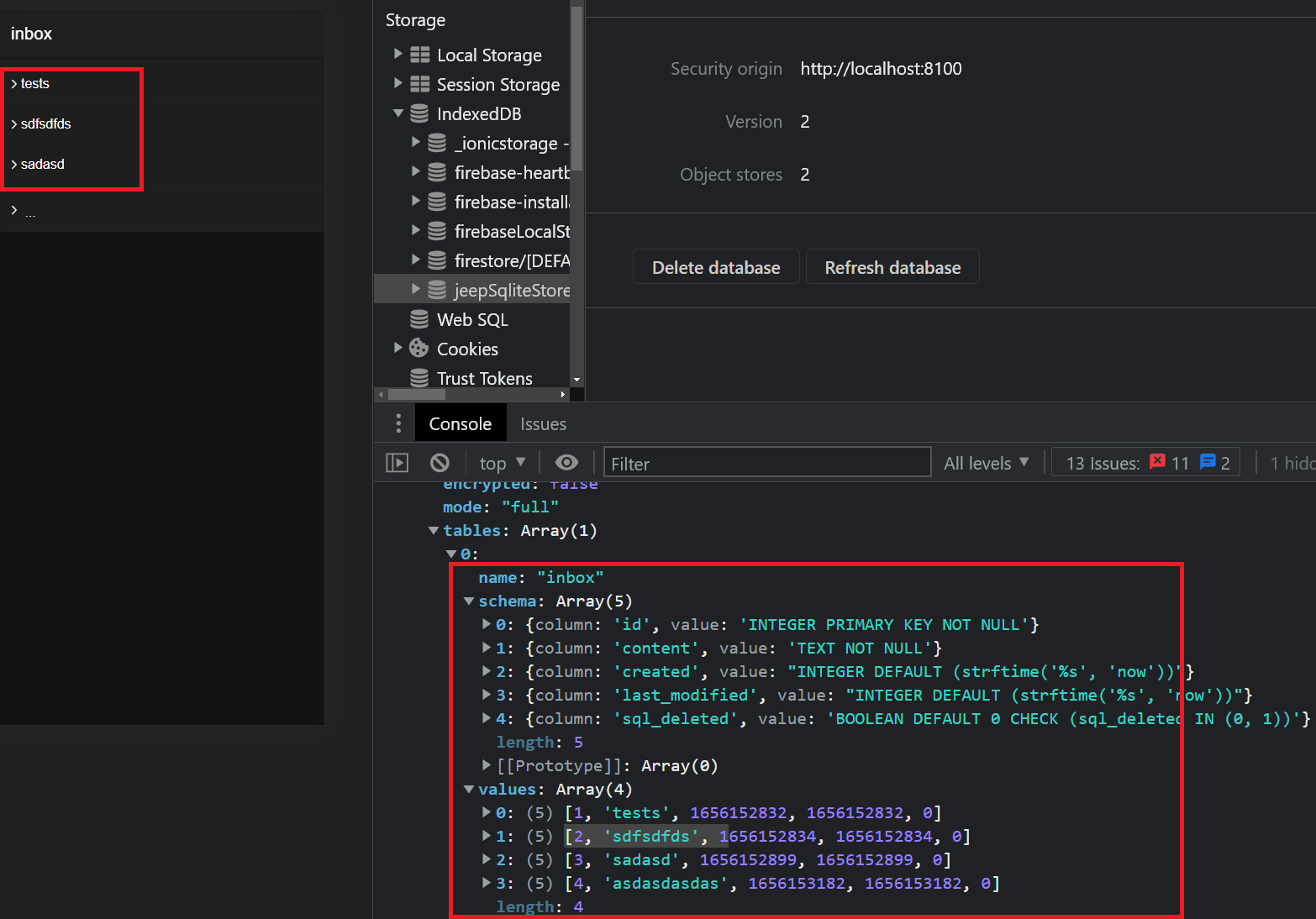
You can notice from the screenshot 2 how the logged data contains 4 values, however the DB only contains 3, this reflects on the fact that only 3 items are listed in the frontend (the last one is skipped). I don't really understand what is happening here.
Expected behavior I would expect that the entire content of the exported DB is imported in the DB
Screenshots
Screenshot 1
Screenshot 2
Desktop (please complete the following information):
- OS: Windows 11
- Browser chrome
- Version 102
Additional context
- I'm absolutely sure that this is not a problem in my frontend:
SELECT * FROM inboxreturns only 3 results - The last item in the screenshot 2 (
> ...) is a list-item that functions as a button and is always present. It has nothing to do with the content of the inbox table - I'm using the Sqlite plugin on the web platform (Angular)
- I always export the DB in
fullmode - I export the DB at every write action
- I only import the DB once in the life of the application -> when the
SyncService(a singleton) is instantitated - In the AppComponent I create the database tables and I call
createSyncTable() - Somewhere in the documentation I read about calling the
importFromJsonfunction in different modes, but the function implementation that I have (coming from thesqlite.service) doesn't accept any arguments. - Slightly different versions of the
sqlite.serviceexist across the different repositories of this project. I don't really know which one is the most updated, I copied the one from the web-platform/angular example repository

@marnec I do not really follow what you are doing from the additional context. the mode for the importFromJson is int the json object itself. i do not really understand what the export of the db is made for and i do not see the reason to do that at every write action. The purpose of the importFromJson and exportToJson is to synchronize the database with a remote database on a server. It seems that your json object got 1 table inbox having 5 columns defined and 4 values given. You. should be more specific and/or share your code.

the mode for the importFromJson is int the json object itself
ok now I get this
i do not really understand what the export of the db is made for and i do not see the reason to do that at every write action.
it's my personal implementation of syncing with a remote server. Syncing every write action means that each time I write I know that an updated version of the database is being uploaded
The purpose of the importFromJson and exportToJson is to synchronize the database with a remote database on a server.
That's exactly what I'm doing. If you look at the upload method in screenshot 1 you'll see that I'm loading the whole json to a firebase realtime db
It seems that your json object got 1 table inbox having 5 columns defined and 4 values given. You. should be more specific and/or share your code.
yes. my REMOTE (just downloaded) inbox table has 5 columns and 4 rows, but when the importFromJson method is called with that REMOTE data, it loads in my LOCAL database only 3 rows. You can see this in screenshot 2 > left-most red square
@marnec Can you show the inbox page html and ts where you call the SyncService
@marnec Look at (angular-sqlite-app-starter)[https://github.com/jepiqueau/angular-sqlite-app-starter] i add a test for issue292 and everything work fine
sorry @jepiqueau I have been on vacation for some time and completely forgot about this, I'll have a look at this this evening and I'll let you know