

 canton7
WindowManager MessageBox UI issue
Dear,
First of all, thank you for all your work, I find this project truly useful for my developments.
I'm using the WindowManager to show Stylet's own MessageBox as discussed in the docs:
this.windowManager.ShowMessageBox($"Error message here.", "Warning", MessageBoxButton.YesNoCancel, MessageBoxImage.Warning);
It works, however, the buttons on the MessageBox are strange-looking:

Do you have any idea what could cause this issue? Thanks a lot in advance!

That's very weird, I haven't seen that before. If you create a <Button> yourself, does it look the same?
Yes, it's very strange, and all other controls including buttons work just fine in windows, usercontrols etc.

Hi, sorry for the thread bumping but I'm also having the same problem:
_windowManager.ShowMessageBox("test", "Test", MessageBoxButton.OK, MessageBoxImage.Hand);
Shows:
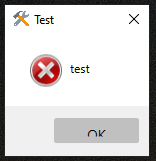
I'm not sure if it helps but I'm using ModernWpf as UI framework -> https://github.com/Kinnara/ModernWpf I executed the aforementioned code in my ViewModel:
        private readonly IWindowManager _windowManager;
        public RootViewModel(IWindowManager windowManager)
        {
             _windowManager = windowManager;
             _windowManager.ShowMessageBox("test", "Test", MessageBoxButton.OK, MessageBoxImage.Hand);
        }
Does anyone know how to fix the button? Other "normal" buttons work normally, thanks

Would the fix to this issue be simply changing the Height property to MinHeight, then allowing the button to presumably automatically increase in height when the font size?

Hi there, I got the same problem as @Coke21. My messagebox button is a) not centered and b) clipping.

I would imagine that the "not centered" part is coming from this code (unfortunately I can't test it):
 https://github.com/canton7/Stylet/blob/master/Stylet/MessageBoxView.xaml
Would be awesome if this gets fixed, if you need anything let me know.

Have you tried this:
<Style TargetType="TextBlock">
     <Setter Property="VerticalAlignment" Value="Center" />
</Style>

I'm using HandyControl as UI framework and I'm having the same problem. Also, MessageBox cannot adapt to dark mode. Is it possible to allow customizing the style of MessageBox in future versions?

I'm using HandyControl as UI framework and I'm having the same problem. Also, MessageBox cannot adapt to dark mode. Is it possible to allow customizing the style of MessageBox in future versions?
I believe this is related to HandyControl more than Stylet.