

 canonical
Mobile navigation menu has different styles when using has-menu-open
Describe the bug
When using has-menu-open to display the mobile Navigation menu there is a grey background whereas displaying the mobile menu without using the class does not add the background.
To Reproduce
Steps to reproduce the behavior:
Visit https://codepen.io/huwshimi/pen/poaRgVa. Resize down to mobile size. Click Menu and see that the mobile menu has a grey background. Visit https://codepen.io/huwshimi/pen/yLvgejK. Resize down to mobile size. Click Menu and see that the mobile menu has a white background.
Expected behavior
The background should be the same whether the class is used or not.
Screenshots
With has-menu-open:

With no class:


Can I contribute to this issue (If it's still Open) under Hactoberfest?

@sushantgwr87 Sure! Thanks!
Just for some additional context. The top image (how it looks with the has-menu-open class) is correct, so the bottom (CSS-only mobile styles) need to be adjusted.
Feel free to reach out if you have any questions. Navigation is one of our most complex components, so may not be the easiest to start with.

@bartaz Hello Sir
Some Help Needed on running the project locally.
I used docker via wsl in windows to build and run the project. Followed this Guide
Build was successful without any errors.
Problem is with running the command ./run serve
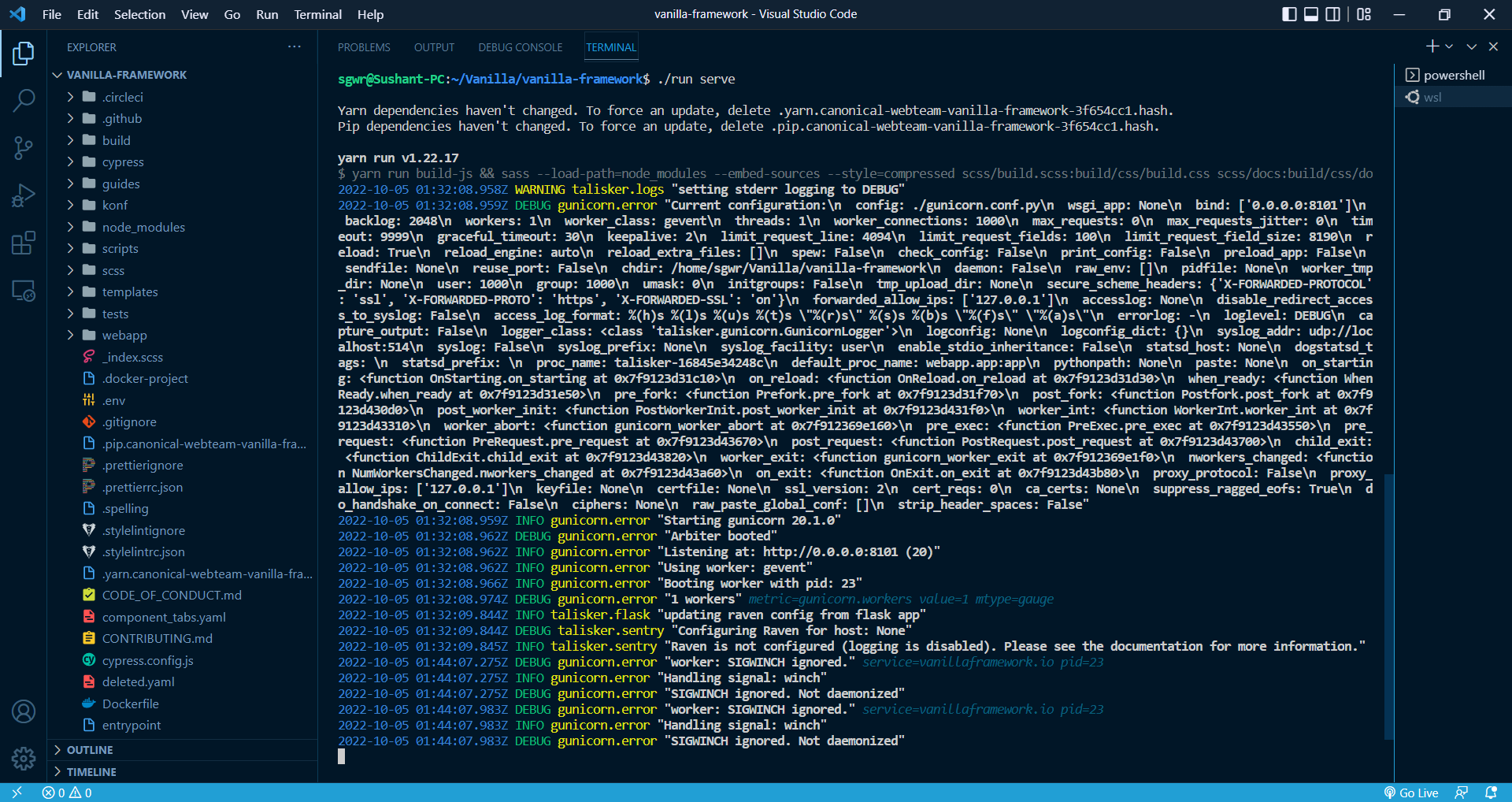
Terminal log:
Yarn dependencies haven't changed. To force an update, delete .yarn.canonical-webteam-vanilla-framework-3f654cc1.hash. Pip dependencies haven't changed. To force an update, delete .pip.canonical-webteam-vanilla-framework-3f654cc1.hash.
yarn run v1.22.17 $ yarn run build-js && sass --load-path=node_modules --embed-sources --style=compressed scss/build.scss:build/css/build.css scss/docs:build/css/docs && postcss --use autoprefixer --replace 'build/css/**/*.css' --map $ mkdir -p build/js/modules && cp node_modules/@canonical/cookie-policy/build/js/cookie-policy.js build/js/modules && cp node_modules/@canonical/latest-news/dist/latest-news.js build/js/modules Done in 10.06s.
yarn run v1.22.17 $ ./entrypoint 0.0.0.0:${PORT} 2022-10-05 01:32:08.731Z INFO talisker.logs "talisker configured" DEVEL=true 2022-10-05 01:32:08.914Z INFO talisker.sentry "Raven is not configured (logging is disabled). Please see the documentation for more information." 2022-10-05 01:32:08.958Z WARNING talisker.logs "setting stderr logging to DEBUG" 2022-10-05 01:32:08.959Z DEBUG gunicorn.error "Current configuration:\n config: ./gunicorn.conf.py\n wsgi_app: None\n bind: ['0.0.0.0:8101']\n backlog: 2048\n workers: 1\n worker_class: gevent\n threads: 1\n worker_connections: 1000\n max_requests: 0\n max_requests_jitter: 0\n timeout: 9999\n graceful_timeout: 30\n keepalive: 2\n limit_request_line: 4094\n limit_request_fields: 100\n limit_request_field_size: 8190\n reload: True\n reload_engine: auto\n reload_extra_files: []\n spew: False\n check_config: False\n print_config: False\n preload_app: False\n sendfile: None\n reuse_port: False\n chdir: /home/sgwr/Vanilla/vanilla-framework\n daemon: False\n raw_env: []\n pidfile: None\n worker_tmp_dir: None\n user: 1000\n group: 1000\n umask: 0\n initgroups: False\n tmp_upload_dir: None\n secure_scheme_headers: {'X-FORWARDED-PROTOCOL': 'ssl', 'X-FORWARDED-PROTO': 'https', 'X-FORWARDED-SSL': 'on'}\n forwarded_allow_ips: ['127.0.0.1']\n accesslog: None\n disable_redirect_access_to_syslog: False\n access_log_format: %(h)s %(l)s %(u)s %(t)s "%(r)s" %(s)s %(b)s "%(f)s" "%(a)s"\n errorlog: -\n loglevel: DEBUG\n capture_output: False\n logger_class: <class 'talisker.gunicorn.GunicornLogger'>\n logconfig: None\n logconfig_dict: {}\n syslog_addr: udp://localhost:514\n syslog: False\n syslog_prefix: None\n syslog_facility: user\n enable_stdio_inheritance: False\n statsd_host: None\n dogstatsd_tags: \n statsd_prefix: \n proc_name: talisker-16845e34248c\n default_proc_name: webapp.app:app\n pythonpath: None\n paste: None\n on_starting: <function OnStarting.on_starting at 0x7f9123d31c10>\n on_reload: <function OnReload.on_reload at 0x7f9123d31d30>\n when_ready: <function WhenReady.when_ready at 0x7f9123d31e50>\n pre_fork: <function Prefork.pre_fork at 0x7f9123d31f70>\n post_fork: <function Postfork.post_fork at 0x7f9123d430d0>\n post_worker_init: <function PostWorkerInit.post_worker_init at 0x7f9123d431f0>\n worker_int: <function WorkerInt.worker_int at 0x7f9123d43310>\n worker_abort: <function gunicorn_worker_abort at 0x7f912369e160>\n pre_exec: <function PreExec.pre_exec at 0x7f9123d43550>\n pre_request: <function PreRequest.pre_request at 0x7f9123d43670>\n post_request: <function PostRequest.post_request at 0x7f9123d43700>\n child_exit: <function ChildExit.child_exit at 0x7f9123d43820>\n worker_exit: <function gunicorn_worker_exit at 0x7f912369e1f0>\n nworkers_changed: <function NumWorkersChanged.nworkers_changed at 0x7f9123d43a60>\n on_exit: <function OnExit.on_exit at 0x7f9123d43b80>\n proxy_protocol: False\n proxy_allow_ips: ['127.0.0.1']\n keyfile: None\n certfile: None\n ssl_version: 2\n cert_reqs: 0\n ca_certs: None\n suppress_ragged_eofs: True\n do_handshake_on_connect: False\n ciphers: None\n raw_paste_global_conf: []\n strip_header_spaces: False" 2022-10-05 01:32:08.959Z INFO gunicorn.error "Starting gunicorn 20.1.0" 2022-10-05 01:32:08.962Z DEBUG gunicorn.error "Arbiter booted" 2022-10-05 01:32:08.962Z INFO gunicorn.error "Listening at: http://0.0.0.0:8101 (20)" 2022-10-05 01:32:08.962Z INFO gunicorn.error "Using worker: gevent" 2022-10-05 01:32:08.966Z INFO gunicorn.error "Booting worker with pid: 23" 2022-10-05 01:32:08.974Z DEBUG gunicorn.error "1 workers" metric=gunicorn.workers value=1 mtype=gauge 2022-10-05 01:32:09.844Z INFO talisker.flask "updating raven config from flask app" 2022-10-05 01:32:09.844Z DEBUG talisker.sentry "Configuring Raven for host: None" 2022-10-05 01:32:09.845Z INFO talisker.sentry "Raven is not configured (logging is disabled). Please see the documentation for more information."
And it stucks here for more than a hour
Screenshot
@sushantgwr87 sorry for late reply, I was away for couple days.
I'm sorry, it seems our HACKING.md guide is out of date.
The ./run script is likely not going to work. Looking at the output you are getting though it does say "Listening at: http://0.0.0.0:8101/ (20)", so maybe you can try opening it in a browser?
The main way to run Vanilla is via dotrun. The HACKING.md talks about "snap", but the latest version is a Python package that uses docker.
So if you follow the dotrun readme and install it via sudo pip3 install dotrun you should be able to use the dotrun command to run the Vanilla project.
Sorry for the inconvenience. I'll make sure we update the HACKING.md file.
The
./runscript is likely not going to work. Looking at the output you are getting though it does say "Listening at: http://0.0.0.0:8101/ (20)", so maybe you can try opening it in a browser?
Actually I tried to open it in browser but it didn't work, It was showing page is unreachable.
The main way to run Vanilla is via dotrun. The HACKING.md talks about "snap", but the latest version is a Python package that uses docker. So if you follow the dotrun readme and install it via sudo pip3 install dotrun you should be able to use the dotrun command to run the Vanilla project.
Will try this and update you soon on it. No problem Sir I myself was trying different ways to run this but have no directions as being new to docker, I only worked once before. I will let you know about my progress in this.
Thanks for help Sir.