

 canonical
Tables probably shouldn't default to fixed width
I'm not sure if this is baked in to the style or part of the implementation where we use it, but using table-layout: fixed; doesn't produce great results for all but the simplest of tables (and even then has limitations).
Using a fixed width for the columns:
- doesn't aid legibility
- often causes table data to run over more lines than it should
- is inefficient at using space (especially in reactive)
- in extreme cases causes avoidable rendering errors
An example:
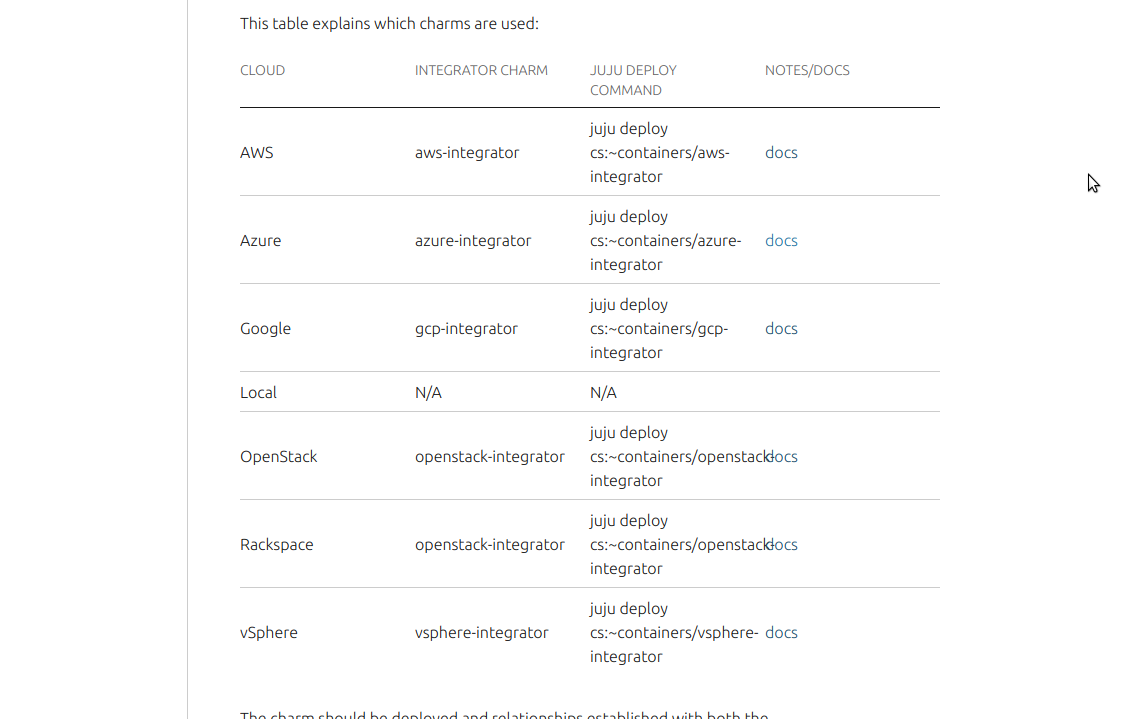
This table pretty much illustrates all of the problems mentioned above. However, with standard, flexible column widths it becomes more readable, more efficient and less broken

Yes, we can still try harder to make things in tables less wordy, but still a huge improvement

@evilnick table-layout: fixed is indeed baked into the 'base' css of vanilla. The reasons for this are:
• it makes styling tables a lot more predictable (a couple of articles on the subject - 1, 2 )
• it is faster. From mdn:
Under the "fixed" layout method, the entire table can be rendered once the first table row has been downloaded and analyzed. This can speed up rendering time over the "automatic" layout method, but subsequent cell content might not fit in the column widths provided. Cells use the overflow property to determine whether to clip any overflowing content, but only if the table has a known width; otherwise, they won't overflow the cells.
• it is particularly well suited to achieving very complex responsive behaviours. Two examples from maas:
- the simple disk partitions table
- the more complex, responsive machines table, which hides /adjusts column widths on multiple breakpoints, in order to to best fit the available space
• in a paginated or virtualised scroll table (as in maas), it ensures table columns don't change widths as new content replaces the initial content
To resolve all of the issues you mention, you just need to set widths on the <th>'s or <td>'s in the table's first row. You can do this in two ways:
• use grid column classes (the quick and dirty approach) • use a css snippet, as in the disk partitions example above
Would any of these work for you? Or do you need a solution that doesn't require writing any css? If that's the case, maybe we can add a utility class or local docs css that overrides the table-layout property.

I appreciate you looking into this, and providing the rationale behind it. I do think however that most of those advantages are mostly for UI design, rather than readability of the content, particularly in a docs context where we are dealing with static content. It is easy in some circumstances to insert a CSS snippet into our markdown to make this work better, but in the more general case, where docs are generated through discourse it is more difficult. The idea there is to make it discourse friendly and easier for more casual contributions, and it would be a bit unreasonable to expect those contributors to meddle with CSS in their posts. So I think a more general, docs-specific CSS would work better overall.
@pmatulis @degville any thoughts?
@evilnick good point about automatic conversions and casual contributors. I've made a pr that allows you to configure the default using variable $table-layout.
In addition, I've added a utility to override this: • If $table-layout is set to 'fixed' (still the default), you can use 'u-table-layout--auto' to override it. • if $table-layout is set to 'auto' (or anything else like 'inherit' etc) it adds a utility called 'u-table-layout--fixed'.
This is so regardless of the default, you still have access to the other option for special cases.
@evilnick just a heads up, after some back and forth on the pr the name of the setting changed to $table-layout-fixed (values true | false)
We just got this changed for the Anbox Cloud documentation: https://github.com/canonical/anbox-cloud.io/issues/273
How can we get the same style for all documentation sites?

We should verify if our existing utility works when put on a container. If it doesn't we should make the util work on container (body or docs container).

Seems that this got lost in backlog.
Current utility doesn't allow to target tables in child elements, so we need to update it, so we can affect all tables on discourse based content.