canonical
BTRFS starting containers with quota too quickly
I am using LXD stable with a custom partition formatted using BTRFS, jobs such as creating a container or restoring from backup prematurely report status as complete, but if you try to carry out operation such as start container it fails.
If you create container, then patch it to set a quota for the disk size, you need to wait approx 15-20 seconds before you can start the container (without triggering errors). If you restore from a backup, this process is much longer.
Basically getting all kinds of quota errors, from setting permissions and like the one below
Failed preparing container for start: Failed to create file \"/var/snap/lxd/common/lxd/containers/ubuntu/backup.yaml\": open /var/snap/lxd/common/lxd/containers/ubuntu/backup.yaml: disk quota exceeded
and (any filename)
Failed preparing container for start: Failed to change ownership of: /var/snap/lxd/common/lxd/storage-pools/default/containers/itest/rootfs/usr/lib/apt/apt.systemd.daily

It's not something we've ever noticed in any of our tests or have seen any report so far.
LXD issues simple btrfs qgroup limit commands and waits for the command to return, there is no mention in the btrfs documentation of any of this being asynchronous so I'd be tempted to consider this a kernel bug.
Can you run nsenter --mount=/run/snapd/ns/lxd.mnt /snap/lxd/current/bin/btrfs qgroup show -pcreF /var/snap/lxd/common/lxd/containers/NAME to confirm the quota is immediately set by LXD and is of the correct value?

It looks like it is, the moment i created container i ran this command for a 1GB quota. If i run sudo btrfs quota rescan /btrfs -w it does not even take 1 second. So the 15-30 second delay seems odd. Is LXD doing something in the background?
sudo nsenter --mount=/run/snapd/ns/lxd.mnt /snap/lxd/current/bin/btrfs qgroup show -pcreF /var/snap/lxd/common/lxd/containers/c1
qgroupid         rfer         excl     max_rfer     max_excl parent  child
--------         ----         ----     --------     -------- ------  -----
0/629       416.18MiB     13.68MiB    953.67MiB         none ---     ---
I did find this on the BTRFS wiki
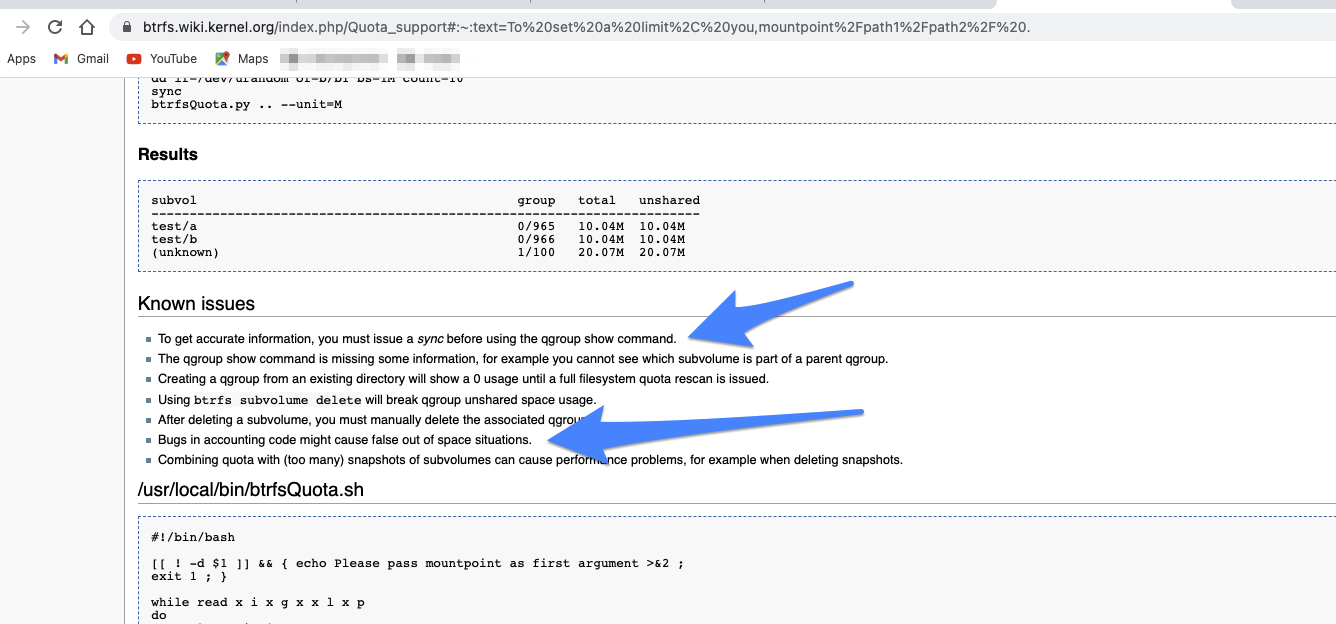
LXD doesn't do anything in the background when it comes to storage handling.
It could be unaccounted data in the page cache which is why they suggest running sync. But that's not a viable solution as sync is a global system wide action which can take minutes and pretty much block I/O for everyone else...
If btrfs is doing some stuff in the background, they should provide a command line flag so we can block until whatever it's doing is done...
This is how it can be recreated from the command line
$ lxc init ubuntu: c1
$ lxc config device add c1 root disk pool=default path=/ size=1GB && lxc start c1
Device root added to c1
Error: Failed preparing container for start: Failed to change ownership of: /var/snap/lxd/common/lxd/storage-pools/default/containers/c1/rootfs/usr/sbin/xfs_scrub
Try `lxc info --show-log c1` for more info
Doing this causes it hang, have to do a CTRL-c
$ lxc launch ubuntu:20.04 c2
$ lxc stop c2
$ lxc config device add c2 root disk pool=default path=/ size=1GB && lxc start c2
When i run the log on the hanging
$ lxc info --show-log c2
lxc c2 20210217100121.870 WARN     cgfsng - cgroups/cgfsng.c:mkdir_eexist_on_last:1126 - File exists - Failed to create directory "/sys/fs/cgroup/cpuset//lxc.monitor.c2"
lxc c2 20210217100121.870 WARN     cgfsng - cgroups/cgfsng.c:mkdir_eexist_on_last:1126 - File exists - Failed to create directory "/sys/fs/cgroup/cpuset//lxc.payload.c2"
lxc c2 20210217100121.872 WARN     cgfsng - cgroups/cgfsng.c:fchowmodat:1547 - No such file or directory - Failed to fchownat(17, memory.oom.group, 1000000000, 0, AT_EMPTY_PATH | AT_SYMLINK_NOFOLLOW )
lxc c2 20210217100121.910 ERROR    utils - utils.c:__safe_mount_beneath_at:1106 - Function not implemented - Failed to open 30(dev)
lxc c2 20210217100121.929 ERROR    utils - utils.c:__safe_mount_beneath_at:1106 - Function not implemented - Failed to open 33(full)
lxc c2 20210217100121.929 ERROR    utils - utils.c:__safe_mount_beneath_at:1106 - Function not implemented - Failed to open 33(null)
lxc c2 20210217100121.929 ERROR    utils - utils.c:__safe_mount_beneath_at:1106 - Function not implemented - Failed to open 33(random)
lxc c2 20210217100121.929 ERROR    utils - utils.c:__safe_mount_beneath_at:1106 - Function not implemented - Failed to open 33(tty)
lxc c2 20210217100121.929 ERROR    utils - utils.c:__safe_mount_beneath_at:1106 - Function not implemented - Failed to open 33(urandom)
lxc c2 20210217100121.929 ERROR    utils - utils.c:__safe_mount_beneath_at:1106 - Function not implemented - Failed to open 33(zero)
If you think 1GB is too small, same happens with 5GB
j@lxd-btrfs:~$ lxc init ubuntu: c3
Creating c3
j@lxd-btrfs:~$ lxc config device add c3 root disk pool=default path=/ size=5GB && lxc start c3
Device root added to c3
Error: Failed preparing container for start: Failed to change ownership of: /var/snap/lxd/common/lxd/storage-pools/default/containers/c3/rootfs/usr/share/mime/audio/x-psf.xml
Try `lxc info --show-log c3` for more info
j@lxd-btrfs:~$ lxc info --show-log c3
Name: c3
Location: none
Remote: unix://
Architecture: aarch64
Created: 2021/02/17 10:22 UTC
Status: Stopped
Type: container
Profiles: default

Log:
I think this issue is related to it, in the end it worked after x time, which is the same thing i have noticed. https://github.com/lxc/lxd/issues/4321