

 camunda
I can connect to Zeebe with a custom certificate
What should we do?
- I can specify a certificate which is used to connect to a TLS secured Zeebe instance.
More insights in https://github.com/camunda/camunda-modeler/issues/2404
Why should we do it?
Cannot deploy models to TLS secured Zeebe instance.

Ideas how to solve this:
- have a directory with certificates which could be used to interact with Zeebe
TODO:
- I haven't checked if it's picked up automatically once I add it to keychain.
- Check how other applications do that: https://www.jetbrains.com/help/idea/settings-tools-server-certificates.html
Additional notes from the customer:
We are using HTTPS certificates with very frequent refreshes (expiry are very short) so I need to do the "extract SSL certificate using openssl s_client" dance pretty often. Not sure how to address frequent cert changes with a nice UX

Proposal: Instead of investing into "building that UX", let us consider to hand over some parts of it to the OS.
How do they usually develop currently (why does "frequent refresh") work with zeebectl (if it works?).

I checked how custom certificates are handled in WebStorm. I can accept all untrusted certificates (insecure) or add specific certificates in the UI:

These are the settings available in VSCode:

Note that it does not have a concept of deployment without extensions (e.g. https://marketplace.visualstudio.com/items?itemName=mkloubert.vs-deploy).
Once I setup my keychain to always trust my self-signed certificate, I was able to connect with zbctl. Still, I haven't been able to connect with zeebe-node yet.
I was able to setup this properly. You can check out the repo: https://github.com/barmac/zeebe-tls-connection-test
zeebe-node is able to connect to the instance when I provide the certificate to the client. Note that the certificate needs to have DNS:localhost specified in the subjectAltName section.
Unfortunately, even if I add the certificate to the system keychain, and make the OS trust it, zeebe-node fails to connect to the instance. It works with zbctl though.
I tried to set the certicate/key paths via env variables, but apparently there is a bug in zeebe-node which prevents us from using env variables at the moment 🤡 I will create an issue for this soon.
edit: I prepared a fix instead: https://github.com/camunda-community-hub/zeebe-client-node-js/pull/263
Simple solution sketch:
Given I have a certificate located on my disk, I can either:
- Run Modeler with
--zeebe-ssl-certificateflag like so:modeler --zeebe-ssl-certificate="/path/to/my/cert.pem", or - Configure
flags.jsonfile like so:
{
  "zeebe-ssl-certificate": "/path/to/my/cert.pem"
}
So that when Modeler tries to connect to Zeebe, it will use the provided certificate.
@ajeans Does it sound like a proper solution for your use case? What potential problems can you see?
@christian-konrad @nikku Please share your feedback. Note that this allows only a single certificate as opposed to the idea in https://github.com/camunda/camunda-modeler/issues/3028#issuecomment-1184216686. However, this is adjusted to zeebe-node API.
Regarding the OS keychain, NodeJS uses per default bundled root certificates from Mozilla CA store. I believe this is the reason why the custom certificate added to a system keychain is ignored by the client.
In VSCode, they patch the http agent to also include the certificates found in the system keychain, cf. https://github.com/microsoft/vscode-proxy-agent/blob/main/src/index.ts#L364 We could do that as well, but it would take more time to implement than the flag-based approach.
Some additional findings:
We cannot use Electron's net module (which uses Chromium networking behind the scenes) because gRPC is based on Node's http2 module while Electron's net can only do normal http(s) requests.
There are also not-vscode packages which handle OS stores:
- https://www.npmjs.com/package/win-ca
- https://www.npmjs.com/package/mac-ca
Note that they're not actively developed.
The flag-based approach can be tested with these artifacts (should be available in ~15 minutes):
- https://camunda-modeler-on-demand.s3.eu-central-1.amazonaws.com/3028-select-certificate-via-flag/camunda-modeler-3028-select-certificate-via-flag-linux-x64.tar.gz
- https://camunda-modeler-on-demand.s3.eu-central-1.amazonaws.com/3028-select-certificate-via-flag/camunda-modeler-3028-select-certificate-via-flag-mac.dmg
- https://camunda-modeler-on-demand.s3.eu-central-1.amazonaws.com/3028-select-certificate-via-flag/camunda-modeler-3028-select-certificate-via-flag-mac.zip
- https://camunda-modeler-on-demand.s3.eu-central-1.amazonaws.com/3028-select-certificate-via-flag/camunda-modeler-3028-select-certificate-via-flag-win-ia32.zip
- https://camunda-modeler-on-demand.s3.eu-central-1.amazonaws.com/3028-select-certificate-via-flag/camunda-modeler-3028-select-certificate-via-flag-win-x64.zip
@christian-konrad and I just had another meeting on this issue. We decided to implement two solutions:
- use system keychain certificates (there is no reason for CM to ignore trusted certificates),
- provide a flag to supplement a custom certificate (to solve the issue for quick dev setup).
Interesting learning: As grpc-js uses Node's http2 module instead of https, global agent patches provided by mac-ca and alike don't solve the issue. Instead, we need to pass the root certs directly to zeebe-node. AFAIK there is no global agent object for http2 module.
The flag-based approach can be tested with these artifacts (should be available in ~15 minutes):
- https://camunda-modeler-on-demand.s3.eu-central-1.amazonaws.com/3028-select-certificate-via-flag/camunda-modeler-3028-select-certificate-via-flag-linux-x64.tar.gz
- https://camunda-modeler-on-demand.s3.eu-central-1.amazonaws.com/3028-select-certificate-via-flag/camunda-modeler-3028-select-certificate-via-flag-mac.dmg
- https://camunda-modeler-on-demand.s3.eu-central-1.amazonaws.com/3028-select-certificate-via-flag/camunda-modeler-3028-select-certificate-via-flag-mac.zip
- https://camunda-modeler-on-demand.s3.eu-central-1.amazonaws.com/3028-select-certificate-via-flag/camunda-modeler-3028-select-certificate-via-flag-win-ia32.zip
- https://camunda-modeler-on-demand.s3.eu-central-1.amazonaws.com/3028-select-certificate-via-flag/camunda-modeler-3028-select-certificate-via-flag-win-x64.zip
I added system keychain certificates to the branch. Unfortunately, it seems that with zeebe-node we need to know upfront whether we want or not to use TLS. This is impossible to determine right away from localhost:26500 as the endpoint address :/ In the artifacts, TLS is enforced.
I'm happy that we ended up with https://github.com/camunda/camunda-modeler/issues/3028#issuecomment-1190035701.
There is no reason why we should not work with standard system facilities.
Given the flag anyone can plug-in their own certificate, overriding the default lookup. :+1:
Unfortunately, it seems that with zeebe-node we need to know upfront whether we want or not to use TLS. This is impossible to determine right away from localhost:26500 as the endpoint address :/
I think the right solution to this problem is to enforce http(s) prefix. This will remove the ambiguity, and for legacy endpoints we can display http when no authentication was configured, otherwise https.
Usually you'd see a tls:// prefix to distinguish secured from insecure access.
Is what we do HTTP? I'm not sure; I thought we'd speak binary.
@barmac I can't get this to work unfortunately.
Prerequisites
First, I expose my zeebe gateway with a port-forward.
kubectl port-forward -n zeebe-caseflow service/zeebe-gateway 26500
Then I retrieve the certificate somewhere inside the output of ...
openssl s_client -connect 127.0.0.1:26500 -showcerts
... and copy this certificate into a dev.crt file.
Finally I add this certificate to the system certificates (Ubuntu system)
$ sudo cp bin/dev.crt /usr/local/share/ca-certificates/
$ sudo update-ca-certificates
Updating certificates in /etc/ssl/certs...
rehash: warning: skipping ca-certificates.crt,it does not contain exactly one certificate or CRL
1 added, 0 removed; done.
Running hooks in /etc/ca-certificates/update.d...

Adding debian:dev.pem
done.
done.
From the commandline
My historical zbctl command still works.
$ ./bin/zbctl deploy quicksign-caseflow-bpmn/src/main/resources/demo-signature.bpmn --address localhost:26500 --authority zeebe-gateway.zeebe-caseflow
{
  "key": "2251799817405410",
  "processes": [
    {
      "bpmnProcessId": "demo-signature",
      "version": 5,
      "processDefinitionKey": "2251799817405078",
      "resourceName": "quicksign-caseflow-bpmn/src/main/resources/demo-signature.bpmn"
    }
  ]
}
Note that the --authority is mandatory, as the certificate is obviously not targetting localhost as its CN.
From the test modeler artifact
Download, install and launch the test artifact.
Deploy graphically as shown in the image.
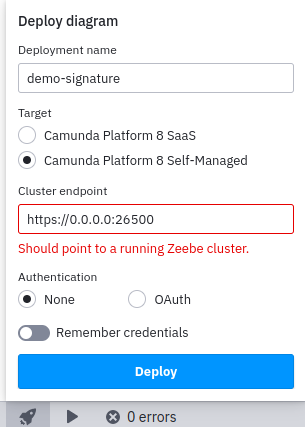
This fails as shown in the image, and I get the following logs.
INFO app:workspace saving (node:476347) [DEP0123] DeprecationWarning: Setting the TLS ServerName to an IP address is not permitted by RFC 6066. This will be ignored in a future version. (Use
camunda-modeler --trace-deprecation ...to show where the warning was created) ERROR app:zeebe-api Failed to connect with config (secrets omitted): { endpoint: { type: 'selfHosted', url: 'https://0.0.0.0:26500' } } Error: 14 UNAVAILABLE: No connection established at Object.callErrorFromStatus (/opt/camunda-modeler-3028-select-certificate-via-flag-linux-x64/resources/app.asar/node_modules/@grpc/grpc-js/build/src/call.js:31:26) at Object.onReceiveStatus (/opt/camunda-modeler-3028-select-certificate-via-flag-linux-x64/resources/app.asar/node_modules/@grpc/grpc-js/build/src/client.js:180:52) at /opt/camunda-modeler-3028-select-certificate-via-flag-linux-x64/resources/app.asar/node_modules/@grpc/grpc-js/build/src/call-stream.js:111:35 at Object.onReceiveStatus (/opt/camunda-modeler-3028-select-certificate-via-flag-linux-x64/resources/app.asar/node_modules/zeebe-node/dist/lib/GrpcClient.js:136:36) at InterceptingListenerImpl.onReceiveStatus (/opt/camunda-modeler-3028-select-certificate-via-flag-linux-x64/resources/app.asar/node_modules/@grpc/grpc-js/build/src/call-stream.js:106:23) at Object.onReceiveStatus (/opt/camunda-modeler-3028-select-certificate-via-flag-linux-x64/resources/app.asar/node_modules/@grpc/grpc-js/build/src/client-interceptors.js:365:141) at Object.onReceiveStatus (/opt/camunda-modeler-3028-select-certificate-via-flag-linux-x64/resources/app.asar/node_modules/@grpc/grpc-js/build/src/client-interceptors.js:328:181) at /opt/camunda-modeler-3028-select-certificate-via-flag-linux-x64/resources/app.asar/node_modules/@grpc/grpc-js/build/src/call-stream.js:182:78 at process.processTicksAndRejections (node:internal/process/task_queues:78:11) { code: 14, details: 'No connection established', metadata: Metadata { internalRepr: Map(0) {}, options: {} } }
So I cheated and faked the authority flag from zbctl with an entry in my /etc/hosts
127.0.0.1 zeebe-gateway.zeebe-caseflow
And deployed graphically with the servername, that still fails.
ERROR app:zeebe-api Failed to connect with config (secrets omitted): { endpoint: { type: 'selfHosted', url: 'https://zeebe-gateway.zeebe-caseflow:26500' } } Error: 14 UNAVAILABLE: No connection established at Object.callErrorFromStatus (/opt/camunda-modeler-3028-select-certificate-via-flag-linux-x64/resources/app.asar/node_modules/@grpc/grpc-js/build/src/call.js:31:26) at Object.onReceiveStatus (/opt/camunda-modeler-3028-select-certificate-via-flag-linux-x64/resources/app.asar/node_modules/@grpc/grpc-js/build/src/client.js:180:52) at /opt/camunda-modeler-3028-select-certificate-via-flag-linux-x64/resources/app.asar/node_modules/@grpc/grpc-js/build/src/call-stream.js:111:35 at Object.onReceiveStatus (/opt/camunda-modeler-3028-select-certificate-via-flag-linux-x64/resources/app.asar/node_modules/zeebe-node/dist/lib/GrpcClient.js:136:36) at InterceptingListenerImpl.onReceiveStatus (/opt/camunda-modeler-3028-select-certificate-via-flag-linux-x64/resources/app.asar/node_modules/@grpc/grpc-js/build/src/call-stream.js:106:23) at Object.onReceiveStatus (/opt/camunda-modeler-3028-select-certificate-via-flag-linux-x64/resources/app.asar/node_modules/@grpc/grpc-js/build/src/client-interceptors.js:365:141) at Object.onReceiveStatus (/opt/camunda-modeler-3028-select-certificate-via-flag-linux-x64/resources/app.asar/node_modules/@grpc/grpc-js/build/src/client-interceptors.js:328:181) at /opt/camunda-modeler-3028-select-certificate-via-flag-linux-x64/resources/app.asar/node_modules/@grpc/grpc-js/build/src/call-stream.js:182:78 at process.processTicksAndRejections (node:internal/process/task_queues:78:11) { code: 14, details: 'No connection established', metadata: Metadata { internalRepr: Map(0) {}, options: {} } }
But I can make this work with zbctl now simply with:
$ ./bin/zbctl deploy quicksign-caseflow-bpmn/src/main/resources/demo-signature.bpmn --address zeebe-gateway.zeebe-caseflow:26500
{
  "key": "2251799817406460",
  "processes": [
    {
      "bpmnProcessId": "demo-signature",
      "version": 7,
      "processDefinitionKey": "2251799817406459",
      "resourceName": "quicksign-caseflow-bpmn/src/main/resources/demo-signature.bpmn"
    }
  ]
}
CC @B-hamza

@ajeans as @barmac is out until August 16th, maybe this can help:
https://github.com/nodejs/node/issues/37025#issuecomment-791992937
There are some other unexpected variables that we can not exclude here when we try to reproduce this locally. Unfortunately, the logs are not verbose and it could be anything related to the certificate or to our implementation itself.
Please tell me if the comment of the related issue helped.
Thanks @christian-konrad , yes I assumed @barmac was on vacation (I was back this week myself, hence the delay in testing the build).
Looking at the comment, this talks a of a missing CN. That is not my case.
$ openssl x509 -in bin/dev.crt -text -noout
Certificate:
    Data:
        Version: 3 (0x2)
        Serial Number:
            1e:b1:bb:2f:d5:c8:86:7c:b3:c0:d6:f5:31:90:7c:cf:85:e6:da:be
        Signature Algorithm: sha256WithRSAEncryption
        Issuer: C = FR, ST = Paris, L = Paris, O = Quicksign, OU = dev, CN = Zeebe
        Validity
            Not Before: Jul 24 16:31:59 2022 GMT
            Not After : Jul 27 16:32:29 2022 GMT
        Subject: CN = zeebe-gateway.zeebe-caseflow.svc.cluster.local
        [...]
The certificate is now expired, but this is the one I used for all the tests a few days ago. And the CN line looks good.
Is there any way to activate debug logs in modeler, and for me to try this again?
Hi @ajeans,
Thanks for your patience. I generated yet another certificate in which I used CN:
openssl req -x509 -newkey rsa:4096 -keyout key.pem -out cert.pem -sha256 -days 365 --nodes -subj "/CN=localhost"
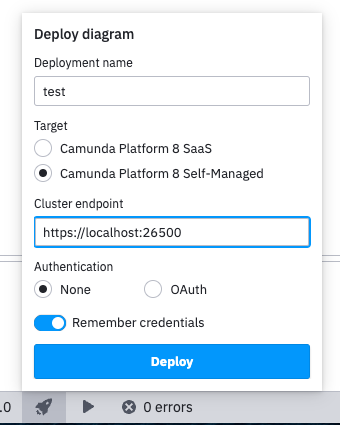
Again, I was able to deploy a BPMN to Zeebe with the artifacts linked in the PR once I added the cert to my system keychain (I am on MacOS).
However, unlike on your screenshot, I used localhost as the hostname and not the IP address:
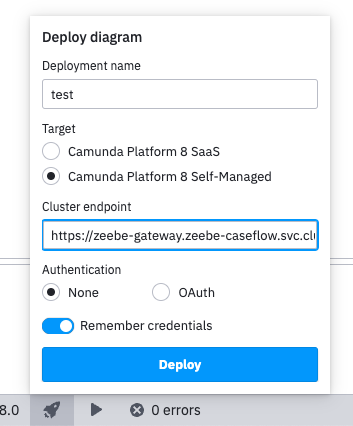
I was also able to connect to the hostname zeebe-gateway.zeebe-caseflow.svc.cluster.local after I added 127.0.0.1 zeebe-gateway.zeebe-caseflow.svc.cluster.local to /etc/hosts, generated and added to the keychain certificated with openssl req -x509 -newkey rsa:4096 -keyout key.pem -out cert.pem -sha256 -days 365 --nodes -subj "/CN=zeebe-gateway.zeebe-caseflow.svc.cluster.local
❯ openssl x509 -in ./cert.pem -text -noout
Certificate:
    Data:
        Version: 3 (0x2)
        Serial Number:
            49:df:04:5d:a5:df:c8:de:7d:8a:2b:f3:5f:51:2e:2f:b9:1b:69:f6
        Signature Algorithm: sha256WithRSAEncryption
        Issuer: CN = zeebe-gateway.zeebe-caseflow.svc.cluster.local
        Validity
            Not Before: Aug 23 14:32:16 2022 GMT
            Not After : Aug 23 14:32:16 2023 GMT
        Subject: CN = zeebe-gateway.zeebe-caseflow.svc.cluster.local
        [...]
Based on my experience, connecting to an IP with a custom SSL cert never works with zeebe-node which we use. This is also marked in the logs:
(node:476347) [DEP0123] DeprecationWarning: Setting the TLS ServerName to an IP address is not permitted by RFC 6066. This will be ignored in a future version.
In the certificate you provided, the hostname is set to: zeebe-gateway.zeebe-caseflow.svc.cluster.local, while in the log you shared:
ERROR app:zeebe-api Failed to connect with config (secrets omitted): {
endpoint: {
type: 'selfHosted',
url: 'https://zeebe-gateway.zeebe-caseflow:26500/'
}
The hostname is zeebe-gateway.zeebe-caseflow. Is this an oversight or two separate tries?
Perhaps the certificates stores that we read on Linux are not the ones where you store them on your machine? These are the paths that we check in the PR:
  '/etc/ssl/certs/ca-certificates.crt',
  '/etc/ssl/certs/ca-bundle.crt',
This is based on what VSCode does: https://github.com/microsoft/vscode-proxy-agent/blob/main/src/index.ts#L453
@ajeans My request for you would be to run a provided build with a flag:
./camunda-modeler --zeebe-ssl-certificate=<path-to-certificate-file>
Try to connect to your Zeebe instance and please share the results.
Regarding the logs, you could set the env variables: GRPC_VERBOSITY=DEBUG GRPC_TRACE=all (according to this SO thread).
Hello @barmac
I'm back from vacation too :)
Based on my experience, connecting to an IP with a custom SSL cert never works with zeebe-node which we use. This is also marked in the logs:
Yes let's forget IP addresses.
The hostname is zeebe-gateway.zeebe-caseflow. Is this an oversight or two separate tries?
This is the same try, and this is Kubernetes DNS territory so I am not sure how the server is aliased in the DNS.
Just to make sure, I also added the full variant to my /etc/hosts
127.0.0.1	zeebe-gateway.zeebe-caseflow.svc.cluster.local
127.0.0.1	zeebe-gateway.zeebe-caseflow
... and tested this from the graphical modeler, with the same result
ERROR app:zeebe-api Failed to connect with config (secrets omitted): {
  endpoint: {
    type: 'selfHosted',
    url: 'https://zeebe-gateway.zeebe-caseflow.svc.cluster.local:26500'
  }
} Error: 14 UNAVAILABLE: No connection established
    at Object.callErrorFromStatus (/opt/camunda-modeler-3028-select-certificate-via-flag-linux-x64/resources/app.asar/node_modules/@grpc/grpc-js/build/src/call.js:31:26)
    at Object.onReceiveStatus (/opt/camunda-modeler-3028-select-certificate-via-flag-linux-x64/resources/app.asar/node_modules/@grpc/grpc-js/build/src/client.js:180:52)
    at /opt/camunda-modeler-3028-select-certificate-via-flag-linux-x64/resources/app.asar/node_modules/@grpc/grpc-js/build/src/call-stream.js:111:35
    at Object.onReceiveStatus (/opt/camunda-modeler-3028-select-certificate-via-flag-linux-x64/resources/app.asar/node_modules/zeebe-node/dist/lib/GrpcClient.js:136:36)
    at InterceptingListenerImpl.onReceiveStatus (/opt/camunda-modeler-3028-select-certificate-via-flag-linux-x64/resources/app.asar/node_modules/@grpc/grpc-js/build/src/call-stream.js:106:23)
    at Object.onReceiveStatus (/opt/camunda-modeler-3028-select-certificate-via-flag-linux-x64/resources/app.asar/node_modules/@grpc/grpc-js/build/src/client-interceptors.js:365:141)
    at Object.onReceiveStatus (/opt/camunda-modeler-3028-select-certificate-via-flag-linux-x64/resources/app.asar/node_modules/@grpc/grpc-js/build/src/client-interceptors.js:328:181)
    at /opt/camunda-modeler-3028-select-certificate-via-flag-linux-x64/resources/app.asar/node_modules/@grpc/grpc-js/build/src/call-stream.js:182:78
    at process.processTicksAndRejections (node:internal/process/task_queues:78:11) {
  code: 14,
  details: 'No connection established',
  metadata: Metadata { internalRepr: Map(0) {}, options: {} }
Perhaps the certificates stores that we read on Linux are not the ones where you store them on your machine? These are the paths that we check in the PR:
I can confirm that the certificate is correctly included one of the path you are reading, sudo update-ca-certificates seems to have worked fine
$ openssl s_client -connect 127.0.0.1:26500 -showcerts | sed -ne '/-BEGIN CERTIFICATE-/,/-END CERTIFICATE-/p' | tail -n 3
t1Y10J4rE/HmvUEwWf4MmttU4TtJaBt796b8kGkLRSCj0UPBKi0JvH/ldLY0QVgr
q/igIoevT5ICggBA4rTWfqvDr7d3wpFs
-----END CERTIFICATE-----
$ tail -n 3 /etc/ssl/certs/ca-certificates.crt
t1Y10J4rE/HmvUEwWf4MmttU4TtJaBt796b8kGkLRSCj0UPBKi0JvH/ldLY0QVgr
q/igIoevT5ICggBA4rTWfqvDr7d3wpFs
-----END CERTIFICATE-----
My request for you would be to run https://github.com/camunda/camunda-modeler/pull/3046#issuecomment-1192353136 with a flag: ./camunda-modeler --zeebe-ssl-certificate=
Started with
$ /opt/camunda-modeler-3028-select-certificate-via-flag-linux-x64/camunda-modeler --zeebe-ssl-certificate=bin/dev.crt
I get the same error logs when deploying with both https://zeebe-gateway.zeebe-caseflow:26500 and https://zeebe-gateway.zeebe-caseflow.svc.cluster.local:26500
ERROR app:zeebe-api Failed to connect with config (secrets omitted): {
  endpoint: {
    type: 'selfHosted',
    url: 'https://zeebe-gateway.zeebe-caseflow:26500'
  }
} Error: 14 UNAVAILABLE: No connection established
    at Object.callErrorFromStatus (/opt/camunda-modeler-3028-select-certificate-via-flag-linux-x64/resources/app.asar/node_modules/@grpc/grpc-js/build/src/call.js:31:26)
    at Object.onReceiveStatus (/opt/camunda-modeler-3028-select-certificate-via-flag-linux-x64/resources/app.asar/node_modules/@grpc/grpc-js/build/src/client.js:180:52)
    at /opt/camunda-modeler-3028-select-certificate-via-flag-linux-x64/resources/app.asar/node_modules/@grpc/grpc-js/build/src/call-stream.js:111:35
    at Object.onReceiveStatus (/opt/camunda-modeler-3028-select-certificate-via-flag-linux-x64/resources/app.asar/node_modules/zeebe-node/dist/lib/GrpcClient.js:136:36)
    at InterceptingListenerImpl.onReceiveStatus (/opt/camunda-modeler-3028-select-certificate-via-flag-linux-x64/resources/app.asar/node_modules/@grpc/grpc-js/build/src/call-stream.js:106:23)
    at Object.onReceiveStatus (/opt/camunda-modeler-3028-select-certificate-via-flag-linux-x64/resources/app.asar/node_modules/@grpc/grpc-js/build/src/client-interceptors.js:365:141)
    at Object.onReceiveStatus (/opt/camunda-modeler-3028-select-certificate-via-flag-linux-x64/resources/app.asar/node_modules/@grpc/grpc-js/build/src/client-interceptors.js:328:181)
    at /opt/camunda-modeler-3028-select-certificate-via-flag-linux-x64/resources/app.asar/node_modules/@grpc/grpc-js/build/src/call-stream.js:182:78
    at process.processTicksAndRejections (node:internal/process/task_queues:78:11) {
  code: 14,
  details: 'No connection established',
  metadata: Metadata { internalRepr: Map(0) {}, options: {} }
Regarding the logs, you could set the env variables: GRPC_VERBOSITY=DEBUG GRPC_TRACE=all
Running GRPC_VERBOSITY=DEBUG GRPC_TRACE=all /opt/camunda-modeler-3028-select-certificate-via-flag-linux-x64/camunda-modeler --zeebe-ssl-certificate=bin/dev.crt, I get
D 2022-08-30T10:28:26.018Z | subchannel_refcount | (14) 127.0.0.1:26500 refcount 1 -> 0
D 2022-08-30T10:28:26.148Z | channel | (10) dns:zeebe-gateway.zeebe-caseflow.svc.cluster.local:26500 createCall [9] method="/gateway_protocol.Gateway/Topology", deadline=Infinity
D 2022-08-30T10:28:26.149Z | call_stream | [9] Sending metadata
D 2022-08-30T10:28:26.149Z | channel | (10) dns:zeebe-gateway.zeebe-caseflow.svc.cluster.local:26500 Pick result: QUEUE subchannel: undefined status: undefined undefined
D 2022-08-30T10:28:26.149Z | channel | (10) dns:zeebe-gateway.zeebe-caseflow.svc.cluster.local:26500 callRefTimer.ref | configSelectionQueue.length=0 pickQueue.length=1
D 2022-08-30T10:28:26.150Z | call_stream | [9] write() called with message of length 0
D 2022-08-30T10:28:26.150Z | call_stream | [9] end() called
D 2022-08-30T10:28:26.150Z | call_stream | [9] deferring writing data chunk of length 5
D 2022-08-30T10:28:26.151Z | pick_first | Connect to address list 127.0.0.1:26500
D 2022-08-30T10:28:26.151Z | subchannel | (17) 127.0.0.1:26500 Subchannel constructed with options {
  "grpc.enable_retries": 1,
  "grpc.initial_reconnect_backoff_ms": 1000,
  "grpc.max_reconnect_backoff_ms": 10000,
  "grpc.min_reconnect_backoff_ms": 5000,
  "grpc.keepalive_time_ms": 45000,
  "grpc.keepalive_timeout_ms": 120000,
  "grpc.http2.min_time_between_pings_ms": 60000,
  "grpc.http2.min_ping_interval_without_data_ms": 60000,
  "grpc.keepalive_permit_without_calls": 1,
  "grpc.http2.max_pings_without_data": 0
}
D 2022-08-30T10:28:26.151Z | subchannel_refcount | (17) 127.0.0.1:26500 refcount 0 -> 1
D 2022-08-30T10:28:26.151Z | subchannel_refcount | (17) 127.0.0.1:26500 refcount 1 -> 2
D 2022-08-30T10:28:26.151Z | pick_first | Start connecting to subchannel with address 127.0.0.1:26500
D 2022-08-30T10:28:26.152Z | pick_first | IDLE -> CONNECTING
D 2022-08-30T10:28:26.152Z | resolving_load_balancer | dns:zeebe-gateway.zeebe-caseflow.svc.cluster.local:26500 IDLE -> CONNECTING
D 2022-08-30T10:28:26.152Z | channel | (10) dns:zeebe-gateway.zeebe-caseflow.svc.cluster.local:26500 callRefTimer.unref | configSelectionQueue.length=0 pickQueue.length=0
D 2022-08-30T10:28:26.152Z | channel | (10) dns:zeebe-gateway.zeebe-caseflow.svc.cluster.local:26500 Pick result: QUEUE subchannel: undefined status: undefined undefined
D 2022-08-30T10:28:26.152Z | channel | (10) dns:zeebe-gateway.zeebe-caseflow.svc.cluster.local:26500 callRefTimer.ref | configSelectionQueue.length=0 pickQueue.length=1
D 2022-08-30T10:28:26.152Z | connectivity_state | (10) dns:zeebe-gateway.zeebe-caseflow.svc.cluster.local:26500 IDLE -> CONNECTING
D 2022-08-30T10:28:26.152Z | subchannel | (17) 127.0.0.1:26500 IDLE -> CONNECTING
D 2022-08-30T10:28:26.152Z | pick_first | CONNECTING -> CONNECTING
D 2022-08-30T10:28:26.152Z | resolving_load_balancer | dns:zeebe-gateway.zeebe-caseflow.svc.cluster.local:26500 CONNECTING -> CONNECTING
D 2022-08-30T10:28:26.152Z | channel | (10) dns:zeebe-gateway.zeebe-caseflow.svc.cluster.local:26500 callRefTimer.unref | configSelectionQueue.length=0 pickQueue.length=0
D 2022-08-30T10:28:26.153Z | channel | (10) dns:zeebe-gateway.zeebe-caseflow.svc.cluster.local:26500 Pick result: QUEUE subchannel: undefined status: undefined undefined
D 2022-08-30T10:28:26.153Z | channel | (10) dns:zeebe-gateway.zeebe-caseflow.svc.cluster.local:26500 callRefTimer.ref | configSelectionQueue.length=0 pickQueue.length=1
D 2022-08-30T10:28:26.153Z | connectivity_state | (10) dns:zeebe-gateway.zeebe-caseflow.svc.cluster.local:26500 CONNECTING -> CONNECTING
D 2022-08-30T10:28:26.153Z | subchannel | (17) 127.0.0.1:26500 creating HTTP/2 session
D 2022-08-30T10:28:26.208Z | subchannel | (17) 127.0.0.1:26500 connection closed with error unable to verify the first certificate
D 2022-08-30T10:28:26.208Z | subchannel | (17) 127.0.0.1:26500 connection closed
D 2022-08-30T10:28:26.208Z | subchannel | (17) 127.0.0.1:26500 CONNECTING -> TRANSIENT_FAILURE
D 2022-08-30T10:28:26.208Z | pick_first | CONNECTING -> TRANSIENT_FAILURE
D 2022-08-30T10:28:26.208Z | resolving_load_balancer | dns:zeebe-gateway.zeebe-caseflow.svc.cluster.local:26500 CONNECTING -> TRANSIENT_FAILURE
D 2022-08-30T10:28:26.208Z | channel | (10) dns:zeebe-gateway.zeebe-caseflow.svc.cluster.local:26500 callRefTimer.unref | configSelectionQueue.length=0 pickQueue.length=0
D 2022-08-30T10:28:26.208Z | channel | (10) dns:zeebe-gateway.zeebe-caseflow.svc.cluster.local:26500 Pick result: TRANSIENT_FAILURE subchannel: undefined status: 14 No connection established
D 2022-08-30T10:28:26.208Z | call_stream | [9] cancelWithStatus code: 14 details: "No connection established"
D 2022-08-30T10:28:26.208Z | call_stream | [9] ended with status: code=14 details="No connection established"
D 2022-08-30T10:28:26.208Z | connectivity_state | (10) dns:zeebe-gateway.zeebe-caseflow.svc.cluster.local:26500 CONNECTING -> TRANSIENT_FAILURE
ERROR app:zeebe-api Failed to connect with config (secrets omitted): {
  endpoint: {
    type: 'selfHosted',
    url: 'https://zeebe-gateway.zeebe-caseflow.svc.cluster.local:26500'
  }
} Error: 14 UNAVAILABLE: No connection established
    at Object.callErrorFromStatus (/opt/camunda-modeler-3028-select-certificate-via-flag-linux-x64/resources/app.asar/node_modules/@grpc/grpc-js/build/src/call.js:31:26)
    at Object.onReceiveStatus (/opt/camunda-modeler-3028-select-certificate-via-flag-linux-x64/resources/app.asar/node_modules/@grpc/grpc-js/build/src/client.js:180:52)
    at /opt/camunda-modeler-3028-select-certificate-via-flag-linux-x64/resources/app.asar/node_modules/@grpc/grpc-js/build/src/call-stream.js:111:35
    at Object.onReceiveStatus (/opt/camunda-modeler-3028-select-certificate-via-flag-linux-x64/resources/app.asar/node_modules/zeebe-node/dist/lib/GrpcClient.js:136:36)
    at InterceptingListenerImpl.onReceiveStatus (/opt/camunda-modeler-3028-select-certificate-via-flag-linux-x64/resources/app.asar/node_modules/@grpc/grpc-js/build/src/call-stream.js:106:23)
    at Object.onReceiveStatus (/opt/camunda-modeler-3028-select-certificate-via-flag-linux-x64/resources/app.asar/node_modules/@grpc/grpc-js/build/src/client-interceptors.js:365:141)
    at Object.onReceiveStatus (/opt/camunda-modeler-3028-select-certificate-via-flag-linux-x64/resources/app.asar/node_modules/@grpc/grpc-js/build/src/client-interceptors.js:328:181)
    at /opt/camunda-modeler-3028-select-certificate-via-flag-linux-x64/resources/app.asar/node_modules/@grpc/grpc-js/build/src/call-stream.js:182:78
    at process.processTicksAndRejections (node:internal/process/task_queues:78:11) {
  code: 14,
  details: 'No connection established',
  metadata: Metadata { internalRepr: Map(0) {}, options: {} }
}
D 2022-08-30T10:28:27.154Z | subchannel | (17) 127.0.0.1:26500 TRANSIENT_FAILURE -> IDLE
D 2022-08-30T10:28:27.154Z | subchannel_refcount | (17) 127.0.0.1:26500 refcount 2 -> 1
D 2022-08-30T10:28:27.154Z | pick_first | TRANSIENT_FAILURE -> IDLE
D 2022-08-30T10:28:27.154Z | resolving_load_balancer | dns:zeebe-gateway.zeebe-caseflow.svc.cluster.local:26500 TRANSIENT_FAILURE -> IDLE
D 2022-08-30T10:28:27.154Z | connectivity_state | (10) dns:zeebe-gateway.zeebe-caseflow.svc.cluster.local:26500 TRANSIENT_FAILURE -> IDLE
INFO app:main window focused
INFO app:main initating close of main window
INFO app:main asking client to allow quit
INFO app:workspace saving
INFO app:main quit allowed
INFO app:main initating close of main window
INFO app:main main window closed
Just to make sure, I am not crazy, I made sure zbctl still worked, but only with the short hostname.
$ ./bin/zbctl deploy quicksign-caseflow-bpmn/src/main/resources/demo-signature.bpmn --address zeebe-gateway.zeebe-caseflow.svc.cluster.local:26500
Error: rpc error: code = Unavailable desc = connection error: desc = "transport: authentication handshake failed: x509: certificate is valid for zeebe-gateway.zeebe-caseflow, zeebe-gateway.zeebe-caseflow.svc, not zeebe-gateway.zeebe-caseflow.svc.cluster.local"

$ ./bin/zbctl deploy quicksign-caseflow-bpmn/src/main/resources/demo-signature.bpmn --address zeebe-gateway.zeebe-caseflow:26500
{
  "key": "2251799814047248",
  "processes": [
    {
      "bpmnProcessId": "demo-signature",
      "version": 3,
      "processDefinitionKey": "2251799814045260",
      "resourceName": "quicksign-caseflow-bpmn/src/main/resources/demo-signature.bpmn"
    }
  ]
}
At least I now understand why the hostname I use is different from the CN in the certificate :+1:
$ openssl x509 -in bin/dev.crt -text -noout | grep zeebe-gateway -B1
            Not After : Aug 31 09:33:59 2022 GMT
        Subject: CN = zeebe-gateway.zeebe-caseflow.svc.cluster.local
--
            X509v3 Subject Alternative Name:
                DNS:zeebe-gateway.zeebe-caseflow, DNS:zeebe-gateway.zeebe-caseflow.svc
see https://support.dnsimple.com/articles/what-is-ssl-san/
So that explains why I should use zeebe-gateway.zeebe-caseflow as a hostname to match the certificate, and why zbctl correctly refuses to deploy on hostname zeebe-gateway.zeebe-caseflow.svc.cluster.local
Hi @ajeans,
I am glad to see you back. Thank you for trying out my suggestion and providing the exact commands you used, as this gave me a 💡 moment.
So I tried to use the certificate with a relative path like in the snippet you provided:
Started with
$ /opt/camunda-modeler-3028-select-certificate-via-flag-linux-x64/camunda-modeler --zeebe-ssl-certificate=bin/dev.crt
...and indeed the solution did not work on my machine. It worked with an absolute path, though -> I must've used an absolute path all the time.
The good news is that I was able to implement relative path handling, so if you download the artifact now, it should work both ways. Please let me know if you can confirm it.