
cal.com
 cal.com copied to clipboard
 calcom
Webex integration
What does this PR do?
Fixes #2744 /claim #2744
Environment: Staging(main branch) / Production
Type of change
- [ ] New feature (non-breaking change which adds functionality)
How should this be tested?
- [ ] Test A
- [ ] Test B
Checklist
- I haven't checked if my changes generate no new warnings
- I haven't added tests that prove my fix is effective or that my feature works
- I haven't checked if new and existing unit tests pass locally with my changes

The latest updates on your projects. Learn more about Vercel for Git ↗︎
| Name | Status | Preview | Comments | Updated (UTC) |
|---|---|---|---|---|
| cal | ✅ Ready (Inspect) | Visit Preview | 💬 Add feedback | May 11, 2023 4:16am |
| ui | ✅ Ready (Inspect) | Visit Preview | 💬 Add feedback | May 11, 2023 4:16am |
![vercel[bot] avatar](https://avatars.githubusercontent.com/in/8329?v=4 "Published by a pub.dev verified publisher")
@aar2dee2 is attempting to deploy a commit to the cal Team on Vercel.
A member of the Team first needs to authorize it.
Hi,
I'm using the Zoom integration as a reference for building the Webex integration. The Oauth is working:
https://user-images.githubusercontent.com/85004512/224246221-eb39ea34-d0dc-4904-884d-de16d0a0bf6f.mov
1/ I'm trying to test creating a meeting, but there's a Prisma error in the event types table.

How should I fix this?
2/ I'm working on functionality for
- listing meetings
- creating a meeting
- updating a meeting
- deleting a meeting
Are any other functions required from the integration?
3/ Other TODOs
- Screenshots
- Tests
-What else should be there?
📦 Next.js Bundle Analysis for @calcom/web
This analysis was generated by the Next.js Bundle Analysis action. 🤖
This PR introduced no changes to the JavaScript bundle! 🙌
![github-actions[bot] avatar](https://avatars.githubusercontent.com/in/15368?v=4 "Published by a pub.dev verified publisher")
Hi,
I'm using the Zoom integration as a reference for building the Webex integration. The Oauth is working:
1/ I'm trying to test creating a meeting, but there's a Prisma error in the event types table.
How should I fix this?
2/ I'm working on functionality for
- listing meetings
- creating a meeting
- updating a meeting
- deleting a meeting
Are any other functions required from the integration?
3/ Other TODOs
- Screenshots
- Tests
-What else should be there?
Can you try running yarn clean && yarn dx in project root - looks like you might be missing a migration

@sean-brydon
I'm running into an error while calculating the utcOffset from event.startTime and event.organizer.timeZone.
Here's the code for the translateEvent function inside the VideoApiAdapter file:
const translateEvent = (event: CalendarEvent) => {
    //To convert the Cal's CalendarEvent type to a webex meeting type
    console.log("event received in translateEvent", event);
    /** @link https://developer.webex.com/docs/api/v1/meetings/create-a-meeting */

    const utcOffset = dayjs(event.startTime, event.organizer.timeZone).utcOffset() / 60;
    console.log("calculated utcOffset", utcOffset);
    console.log("calculated start", dayjs(event.startTime).utcOffset(utcOffset).format());
    return {
      title: event.title,
      start: dayjs(event.startTime).utcOffset(utcOffset).format(),
      end: event.endTime,
      recurrence: event.recurrence, //Follows RFC 2445 https://www.ietf.org/rfc/rfc2445.txt, TODO check if needs conversion
      timezone: event.organizer.timeZone,
      agenda: event.description,
      enableJoinBeforeHost: true, //this is true in zoom's api, do we need it here?
      invitees: event.attendees.map((attendee) => ({
        email: attendee.email,
      })),
      sendEmail: true,
    };
  };
Here's the corresponding console log:
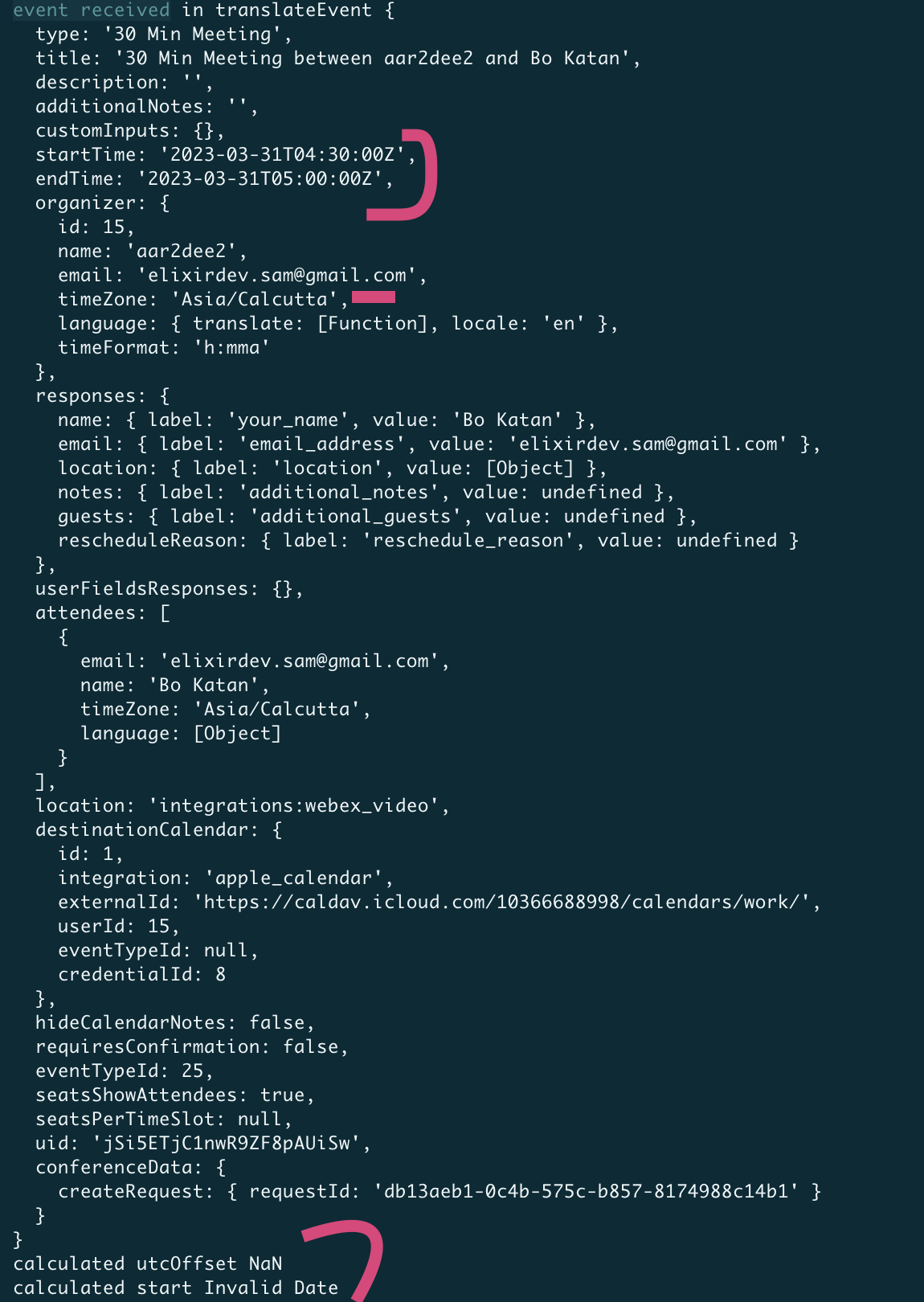
After merging recent changes from calcom:main, I'm getting a Prisma error:
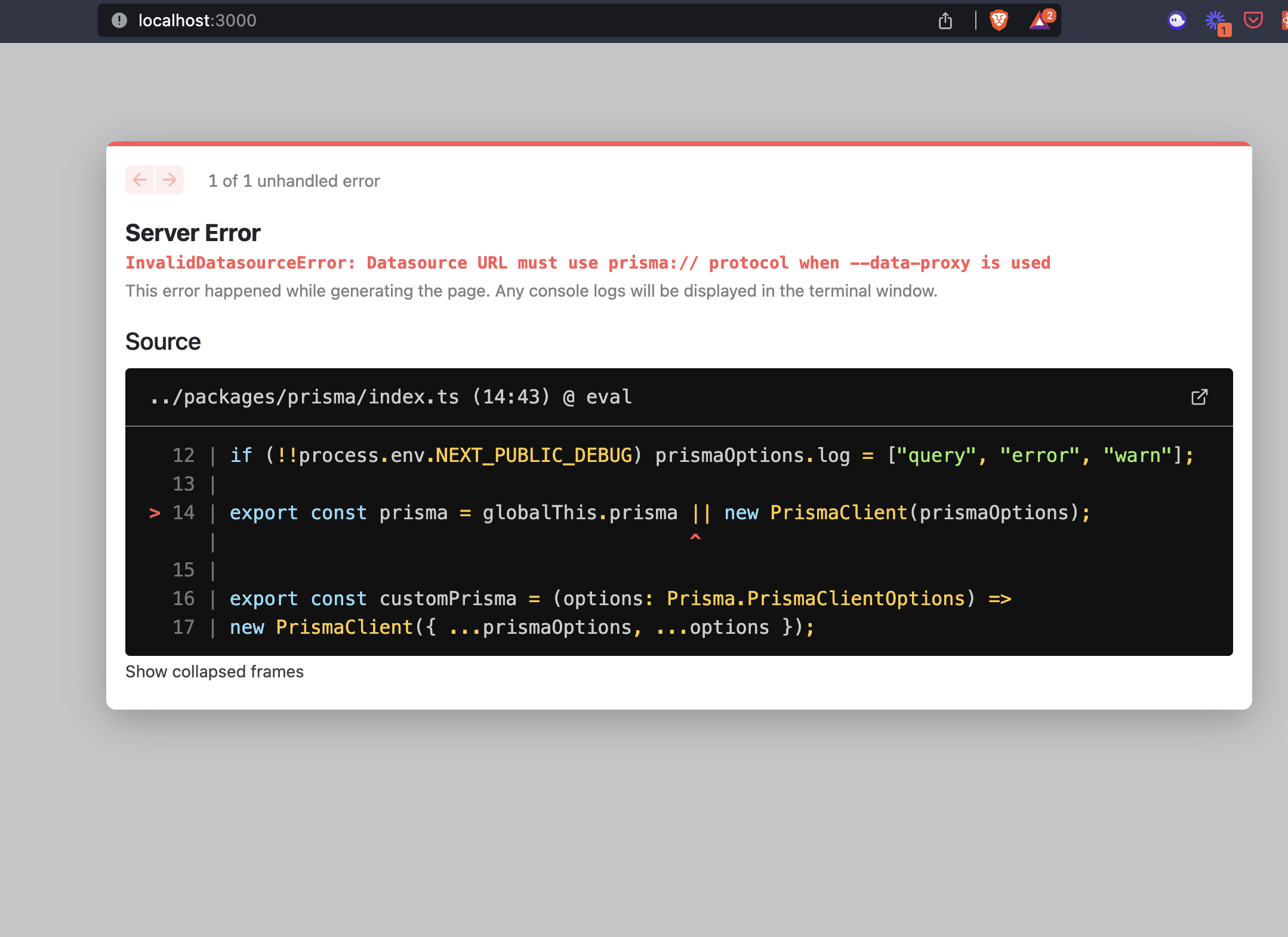
I've run yarn clean, yarn and yarn workspace @calcom/prisma db-deploy.
The database is accessible in the Prisma studio.
The variables in /packages/prisma/.env are:
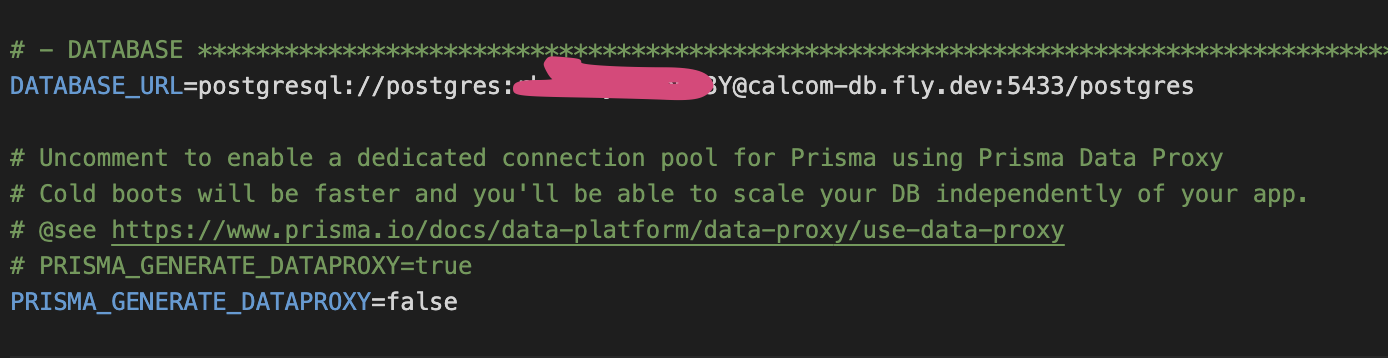
Also, do you use a specific app for taking screenshots (for using in the Calcom app store)?
After merging recent changes from calcom:main, I'm getting a Prisma error:
I've run
yarn clean,yarnandyarn workspace @calcom/prisma db-deploy. The database is accessible in the Prisma studio.The variables in
/packages/prisma/.envare:Also, do you use a specific app for taking screenshots (for using in the Calcom app store)?
nvm, fixed this. Needed to set PRISMA_GENERATE_DATAPROXY= as blank instead of false
Creating a meeting:
If I create a meeting with start and end times in UTC and pass along the organizer's timezone, Webex throws a 404.
(Error inducing) Request body:
{
    "title":"30 Min Meeting between aar2dee2 and Bo Katan",
    "start":"2023-03-27T05:30:00Z",
    "end":"2023-03-27T06:00:00Z",
    "agenda":"",
    "timeZone": "Asia/Calcutta",
    "enableJoinBeforeHost":true,
    "invitees": [
              {"email":"[email protected]"}
          ],
    "sendEmail":true
}
Response body for above request:
{
  "message": "timezone 'Asia/Calcutta' and timezone offset in '2023-03-21T05:00:00Z' do not match",
  "trackingId": "WEBEX-DEV-PORTAL_a000625b-de6a-4d9b-b40c-3d52ee522a05_2"
}
If I comment out the timezone parameter in translateEvent as below, the request is processed and the meeting is created.
const translateEvent = (event: CalendarEvent) => {
    //To convert the Cal's CalendarEvent type to a webex meeting type
    console.log("event received in translateEvent", event);
    /** @link https://developer.webex.com/docs/api/v1/meetings/create-a-meeting */
    //Required params - title, start, end
    //There are a ton of other options, what do we want to support?

    console.log("calculated start", dayjs(event.startTime).utc().format());
    return {
      title: event.title,
      start: dayjs(event.startTime).utc().format(),
      end: dayjs(event.endTime).utc().format(),
      recurrence: event.recurrence, //Follows RFC 2445 https://www.ietf.org/rfc/rfc2445.txt, TODO check if needs conversion
      // timezone: event.organizer.timeZone, // Comment this out for now
      agenda: event.description,
      enableJoinBeforeHost: true, //this is true in zoom's api, do we need it here?
      invitees: event.attendees.map((attendee) => ({
        email: attendee.email,
      })),
      sendEmail: true,
    };
  };
I assume it requires conversion to a utcOffset format. But if the api accepts UTC which Cal uses by default, can we avoid passing the timezone parameter altogether (it is not a required param for the Webex api)?
Screenshots from the successful request for creating a meeting, where timezone was not included in request.
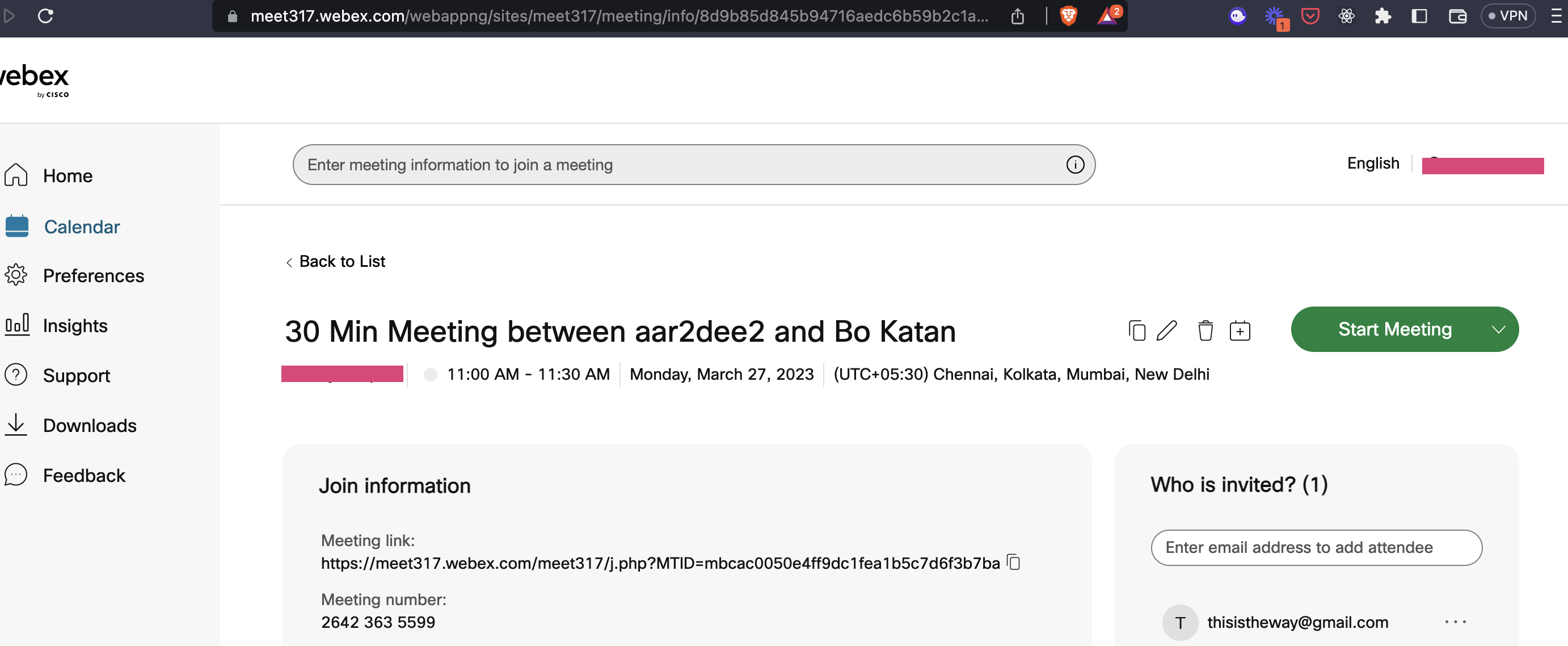
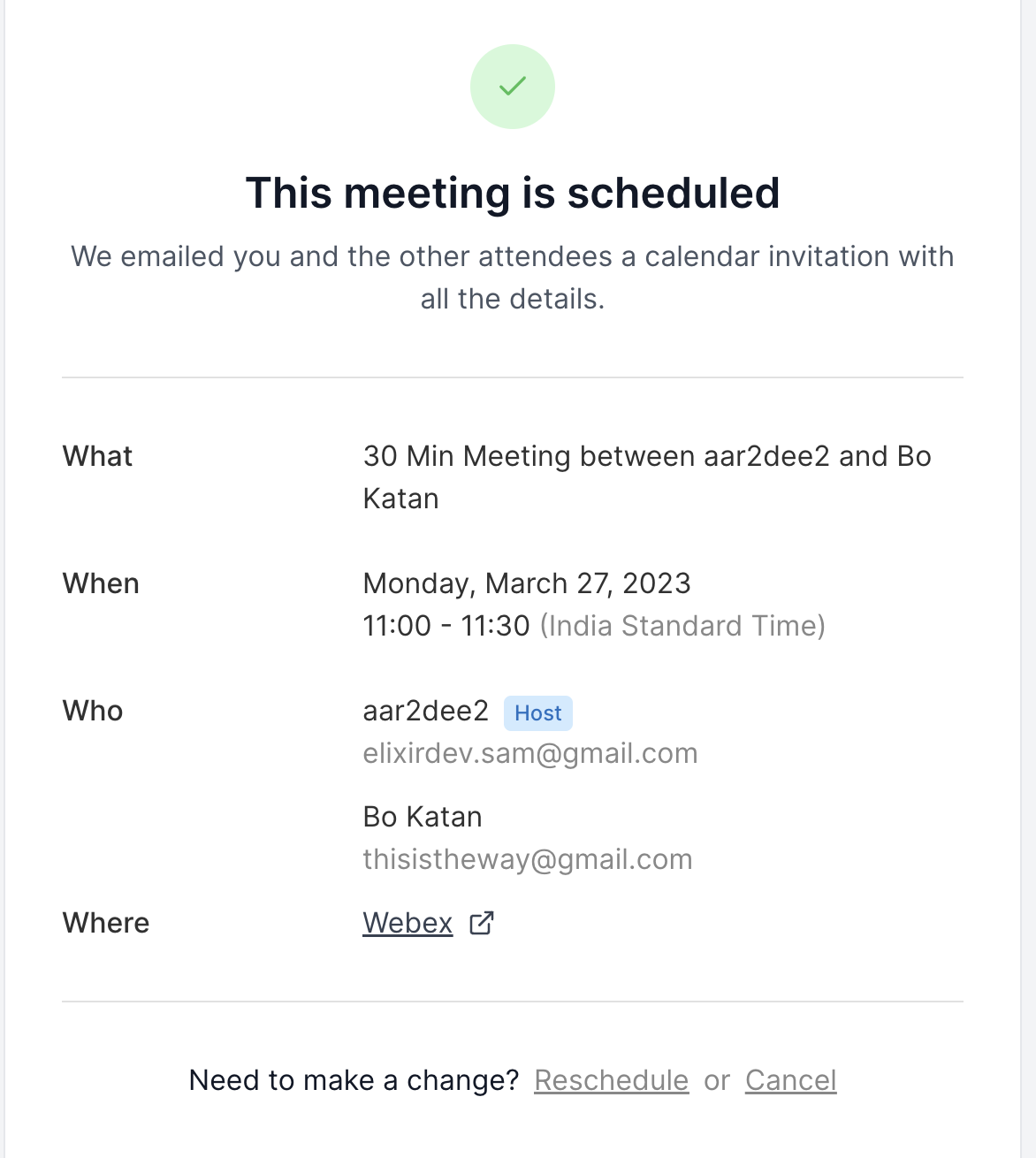
I assume it requires conversion to a utcOffset format. But if the api accepts UTC which Cal uses by default, can we avoid passing the timezone parameter altogether (it is not a required param for the Webex API)?
@emrysal or @roae know more about this

Hi @aar2dee2 - We have a similar approach in the office 365 translate event:
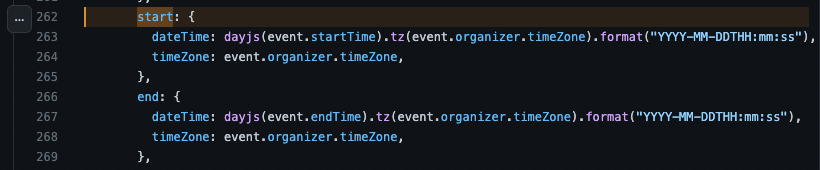
Would this work for your usecase as well? Regardless, you can assume startTime and endTime are always given in UTC, so if webex handles this for you just pass those, no utcOffset translation will be necessary

Hi @aar2dee2 - We have a similar approach in the office 365 translate event:
Would this work for your usecase as well? Regardless, you can assume startTime and endTime are always given in UTC, so if webex handles this for you just pass those, no utcOffset translation will be necessary
Thanks for this! Proceeding without the utcOffset translation.
I have create and update meeting working correctly. For delete meeting, the deleteMeeting function in the Webex VideoApiAdapter is not called, resulting in the meeting getting canceled on Cal, but not on Webex.
https://www.loom.com/share/dcfad65245e34343922da192c734a6cb
I think this is because the BookingReference for the booking has the wrong credentialId for webex_video. (In the loom link below, the correct credentialId for webex_video is 13, not 8.
https://www.loom.com/share/97853e302cbf4f9581ab314ca7c43ba0
Is it possible this is happening because of how the app was named? I have the app name as Webex and slug as webex and had to do a fix in /packages/app-store/index.
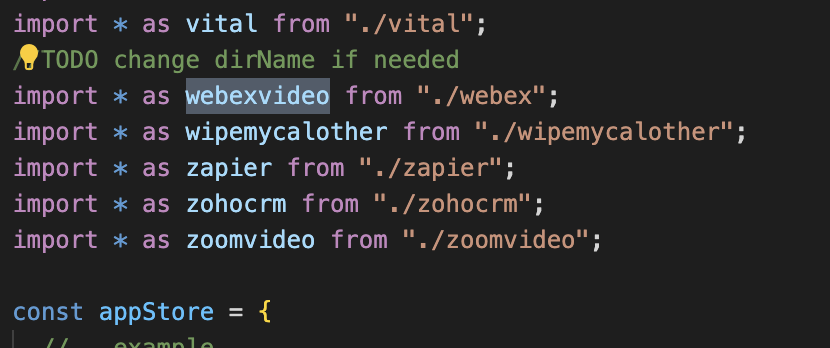
Also, do you have an integration todos list I can check against?
The credentialId is set to the calendar's credentialId here.
This does not cause errors in updateMeeting because the correct video credentials are obtained using getVideoCredentials.
However, the handleCancelBooking handler directly calls deleteMeeting in the videoClient and does not use getVideoCredentials to obtain the video integration credentials. Accordingly, no videoAdapter is found for deleteMeeting.
I've proposed a fix in handleCancelBooking.
The following are now working:
- [x] App installation and Oauth
- [x] Create a meeting with Webex
- [x] Update a Webex meeting
- [x] Delete a Webex meeting
Looms showing the functionality https://www.loom.com/share/0a49e0c378d3496ca057361688d0a1a8 https://www.loom.com/share/bb2151b387d34b13a82f9d90353692d4
Hello Cal team,
I was wondering if you've had a chance to review the changes I made recently. Please share any feedback or suggestions when it's convenient for you. Thank you!

📦 Next.js Bundle Analysis for @calcom/web
This analysis was generated by the Next.js Bundle Analysis action. 🤖
Fifty-six Pages Changed Size
The following pages changed size from the code in this PR compared to its base branch:
| Page | Size (compressed) | First Load | % of Budget (350 KB) |
|---|---|---|---|
/[user] |
70.31 KB |
303.65 KB | 86.76% (🟡 +0.42%) |
/[user]/[type] |
92.04 KB |
325.39 KB | 92.97% (🟡 +0.32%) |
/[user]/[type]/embed |
92.07 KB |
325.41 KB | 92.98% (🟡 +0.32%) |
/[user]/embed |
70.37 KB |
303.72 KB | 86.78% (🟡 +0.42%) |
/apps |
167.32 KB |
400.66 KB | 114.47% (🟡 +1.72%) |
/apps/[slug] |
191.04 KB |
424.38 KB | 121.25% (🟡 +2.28%) |
/apps/[slug]/[...pages] |
392.33 KB |
625.67 KB | 178.76% (🟡 +1.51%) |
/apps/categories |
152.21 KB |
385.56 KB | 110.16% (🟡 +2.33%) |
/apps/categories/[category] |
156.08 KB |
389.43 KB | 111.26% (🟡 +2.32%) |
/apps/installed/[category] |
197.07 KB |
430.41 KB | 122.97% (🟡 +1.68%) |
/availability |
155.52 KB |
388.87 KB | 111.10% (🟡 +1.70%) |
/availability/[schedule] |
272.28 KB |
505.62 KB | 144.46% (🟡 +2.59%) |
/availability/troubleshoot |
152.9 KB |
386.25 KB | 110.36% (🟡 +2.33%) |
/booking/[uid] |
123.73 KB |
357.08 KB | 102.02% (🟡 +0.30%) |
/bookings/[status] |
272.64 KB |
505.99 KB | 144.57% (🟡 +1.43%) |
/d/[link]/[slug] |
91.69 KB |
325.03 KB | 92.87% (🟡 +0.32%) |
/d/[link]/[slug]/embed |
91.72 KB |
325.06 KB | 92.88% (🟡 +0.32%) |
/event-types |
349.29 KB |
582.63 KB | 166.47% (🟡 +1.49%) |
/event-types/[type] |
383.11 KB |
616.45 KB | 176.13% (🟡 +1.49%) |
/getting-started/[[...step]] |
303.22 KB |
536.56 KB | 153.30% (🟢 -0.22%) |
/insights |
387.37 KB |
620.71 KB | 177.35% (🟡 +2.05%) |
/more |
151.84 KB |
385.18 KB | 110.05% (🟡 +2.33%) |
/settings/admin |
157.29 KB |
390.64 KB | 111.61% (🟡 +2.33%) |
/settings/admin/apps |
166.01 KB |
399.35 KB | 114.10% (🟡 +1.73%) |
/settings/admin/apps/[category] |
165.99 KB |
399.34 KB | 114.10% (🟡 +1.72%) |
/settings/admin/flags |
160.19 KB |
393.53 KB | 112.44% (🟡 +2.33%) |
/settings/admin/impersonation |
157.58 KB |
390.92 KB | 111.69% (🟡 +2.33%) |
/settings/billing |
157.41 KB |
390.75 KB | 111.64% (🟡 +2.33%) |
/settings/developer/api-keys |
186.56 KB |
419.9 KB | 119.97% (🟡 +2.34%) |
/settings/developer/webhooks |
160.06 KB |
393.4 KB | 112.40% (🟡 +2.33%) |
/settings/developer/webhooks/[id] |
190.75 KB |
424.09 KB | 121.17% (🟡 +2.35%) |
/settings/developer/webhooks/new |
190.61 KB |
423.95 KB | 121.13% (🟡 +2.35%) |
/settings/my-account/appearance |
171.35 KB |
404.7 KB | 115.63% (🟡 +2.13%) |
/settings/my-account/calendars |
191.6 KB |
424.94 KB | 121.41% (🟡 +2.34%) |
/settings/my-account/conferencing |
163.22 KB |
396.57 KB | 113.30% (🟡 +2.38%) |
/settings/my-account/general |
266.56 KB |
499.91 KB | 142.83% (🟡 +2.38%) |
/settings/my-account/profile |
274.38 KB |
507.73 KB | 145.07% (🟡 +2.16%) |
/settings/security/impersonation |
159.45 KB |
392.79 KB | 112.23% (🟡 +2.34%) |
/settings/security/password |
192.77 KB |
426.11 KB | 121.75% (🟡 +1.73%) |
/settings/security/sso |
167.14 KB |
400.48 KB | 114.42% (🟡 +2.34%) |
/settings/security/two-factor-auth |
161.96 KB |
395.3 KB | 112.94% (🟡 +2.34%) |
/settings/teams |
157.04 KB |
390.38 KB | 111.54% (🟡 +2.33%) |
/settings/teams/[id]/appearance |
171.38 KB |
404.72 KB | 115.63% (🟡 +2.19%) |
/settings/teams/[id]/billing |
157.27 KB |
390.62 KB | 111.61% (🟡 +2.32%) |
/settings/teams/[id]/members |
297.37 KB |
530.72 KB | 151.63% (🟡 +2.16%) |
/settings/teams/[id]/profile |
269.59 KB |
502.94 KB | 143.70% (🟡 +2.31%) |
/settings/teams/[id]/sso |
167.23 KB |
400.58 KB | 114.45% (🟡 +2.34%) |
/settings/teams/new |
92.73 KB |
326.08 KB | 93.17% (🟡 +1.03%) |
/team/[slug] |
72.65 KB |
305.99 KB | 87.43% (🟢 -9.51%) |
/team/[slug]/[type] |
91.69 KB |
325.04 KB | 92.87% (🟡 +0.33%) |
/team/[slug]/[type]/embed |
91.72 KB |
325.07 KB | 92.88% (🟡 +0.32%) |
/team/[slug]/embed |
72.71 KB |
306.06 KB | 87.45% (🟢 -9.51%) |
/teams |
152.06 KB |
385.4 KB | 110.12% (🟡 +2.33%) |
/video/[uid] |
76.71 KB |
310.05 KB | 88.59% (🟡 +9.44%) |
/workflows |
165 KB |
398.35 KB | 113.81% (🟡 +2.32%) |
/workflows/[workflow] |
294.2 KB |
527.54 KB | 150.73% (🟡 +2.16%) |
Details
Only the gzipped size is provided here based on an expert tip.
First Load is the size of the global bundle plus the bundle for the individual page. If a user were to show up to your website and land on a given page, the first load size represents the amount of javascript that user would need to download. If next/link is used, subsequent page loads would only need to download that page's bundle (the number in the "Size" column), since the global bundle has already been downloaded.
Any third party scripts you have added directly to your app using the <script> tag are not accounted for in this analysis
The "Budget %" column shows what percentage of your performance budget the First Load total takes up. For example, if your budget was 100kb, and a given page's first load size was 10kb, it would be 10% of your budget. You can also see how much this has increased or decreased compared to the base branch of your PR. If this percentage has increased by 20% or more, there will be a red status indicator applied, indicating that special attention should be given to this. If you see "+/-
📦 Next.js Bundle Analysis for @calcom/web
This analysis was generated by the Next.js Bundle Analysis action. 🤖
Sixty Pages Changed Size
The following pages changed size from the code in this PR compared to its base branch:
| Page | Size (compressed) | First Load | % of Budget (350 KB) |
|---|---|---|---|
/[user] |
70.31 KB |
303.65 KB | 86.76% (🟡 +0.42%) |
/[user]/[type] |
92.04 KB |
325.39 KB | 92.97% (🟡 +0.32%) |
/[user]/[type]/embed |
92.07 KB |
325.42 KB | 92.98% (🟡 +0.32%) |
/[user]/book |
183.63 KB |
416.98 KB | 119.14% (🟡 +0.20%) |
/[user]/embed |
70.37 KB |
303.72 KB | 86.78% (🟡 +0.42%) |
/apps |
167.32 KB |
400.66 KB | 114.48% (🟡 +1.71%) |
/apps/[slug] |
191.04 KB |
424.38 KB | 121.25% (🟡 +2.31%) |
/apps/[slug]/[...pages] |
392.33 KB |
625.68 KB | 178.76% (🟡 +1.36%) |
/apps/categories |
152.21 KB |
385.56 KB | 110.16% (🟡 +2.33%) |
/apps/categories/[category] |
156.08 KB |
389.43 KB | 111.26% (🟡 +2.32%) |
/apps/installed/[category] |
197.07 KB |
430.41 KB | 122.97% (🟡 +1.64%) |
/auth/setup |
79.48 KB |
312.83 KB | 89.38% (🟢 -0.32%) |
/availability |
155.52 KB |
388.87 KB | 111.10% (🟡 +1.70%) |
/availability/[schedule] |
272.28 KB |
505.63 KB | 144.46% (🟡 +2.59%) |
/availability/troubleshoot |
152.9 KB |
386.25 KB | 110.36% (🟡 +2.33%) |
/booking/[uid] |
123.73 KB |
357.08 KB | 102.02% (🟡 +0.30%) |
/bookings/[status] |
272.64 KB |
505.99 KB | 144.57% (🟡 +1.43%) |
/d/[link]/[slug] |
91.69 KB |
325.04 KB | 92.87% (🟡 +0.32%) |
/d/[link]/[slug]/embed |
91.72 KB |
325.07 KB | 92.88% (🟡 +0.32%) |
/d/[link]/book |
183.29 KB |
416.63 KB | 119.04% (🟡 +0.21%) |
/event-types |
349.29 KB |
582.63 KB | 166.47% (🟡 +1.52%) |
/event-types/[type] |
383.11 KB |
616.46 KB | 176.13% (🟡 +1.36%) |
/getting-started/[[...step]] |
303.22 KB |
536.56 KB | 153.30% (🟢 -0.20%) |
/insights |
387.37 KB |
620.71 KB | 177.35% (🟡 +2.05%) |
/more |
151.84 KB |
385.18 KB | 110.05% (🟡 +2.33%) |
/settings/admin |
157.29 KB |
390.64 KB | 111.61% (🟡 +2.33%) |
/settings/admin/apps |
166.01 KB |
399.35 KB | 114.10% (🟡 +1.63%) |
/settings/admin/apps/[category] |
165.99 KB |
399.34 KB | 114.10% (🟡 +1.62%) |
/settings/admin/flags |
160.19 KB |
393.53 KB | 112.44% (🟡 +2.33%) |
/settings/admin/impersonation |
157.58 KB |
390.92 KB | 111.69% (🟡 +2.33%) |
/settings/billing |
157.41 KB |
390.75 KB | 111.64% (🟡 +2.33%) |
/settings/developer/api-keys |
186.56 KB |
419.91 KB | 119.97% (🟡 +2.34%) |
/settings/developer/webhooks |
160.06 KB |
393.4 KB | 112.40% (🟡 +2.33%) |
/settings/developer/webhooks/[id] |
190.75 KB |
424.09 KB | 121.17% (🟡 +2.35%) |
/settings/developer/webhooks/new |
190.61 KB |
423.96 KB | 121.13% (🟡 +2.35%) |
/settings/my-account/appearance |
171.35 KB |
404.7 KB | 115.63% (🟡 +2.13%) |
/settings/my-account/calendars |
191.6 KB |
424.94 KB | 121.41% (🟡 +2.34%) |
/settings/my-account/conferencing |
163.22 KB |
396.57 KB | 113.30% (🟡 +2.34%) |
/settings/my-account/general |
266.56 KB |
499.91 KB | 142.83% (🟡 +2.38%) |
/settings/my-account/profile |
274.38 KB |
507.73 KB | 145.07% (🟡 +2.19%) |
/settings/security/impersonation |
159.45 KB |
392.79 KB | 112.23% (🟡 +2.34%) |
/settings/security/password |
192.77 KB |
426.11 KB | 121.75% (🟡 +1.73%) |
/settings/security/sso |
167.14 KB |
400.49 KB | 114.42% (🟡 +2.34%) |
/settings/security/two-factor-auth |
161.96 KB |
395.3 KB | 112.94% (🟡 +2.34%) |
/settings/teams |
157.04 KB |
390.39 KB | 111.54% (🟡 +2.33%) |
/settings/teams/[id]/appearance |
171.38 KB |
404.72 KB | 115.63% (🟡 +2.19%) |
/settings/teams/[id]/billing |
157.27 KB |
390.62 KB | 111.61% (🟡 +2.32%) |
/settings/teams/[id]/members |
297.37 KB |
530.72 KB | 151.63% (🟡 +2.16%) |
/settings/teams/[id]/profile |
269.59 KB |
502.94 KB | 143.70% (🟡 +2.34%) |
/settings/teams/[id]/sso |
167.23 KB |
400.58 KB | 114.45% (🟡 +2.34%) |
/settings/teams/new |
92.73 KB |
326.08 KB | 93.17% (🟡 +1.04%) |
/team/[slug] |
72.65 KB |
305.99 KB | 87.43% (🟢 -9.48%) |
/team/[slug]/[type] |
91.69 KB |
325.04 KB | 92.87% (🟡 +0.33%) |
/team/[slug]/[type]/embed |
91.72 KB |
325.07 KB | 92.88% (🟡 +0.32%) |
/team/[slug]/book |
183.29 KB |
416.63 KB | 119.04% (🟡 +0.21%) |
/team/[slug]/embed |
72.71 KB |
306.06 KB | 87.45% (🟢 -9.48%) |
/teams |
152.06 KB |
385.41 KB | 110.12% (🟡 +2.33%) |
/video/[uid] |
76.71 KB |
310.05 KB | 88.59% (🟡 +9.44%) |
/workflows |
165 KB |
398.35 KB | 113.81% (🟡 +2.32%) |
/workflows/[workflow] |
294.2 KB |
527.54 KB | 150.73% (🟡 +2.17%) |
Details
Only the gzipped size is provided here based on an expert tip.
First Load is the size of the global bundle plus the bundle for the individual page. If a user were to show up to your website and land on a given page, the first load size represents the amount of javascript that user would need to download. If next/link is used, subsequent page loads would only need to download that page's bundle (the number in the "Size" column), since the global bundle has already been downloaded.
Any third party scripts you have added directly to your app using the <script> tag are not accounted for in this analysis
The "Budget %" column shows what percentage of your performance budget the First Load total takes up. For example, if your budget was 100kb, and a given page's first load size was 10kb, it would be 10% of your budget. You can also see how much this has increased or decreased compared to the base branch of your PR. If this percentage has increased by 20% or more, there will be a red status indicator applied, indicating that special attention should be given to this. If you see "+/-
I followed the steps as mentioned and set up the steps accordingly
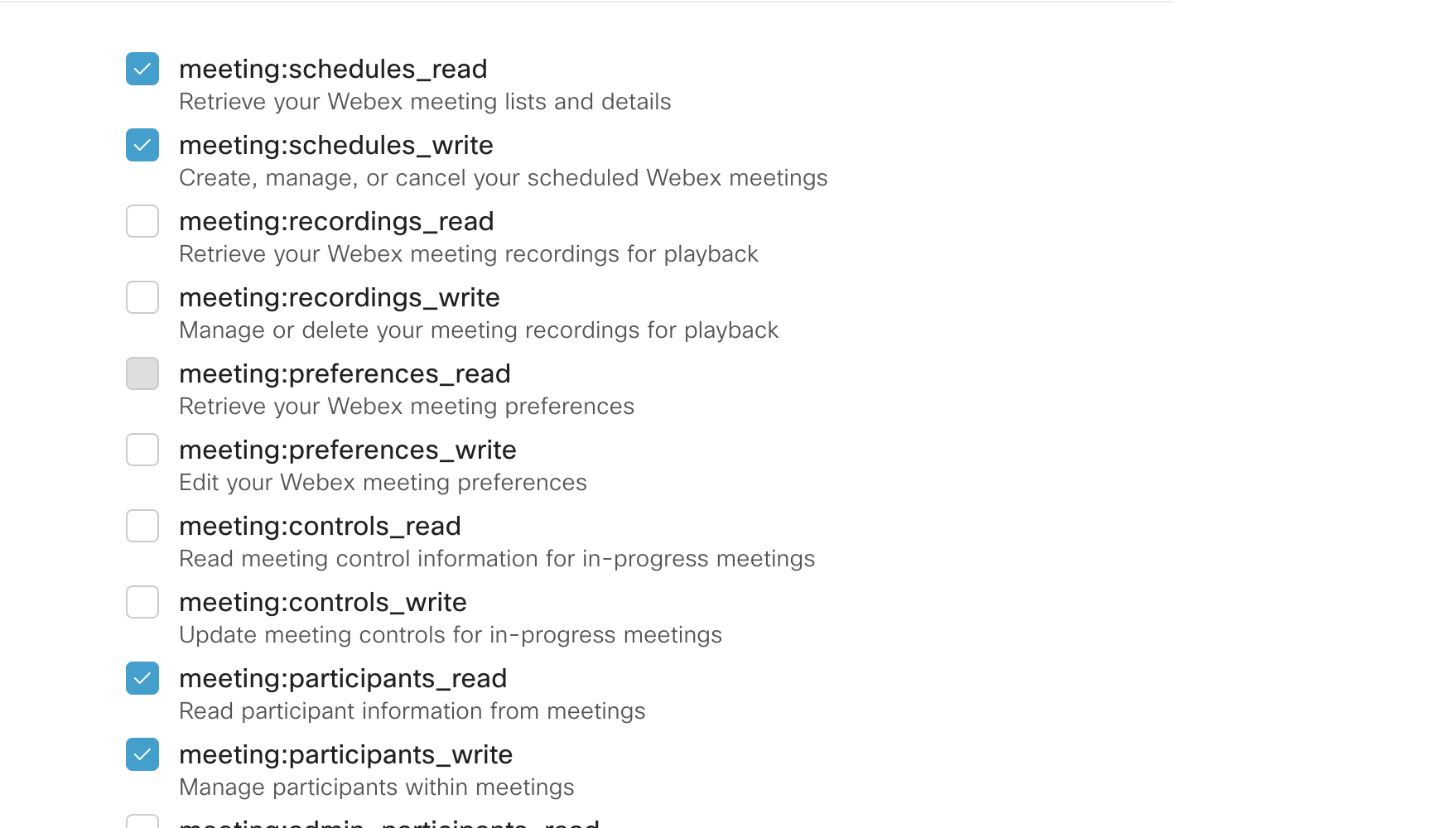
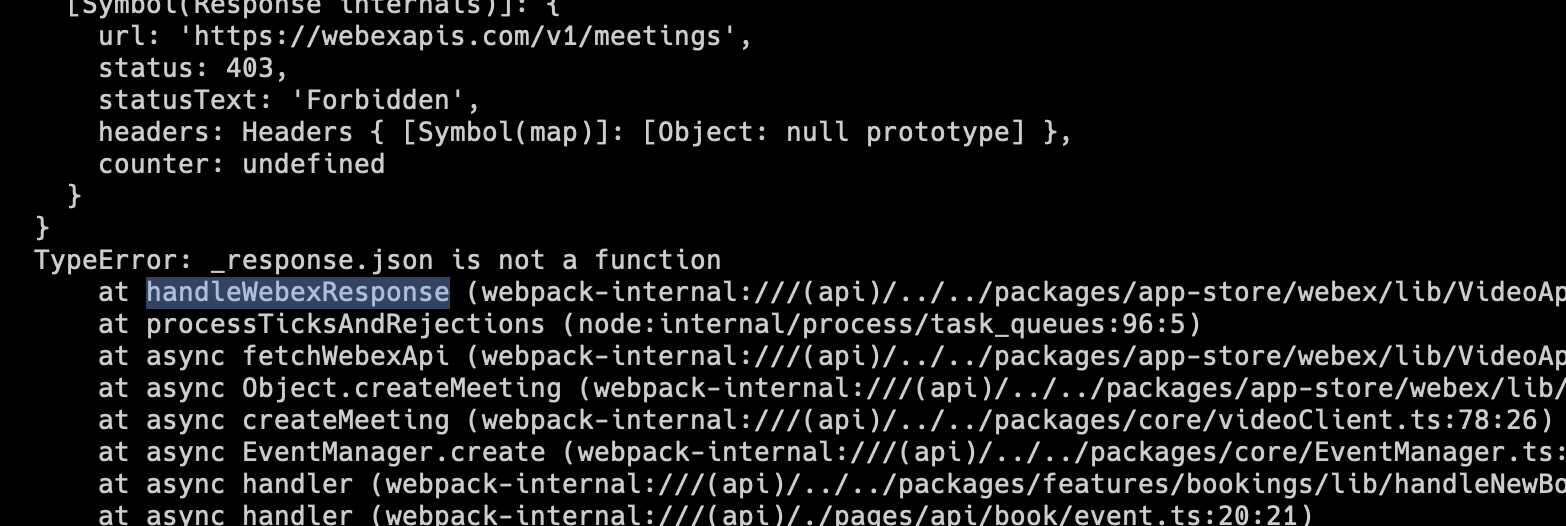
But this is what I see in the received credential and thus it fails to create meeting with webex.

When I temporarily avoided that error by changing the schema to expect 'spark:kms', I got the following error which I believe is because _response is a POJO after this line https://github.com/calcom/cal.com/blob/ab6877c0439dfb3bb54c12f7ceab3e8080d90874/packages/app-store/webex/lib/VideoApiAdapter.ts#L391
Hi @hariombalhara
I've added screenshots & icon. The issue with permissions should be fixed now. We only need meetings:schedules_read and meeting:schedules_write permissions. Have updated the readme for this.
I was able to create, update & delete meetings. The type error should be fixed.
I am still getting the error related to scope. I am not sure why that can happen as the code seems to be correctly using scopes but they are not reflecting in the credentials received.

I have set the scopes correctly.
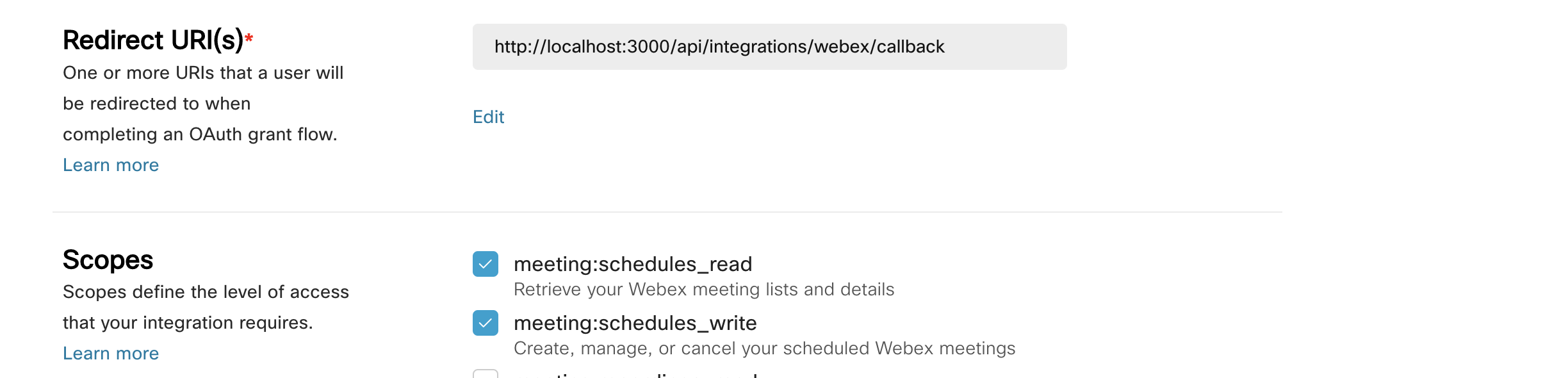
Have tried to uninstall and reinstall the app. I even created a new Integration App in Webex by following the steps in README.
@aar2dee2 You can book me here if you want and we can together solve this on call.
Requesting changes as I can't get the app to work.
Hi @hariombalhara
The error is likely because I missed adding the auth callback uri in the README file. Updated this now.
I created a new integration and it works. See video Have booked time on your calendar as well, incase needed.