
bitsail
 bitsail copied to clipboard
 bytedance
kafkatest 测试用例无法启动
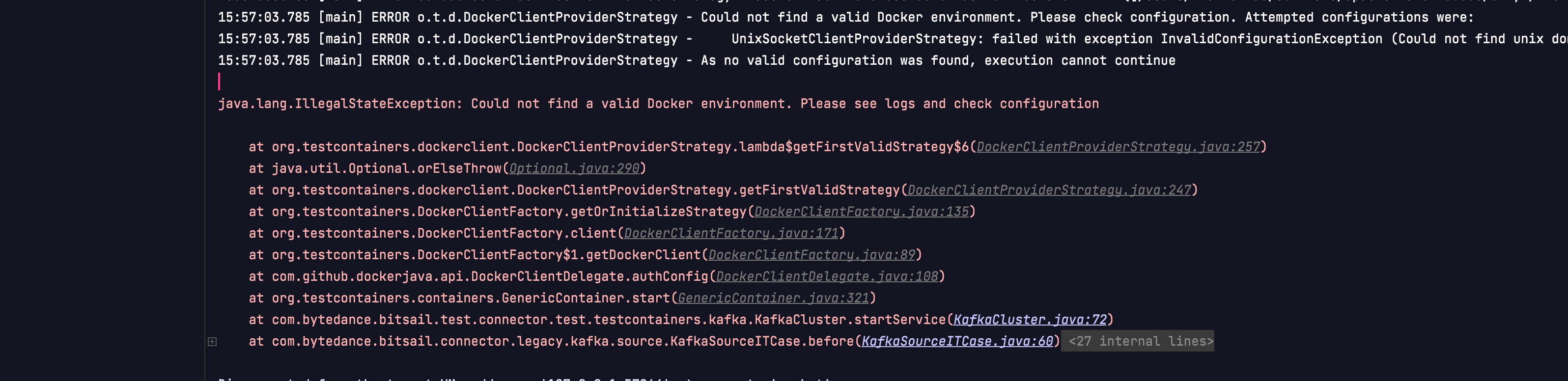


重试和重启过了 不行。我用的kafka版本是2.8.1 在创建镜像的时候,源码这个

是不是要改写?
我改成对应的confluet版本
 还是报无法找到可用的docker环境。
然后我查看我本地的kafka image名称
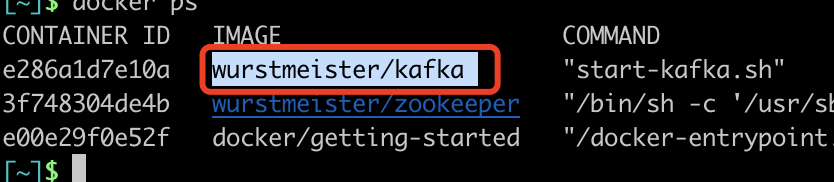 改写
改写

报如下错:
16:41:08.168 [main] INFO o.t.utility.ImageNameSubstitutor - Image name substitution will be performed by: DefaultImageNameSubstitutor (composite of 'ConfigurationFileImageNameSubstitutor' and 'PrefixingImageNameSubstitutor') Disconnected from the target VM, address: '127.0.0.1:58789', transport: 'socket'
java.lang.IllegalStateException: Failed to verify that image 'wurstmeister/kafka' is a compatible substitute for 'confluentinc/cp-kafka'. This generally means that you are trying to use an image that Testcontainers has not been designed to use. If this is deliberate, and if you are confident that the image is compatible, you should declare compatibility in code using the asCompatibleSubstituteFor method. For example:
DockerImageName myImage = DockerImageName.parse("wurstmeister/kafka").asCompatibleSubstituteFor("confluentinc/cp-kafka");
and then use myImage instead.
at org.testcontainers.utility.DockerImageName.assertCompatibleWith(DockerImageName.java:270)
at org.testcontainers.containers.KafkaContainer.<init>(KafkaContainer.java:43)
at com.bytedance.bitsail.test.connector.test.testcontainers.kafka.KafkaContainers.<init>(KafkaContainers.java:38)
at com.bytedance.bitsail.test.connector.test.testcontainers.kafka.KafkaCluster.startService(KafkaCluster.java:70)
at com.bytedance.bitsail.connector.legacy.kafka.sink.KafkaSinkITCase.before(KafkaSinkITCase.java:50)
at sun.reflect.NativeMethodAccessorImpl.invoke0(Native Method)
at sun.reflect.NativeMethodAccessorImpl.invoke(NativeMethodAccessorImpl.java:62)
at sun.reflect.DelegatingMethodAccessorImpl.invoke(DelegatingMethodAccessorImpl.java:43)
at java.lang.reflect.Method.invoke(Method.java:498)
at org.junit.runners.model.FrameworkMethod$1.runReflectiveCall(FrameworkMethod.java:59)
at org.junit.internal.runners.model.ReflectiveCallable.run(ReflectiveCallable.java:12)
at org.junit.runners.model.FrameworkMethod.invokeExplosively(FrameworkMethod.java:56)
at org.junit.internal.runners.statements.RunBefores.invokeMethod(RunBefores.java:33)
at org.junit.internal.runners.statements.RunBefores.evaluate(RunBefores.java:24)
at org.junit.internal.runners.statements.RunAfters.evaluate(RunAfters.java:27)
at org.junit.runners.ParentRunner$3.evaluate(ParentRunner.java:306)
at org.junit.runners.BlockJUnit4ClassRunner$1.evaluate(BlockJUnit4ClassRunner.java:100)
at org.junit.runners.ParentRunner.runLeaf(ParentRunner.java:366)
at org.junit.runners.BlockJUnit4ClassRunner.runChild(BlockJUnit4ClassRunner.java:103)
at org.junit.runners.BlockJUnit4ClassRunner.runChild(BlockJUnit4ClassRunner.java:63)
at org.junit.runners.ParentRunner$4.run(ParentRunner.java:331)
at org.junit.runners.ParentRunner$1.schedule(ParentRunner.java:79)
at org.junit.runners.ParentRunner.runChildren(ParentRunner.java:329)
at org.junit.runners.ParentRunner.access$100(ParentRunner.java:66)
at org.junit.runners.ParentRunner$2.evaluate(ParentRunner.java:293)
at org.junit.runners.ParentRunner$3.evaluate(ParentRunner.java:306)
at org.junit.runners.ParentRunner.run(ParentRunner.java:413)
at org.junit.runner.JUnitCore.run(JUnitCore.java:137)
at com.intellij.junit4.JUnit4IdeaTestRunner.startRunnerWithArgs(JUnit4IdeaTestRunner.java:69)
at com.intellij.rt.junit.IdeaTestRunner$Repeater.startRunnerWithArgs(IdeaTestRunner.java:33)
at com.intellij.rt.junit.JUnitStarter.prepareStreamsAndStart(JUnitStarter.java:235)
at com.intellij.rt.junit.JUnitStarter.main(JUnitStarter.java:54)
Process finished with exit code 255
按照报错提示 改写:

又报

请问这个需要怎么处理呢。
Got it, i will test in my local environemnt and reply if have any progress.
@love-star met this Docker issue before. Would you describe how you resolved this issue?

Got it, i will test in my local environemnt and reply if have any progress.
ok thx look forward to your reply.
@kafcat Can you describe your environment? such as operating system, docker version, docker machine version and JDK version. I have met a a similar problem, you can try "docker-machine create default" in your terminal, if you meet question like "VBoxManage not found. Make sure VirtualBox is installed and VBoxManage is in the path", you should install virtualbox 6, if you meet any other question like "Error in driver during machine creation: Error setting up host only network on machine start: /usr/local/bin/VBoxManage hostonlyif ipconfig vboxnet2 --ip 192.168.99.1 --netmask 255.255.255.0 failed", you can watch this article: https://stackoverflow.com/questions/70281938/docker-machine-unable-to-create-a-machine-on-macos-vboxmanage-returning-e-acces

@kafcat Can you describe your environment? such as operating system, docker version, docker machine version and JDK version. I have met a a similar problem, you can try "docker-machine create default" in your terminal, if you meet question like "VBoxManage not found. Make sure VirtualBox is installed and VBoxManage is in the path", you should install virtualbox 6, if you meet any other question like "Error in driver during machine creation: Error setting up host only network on machine start: /usr/local/bin/VBoxManage hostonlyif ipconfig vboxnet2 --ip 192.168.99.1 --netmask 255.255.255.0 failed", you can watch this article: https://stackoverflow.com/questions/70281938/docker-machine-unable-to-create-a-machine-on-macos-vboxmanage-returning-e-acces
thx for your reply,
I used Docker Desktop on macOS as local env. for debugging code , version: Docker version 20.10.20, IDEA jdk 1.8, kafka version 2.8.1 / openjdk11 zk version 3.4.13 /java-7-openjdk installed kafka and zk images all used default configuration。
@kafcat Can you describe your environment? such as operating system, docker version, docker machine version and JDK version. I have met a a similar problem, you can try "docker-machine create default" in your terminal, if you meet question like "VBoxManage not found. Make sure VirtualBox is installed and VBoxManage is in the path", you should install virtualbox 6, if you meet any other question like "Error in driver during machine creation: Error setting up host only network on machine start: /usr/local/bin/VBoxManage hostonlyif ipconfig vboxnet2 --ip 192.168.99.1 --netmask 255.255.255.0 failed", you can watch this article: https://stackoverflow.com/questions/70281938/docker-machine-unable-to-create-a-machine-on-macos-vboxmanage-returning-e-acces
thx for your reply,
I used Docker Desktop on macOS as local env. for debugging code , version: Docker version 20.10.20, IDEA jdk 1.8, kafka version 2.8.1 / openjdk11 zk version 3.4.13 /java-7-openjdk installed kafka and zk images all used default configuration。
I meet the same problem as you, what I do is delete the default mirror, install "docker-machine", install virtualbox 6, and "sodu vim /etc/vbox/networks.conf", place "* 0.0.0.0/0 ::/0" in this file.
delete
@kafcat Can you describe your environment? such as operating system, docker version, docker machine version and JDK version. I have met a a similar problem, you can try "docker-machine create default" in your terminal, if you meet question like "VBoxManage not found. Make sure VirtualBox is installed and VBoxManage is in the path", you should install virtualbox 6, if you meet any other question like "Error in driver during machine creation: Error setting up host only network on machine start: /usr/local/bin/VBoxManage hostonlyif ipconfig vboxnet2 --ip 192.168.99.1 --netmask 255.255.255.0 failed", you can watch this article: https://stackoverflow.com/questions/70281938/docker-machine-unable-to-create-a-machine-on-macos-vboxmanage-returning-e-acces
thx for your reply, I used Docker Desktop on macOS as local env. for debugging code , version: Docker version 20.10.20, IDEA jdk 1.8, kafka version 2.8.1 / openjdk11 zk version 3.4.13 /java-7-openjdk installed kafka and zk images all used default configuration。
I meet the same problem as you, what I do is delete the default mirror, install "docker-machine", install virtualbox 6, and "sodu vim /etc/vbox/networks.conf", place "* 0.0.0.0/0 ::/0" in this file.
ok I'll try it later THX~