

 bw1129
Unable to open logs
Hello , PT freeze when opening any BF log . The program was working perfectly a few months ago (last time I needed it) but now it wont open a single log . I tried to un/reinstall but it still the same . It can be with the "please wait message" forever . At the bottom right says: "Unable to set defaults".
Any help is apreciated
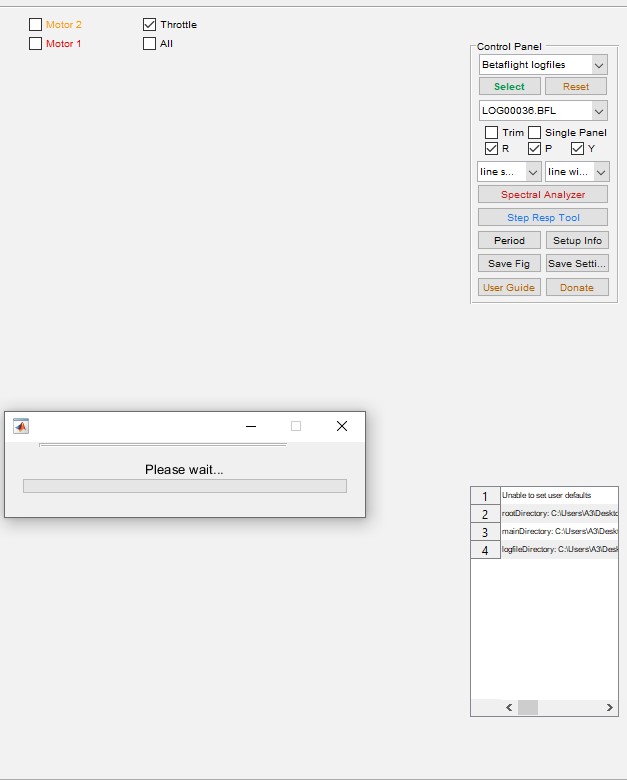

please make sure you're following the README_PLEASE.txt file
From: Flyngd @.> Sent: Tuesday, July 19, 2022 5:13 PM To: bw1129/PIDtoolbox @.> Cc: Subscribed @.***> Subject: [bw1129/PIDtoolbox] Unable to open logs (Issue #88)
Hello , PT freeze when opening any BF log . The program was working perfectly a few months ago (last time I needed it) but now it wont open a single log . I tried to un/reinstall but it still the same . It can be with the "please wait message" forever . At the bottom right says: "Unable to set defaults".
Any help is apreciated
— Reply to this email directly, view it on GitHubhttps://can01.safelinks.protection.outlook.com/?url=https%3A%2F%2Fgithub.com%2Fbw1129%2FPIDtoolbox%2Fissues%2F88&data=05%7C01%7Cbrian.white%40queensu.ca%7Cc07d8806bdc7463b780808da69cb98c8%7Cd61ecb3b38b142d582c4efb2838b925c%7C1%7C0%7C637938620401370050%7CUnknown%7CTWFpbGZsb3d8eyJWIjoiMC4wLjAwMDAiLCJQIjoiV2luMzIiLCJBTiI6Ik1haWwiLCJXVCI6Mn0%3D%7C3000%7C%7C%7C&sdata=druvDwWYrlpiywAVbER5F2emcF9INkBB6Yclgg0mQoM%3D&reserved=0, or unsubscribehttps://can01.safelinks.protection.outlook.com/?url=https%3A%2F%2Fgithub.com%2Fnotifications%2Funsubscribe-auth%2FAED36MAZQRWX5I2GHA5YWU3VU4LBHANCNFSM54BLIL2Q&data=05%7C01%7Cbrian.white%40queensu.ca%7Cc07d8806bdc7463b780808da69cb98c8%7Cd61ecb3b38b142d582c4efb2838b925c%7C1%7C0%7C637938620401370050%7CUnknown%7CTWFpbGZsb3d8eyJWIjoiMC4wLjAwMDAiLCJQIjoiV2luMzIiLCJBTiI6Ik1haWwiLCJXVCI6Mn0%3D%7C3000%7C%7C%7C&sdata=apK%2BXhZoRe6lALIbOz%2FW0uiDjqTDGCq8FOOaxYDT3TA%3D&reserved=0. You are receiving this because you are subscribed to this thread.Message ID: @.***>

Sorry about the delay on answer (holidays time) , I follow the readme.txt but unfortunately still dont open the logs . I tried to search on the Pc the "PTBdefaults" and "logfileDir" text files , but they are not any where on my computer . And it still sending the message "Unable to set user defaults".
The funny part is I have tried also on a laptop , it never had have PTbox installed on it , but it reproduces the exact same error .
Thanks for your help
If this is max, Go to ‘users/shared’ and delete the ‘PTB-…txt’ file then start again. Follow 2 main rules: 1) don’t put logfiles in main folder, 2) don’t run Ptb from application folder (use the version that’s in ‘main’ with that folder placed on your desktop. When asked via that pop up for the directory, navigate to that main folder. If you’ve done all that correctly it should work
Finally it works, I moved all the folders to another hard disk and then it started to create new "default" and "log" files. Since then it works perfectly. (Of course, it's a problem on my PC)
Thank you very much for your quick answer
I have exact the same issue on Macbook Pro M1. The version of PIDToolbox is 2.57. The same version runs fine on Windows PC. However, on Mac the program stack on opening BB file. I run the app from main folder and BB id not under main (I tried different locations but no effect). Is anyone else experiencing the same issue?

Read the ‘readme_please.txt’
Message ID: @.***>
Delete the ‘PTB…txt’ files in ‘users/shared’, Then start over following that readme as carefully as possible
Got it. I had to select main folder at the first run. It works now. Thank you