
dlangui
 dlangui copied to clipboard
 buggins
Unicode folders names do not display correctly
The file dialog, when displaying directories written with unicode characters such as chinese, only shows boxes. This is on windows.
Using the example dml editor for context
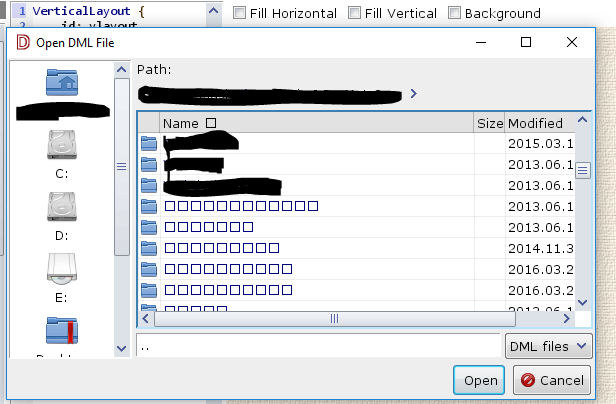

After much digging, I have found that I need a custom theme to select a font that can render those characters. That being said, is there an easier way to change the font face without duplicating the theme_default style, and setting a font in that fontface attribute? Most everything else looks like it is readonly.


Just tried it, and that did not help :(. Only correcting the font in the style used allows those characters to display. I also tried altering the font for the widget specifically, which did not take effect either. Otherwise this has been working for my purposes.
If you want change font for theme from code you can do something like this:
import dlangui.widgets.styles;
Theme theme = currentTheme;
theme.fontFamily(FontFamily.MonoSpace);
theme.fontFace("DejaVu Serif");
Platform.instance.onThemeChanged();
If you want change style for filedialog list try something like this:
Theme theme = currentTheme;
Style style = theme.get("STRING_GRID");
style.fontFamily(FontFamily.MonoSpace);
style.fontFace("DejaVu Serif");
Platform.instance.onThemeChanged();
Current there is STRING_GRID style but I think we should add another style for filedialog grid like FILEDIALOG_GRID.
What do you think about that Vadim?

@buggins Not FILEDIALOG_GRID - FILE_DIALOG_GRID will be better. I propose PR with this change.
@ncoe From next release STRING_GRID will be changed to FILE_DIALOG_GRID. Can you give us feedback which font you use to see all characters and example strings to test it. So we can try change default theme to work properly with Chinese characters.
The font I chose is 'Arial Unicode MS' since it sounded familiar and stood out. I did not search the entire font space for candidates that would would better on all platforms (if that is even an issue).
Some example strings:
- 鼠牛虎兔龍蛇馬羊猴鸡狗豬 for the twelve animals of the chinese zodiac
- こんにちわ for hello in japanese
@ncoe Sorry for answer delay (have a lot of work). Thanks for example strings. I made some investigation and situation on windows is little complicated. Microsoft propose to use Segoe UI font for UI. But this font don't have Chinese characters. For Japanese they propose Meiryo font and for Chinese Microsoft JhengHei or Microsoft YaHei (https://msdn.microsoft.com/en-us/library/windows/desktop/dn742483.aspx).
Maybe there should be font based on locale or we should use Arial Unicode MS like you.
Currently I don't know what is right. I reopen your issue, because I think that should be fixed in dlangui.
@and3md No problem. Fonts are definitely complicated. A quick search shows at least 136,690 unicode characters which a font would need to define a glyph for, so they specialize where needed. Having the method you showed for overriding the font programmatically lets me find the test data I want. Good luck.
We should implement feature - substitution fonts. For substitution of missing glyphs in one font using glyphs from other font.