
wl-clipboard
 wl-clipboard copied to clipboard
 bugaevc
`wl-paste` hangs on data over 64kb
This issue is rather difficult to explain, so please bear with me... :slightly_smiling_face:
In the simplest form, neither wl-copy nor wl-paste don't seem to have any size limits. However, when wl-paste is used in combination with wl-paste -w, it hangs.
To reproduce, first create file /tmp/paste with the following contents:
#!/bin/sh

notify-send before paste
wl-paste -n > /tmp/$(date +%s)
notify-send after paste
Make it executable.
Run the following command:
$ wl-paste -w /tmp/paste
Now copy any small chunk of text - you will see two notifications (as expected).
Try to copy exactly 64kb of text:
$ cat /dev/urandom | tr -dc A-Za-z0-9 | head -c 65536 | wl-copy
This will also show you two notifications.
Now try to copy a 1 byte bigger chunk of text:
$ cat /dev/urandom | tr -dc A-Za-z0-9 | head -c 65537 | wl-copy
This will show you only one notification (before paste), and wl-paste -n line hangs.
If now you copy any other small chunks of text, you will see no notifications, because the process is hanging.
htop looks like this:
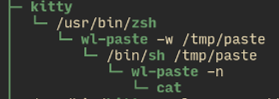
I tried to search what can cause this 64kb limit but I can't find anything...
This doesn't seem to exceed my pipe limit, and although locked memory seems to fit the number, I checked that it isn't relevant (I reproduced on another computer where this limit is doubled)...
$ ulimit -a
time(seconds)        unlimited
file(blocks)         unlimited
data(kbytes)         unlimited
stack(kbytes)        8192
coredump(blocks)     unlimited
memory(kbytes)       unlimited
locked memory(kbytes) 64
process              125719
nofiles              1024
vmemory(kbytes)      unlimited
locks                unlimited
rtprio               0

$ cat /proc/sys/fs/pipe-max-size
1048576
Do you have any idea?

I think I found some clue. It is pipe limit in fact.
See this: https://unix.stackexchange.com/a/353735
(also interesting: http://community.cs.hku.hk/web/atctam/csis0230a/-/message_boards/message/35029)
The default pipe limit is 64kb, it can be increased to the max_size as defined in /proc/sys/fs/pipe-max-size (which is ~1mb in my case), and you can do it via C bindings.
But this won't really fix the problem, whether the pipe limit is 64kb or 1mb, it is still a relatively small limit, and wl-paste -w will continue to get stuck. I can easily imagine my clipboard containing larger chunks sometimes (files, screenshots, etc), and so every time I e.g. take a screenshot my watch will hang.
Is it possible to implement some sort of paging, so that you pass the data in chunks, without exceeding the limit and hanging the process?
Thanks for the report!
I think I know what's happening here. First of all, this is not how you're really supposed to use wl-paste --watch: the command you're spawning shouldn't run wl-paste again, it should just read the data from its stdin. So your script should do this:
#!/bin/sh

notify-send before paste
cat > /tmp/$(date +%s)
notify-send after paste
Now as you can see, ignoring your stdin and running wl-paste again also works (but there are issues, mainly atomicity). But since both copies of wl-paste are trying to paste from the same source, which is a wl-copy, and one of them is not reading (because the script doesn't read its stdin), we run into this:
https://github.com/bugaevc/wl-clipboard/blob/f3a45f69f7d14e7f7050bca4cbf6fea6697d1455/src/types/copy-action.c#L86-L93
So the second wl-paste is waiting for the wl-copy to respond, which is waiting for the whole data to be read by the script, which is ignoring its stdin and waiting for the second wl-paste.
The easy fix for you is to use stdin instead of another wl-paste, but as said in the comment, perhaps we should switch to an asynchronous child waiting scheme.

Ooh, thanks, this makes a lot of sense :+1: I confirm that reading directly from stdin works and has no issue :+1: I now see this is even mentioned in the manual, I didn't see this at first.
strangely for me, wl-paste hangs for even small selections from GIMP like 70x70 px image - and without any other wl-paste or wl-copy instances running. any ideas?
https://user-images.githubusercontent.com/6832539/121425899-d90a9d80-c96a-11eb-8b54-c5682771a3a4.mp4
