

 bruderstein
Proxy Settings
Description of the Issue
Hi Dave, since I've upgraded N++ to new version (v 7.5.4 portable 32bit), I'm not able to update/install easily from Plugin Manager anymore (PluginManager_v1.4.9_UNI) I don't know where to put my Proxy Settings inside PluginManagerGpup.xml, or wherever it is thanx so much! greets! Millo
Steps to Reproduce the Issue
Expected Behavior
Actual Behavior
Debug Information
Notepad++ v7.5.4 (32-bit) Build time : Jan 1 2018 - 01:47:45 Path : C:\winapp\PortableApps\PortableApps\Notepad++Portable\App\Notepad++\notepad++.exe Admin mode : ON Local Conf mode : ON OS : Windows 7 (64-bit) Plugins : ComparePlugin.dll CustomizeToolbar.dll DSpellCheck.dll HexEditor.dll HTMLTag_unicode.dll LanguageHelp.dll mimeTools.dll NppBookmarkManager.dll NppColumnSort.dll NppConverter.dll NppEditorConfig.dll NppExport.dll NppFTP.dll NPPJSONViewer.dll NppQCP.dll NppTextFX.dll PluginManager.dll PreviewHTML.dll ReloadButton.dll TabIndentSpaceAlign.dll Tidy2.dll UniversalIndentGUI_NPP.dll WebEditU.dll XBrackets.dll XMLTools.dll XPatherizerNPP.dll

@millo74 Maybe you are mixing that up with the proxy settings from https://github.com/gup4win/wingup the updater of N++ itself. PM is just reusing the settings of the IE, since
1.2.0
Downloads now using WinInet API instead of libcurl. Hence now using system proxy (same as IE and Chrome), and smaller binaries.

Similar issue here. Since I started using NPP, the Plugin Manager was in the installation file (windows).
I now just installed it again and there is no Plugin Manager. When I donwloaded the PM manually, moved it to the plugins directory and restarted NPP it has no plugins in its list.


@kludikovsky Which version of PM did you install. This is probably not the current one 1.4.9 from https://github.com/bruderstein/nppPluginManager/releases/tag/v1.4.9.
@millo74 See https://superuser.com/questions/337685/how-do-i-change-the-windows7-lan-proxy-config-from-the-command-line or https://www.perfect-privacy.com/howto/http-proxy-configuration-windows-7/ how to set and check the current proxy settings relevant for the PluginManager
Same issue for me: I have installed Plugin Manager 1.4.11 but I am not able to specify proxy settings.
Could you provide some guidelines? Which are different ways to define proxy server?

@chcg It's now ok, and I am at 1.4.9
I am not sure what I've done to get it working, but most properly I (re-)installed NPP 'As Administrator'
But as I see I am back two releases, even as I update regularely, I don't get your 1.4.11 Version in the updates. Are you using a different release procedure?
I just got another issue:
After I wrote the above comment I tried to update the extensions. There where 3 of them.
Following the restart I just saw that 2 of them are still in the update list. But with not installed version information, which was there before.
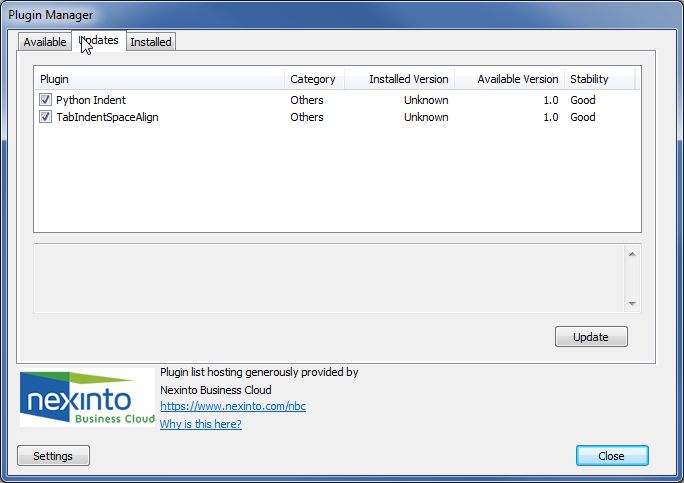
I restarted as Administrator and did it again - but with no effect.
Nevertheless the extensions are installed and active.

But they are not shown in the list of installed extensions.
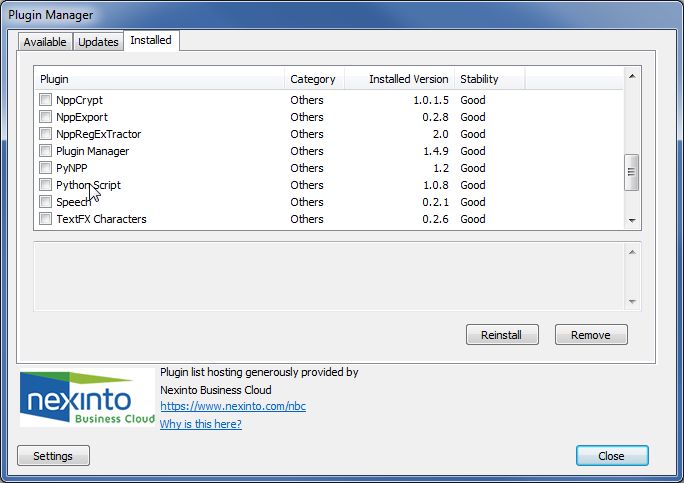
So there seems to be some inconsistency.
@kludikovsky Just updated the 32bit version of PM to 1.4.11 right now due to problems with the webinterface. So it is available via the development list and in ca. 2 weeks also as regular update.
The issue with python indent and tabindentspacealign is that the dlls have no version info (file property->detail) and therefore are not identified correctly. I will add a MD5 sum of these plugins to correct that. Thanks for the hint.
using notepad++ 7.5.8 with pluginmanager 1.4.11 i can not download anything through the proxy. System proxy settings are correct and work from other applications. Also no authentication request appears (auth proxy)

@KptainBiwouak Proxy settings are taken from the one used also for windows IE, Edge browser. Are you able to access the internet with the microsoft browsers?
@vladtepesch Which windows version do you use? Maybe you are facing a TLS issue. Could you also check against #116 and #114 that you don't face a download problem due to missing TLS 1.2 activation.