

 brownbat
Card ease doesn't appear to be set below 130% until you click "Adjust Ease Factors To Performance"
In the popup stats when you do a review, the popup says that the cards ease will be set to 1000 (so 100%), but it actually appears to be set to 130% when I checked the card in the browser. After clicking the adjust ease factor button, it properly shows 100% now. I don't know if the card is actually being set to 130%, or if it's really 100% like it should be but just appears to be set to 130%. This happened with every card I checked.
Before I clicked the adjust button:
 After I clicked the adjust button:

I'm on the Linux version of Anki, and I'm also using the japanese support and awesome TTS addons, but those don't affect scheduling, so I don't think they're affecting anything here.
Here are my options for the addon: { "leash": 100, "max_ease": 5000, "min_ease": 1000, "moving_average_weight": 0.2, "reviews_only": true, "stats_duration": 30000, "stats_enabled": true, "target_ratio": 0.8, "two_button_mode": true }

Sorry for the slow reply! I think I have this one diagnosed. It's a hard fix, but shouldn't actually affect review scheduling.
Testing on Linux Mint with Anki 2.1.35.
For most cards I see it working as designed:
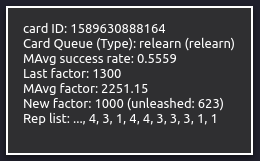
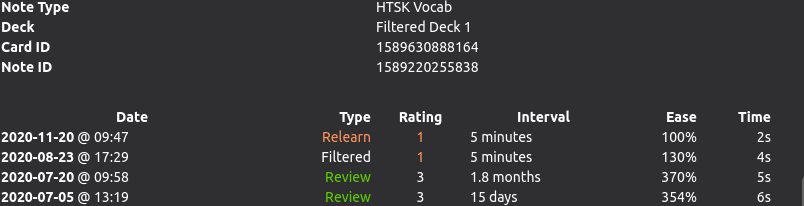
However for cards that are just graduating learning status, Anki will reset the ease to a fixed value. It should be determined by "Starting Ease" in deck options. (Is it possible this is only affecting graduating cards for you?)
Graduating a card from a test deck, with deck settings for starting ease at 250:
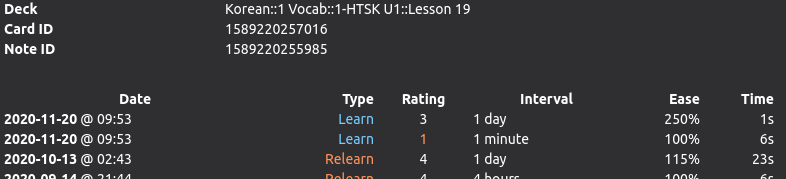
This is because Anki resets the ease on graduation. Rest easy though, this won't actually affect much, since the next interval (the graduating interval) is set by the deck options, and then after that interval, the algorithm will correct the ease factor to the right value on the very next review and you should be back on track without any mis-scheduling.
It's a little annoying to have that bad data, but shouldn't affect the scheduling of reviews in practice.

Also discussed here: https://github.com/brownbat/autoEaseFactor/issues/23#issuecomment-719951339
Reopen if you're seeing this on any cards that aren't graduating, but since there's not an easy way for me to stop the graduation process, and since it shouldn't actually impact scheduling, I'm going to close for now.
This does happen to cards that aren't graduation. The example I showed was actually just a normal review. In fact, I've only seen this on review cards so far, since I haven't had any "new" cards in a while, and I have relearning off completely.
Here's another example. This one shows what the addon says in set the card's ease to:
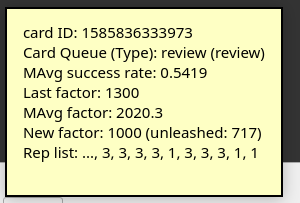 Here's what the browser says it set the card to before I clicked the adjust button:
 Here's what the browser says it set the card to after I clicked the adjust button:

It seems like the addon is saying that it sets the cards to 100% ease, but Anki itself intervenes somehow and raises it to 130% ease, which is the lowest ease that Anki normally allows. Clicking adjust lets the addon change the ease to 100% without Anki's normal scheduling being involved, so it doesn't mess with the addon's scheduling again. At least, that's what I suspect is happening.
Ok, that is really strange.
I want to try to duplicate your conditions as much as possible.
Can you go into the card browser and select 2-3 cards this has affected (and maybe 2-3 cards this hasn't affected in the same deck for good measure), then export it as an .apkg file (with "include media" and "include scheduling" included?)
If you then just add a .zip extension, GitHub will let you drag it into the comment box as an attachment, like so: Selected Notes.apkg.zip
(The shortcut for exporting selected notes in the browser is ctrl+shift+E.)
Thanks for continuing to help me test, sorry for the misdiagnosis. Definitely something weird inserting a floor in there.
Okay, here are some cards that I saw affected by this issue. The problem seems to happen with any cards that have low enough success rates to be set to 100% ease by the addon, so I actually couldn't find any cards that this didn't affect, since it affected every card that's supposed to be set to 100% ease.
I didn't actually compress the file btw. I just added the extension to the end of the name, so just remove it then import it.
Good catch, can't believe I missed this.
Anki main is overwriting the factors whenever it gets to a Review or a Lapse.
Reviews: https://github.com/ankitects/anki/blob/98a4a1927a8e781a1c0b4a297caa8e86134ac027/pylib/anki/schedv2.py#L934
Lapse: https://github.com/ankitects/anki/blob/98a4a1927a8e781a1c0b4a297caa8e86134ac027/pylib/anki/schedv2.py#L934
v1 lapse: https://github.com/ankitects/anki/blob/98a4a1927a8e781a1c0b4a297caa8e86134ac027/pylib/anki/sched.py#L515
v1 review: https://github.com/ankitects/anki/blob/98a4a1927a8e781a1c0b4a297caa8e86134ac027/pylib/anki/sched.py#L554
Since it only affects reviews and lapses, I would see other cards (mid-learning or relearning) go beneath 130% and didn't catch it.
This may be difficult to fix... was hoping not to have to hijack the whole scheduler, for compatibility with future versions and other addons. Might have to though.
Would the problem be solved if ease factors were adjusted not (only) during review but outside of it, for example when pressing an "Adjust ease for all decks" button or when closing Anki? I implemented this functionality in PR https://github.com/brownbat/autoEaseFactor/pull/56

I don't think it would, because it seems that even when the ease factors are manually adjusted outside the review, they just get set back to 130% and the interval increase is based on that. So adjusting outside the review won't help, because the normal anki algorithm interferes when it comes to actually scheduling the next interval, regardless of what the addon sets the ease to.
I actually set the minimum ease to 130% for now (until it gets fixed) because I was afraid that the anki scheduler's interference would give the addon bad data and mess up my review intervals.