

 brocaar
Explicit refresh button for some objects loaded higher in the tree
- [x] I have searched the issues of this repository and believe that this is not a duplicate.
Summary
Information on some pages does not refresh as common user experience would expect and as some other pages do. Refreshing such information requires reloading whole page which may not be obvious at the first sight.
The object is loaded higher in the object tree. This means that changing tabs does not create a new API request. This makes changing tabs faster (e.g. no reload on tab change), but could be confusing when you expect to load a new page.
Example:
- Open device or gateway details page and observe "Last seen at" info
- Let device send new data to server
- The "Last seen at" would not refresh by clicking tab name or selecting other tabs, you have to refresh whole page.
Example that works as expected:
- Open devices or gateways list and observe "Last seen" info
- Let device send new data to server
- The "Last seen" info will refresh by clicking tab name
What is the use-case?
As mentioned in https://github.com/brocaar/chirpstack-application-server/issues/479 it is prefered to have refresh button on details page to make data reload more explicit rather than changing behaviour of whole page.
Implementation description
Add a button that will simply refresh whole page (just like F5 in web browser) or possibly reloads only some portion of data on the page (see "Downlink queue" for example).
Pages / information affected
- Device details: Last seen at (this one could be reloaded separately)
- Gateway details: Last seen at, Frames received, Frames transmitted (these could be reloaded all together)
If you find others let me know and I'll add them to the list.
Can you implement this by yourself and make a pull request?
Not right now as I reinstalled my OS and did not setup development environment yet. UPDATE: got it mostly working, just have to sync local repos carefully. Not sure about my coding skills in this regar tho.

I have been doing some experiments, here are my thoughts:
- At ui, there are other two places where we can found out "Last seen" aside what @mmrein mentioned:
- List Applications
- List Gateways
I think that we can cross them out cause since do not fit in the idea of updating Last seen as a single element and I am trying to think out loud in which other areas that present this information we can apply same behavior.
When someone is at Gateway details, does someone really wants to reload Last seen only? Actual deployment requests to the api contains other information from the Gateway, like the stats for example. In this sense we can not (If I am wrong, let me know) use same api call if we want to update only Last seen parameter since rest of information will be updated as well.
Do you have some ideas about how we can achieve to update that parameter aside of creating a new api call to retrieve only this value?
What are your thoughts?

When someone is at Gateway details, does someone really wants to reload Last seen only?
I doubt that. From user's perspective it would make sense to me that with refreshing Last seen the stats would refresh too.
@mmrein I agreed with you. However, does this will make sense when user is at Device Details?
Even if we assume to go with this option, I can not find a direct way to embrace a refresh button within the whole page that will indicate right away to the user the action to take.
We can not set the refresh button here since I think this will be miss understood like update only the data within that card, when is not.
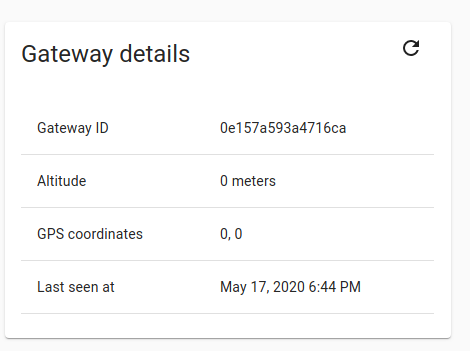
I am looking forward to read some feedback from @brocaar on this.
@sophiekovalevsky Hmm, I see. One possibility may be to put refresh button on each card but reload everything no matter which one of them is clicked. That may not be straight forward, but it would be better than nothing, I believe.
For device detail I would go with refreshing the status card only.
This would on the other hand create two different aproaches on stuff that may be somehow unified. So, yes, I can't tell what is better.
@sophiekovalevsky @mmrein I'm not sure if from a technical point of view it makes sense to implement the refresh button on a card. Each *Layout component loads the object, and then passes this to the objects that are rendered within, e.g.:
https://github.com/brocaar/chirpstack-application-server/blob/master/ui/src/views/gateways/GatewayLayout.js#L47
https://github.com/brocaar/chirpstack-application-server/blob/master/ui/src/views/gateways/GatewayLayout.js#L157
From a technical point of view, this means that the logical place to implement such refresh button would be the *Layout component I think.

@brocaar then, what you suggest is not implement this it all ?
I agree in the idea that the refresh button should not be place on the card since will lead to miss understanding aside of knowning that Last seen is coming from *Layout component and passed as props to *Gateway Details component.
What I suggest is:
- within
*Layoutcreate a method to request a new API call at GatewayService retrieving only Last seen parameter first time when *Layout DOM is loaded. - Take the result of this request and set it on the right side corner within Gateway Details tab. Something similar to this but more appealing:
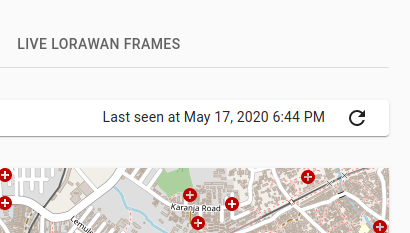
- Follow the same approach in Device Details, I think.
@brocaar is this okey to you?
Or maybe something like this could work?
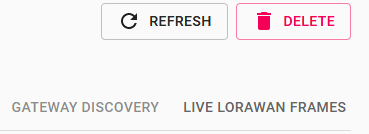
This would actually make sense even on metadata tabs or config tabs if you want to refresh without saving changes.
I've simply put this button next to Delete button (so it is currently only available for admin which is not right) and was just trying various methods to call onClick.
One thing I tried is onClick={this.componentDidMount} which mostly does what I was expecting but I have no idea what it really does from technical point of view. Also this does refresh LastSeenAt but not the frame statistics. It does refresh metadata though, which is nice.
Notes to self:
import Refresh from "mdi-material-ui/Refresh";

              <TitleBarButton
                key={2}
                label="Refresh"
                icon={<Refresh />}
                onClick={this.componentDidMount/*.bind(this)*/}
                //onClick={() => window.location.reload(false) }    // Does full (F5) reload. Ok but not great
              />