

 brimdata
Cloud "zed load" failing with PROTOCOL_ERROR after <10 minutes
Repro is with Zed commit fe6d602f to a cloud lake.
$ curl https://cedar.lake.brimdata.io/version
{"version":"v0.33.0-77-gfe6d602f"}

$ zed -version
Version: v0.33.0-77-gfe6d602f
The data set is a 37 GB ZNG file of shaped DNS data. I've sent @mattnibs a ~5 GB subset of this data for test purposes. A sampling:
$ zq -z fdns.zng
{name:"0.202.98.34.bc.googleusercontent.com",timestamp:2020-11-27T00:28:12Z,type:"a",value:34.98.202.0}
{name:"0.202.98.84.rev.sfr.net",timestamp:2020-11-27T00:18:53Z,type:"a",value:84.98.202.0}
...
What I've observed is that an attempt to load this data to the cloud lake typically fails in under 10 minutes. Here's the error output in a couple attempts:
$ zed create -orderby value:asc fdns
pool created: fdns 23WcxKCrgXZ05MIMBqz4NpLKgpw

$ zed use -p fdns
Switched to branch "main" on pool "fdns"

$ time zed load fdns.zng
(0/1) 1.38GB/39.86GB 0B/s 3.47%
Post "https://cedar.lake.brimdata.io/pool/23WVBZMg9Bts1Yi1KiCcKfwMvkz/branch/main": http2: Transport: cannot retry err [stream error: stream ID 3; PROTOCOL_ERROR; received from peer] after Request.Body was written; define Request.GetBody to avoid this error
real	9m30.072s
user	2m12.069s
sys	1m38.150s

$ zed drop fdns
Are you sure you want to delete pool "fdns"? There is no going back... [y|n]
y
pool deleted: fdns

$ zed create -orderby value:asc fdns
pool created: fdns 23WcxKCrgXZ05MIMBqz4NpLKgpw

$ zed use -p fdns
Switched to branch "main" on pool "fdns"

$ time zed load fdns.zng
(0/1) 1.69GB/39.86GB 0B/s 4.25%
Post "https://cedar.lake.brimdata.io/pool/23WcxKCrgXZ05MIMBqz4NpLKgpw/branch/main": http2: Transport: cannot retry err [stream error: stream ID 3; PROTOCOL_ERROR; received from peer] after Request.Body was written; define Request.GetBody to avoid this error
real	7m40.805s
user	1m28.602s
sys	0m52.459s
I don't get this failure if I'm loading to a lake on localhost.

I know the cloud stuff hasn't been touched in a while so this is probably not a surprise, but I've confirmed with current Zed commit 9c0f097 that this problem is still with us. It happened to fail a bit quicker than before and with a different error.
$ zed -version
Version: v1.2.0-49-g9c0f0973

$ curl https://shasta.lake.brimdata.io/version
{"version":"v1.2.0-49-g9c0f0973"}

$ export ZED_LAKE="https://shasta.lake.brimdata.io"

$ zed auth login

$ zed create -orderby value:asc fdns
pool created: fdns 2EjkVuvjc0QaJi4jrCWsx5JV7np

$ zed use fdns
Switched to branch "main" on pool "fdns"

$ zq -Z 'head 1' fdns-a-large.zng.gz
{
    name: "0.202.98.34.bc.googleusercontent.com",
    timestamp: 2020-11-27T00:28:12Z,
    type: "a",
    value: 34.98.202.0
}

$ time zed load fdns-a-large.zng.gz
(0/1) 532.69MB/21.32GB 0B/s 2.50%
status code 504: <html>
<head><title>504 Gateway Time-out</title></head>
<body>
<center><h1>504 Gateway Time-out</h1></center>
</body>
</html>

real	2m54.893s
user	0m43.209s
sys	0m6.157s
I plan to take this issue in two directions.
- Better understand why the sorts of the chunks are taking so long. For comparison, I'll see how long a simple Unix
sorttakes to do the same operation on the same data. - Look more into the load balancer settings to confirm if we can avoid the timeouts, as we may have other reasons to want to avoid the death of long idle connections.
I ran some tests where I varied the Idle timeout setting on the EC2 Load Balancer that sits in front of the cloud VM and confirmed that this does indeed make a big difference.
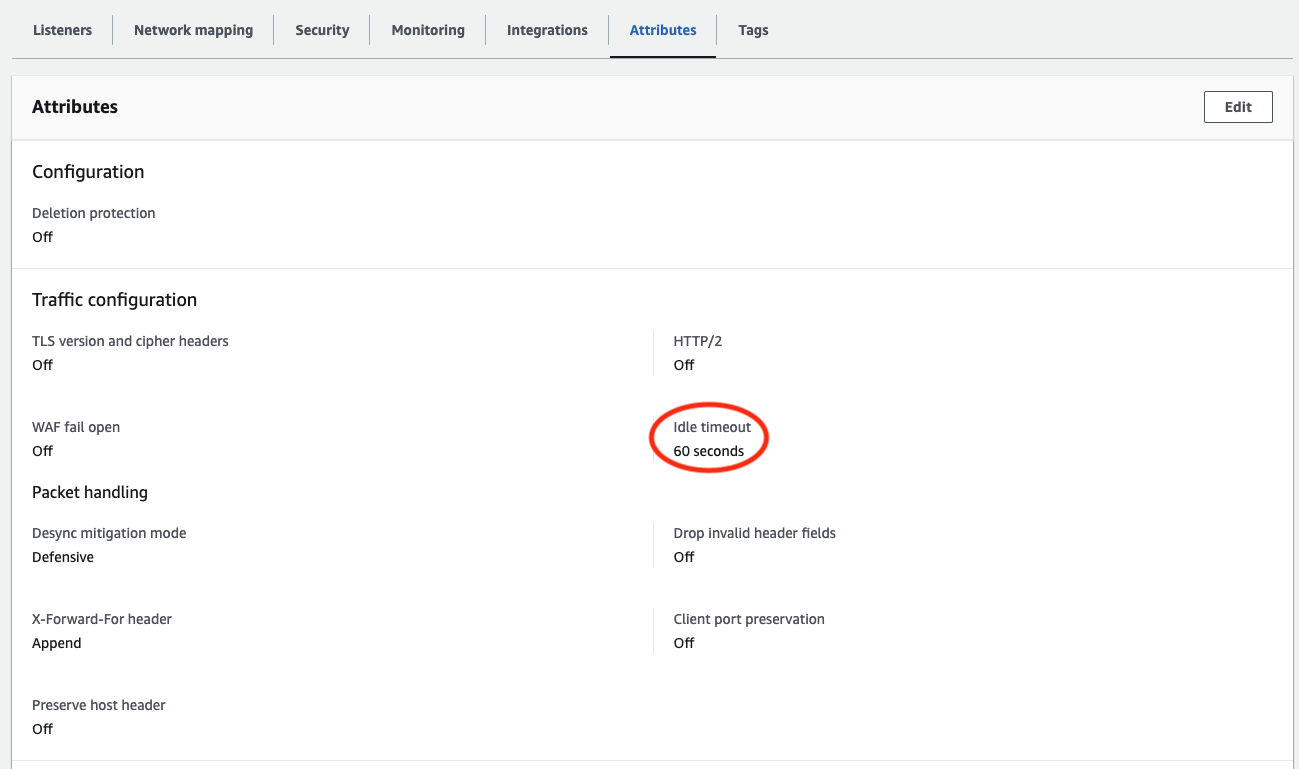
I had to rig the test case a little bit since conditions have changed since this issue was opened.
-
We've improved sort performance such that on a healthy cloud VM fronted by a load balancer with the default Idle timeout of 60 seconds it's no longer a given that the
zed loadwill see pauses long enough to timeout the connection, and, -
Memory usage during
zed loadhas actually increased over time (#4121, #4119) such that the cloud VM we've been using that has 8 GB of RAM will tend to run out of memory and hang during the kinds of data loads that I've used to repro this problem in the past.
Therefore what I ended up doing was using the existing VM but adding 16 GB of swap space so it would not run out of memory, but data sorts during load would likely take a real long time due to being I/O bound.
With that VM config and the Idle timeout at its default setting of 60 seconds, an attempted zed load of the fdns-a-large.zng.gz data set timed out in 11 minutes and 21 minutes on separate runs. Upping the Idle timeout to 300 seconds, it timed out in 146 minutes and 97 minutes on separate runs. Finally, upping the Idle timeout to its maximum of 4000 seconds, the zed load ultimately did complete successfully in 985 minutes. Please keep in mind that this high number is not representative of healthy zed load performance: The VM spent most of its time in I/O wait. These were just conditions that most visibly reproduced what we wanted to study here.
In conclusion, if we want to make sure that connections are never timed out due to long-but-recoverable delays in the Zed service, it does seem like maxing out this Idle timeout this value would be prudent. OTOH, since the service should generally not be going quiet for 5+ minutes at a time, and failed connections would likely be seen as a sign of things gone wrong such that we'd be more aware of there's a problem, I could see a case for setting the value to something lower than the max.
I'll review these results with the team and we'll reach consensus on a setting to use going forward.
I shared the details in the prior update with the team and based on that have upped the timeout on the load balancer to 300 seconds. Closing this issue.