slim-select

slim-select copied to clipboard
 brianvoe
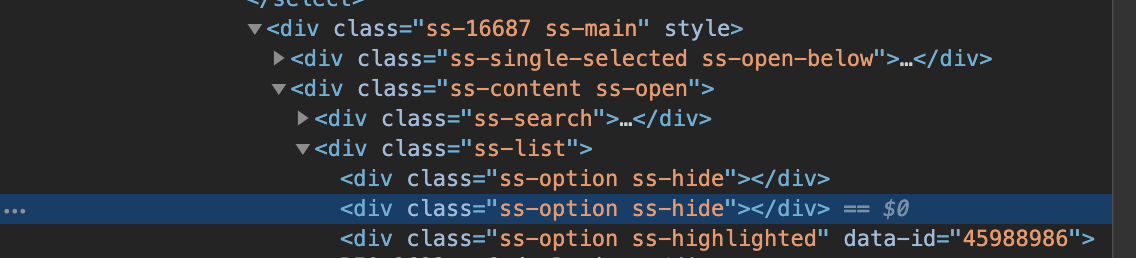
ss-hide elements at top of ss-list div making it harder to select options using arrow keys
Describe the bug When I do an ajax search the first two elements in ss-list are empty divs with classes of "ss-option ss-hide" and when I try and select an option using the arrow keys it selects these two elements first. Below is how I initialize my slim select.
    new SlimSelect({
      select: '#uid_or_summary_cont',
      searchingText: 'Searching...',
      limit: 10,
      onChange: (ticket) => {
        const token = $('*[data-behavior="autocomplete"]').parent().parent().find('input[name="q[authenticity_token]"]').val();
        $('*[data-behavior="autocomplete"]').val('');
        $.ajax(`/tickets/${ticket.value}/intervals?event=start`, {
          "method": 'post',
          "data": { authenticity_token: token }
        })
      },
      searchFilter: (option, search) => {
        return option;
      },
      ajax: debounce((search, callback) => {
        if (search.length < 3) {
          callback('Need 3 characters')
          return
        }
        fetch(`/tickets_autocomplete.json?q=${encodeURIComponent(search)}`)
          .then(function (response) {
            return response.json()
          })
          .then(function (json) {
            let data = [];
            for (let i = 0; i < json.length; i++) {
              let ticket = json[ i ];
              data.push({ text: `${ticket.uid} - ${ticket.summary}`, value: ticket.id })
            }
            $('.ss-hide').remove();
            callback(data)
          })
          .catch(function (error) {
            callback(false)
          })
      }, 250)
    })
Screenshots
Add screenshots to help explain your issue. If you do not submit at least an image or animated gif I most likely wont look into it.