

 brave
brave
Tab titles blurry/soft on Windows 10
Description
I've used Chrome for a decade. Today I switched to Brave, but I'm not sure if I can stay here because the tab titles are slightly blurry and it makes me feel like I can't see clearly. See the screenshot below.
Steps to Reproduce
- Open a tab (in my case, a Google search for "screenplay format")
Actual result:
Top-left is Brave, beneath that is Edge and to the right is Chrome. In this case the tab is in the background, but it's the same when it's in the foreground. Besides that, Edge still manages to be sharp even in the background.
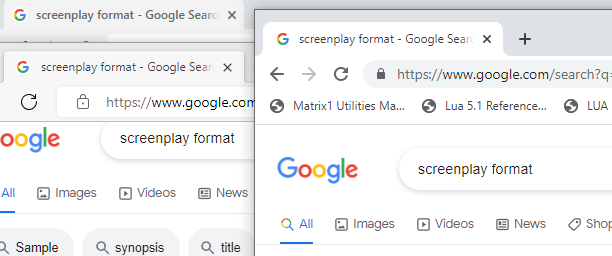
Expected result:
See Edge and Chrome in the screenshot above (their tab titles are tack-sharp).
Reproduces how often:
Easily reproduced
Brave version (info found on brave://version)
Brave: 1.42.88 Chromium: 104.0.5112.81 (Official Build) (64-bit) Revision: 5b7b76419d50f583022568b6764b630f6ddc9208-refs/branch-heads/5112@{#1309} OS: Windows 10 Version 21H1 (Build 19043.1766)
Version/Channel Information:
- Can you reproduce this issue with the current release? Yes
- Can you reproduce this issue with the beta channel? Untested
- Can you reproduce this issue with the dev channel? Untested
- Can you reproduce this issue with the nightly channel? Untested
Other Additional Information:
- Does the issue resolve itself when disabling Brave Shields? No
- Does the issue resolve itself when disabling Brave Rewards? No
- Is the issue reproducible on the latest version of Chrome? No
Miscellaneous Information:
- I have no scaling (Windows or otherwise) applied
- It's a regular PC with no switchable graphics or anything

I believe the active tab's text gets bolded - and in Brave this is expected
cc: @rebron @bradleyrichter

cc: @MadhaviSeelam @jonathansampson We deliberately added weight to the foreground tab and decreased weight on background tabs. We shouldn't be blurry. @goodov gpu issue?
