

 braintree
Paypal browser switch works only api 28+ (including 28)
General information
- SDK/Library version: 4.2.0/4.6.0
- Environment: Sandbox and Production
- Android Version and Device: Android API 26, 27 are not working, from 28 works fine
- Braintree dependencies:
- com.braintreepayments.api:paypal:4.2.0/4.6.0
- com.braintreepayments.api:data-collector:4.2.0/4.6.0
Bug description
We are using the braintree-api to support PayPal payment, and in Fragment we have called the method to waiting for the nonce like this way.
    override fun onResume() {
        super.onResume()

        braintreeClient?.deliverBrowserSwitchResult(activity)?.let { result ->
            if (result.requestCode == BraintreeRequestCodes.PAYPAL) {
                payPalClient?.onBrowserSwitchResult(result) { nonce, error ->
               // send nonce to server
                }
            }
        }
    }
also in activity we have called setIntent(intent) in onNewIntent.
In the case api 28+, if we open the PayPal-WebVie, after the user is authorized and the WebView is closed , the method onResume from Fragment is called, and we can receive the nonce from callback.
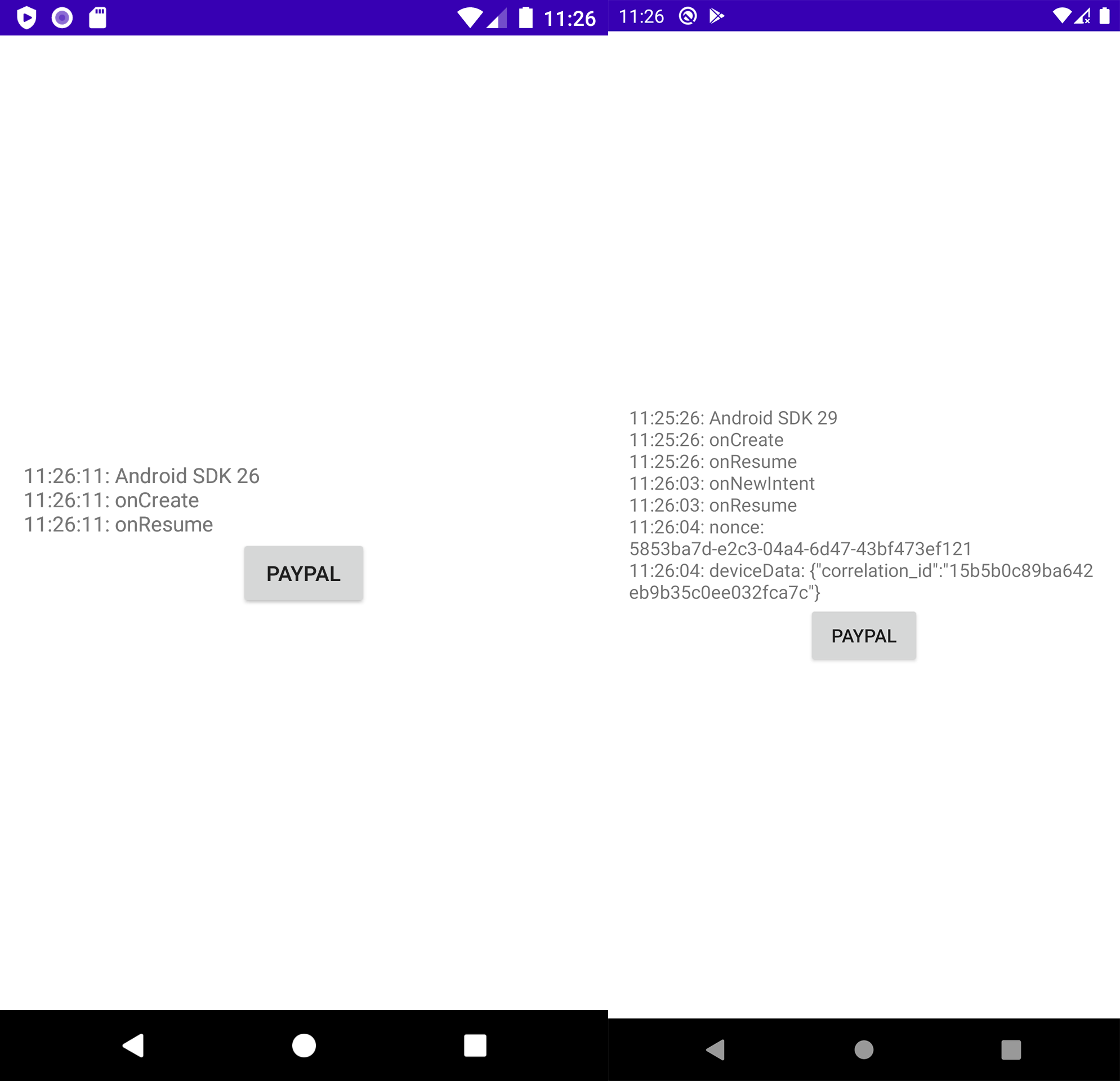
But in api 26 and 27, we can't receive any nonce after user is authorized. Because the activity is newly started, the onNewIntent is not called, and the Fragment is disappeared, the onResume not called.
Actually the problem might be the onNewIntent method was not called.

Hi @F9F8 thanks for using the Braintree SDK for Android. Have you tried using a singleTop launch mode for the deep link target Activity?

@sshropshire Hi, thanks for the quick answer, we are using the singleTop mode for Activity.
@sshropshire Hi, i made a test version, you can find it on https://drive.google.com/file/d/1v1Nl7tegY7EVbffzQqBcbyPcpKBvg2hF/view?usp=sharing
The token need to be replaces on activity. Here is a screenshot, will be easier to identify the difference. The activity from 26 will started new and onNewIntent is not called.
@F9F8 thanks for the additional info. We are looking into this issue on our side. I have a feeling this may be related to Chrome Custom Tabs. We'll post back here with more updates.
Hi @F9F8 We have been able to reproduce this issue and there seems to have been some behavior change between API 27 and 28 in onNewIntent being called. When onNewIntent is not called in API 27, the BraintreeClient and PayPalClient instances needed to handle the browser switch result are likely null. To work around this - you could implement helper methods to check if the client instances are null, and recreate them if needed whenever they are used, for example:
private BraintreeClient getBraintreeClient() {
    if (braintreeClient == null) {
        braintreeClient = new BraintreeClient(getActivity(), <AUTHORIZATION>);
    }
    return braintreeClient;
}

private PayPalClient getPayPalClient() {
    if (payPalClient == null) {
        payPalClient = new PayPalClient(getBraintreeClient());
    }
    return payPalClient;
}
Checking if the instances are null before using them would also be helpful to handle process kills.

Hi @sarahkoop thank you for the quick answer, the helper methods will resolve the Problem, if api calls are on activity. Unfortunately if it will be not working on fragments. I uploaded a new test version.
https://drive.google.com/file/d/1XFLXBFNgIgY3FBhFGy5zBG2QjN2zhHnh/view?usp=sharing
On sdk 28+ will keep the navigation state and on sdk 26, 27 the activity will be newly started and navigation state is losing.
@F9F8 I am not able to access the sample project via Google Drive - can you provide a GitHub link or another way to access the project?
@sarahkoop Hi, can you try this link http://tardis.geomobile.de/rooms/efcbbcac-8e1e-4504-9a2d-27cdeddbf0b4
Ok I am able to reproduce the issue with that project - thanks for setting it up. After some investigation, it looks like there have been similar issues reported to Google about onNewIntent not being called for singleTop activities in lower versions of Android. Since it is working as expected in the newer Android versions, I'm not sure if it will be resolved in older versions. As a workaround, I tested checking if the intent is the deep link intent in onCreate of MainActivity, and navigating to the fragment for handling the browser switch result if it is, and it appears to resolve the issue. I added the below code snippet to onCreate:
 val applicationId = "com.example.paypaltest"
 val isDeepLink = intent.data?.scheme.equals("$applicationId.braintree")
 if (isDeepLink) {
     // Navigate to the Fragment handling the browser switch result
     val navController = findNavController(this, R.id.navFragment)
     navController.navigate(R.id.showFragmentTwo)
 }
Does this solution work for you?
@sarahkoop Thank you for the answer and the investigation, unfortunately this solution won't help us, because the fragment is deeply integrated, which call the PayPal-Api, it's not that simple as "FragmentOne" and "FragmentTwo", and also very difficult to rebinding the data for each fragment.
I can also understand, if Google has a similar problem, it will be difficult to fix it. We are going to show a dialog for the customer, that paypal is currently not support by android 7 and 8.
Thanks again for your support, i really like your api.
@sarahkoop I have found another problem, if you change the default browser from chrome to firefox or opera, it has the same problem as above what i mentioned, although i used android 10 and 11. You could try to use my test app.
Is there a fix for firefox browser issue as mentioned in above comment? Chrome and Samsung browser works fine but firefox doesn't. onNewIntent isn't being called and a new activity gets created after returning from firefox.

@nitingrov86 are you able to reproduce this issue reliably with the latest version of the SDK?
Yes, I am able to reproduce it with latest SDK as well (4.11.0). When user is deep linked back to the activity, I could see the {packagename}.Braintree scheme come through. Since, onNewIntent isn't triggered it recreates the whole activity again. When, I changed the launchmode from singleTop to singleTask, thats when it started working and hitting onNewIntent as well. I am not sure about this launchmode change as it might have some side effects, so do you suggest looking into anything else?
@nitingrov86 honestly UI State Restoration will be the best bet since onNewIntent can be unpredictable at times (especially for older API versions).
Supporting state restoration also helps improve the UX in scenarios where the Android OS needs to perform a process kill to free up system resources. Your users won't be able to tell when an Activity has been recreated, and they can pick up where they left off in your app.
closing this issue for inactivity. If you encounter a similar problem please create a new issue. Thanks!
