
brainstorm3
 brainstorm3 copied to clipboard
 brainstorm-tools
small fixes for head points
Found some old .pos files with head points labeled 'EXTRA' instead of indexed. They were misclassified as 'CARDINAL'. This fixes it.
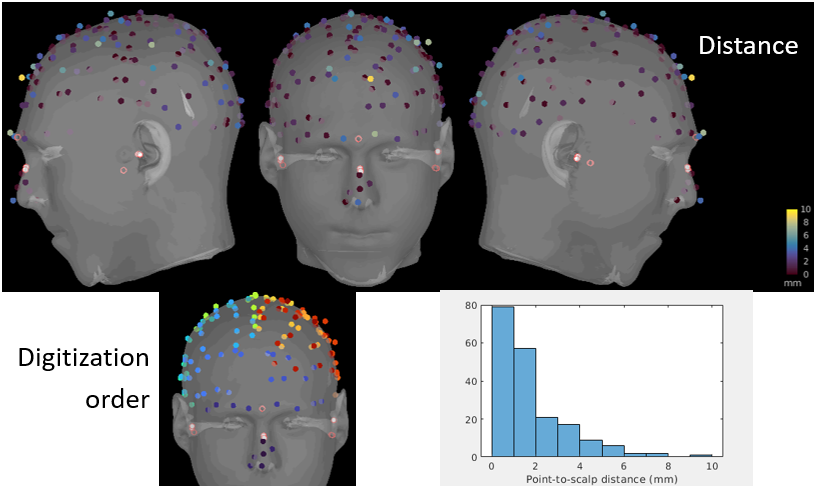
Also changed the head point display to color code the distance from point to scalp. Useful for quick QC and report snapshots (where the distances are hard to see without rotating the head). I also use the saved distances to plot a distance histogram for QC.
I couldn't figure out how to keep the 'mm' units on the color bar. The units are lost when changing the colormap.

I update the code to fix the following:
- Recompute dynamically the distance with the currently selected surface (the distance would change if there are other modifiers applied to the channel file or the surface)
- Display the color without modifying the colormap of the figure (your suggestion was not going to work)
- Disable the color-coding for all the displays, but adding it as an option with a new popup menu 'View head points (color=distance)'
Does it work for you?

Hi François. I was also working on this. I realized the points were read & updated from the figure elsewhere in the code so the change from line to patch require minor tweaks.
I also want to see the dynamic distance color in the channel_adjust_manual figure, so I was doing something similar for dynamic updating. Following your lead, we could add a toggle button in that figure, next to the "show/hide helmet" toggle, to display head point colors. (Just let me know if you're working on it so we don't duplicate efforts.) Thanks!
- Display the color without modifying the colormap of the figure (your suggestion was not going to work)
Can you clarify? It was working (at least in view_headpoints and channel_adjust_manual) except for the units disappearing when we change the colormap through the GUI.
Can you clarify? It was working (at least in view_headpoints and channel_adjust_manual) except for the units disappearing when we change the colormap through the GUI.
Yes, this is what I mean: it was not working, considering the standards of quality and homogeneity of the rest of the software. I proposed a solution that is compatible with the way the centralized management of the colormaps works. Which means NOT using directly the colormap properties of the Matlab figure. Most figures in Brainstorm generate their own colors, and do not rely on Matlab for the correspondence between indexed colors and RGB colors. This allows overlaying multiple colored elements in the figures (e.g. MRI slices + EEG recordings + source maps).
I also want to see the dynamic distance color in the channel_adjust_manual figure, so I was doing something similar for dynamic updating. Following your lead, we could add a toggle button in that figure, next to the "show/hide helmet" toggle, to display head point colors. (Just let me know if you're working on it so we don't duplicate efforts.) Thanks!
No, I'm not working on it.
NOT using directly the colormap properties of the Matlab figure.
I tried using the "centralized bst management of colormaps" as you say, not directly the figure properties:
bst_colormaps('AddColormapToFigure', hFig, ColormapType);
bst_colormaps('ConfigureColorbar', hFig, ColormapType, 'stat', 'mm');
bst_colormaps('SetColorbarVisible', hFig, 1);
I admit I'm still not clear on how these functions should be used. But I think it's a major plus that users can pick their preferred colormap, set a max distance threshold, etc., like in other bst figures. The point here being QC, it's also essential to view the colorbar with the actual distance scale. The choice of ColormapType as 'stat1' seemed appropriate, but maybe there's a better choice?
Here's an example of what I'd want to include eventually in OMEGA's quality control documentation:
I think it's ready to review. Summary of changes:
- Head points changed from line to patch object for both color modes, for simplicity and to allow toggling color modes.
- Added contextual menu item in figure_3d (instead of tree_callbacks) for color coding head points, with ctrl+h shortcut to cycle between 3 modes: hide, show, color-code by distance.
- Kept bst_colormap functionality for now. We can discuss, but works nicely.
- New function that computes point-to-surface distance more precisely.
- Unrelated to head points: re-center camera target. It was moving when applying a "standard view" or resetting the view, with axes visible.
Centering on (0,0,0) permanently leads to open most surfaces and channel files like this:
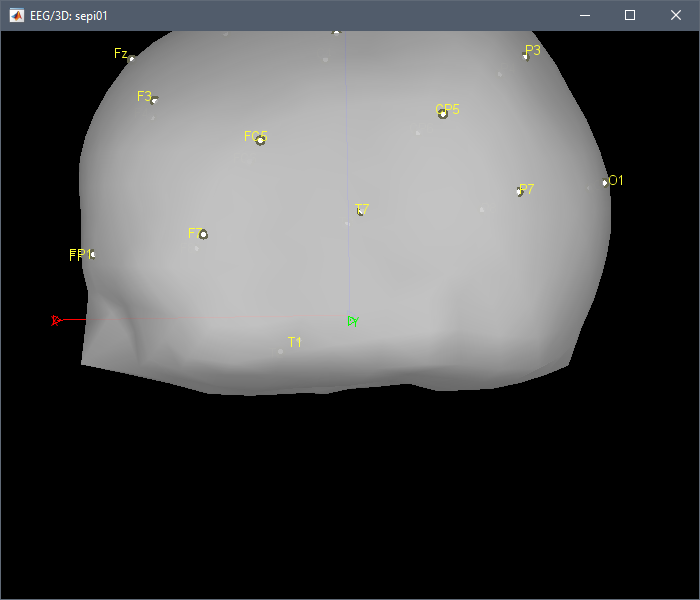
This is really not what we want, so I disabled the centering on (0,0,0) completely, I'm not sure it's helpful for anything.
normr is not a Matlab function. If you need it, you can add it as a subfunction in bst_surfdist.
***************************************************************************
** Error: Line 59: Undefined function 'normr' for input arguments of type 'double'.
**
** Call stack:
** >bst_surfdist.m at 59
** >figure_3d.m>ViewHeadPoints at 3764
** >figure_3d.m>FigureKeyPressedCallback at 1130
** >bst_call.m at 28
** >figure_3d.m>@(h,ev)bst_call(@FigureKeyPressedCallback,h,ev) at 75
**
***************************************************************************
Kept bst_colormap functionality for now. We can discuss, but works nicely.
It doesn't work that nicely. If you click on the color bar it changes the color scheme.
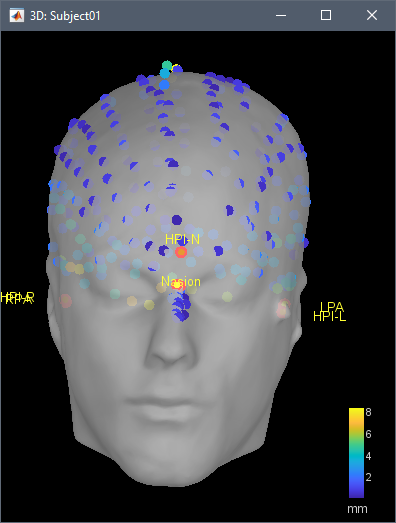
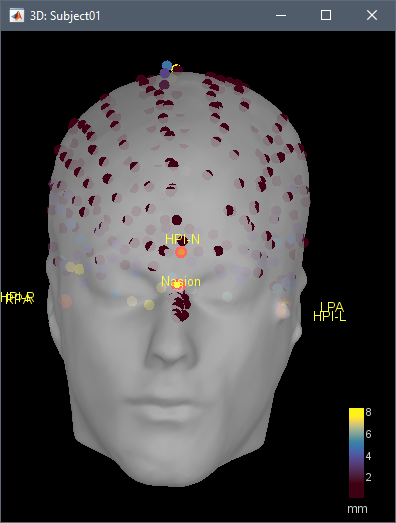
This needs to be fixed.
Thanks Francois. normr is from the Deep Learning toolbox, my bad. I'll fix what you pointed out.
Centering on the origin was for easier/more natural rotating and zooming. It started with this extreme example of a rat: https://github.com/brainstorm-tools/brainstorm3/issues/263#issuecomment-589359569 But it also happens with a human head in a less extreme way. I'll have another look at some point to have a better solution that avoids the display issues you pointed out. For now we can keep it out of this PR.
Centering on the origin was for easier/more natural rotating and zooming. It started with this extreme example of a rat: https://github.com/brainstorm-tools/brainstorm3/issues/263#issuecomment-589359569
I'm not sure I understand why centering the view on (0,0,0) would produce a more natural display and interactivity, as this origin is completely arbitrary. Centering the view on the center of the object (which is the current behavior) seems like a more natural approach. In this rat example, the problem is not the centering, it is the size of the axes: a better fix would be to adjust the size of the displayed read/green/blue arrows depending on the size of the objects that are being displayed.
If you click on the color bar it changes the color scheme.
I could not reproduce this with a single click, but I think I fixed it by moving a few things around. It does change on double clicking the colour bar, but I think that's the desired behaviour: to go back to all default settings. It does that for surface maps too for example.
Ready for another review. Thanks
I added a paragraph to introduce the menu here: https://neuroimage.usc.edu/brainstorm/Tutorials/ChannelFile#Manual_registration
Hi @ftadel, I thought this worked better when we made it, but I ran into small bugs now that I'm using it. If you have a little time, one thing I want to be able to do is change the colorbar limits. Right now it gives an error of "no data loaded" because the head points are not registered as a surface in the figure. Would it be ok to do that, add the points patch as a surface, setappdata(hFig, 'Surface', TessInfo)? Or do you have a better idea?
Also, the right-click menu for showing the point coloring is missing in the registration check and edit figures, though ctrl+h works.
Right now it gives an error of "no data loaded" because the head points are not registered as a surface in the figure.
I tried fixing this here: https://github.com/brainstorm-tools/brainstorm3/commit/422078ae45b6a2bf08352797218a812d55fc5f0b It's painful to touch central functions like the colormap management because all the modifications may have lots of side effects. I hope I didn't break anything else...
the right-click menu for showing the point coloring is missing in the registration check and edit figures, though ctrl+h works.
I can't reproduce the problem with the "Check" menu:
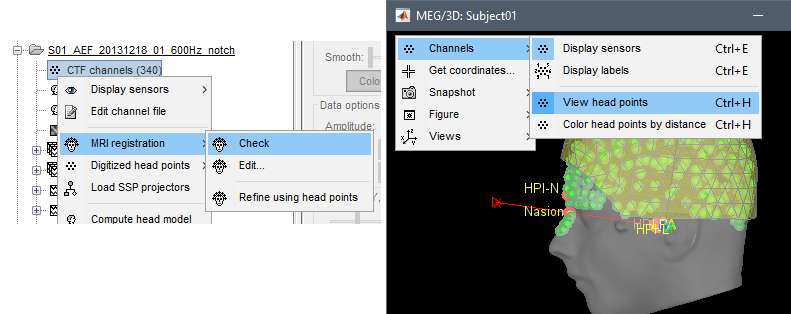
For the edit figure: Fixed in the same commit.
Thanks Francois. I was also working on this yesterday. I went the road of adding the points as a surface, with about the same amount of changes, but it removed the need for any direct colorbar manipulation for this feature. I'll compare with what you did and try to pick the best of both, possibly making another PR.