

 bottlerocket-os
datadog-agent; system-probe; RunContainerError; OCI Runtime Create Failed
Image I'm using: We are using the following:
Bottlerocket OS 1.9.2 (aws-k8s-1.21)
What I expected to happen: I expected all containers in our datadog-agent pod to spin up correctly without errors.
What actually happened: One of our containers in our datadog-agent pod daemonset (system-probe) is not spinning up correctly, with the following error, when this image is used. 1.9.1 appears to be fine.
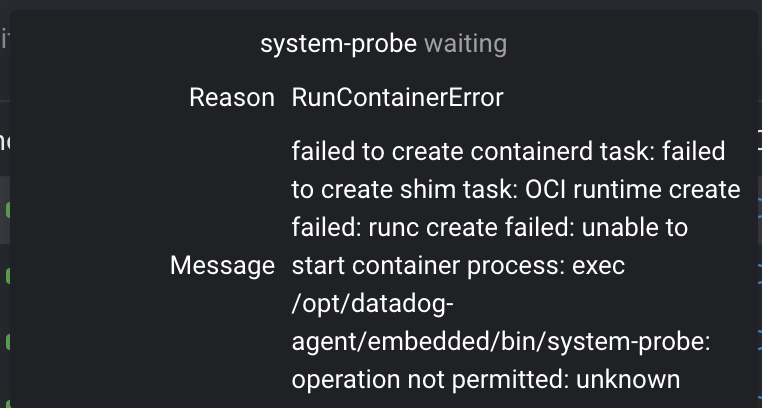
How to reproduce the problem: Spin up a node using Bottlerocket OS 1.9.2 (aws-k8s-1.21) and try to deploy the datadog-agent daemonset, utilizing at least image version 7.38.2, on Kubernetes EKS. You can observe the system-probe container having trouble starting up.
This works fine on 1.9.1.

@jpardo-skillz, thank you for bringing this to our attention so quickly! This is certainly a problem and we are actively evaluating our options. Can you please check dmesg for any SELinux denials?

Thanks @jpculp for your reply here! Do you have any advice on where I should check this? The container itself won't start so I can't shell into it; none of the containers on this pod will permit this operation (Operation Not Permitted) for dmesg.
Should I check it on the bottlerocket node itself?
I would start with the "superpowered" admin container which you can enable to perform OS-level troubleshooting. Once inside the admin container you can run sudo sheltie from which you can access things like dmesg. You can also try journalctl -D /.bottlerocket/rootfs/var/log/journal outside of sheltie.
https://github.com/opencontainers/runc/commit/d83a861d950b42b53406424468f8644551fa8980 added a potential syscall to faccessat2(), which would happen on Bottlerocket because nodes will run with a 5.10 kernel.
I don't have a fully working datadog agent setup, but I was able to reproduce this error with datadog-agent-all-features.yaml. When I modified it to add faccessat2 to the list of syscalls in system-probe-seccomp.json, that error went away.
@jpardo-skillz can you give that a try?

We're on 1.9.1 right now .. but noticing these warnings in our bottlerocket nodes:
Sep 14 18:07:17 ip-100-64-145-60.us-west-2.compute.internal systemctl[195966]: Running in chroot, ignoring request: is-active
Sep 14 18:07:17 ip-100-64-145-60.us-west-2.compute.internal systemctl[195968]: Running in chroot, ignoring request: is-active
Sep 14 18:07:18 ip-100-64-145-60.us-west-2.compute.internal audit[183944]: AVC avc:  denied  { signull } for  pid=183944 comm="system-probe" scontext=system_u:system_r:container_t:s0:c503,c650 tcontext=system_u:system_r:control_t:s0-s0:c0.c1023 tclass=process permissive=0
Sep 14 18:07:18 ip-100-64-145-60.us-west-2.compute.internal kernel: audit: type=1400 audit(1663178838.160:135): avc:  denied  { signull } for  pid=183944 comm="system-probe" scontext=system_u:system_r:container_t:s0:c503,c650 tcontext=system_u:system_r:control_t:s0-s0:c0.c1023 tclass=process permissive=0
Sep 14 18:07:47 ip-100-64-145-60.us-west-2.compute.internal systemctl[196837]: Running in chroot, ignoring request: is-active
Sep 14 18:07:47 ip-100-64-145-60.us-west-2.compute.internal systemctl[196843]: Running in chroot, ignoring request: is-active
Sep 14 18:07:48 ip-100-64-145-60.us-west-2.compute.internal audit[183944]: AVC avc:  denied  { signull } for  pid=183944 comm="system-probe" scontext=system_u:system_r:container_t:s0:c503,c650 tcontext=system_u:system_r:control_t:s0-s0:c0.c1023 tclass=process permissive=0
Sep 14 18:07:48 ip-100-64-145-60.us-west-2.compute.internal kernel: audit: type=1400 audit(1663178868.156:136): avc:  denied  { signull } for  pid=183944 comm="system-probe" scontext=system_u:system_r:container_t:s0:c503,c650 tcontext=system_u:system_r:control_t:s0-s0:c0.c1023 tclass=process permissive=0
Sep 14 18:08:04 ip-100-64-145-60.us-west-2.compute.internal kubelet[1441]: W0914 18:08:04.188215    1441 machine.go:65] Cannot read vendor id correctly, set empty.Sep 14 18:12:47 ip-100-64-145-60.us-west-2.compute.internal systemctl[205761]: Running in chroot, ignoring request: is-active
I am guessing this is related?

It looks unrelated, but might need a fix somewhere.
Here system-probe is running with an unprivileged label (system_u:system_r:container_t:s0:c503,c650) trying to send a signal to some process with a privileged label (system_u:system_r:control_t:s0-s0:c0.c1023). It's sending signull, which tests for the existence of the target PID and whether the process has permissions to send it a signal.
With SELinux this is problematic:
- the "test for existence" behavior seems harmless enough to allow
- the "check for permissions" behavior seems best to disallow if all other signals will be denied by policy
Whether this is a problem depends on what the agent is trying to do by sending the signal, and if it will continue on or die if the existence / permission check fails.
This behavior should be allowed by our seccomp profile since v2.32.5 of the Helm chart: https://github.com/DataDog/helm-charts/blob/main/charts/datadog/templates/system-probe-configmap.yaml#L271-L286
https://github.com/DataDog/helm-charts/commit/76f1416871df57da834e420f7b933ac7d3aedbf1

I got hit by this on a fresh Ubuntu 22.04 LTS install with K8S 1.24
I was able to fix it by bumping the helm chart to 3.1.3 and adding:
    agents:
      podAnnotations:
        container.apparmor.security.beta.kubernetes.io/agent: unconfined
        container.apparmor.security.beta.kubernetes.io/process-agent: unconfined
with final annotations being:
apiVersion: v1
kind: Pod
metadata:
  annotations:
    container.apparmor.security.beta.kubernetes.io/agent: unconfined
    container.apparmor.security.beta.kubernetes.io/process-agent: unconfined
    container.apparmor.security.beta.kubernetes.io/system-probe: unconfined
    container.seccomp.security.alpha.kubernetes.io/system-probe: localhost/system-probe

Closing this issue as the datadog helm charts >=v2.32.5 allows users to address this issue. Please feel free to re-open if necessary.
