
boto3
 boto3 copied to clipboard
 boto
boto
Sagemaker autoscaling not working using boto3 client
Describe the bug I want to programmatically configure auto-scaling in AWS Sagemaker. I am using the official boto3 documentation. First step is to register a scalable target. Second step is to define a scaling policy on the target. The first step works fine. Second step gets executed but it wont change the metric value .
Steps to reproduce
#Step - 1  -- This step works fine. Max and Min capacities are updated as passed in the arguments
        autoscaling.register_scalable_target(
            ServiceNamespace='sagemaker',
            ResourceId='endpoint/test-20450427-0648/variant/test-20450427-0648-model-kp-vrjfgs268gfljnhs5ra',
            ScalableDimension='sagemaker:variant:DesiredInstanceCount',
            MinCapacity=1,
            MaxCapacity=10,
            RoleARN='arn:aws:iam::654763378725:role/ml-sagemaker'
        )

#Step-2  -- This step is not working.
        autoscaling.put_scaling_policy(
            PolicyName='InvocationsPerInstanceCustom',
            ServiceNamespace='sagemaker',
            ResourceId='endpoint/test-20450427-0648/variant/test-20450427-0648-model-kp-vrjfgs268gfljnhs5ra',
            ScalableDimension='sagemaker:variant:DesiredInstanceCount',
            PolicyType='TargetTrackingScaling',
            TargetTrackingScalingPolicyConfiguration={
                "TargetValue": 122.0,
                "PredefinedMetricSpecification": {"PredefinedMetricType": "SageMakerVariantInvocationsPerInstance"},
                'ScaleOutCooldown': 60,
                'ScaleInCooldown': 60
            }
        )
Expected behavior
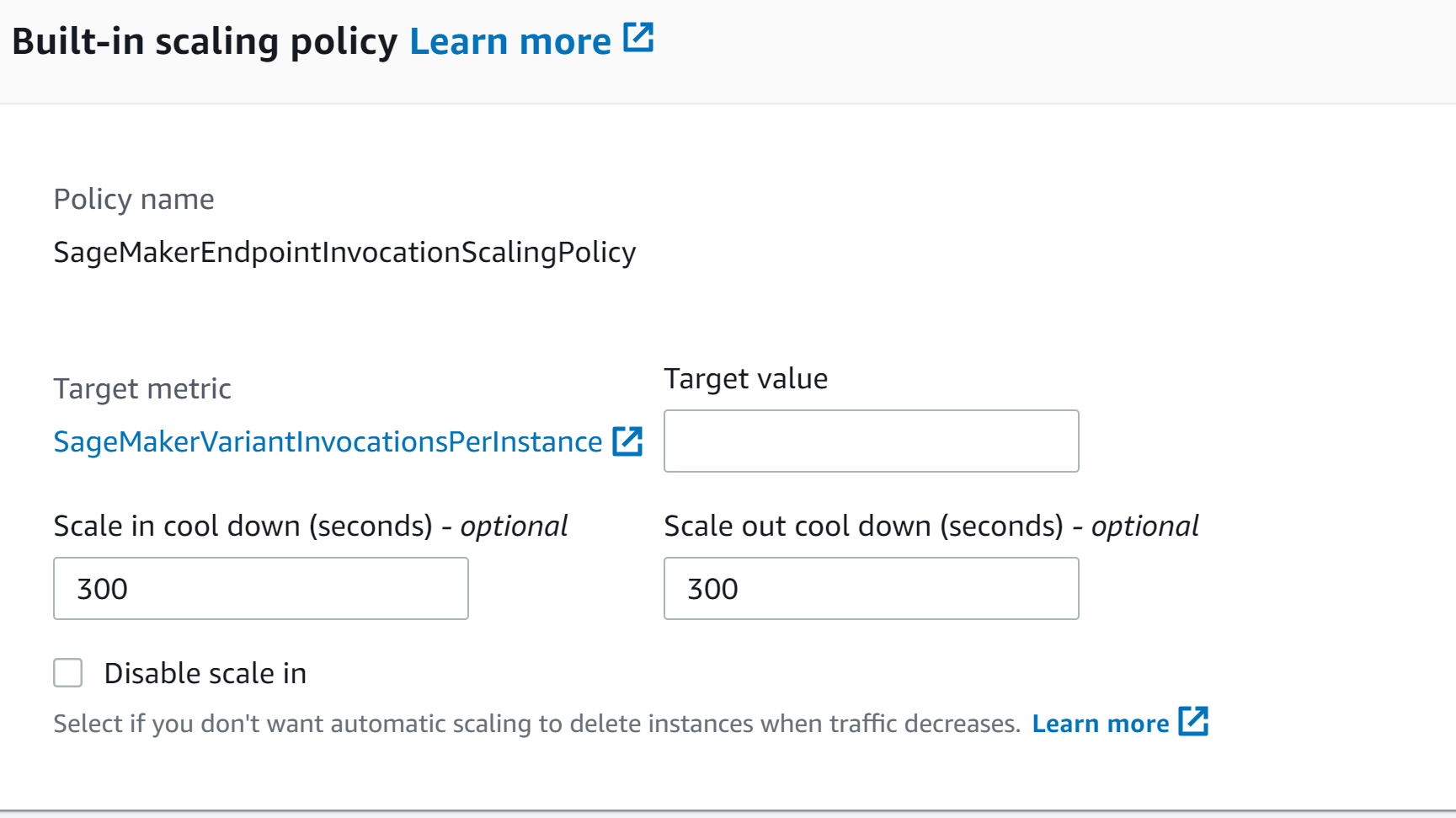
Step 2 should update the target value of metric SageMakerVariantInvocationsPerInstance to 122. But it remains empty when checked on AWS console . ScaleOutCooldown and ScaleInCooldown also should be set to 60 but they show default value 300.
Debug logs
No error message is repoted.


Hi @singh0777,
After reviewing your code compared to the documentation, I'm not seeing anything that stands out as problematic. Would you be able to provide a full stack trace for the put_scaling_policy operation by adding boto3.set_stream_logger('') to your code? Please obscure any sensitive information, such as account numbers. Thanks!
Hi @stobrien89 . Following is the full stack from put_scaling_policy operation. Thanks.!
AWS Console after running the above commands.
2021-04-29 04:10:17,876 botocore.hooks [DEBUG] Event before-parameter-build.application-auto-scaling.PutScalingPolicy: calling handler <function generate_idempotent_uuid at 0x7feec759f758>
DEBUG:botocore.endpoint:Making request for OperationModel(name=PutScalingPolicy) with params: {'body': '{"PolicyName": "InvocationsPerInstanceCustom", "ScalableDimension": "sagemaker:variant:DesiredInstanceCount", "ResourceId": "***", "PolicyType": "TargetTrackingScaling", "TargetTrackingScalingPolicyConfiguration": {"TargetValue": 310.0, "PredefinedMetricSpecification": {"PredefinedMetricType": "SageMakerVariantInvocationsPerInstance"}, "ScaleOutCooldown": 60, "ScaleInCooldown": 60}, "ServiceNamespace": "sagemaker"}', 'url': u'https://autoscaling.eu-central-1.amazonaws.com/', 'headers': {'User-Agent': 'Boto3/1.9.25 Python/2.7.12 Linux/4.15.0-136-generic Botocore/1.12.25', 'Content-Type': u'application/x-amz-json-1.1', 'X-Amz-Target': u'AnyScaleFrontendService.PutScalingPolicy'}, 'context': {'auth_type': None, 'client_region': 'eu-central-1', 'has_streaming_input': False, 'client_config': <botocore.config.Config object at 0x7feec25692d0>}, 'query_string': '', 'url_path': '/', 'method': u'POST'}
2021-04-29 04:10:17,877 botocore.endpoint [DEBUG] Making request for OperationModel(name=PutScalingPolicy) with params: {'body': '{"PolicyName": "InvocationsPerInstanceCustom", "ScalableDimension": "sagemaker:variant:DesiredInstanceCount", "ResourceId": "***", "PolicyType": "TargetTrackingScaling", "TargetTrackingScalingPolicyConfiguration": {"TargetValue": 310.0, "PredefinedMetricSpecification": {"PredefinedMetricType": "SageMakerVariantInvocationsPerInstance"}, "ScaleOutCooldown": 60, "ScaleInCooldown": 60}, "ServiceNamespace": "sagemaker"}', 'url': u'https://autoscaling.eu-central-1.amazonaws.com/', 'headers': {'User-Agent': 'Boto3/1.9.25 Python/2.7.12 Linux/4.15.0-136-generic Botocore/1.12.25', 'Content-Type': u'application/x-amz-json-1.1', 'X-Amz-Target': u'AnyScaleFrontendService.PutScalingPolicy'}, 'context': {'auth_type': None, 'client_region': 'eu-central-1', 'has_streaming_input': False, 'client_config': <botocore.config.Config object at 0x7feec25692d0>}, 'query_string': '', 'url_path': '/', 'method': u'POST'}
DEBUG:botocore.hooks:Event request-created.application-auto-scaling.PutScalingPolicy: calling handler <bound method RequestSigner.handler of <botocore.signers.RequestSigner object at 0x7feec2569290>>
2021-04-29 04:10:17,878 botocore.hooks [DEBUG] Event request-created.application-auto-scaling.PutScalingPolicy: calling handler <bound method RequestSigner.handler of <botocore.signers.RequestSigner object at 0x7feec2569290>>
DEBUG:botocore.hooks:Event choose-signer.application-auto-scaling.PutScalingPolicy: calling handler <function set_operation_specific_signer at 0x7feec759f668>
2021-04-29 04:10:17,878 botocore.hooks [DEBUG] Event choose-signer.application-auto-scaling.PutScalingPolicy: calling handler <function set_operation_specific_signer at 0x7feec759f668>
DEBUG:botocore.auth:Calculating signature using v4 auth.
2021-04-29 04:10:17,878 botocore.auth [DEBUG] Calculating signature using v4 auth.
DEBUG:botocore.auth:CanonicalRequest:
POST
/

content-type:application/x-amz-json-1.1
host:autoscaling.eu-central-1.amazonaws.com
x-amz-date:20210429T041017Z
x-amz-target:AnyScaleFrontendService.PutScalingPolicy

content-type;host;x-amz-date;x-amz-target
***
2021-04-29 04:10:17,878 botocore.auth [DEBUG] CanonicalRequest:
POST
/

content-type:application/x-amz-json-1.1
host:autoscaling.eu-central-1.amazonaws.com
x-amz-date:20210429T041017Z
x-amz-target:AnyScaleFrontendService.PutScalingPolicy

content-type;host;x-amz-date;x-amz-target
***
DEBUG:botocore.auth:StringToSign:
***
20210429T041017Z
***/eu-central-1/application-autoscaling/aws4_request
***
2021-04-29 04:10:17,878 botocore.auth [DEBUG] StringToSign:
***
20210429T041017Z
***/eu-central-1/application-autoscaling/aws4_request
***
DEBUG:botocore.auth:Signature:
***
2021-04-29 04:10:17,878 botocore.auth [DEBUG] Signature:
***
DEBUG:botocore.endpoint:Sending http request: <AWSPreparedRequest stream_output=False, method=POST, url=https://autoscaling.eu-central-1.amazonaws.com/, headers={'Content-Length': '498', 'X-Amz-Target': 'AnyScaleFrontendService.PutScalingPolicy', 'X-Amz-Date': '20210429T041017Z', 'User-Agent': 'Boto3/1.9.25 Python/2.7.12 Linux/4.15.0-136-generic Botocore/1.12.25', 'Content-Type': 'application/x-amz-json-1.1', 'Authorization': '*** Credential=[*******]/20210429/eu-central-1/application-autoscaling/aws4_request, SignedHeaders=content-type;host;x-amz-date;x-amz-target, Signature=***'}>
2021-04-29 04:10:17,879 botocore.endpoint [DEBUG] Sending http request: <AWSPreparedRequest stream_output=False, method=POST, url=https://autoscaling.eu-central-1.amazonaws.com/, headers={'Content-Length': '498', 'X-Amz-Target': 'AnyScaleFrontendService.PutScalingPolicy', 'X-Amz-Date': '20210429T041017Z', 'User-Agent': 'Boto3/1.9.25 Python/2.7.12 Linux/4.15.0-136-generic Botocore/1.12.25', 'Content-Type': 'application/x-amz-json-1.1', 'Authorization': '*** Credential=[*******]/20210429/eu-central-1/application-autoscaling/aws4_request, SignedHeaders=content-type;host;x-amz-date;x-amz-target, Signature=***'}>
DEBUG:urllib3.util.retry:Converted retries value: False -> Retry(total=False, connect=None, read=None, redirect=0, status=None)
2021-04-29 04:10:17,879 urllib3.util.retry [DEBUG] Converted retries value: False -> Retry(total=False, connect=None, read=None, redirect=0, status=None)
DEBUG:urllib3.connectionpool:https://autoscaling.eu-central-1.amazonaws.com:443 "POST / HTTP/1.1" 200 1008
2021-04-29 04:10:18,344 urllib3.connectionpool [DEBUG] https://autoscaling.eu-central-1.amazonaws.com:443 "POST / HTTP/1.1" 200 1008
DEBUG:botocore.parsers:Response headers: {'x-amzn-RequestId': '4786dbfd-280b-42e4-b821-01ee1df3fc24', 'Date': 'Thu, 29 Apr 2021 04:10:17 GMT', 'Content-Length': '1008', 'Content-Type': 'application/x-amz-json-1.1'}
2021-04-29 04:10:18,345 botocore.parsers [DEBUG] Response headers: {'x-amzn-RequestId': '4786dbfd-280b-42e4-b821-01ee1df3fc24', 'Date': 'Thu, 29 Apr 2021 04:10:17 GMT', 'Content-Length': '1008', 'Content-Type': 'application/x-amz-json-1.1'}
DEBUG:botocore.parsers:Response body:
{"Alarms":[{"AlarmARN":"arn:aws:cloudwatch:eu-central-1:***:alarm:TargetTracking-endpoint/test-***-***/variant/test-***-***-model-yxru9rvntdm6kbxnprejlw-AlarmHigh-8b2164cc-444f-4901-b924-0fd89db4e5b3","AlarmName":"TargetTracking-endpoint/test-***-***/variant/test-***-***-model-yxru9rvntdm6kbxnprejlw-AlarmHigh-8b2164cc-444f-4901-b924-0fd89db4e5b3"},{"AlarmARN":"arn:aws:cloudwatch:eu-central-1:***:alarm:TargetTracking-endpoint/test-***-***/variant/test-***-***-model-yxru9rvntdm6kbxnprejlw-AlarmLow-7599c3c8-d0ff-4de3-91e2-18931ab01d25","AlarmName":"TargetTracking-endpoint/test-***-***/variant/test-***-***-model-yxru9rvntdm6kbxnprejlw-AlarmLow-7599c3c8-d0ff-4de3-91e2-18931ab01d25"}],"PolicyARN":"arn:aws:autoscaling:eu-central-1:***:scalingPolicy:e3eb73cb-8c08-4834-a0da-ae542cf487c9:resource/sagemaker/endpoint/test-***-***/variant/test-***-***-model-yxru9rvntdm6kbxnprejlw:policyName/InvocationsPerInstanceCustom"}
2021-04-29 04:10:18,345 botocore.parsers [DEBUG] Response body:
{"Alarms":[{"AlarmARN":"arn:aws:cloudwatch:eu-central-1:***:alarm:TargetTracking-endpoint/test-***-***/variant/test-***-***-model-yxru9rvntdm6kbxnprejlw-AlarmHigh-8b2164cc-444f-4901-b924-0fd89db4e5b3","AlarmName":"TargetTracking-endpoint/test-***-***/variant/test-***-***-model-yxru9rvntdm6kbxnprejlw-AlarmHigh-8b2164cc-444f-4901-b924-0fd89db4e5b3"},{"AlarmARN":"arn:aws:cloudwatch:eu-central-1:***:alarm:TargetTracking-endpoint/test-***-***/variant/test-***-***-model-yxru9rvntdm6kbxnprejlw-AlarmLow-7599c3c8-d0ff-4de3-91e2-18931ab01d25","AlarmName":"TargetTracking-endpoint/***/variant/test-***-***-model-yxru9rvntdm6kbxnprejlw-AlarmLow-7599c3c8-d0ff-4de3-91e2-18931ab01d25"}],"PolicyARN":"arn:aws:autoscaling:eu-central-1:***:scalingPolicy:e3eb73cb-8c08-4834-a0da-ae542cf487c9:resource/sagemaker/endpoint/test-***-***/variant/test-***-***-model-yxru9rvntdm6kbxnprejlw:policyName/InvocationsPerInstanceCustom"}
DEBUG:botocore.hooks:Event needs-retry.application-auto-scaling.PutScalingPolicy: calling handler <botocore.retryhandler.RetryHandler object at 0x7feec2569cd0>
2021-04-29 04:10:18,345 botocore.hooks [DEBUG] Event needs-retry.application-auto-scaling.PutScalingPolicy: calling handler <botocore.retryhandler.RetryHandler object at 0x7feec2569cd0>
DEBUG:botocore.retryhandler:No retry needed.
2021-04-29 04:10:18,345 botocore.retryhandler [DEBUG] No retry needed.```
Hi @singh0777,
Thanks for the additional information! So I noticed a few things here— the endpoint url https://autoscaling.eu-central-1.amazonaws.com/ is for the EC2 auto-scaling service. They also have an operation called put_scaling_policy, but it takes different parameters— I'm not sure why the API isn't returning an error, but I believe the client you want is ~application-auto-scaling~ application-autoscaling. If you've already instantiated your client correctly, it may be worth upgrading your boto3 version, as it was released in late 2018 and I'm thinking it's possible that these two services shared the same endpoint url at one time.
Let me know if that helps!
Hi @stobrien89 , Did you mean application-autoscaling ? because application-auto-scaling throws an error.
I am using the following command to instantiate.
autoscaling = boto3.client('application-autoscaling', region_name=region)
Also , the boto 3 version that I am using is the latest one - Version: 1.9.25 .
Hi @singh0777,
Sorry for the typo, I indeed meant application-autoscaling. The latest boto3 version is 1.17.62— Have you tried to upgrade using pip?
@stobrien89
Oh I didn't specify the version while installing using pip. Tried with the latest one now but still no luck with the put_scaling_policy operation :/ .
boto3 --
Name: boto3
Version: 1.17.62
Summary: The AWS SDK for Python

botocore --
Name: botocore
Version: 1.20.63
Summary: Low-level, data-driven core of boto 3.
Hi @singh0777,
Sorry to hear it's still not working— If you generate another full stack trace, does the request endpoint/url follow the format application-autoscaling.<region>.amazonaws.com? This may be something we need to escalate to the application-autoscaling team.
Hi @stobrien89 .Yes The endpoint has same format . https://application-autoscaling.eu-central-1.amazonaws.com/
Please let me know if I can help in reporting the issue to application-autoscaling team. Thanks.
Hi @singh0777,
I was able to touch base with a member of the autoscaling team and they confirmed their legacy endpoint was the same as the one provided in the stack trace from your previous boto3 version, so we've officially ruled that out at this point.
They mentioned that their best guess for what's happening here (depending on how these operations are being executed in your code) is a race condition with the RegisterScalableTarget and PutScalingPolicy calls trying to make updates simultaneously.
They suggested you try the following:
- describe-scaling-policies via the CLI for the one that's showing the wrong values after the update does the wrong thing
- Try making the RegisterScalableTarget and PutScalingPolicy calls separately (as a test)
Let me know how it goes either way!
Hi @stobrien89 . I tried the above two suggestions and found the following:
describe-scaling-policiesvia the CLI for the one that's showing the wrong values after the update does the wrong thing > I tested the response using AWS CLI and the boto3 method -describe_scaling_policies. The reponse shows the correct (expected) values forSageMakerVariantInvocationsPerInstance,ScaleOutCooldown,ScaleInCooldownwhile the AWS console shows wrong values. Response from aws CLI is:
{
            "PolicyARN": "arn:aws:autoscaling:eu-central-1:***:scalingPolicy:8153be22-e2c6-4d9b-9d39-fbcabfd767fe:resource/sagemaker/endpoint/***/variant/***-model-5yhlononrjsh0uncdogiwa:policyName/InvocationsPerInstanceCustom",
            "PolicyName": "InvocationsPerInstanceCustom",
            "ServiceNamespace": "sagemaker",
            "ResourceId": "endpoint/***/variant/***-model-5yhlononrjsh0uncdogiwa",
            "ScalableDimension": "sagemaker:variant:DesiredInstanceCount",
            "PolicyType": "TargetTrackingScaling",
            "TargetTrackingScalingPolicyConfiguration": {
                "TargetValue": 122.0,
                "PredefinedMetricSpecification": {
                    "PredefinedMetricType": "SageMakerVariantInvocationsPerInstance"
                },
                "ScaleOutCooldown": 60,
                "ScaleInCooldown": 60
            },
            "Alarms": [
                {
                    "AlarmName": "TargetTracking-endpoint/***/variant/***-model-5yhlononrjsh0uncdogiwa-AlarmHigh-74ae2c49-ce02-4f39-9098-e1875aea3746",
                    "AlarmARN": "arn:aws:cloudwatch:eu-central-1:***:alarm:TargetTracking-endpoint/***/variant/***-model-5yhlononrjsh0uncdogiwa-AlarmHigh-74ae2c49-ce02-4f39-9098-e1875aea3746"
                },
                {
                    "AlarmName": "TargetTracking-endpoint/***/variant/***-model-5yhlononrjsh0uncdogiwa-AlarmLow-0cc02725-e6d4-4546-8dac-0cf4311b9842",
                    "AlarmARN": "arn:aws:cloudwatch:eu-central-1:***:alarm:TargetTracking-endpoint/***/variant/***-model-5yhlononrjsh0uncdogiwa-AlarmLow-0cc02725-e6d4-4546-8dac-0cf4311b9842"
                }
            ],
            "CreationTime": 1620239132.527
        }
- Try making the RegisterScalableTarget and PutScalingPolicy calls seperatly (as a test)
I tried executing the operations separately and it didn't help. I executed the commands from two different boto3 client sessions.
Hi @singh0777,
Thanks for trying those steps! So it looks like (from the describe_scaling_policies response) everything is getting updated except for the TargetValue? Also, just to confirm, you're viewing the policy from the eu-central-1 region in the AWS console?
Hi @stobrien89 .
So it looks like (from the
describe_scaling_policiesresponse) everything is getting updated except for theTargetValue?
All the three values are updated correctly according to describe_scaling_policies including TargetValue. ( however, AWS console shows blank field for TargetValue and shows incorrect values for other fields ) .
Also, just to confirm, you're viewing the policy from the eu-central-1 region in the AWS console?
yes. the zone is eu-central-1.
So, describe_scaling_policies just shows the policy configuration , right? . It doesn't mean that the configuration is actually applied to the autoscaling target . Is my understanding correct?
Hi @singh0777,
That's correct— the describe_scaling_policies operation just shows the policy configuration and doesn't confirm that it's been applied to the autoscaling target.
To clarify, when you're looking in the console, you're viewing the target itself to see if the configuration is being applied and not the the actual policy? Another question: are there multiple policies for the target in question?
Yes. I am looking at the target. My target is a sagemaker endpoint . Console allows to manually update the auto-scaling values by clicking on Configure auto-scaling button and I am trying to automate this using boto3 client.
There is no other policy on this target. Basically, I am doing the following using boto3 client.
- Create a Sagemaker endpoint.
- Register the endpoint as scalable target.
- Apply scaling policy on the target. (this one is not working)
@singh0777,
Thanks for your patience with us on this. I've passed along the additional info to the autoscaling team member I've been working with and should hopefully have an update early next week. We may need to look at the resources internally, but I'll let you know when/if we get to that point.
Hi again @singh0777,
One more thing I noticed is that the name of the policy you attached a photo of (from the console) is SagemakerEndpointInvocationScalingPolicy. Is this the same policy you refer to in your code as InvocationsPerInstanceCustom?
Hi @stobrien89 . Using SagemakerEndpointInvocationScalingPolicy instead of InvocationsPerInstanceCustom worked. I can see the values updated now. My bad, I thought I can choose any custom policy name and that the updates are done on the basis of metric type SageMakerVariantInvocationsPerInstance. However, I still wonder why boto3 didn't through any error!.
Thank for your time and help. : )
Hi @singh0777,
Glad you were able to get it working! I don't think you did anything wrong here— it seems like, in theory, you should be able to apply custom policies to a target regardless of whether or not a 'built-in' policy has already been applied. This may be a bug with the Sagemaker console; I've asked the team to elaborate on what the expected behavior should be and am currently waiting on a response.
I have a hunch that your custom policy was actually being applied to the target, but it was not displaying in the console due to the name. I'll let you know as soon as I have more information!
Ran into this issue as well, the fix of naming the Policy SagemakerEndpointInvocationScalingPolicy doesn't seem to be working for me however.

Hi @yurigorokhov,
If you're still having an issue, could you provide some more information about your policy/configuration so that we can attempt to troubleshoot? Thanks!
Hi @stobrien89
I am facing the same problem with @singh0777. Changing SagemakerEndpointInvocationScalingPolicy instead of InvocationsPerInstanceCustom did not work. I am using boto3 to register the scalable target which is configured correctly. On the other hand I can't use the put_scaling_policy.
Configure Autoscaling on asynchronous endpoint down to zero instances
resource_id = (
    "endpoint/" + endpoint_name + "/variant/" + variant_name # variant_name is provided as input in my code
)

response = client.register_scalable_target(
    ServiceNamespace="sagemaker",
    ResourceId=resource_id,
    ScalableDimension="sagemaker:variant:DesiredInstanceCount",
    MinCapacity=0,
    MaxCapacity=5,
)

response = client.put_scaling_policy(
    PolicyName="SagemakerEndpointInvocationScalingPolicy ",
    ServiceNamespace="sagemaker",
    ResourceId=resource_id,
    ScalableDimension="sagemaker:variant:DesiredInstanceCount",
    PolicyType="TargetTrackingScaling",
    TargetTrackingScalingPolicyConfiguration={
        "PredefinedMetricSpecification":
        {
            "PredefinedMetricType": "SageMakerVariantInvocationsPerInstance"
        },
        "TargetValue": 122.0,
        "ScaleInCooldown": 60,
        "ScaleOutCooldown": 60
    },
)
I have tried to implement all changes described in the above thread, but nothing seems to do the work. I am using an Asynchronous implementation of a custom model (instance segmentation running on detectron2).
While the requests are handled correctly, autoscaling is not implemented, as as many times as I try and invoke the endpoint, the count stays idle to the initial count which is 1. Also, scale in does not also seem to work, because although min_capacity is set to 0 current instance count stays at 1 either way.
Can you provide some help? Thanks in advance!

@georgebakas
PolicyName="SagemakerEndpointInvocationScalingPolicy ", ...........................................................................there is a space here^

Checking in - based on this earlier comment by the original issue creator a solution was found. I'm not sure if the more recent comments here are directly related to the original issue or something else. Regardless - this issue relates to SageMaker rather than boto3 directly.
For general guidance we recommend reaching out in the re:Post forums or through AWS Support. We can also forward issues to service teams like SageMaker internally. Please let us know if there are any updates here that we can pass along.

Greetings! It looks like this issue hasn’t been active in longer than five days. We encourage you to check if this is still an issue in the latest release. In the absence of more information, we will be closing this issue soon. If you find that this is still a problem, please feel free to provide a comment or upvote with a reaction on the initial post to prevent automatic closure. If the issue is already closed, please feel free to open a new one.
![github-actions[bot] avatar](https://avatars.githubusercontent.com/in/15368?v=4 "Published by a pub.dev verified publisher")