

 bosskmk
[Help] best way of creating a money format column with comma as decimal separator
@bosskmk what's the best way of creating a money column?
we are currently setting the field as PlutoColumnType.text() and passing the already formatted text to the column, like the sample bellow:
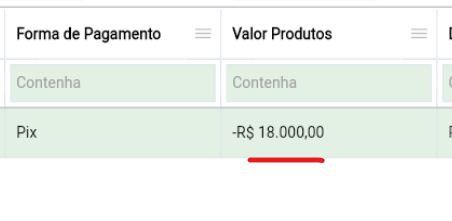
The problem with this way of doing things is that it breaks the filter and the order (as it is a string, not a number)
there's this sample from #560:
PlutoColumn(
          enableContextMenu: false,
          title: 'Price',
          field: 'price',
          formatter: (str) => f.formatAmount(str, 'DKK'),
          type: PlutoColumnType.number(negative: false, format: '#,###.########'))
But it limits the maximum value of the column. How can i create an unlimited ammount money column, that can show both 12,50 and 150.430,31 (or greater numbers)

@Macacoazul01 I didn't understand your problem. Is it a matter of Dart's Number max?

The is no more a limitation on the value on the newest versions, sorry.
I was able to format corretly the cell and the ordering filter works, but still having the problem related to #569:
String moneyFormat(double dinheiro) {
  final formatter = NumberFormat.simpleCurrency(locale: 'pt_Br');
  return formatter.format(dinheiro);
}


PlutoColumn(
    enableContextMenu: false,
    title: 'Valor Unitário',
    field: 'valoruni',
    formatter: (value) {
      return moneyFormat(value);
    },
    type: PlutoColumnType.number(format: '#,###.##'),
),
ProdutoNota(idProduto: 1, valoruni: 232323, quantidade: 3),
ProdutoNota(idProduto: 2, valoruni: 3.2, quantidade: 4),
ProdutoNota(idProduto: 2, valoruni: -3, quantidade: 4),
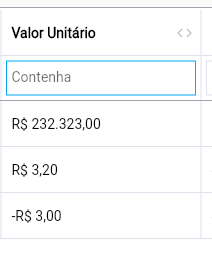
if i filter 3,2:
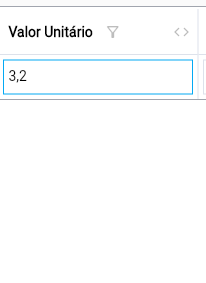
full sample code: money.zip
I have attached the example code below. Try it.
import 'package:flutter/material.dart';
import 'package:intl/intl.dart';
import 'package:pluto_grid/pluto_grid.dart';

String moneyFormat(dynamic value) {
  final formatter = NumberFormat.simpleCurrency(locale: 'pt_Br');
  return formatter.format(value);
}

class EmptyScreen extends StatefulWidget {
  static const routeName = 'empty';

  const EmptyScreen({Key? key}) : super(key: key);

  @override
  _EmptyScreenState createState() => _EmptyScreenState();
}

class _EmptyScreenState extends State<EmptyScreen> {
  late List<PlutoColumn> columns;

  late List<PlutoRow> rows;

  late PlutoGridStateManager stateManager;

  @override
  void initState() {
    super.initState();

    columns = [
      PlutoColumn(
        title: 'column1',
        field: 'column1',
        type: PlutoColumnType.number(format: '#,###.##'),
        formatter: moneyFormat,
      ),
    ];

    rows = [
      PlutoRow(cells: {
        'column1': PlutoCell(value: 232323),
      }),
      PlutoRow(cells: {
        'column1': PlutoCell(value: 3.2),
      }),
      PlutoRow(cells: {
        'column1': PlutoCell(value: -3),
      }),
    ];
  }

  @override
  Widget build(BuildContext context) {
    return Scaffold(
      body: Container(
        padding: const EdgeInsets.all(15),
        child: PlutoGrid(
          columns: columns,
          rows: rows,
          onChanged: (PlutoGridOnChangedEvent event) {
            print(event);
          },
          onLoaded: (PlutoGridOnLoadedEvent event) {
            stateManager = event.stateManager;
            stateManager.setShowColumnFilter(true);
          },
          configuration: PlutoGridConfiguration(
            columnFilter: PlutoGridColumnFilterConfig(
              filters: [const ClassYouImplemented()],
              resolveDefaultColumnFilter: (column, resolver) {
                return resolver<ClassYouImplemented>() as PlutoFilterType;
              },
            ),
          ),
        ),
      ),
    );
  }
}

class ClassYouImplemented implements PlutoFilterType {
  @override
  String get title => 'Custom contains';

  @override
  get compare => ({
        required String? base,
        required String? search,
        required PlutoColumn? column,
      }) {
        return FilterHelper.compareContains(
          base: moneyFormat(column!.type.number!.toNumber(base.toString())),
          search: search,
          column: column,
        );
      };

  const ClassYouImplemented();
}
@bosskmk does the 5.0.6 fixes the decimal character for the search too? If so, maybe the custom filter isn't necessary for this case.
with this custom filter you created it's also necessary to add the dot separator for values greater than 1000.
Maybe if it was possible to use NumberFormat.simpleCurrency(locale: 'pt_Br') on the format of PlutoColumnType.number(format: '#,###.##') it could be a solution also
Try something like below.
import 'package:flutter/material.dart';
import 'package:intl/intl.dart';
import 'package:pluto_grid/pluto_grid.dart';

String moneyFormat(dynamic value) {
  final formatter = NumberFormat.simpleCurrency(locale: 'pt_Br');
  return formatter.format(value);
}

class EmptyScreen extends StatefulWidget {
  static const routeName = 'empty';

  const EmptyScreen({Key? key}) : super(key: key);

  @override
  _EmptyScreenState createState() => _EmptyScreenState();
}

class _EmptyScreenState extends State<EmptyScreen> {
  late List<PlutoColumn> columns;

  late List<PlutoRow> rows;

  late PlutoGridStateManager stateManager;

  @override
  void initState() {
    super.initState();

    PlutoGrid.setDefaultLocale('pt_Br');

    columns = [
      PlutoColumn(
        title: 'column1',
        field: 'column1',
        type: PlutoColumnType.number(format: '#,###.##'),
        formatter: moneyFormat,
      ),
    ];

    rows = [
      PlutoRow(cells: {
        'column1': PlutoCell(value: 232323),
      }),
      PlutoRow(cells: {
        'column1': PlutoCell(value: 3.2),
      }),
      PlutoRow(cells: {
        'column1': PlutoCell(value: -3),
      }),
    ];
  }

  @override
  Widget build(BuildContext context) {
    return Scaffold(
      body: Container(
        padding: const EdgeInsets.all(15),
        child: PlutoGrid(
          columns: columns,
          rows: rows,
          onChanged: (PlutoGridOnChangedEvent event) {
            print(event);
          },
          onLoaded: (PlutoGridOnLoadedEvent event) {
            stateManager = event.stateManager;
            stateManager.setShowColumnFilter(true);
          },
          configuration: PlutoGridConfiguration(
            columnFilter: PlutoGridColumnFilterConfig(
              filters: [const ClassYouImplemented()],
              resolveDefaultColumnFilter: (column, resolver) {
                return resolver<ClassYouImplemented>() as PlutoFilterType;
              },
            ),
          ),
        ),
      ),
    );
  }
}

class ClassYouImplemented implements PlutoFilterType {
  @override
  String get title => 'Custom contains';

  @override
  get compare => ({
        required String? base,
        required String? search,
        required PlutoColumn? column,
      }) {
        final numberColumn = column!.type.number!;

        final formattedBase = moneyFormat(
          numberColumn.toNumber(base.toString()),
        );

        return FilterHelper.compareContains(
              base: formattedBase,
              search: search,
              column: column,
            ) ||
            FilterHelper.compareContains(
              base: base,
              search: search.toString().replaceAll(
                    numberColumn.numberFormat.symbols.DECIMAL_SEP,
                    '.',
                  ),
              column: column,
            );
      };

  const ClassYouImplemented();
}
@bosskmk i'm creating the currency column type to help me and other users that want a money field on pluto grid. If you have some time, please take a look at #578 and see whats missing