

 bosskmk
[Bug] - Hiding the first column causes an error when using the keyboard to move from one cell to another
I don't know why but when my Pluto grid loads, the first row is selected (when it exists), but not the first cell, so when i press any arrow keyboard key this error is shown:
Error: Unexpected null value.
    at Object.throw_ [as throw] (http://localhost:54403/dart_sdk.js:5080:11)
    at Object.nullCheck (http://localhost:54403/dart_sdk.js:5399:30)
at pluto_grid_state_manager.PlutoGridStateManager.new.canMoveCell (http://localhost:54403/packages/pluto_grid/src/ui/pluto_right_frozen_rows.dart.lib.js:18060:25)
at pluto_grid_state_manager.PlutoGridStateManager.new.canNotMoveCell (http://localhost:54403/packages/pluto_grid/src/ui/pluto_right_frozen_rows.dart.lib.js:18073:20)
at pluto_grid_state_manager.PlutoGridStateManager.new.moveCurrentCell (http://localhost:54403/packages/pluto_grid/src/ui/pluto_right_frozen_rows.dart.lib.js:16549:40)
at [_handleMoving] (http://localhost:54403/packages/pluto_grid/src/ui/pluto_right_frozen_rows.dart.lib.js:18996:25)
at [_handler] (http://localhost:54403/packages/pluto_grid/src/ui/pluto_right_frozen_rows.dart.lib.js:18923:31)
    at _RootZone.runUnaryGuarded (http://localhost:54403/dart_sdk.js:40448:11)
    at [_sendData] (http://localhost:54403/dart_sdk.js:33985:22)
    at _DelayedData.new.perform (http://localhost:54403/dart_sdk.js:37447:28)
    at _StreamImplEvents.new.handleNext (http://localhost:54403/dart_sdk.js:37557:15)
    at async._AsyncCallbackEntry.new.callback (http://localhost:54403/dart_sdk.js:37305:16)
    at Object._microtaskLoop (http://localhost:54403/dart_sdk.js:40778:13)
    at _startMicrotaskLoop (http://localhost:54403/dart_sdk.js:40784:13)
    at http://localhost:54403/dart_sdk.js:36261:9
Using flutter web: 3.0.5 and plutogrid: 5.0.4
I couldn't reproduce outside of my code but noticed these berraviors:
1- When using the sync function to load the data, the cell 0,0 is selected with the row
2- When using the async version, the table loads without any selected cell
On my code the table is loaded with a sync function that reads a hive box:
(Inside getx controller):
@override
  void onInit() {
    super.onInit();
    rowsNotas = startPage();
  }

List<PlutoRow> startPage() {
    final _notas = despesas
        ? Boxes.getDespesas().values.toList()
        : Boxes.getReceitas().values.toList();
    if (_notas.isNotEmpty) {
      return _notas.map((nota) => nota.retornaLinha()).toList();
    }
    return [];
  }


I'm trying to create another code where the problem happens too. This one is just a sample of the logic. On the next days i pretend to have one with the bug
crash_sample.zip This is a closer sample to the real behavior but i still can't reproduce the full error
@bosskmk finally found how to fix it:
commenting lines 529 and 530 from pluto_grid.dart solved the issue:
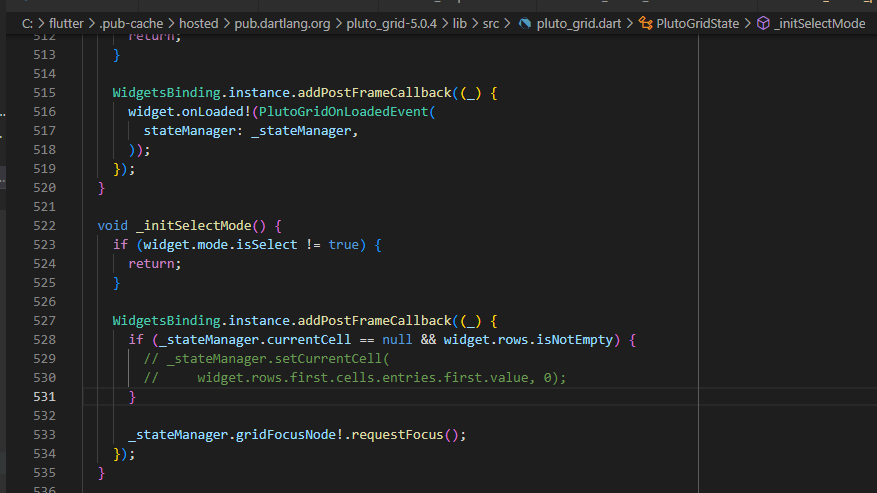
So it seems that avoiding this part of the code made everything fine.
There's this parameter on line 523: widget.mode.isSelect that looks like to be the one that will solve my problem.
Is there any config that i need to set?
The ones that i'm using on my grid:
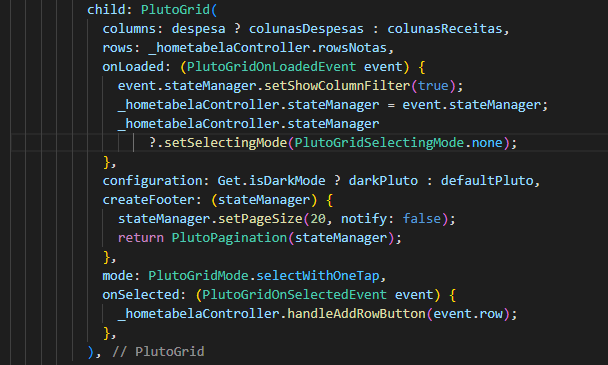
I do not know. I'm not sure about your problem. One thing to expect is that the field specified in the column and the key value specified in the row do not match.
The field specified in the column does not exist in the row or vice versa.
columns = [
  PlutoColumn(field: 'fieldA'),
];

rows = [
  PlutoRow(cells: {'fieldB' : PlutoCell()})
];
but is there any manual way to set widget.mode.isSelect to false with some config?
https://github.com/bosskmk/pluto_grid/blob/master/lib/src/manager/state/grid_state.dart#L177
You can change it at runtime with stateManager.setGridMode, but this is a method for initial setting.
It is not intended for behavior when changed during runtime.
I do not know. I'm not sure about your problem. One thing to expect is that the field specified in the column and the key value specified in the row do not match.
The field specified in the column does not exist in the row or vice versa.
columns = [
  PlutoColumn(field: 'fieldA'),
];

rows = [
  PlutoRow(cells: {'fieldB' : PlutoCell()})
];
@bosskmk finally found the problem:
the first column of my table was hidden:
PlutoColumn(
      title: 'idNota',
      field: 'idNota',
      type: PlutoColumnType.text(),
      hide: true),
Testing with hide = false made everything work again
what was happening is that the cell (0,0) didn't exist visually on the table load.
There should be a change on the first select to only look for visible columns or an assert to show an error if the dev sets the first column with hide: true
This issue is stale because it has been open for 30 days with no activity.
![github-actions[bot] avatar](https://avatars.githubusercontent.com/in/15368?v=4 "Published by a pub.dev verified publisher")