

 borisveytsman
Basic LaTeX & Word Accessibility issues.
While it isn't quite possible to generate a fully accessible PDF from LaTeX (or Word) there are some basic steps to making a 'more' accessible one which are documented here:
https://github.com/sigchi/Document-Formats/wiki/Accessibility
and here:
http://www.sigaccess.org/welcome-to-sigaccess/resources/accessible-pdf-author-guide/
it would be good if the templates did their best at making themselves accessible as well as pointed to a guide on how to make it more accessible (like the SIGACCESS one).

Thanks
Accessibility is definitely in the plans for acmart. The way I'd like to do it is to use the generic accessibility module that Ross Moore is working upon, once this module is released.
Actually we have a working group on accessibility and compliance in TeX. http://www.tug.org/twg/accessibility/. I wonder whether you would like to join our mailing list, http://tug.org/mailman/listinfo/accessibility. Your advice and help would be certainly very useful for us.

Thanks and great! There were just a few simple things that fail hard.
- Missing PDF title.
- Missing PDF language.
- Opening the example file and Autotagging in Acrobat leads to a destructive font substitution:
 Hopefully these can be resolved while we await that module.
Will also tell some of the SIGCHI accessibility folk about the tug.org list.
That font substitution is for the special font that provides interword spaces, called dummyfont, or similar name. You should be able to configure the process to avoid such substitution. Setting the PDF title is automatic if the pdfx.sty package is used to provide the XMP Metadata. The current version of pdfx.sty does not allow the language to be set, but the next version, to be released soon, will have this ability, as well as the ability to set the language of individual metadata fields. This is more for archivability than accessibility, but academic documents should be prepared for both standards.
Hope this helps. Ross

That font substitution is for the special font that provides interword spaces, called dummyfont, or similar name. You should be able to configure the process to avoid such substitution.
Ross, it this configuration done on the TeX side or on the Acrobat side?
Thanks
For some fully tagged example documents, produced using LaTeX, see here:
http://maths.mq.edu.au/~ross/TaggedPDF/
Please send me the ACM template and style files, so I can explore how to handle its title-matter, 2-column layout, and any other special features.
Hi Boris,
On 20/01/2017, at 6:50, "Boris Veytsman" <[email protected]mailto:[email protected]> wrote:
That font substitution is for the special font that provides interword spaces, called dummyfont, or similar name. You should be able to configure the process to avoid such substitution.
Ross, it this configuration done on the TeX side or on the Acrobat side?
It should be possible in Acrobat Pro. Just about everything in Preflight can be adjusted. It takes a fair bit of experimentation and getting used to.
Thanks
You are receiving this because you commented. Reply to this email directly, view it on GitHubhttps://github.com/borisveytsman/acmart/issues/75#issuecomment-273879490, or mute the threadhttps://github.com/notifications/unsubscribe-auth/ALFUOWO3qLxqdAV96S7RT-jxOP0Bd4bBks5rT76SgaJpZM4Ln6Wq.
Cheers,
Ross
Ross, acmart is now in TeXLive. CTAN version is at http://www.ctan.org/pkg/acmart. The development version is here at the Download link
Thanks for your help!
-B
The attached image shows how to edit a Preflight Profile. If Acrobat's routine for Automatic Tagging doesn't work well enough, you can try constructing your own in Preflight. The relevant filters are listed, for you to choose or leave out.
Have fun! :-)

I got the same problem with Acrobat's Autotagging, when working on a submission for TACCESS which is set with format=acmsmall, and needs to be made accessible, since it is a journal on accessibility, and my article is about blind people. I am relieved, that I'm not the only one with this problem. I did some digging, and came to a kind of "solution" yesterday. I'd like to have your advice, to what extent you think this is usable:
The problem seems to be with the fonts from the Libertine package. Latex normally doesn't emit spaces as it computes optimal spacing anyway and moves the letters individually. Normal Latex-Fonts therefore do not contain a character for space. The libertine fonts however do. And in addition it contains these "rectangle with X" for characters that are not present, instead of just not defining them. Now when Acrobat does the "Tools/Accessibility/Add Tags to Document" it normally adds artificial spaces from another font, so that it reads and works fine. However with the libertine fonts it somehow messes up and inserts on of these non-printable characters (instead of the proper space).
With (https://tex.stackexchange.com/questions/318425/use-pdfinterwordspaceon-with-pdflatex-from-miktex-on-windows):
\pdfmapline{+dummy-space <dummy-space.pfb}
\pdfglyphtounicode{space}{0020}
\pdfinterwordspaceon
and a dummy-space.pdf and .tfm from (https://ctan.org/tex-archive/systems/doc/pdftex/tests/01-fake-interword-space), I managed to get artificial spaces inserted directly from pdfLatex, but Arcrobat still messed up.
Using
\pdfmapline{+dummy-space <LinLibertineT.pfb}
worked, but only for text in this exact font.
The only "dirty" solution I found was to manipulate the *.pfb fonts in the Latex distribution directly. In MikTex inside:
C:\Program Files\MiKTeX 2.9\fonts\type1\public\libertine
I deleted the unprintable dummy character (rectangles with X) from the font, and then it worked in Acrobat for all but the plain LinLibertineT font (not sure why it did not work with this particular font, even without all the other changes)
In the end the solution is a combination of both approaches, manipulated fonts and the \pdfinterwordspaceon.
Now this solution is only workable when you tamper with the Latex distribution. I'm not sure, ACM is happy with this, but it works on my setup.
I'm happy to send the modified fonts if you need them.
UPDATE: The \pdfinterwordspaceon was necessary since I forgot to delete the unmodified _LinLibertineT.pfb from the working directory, and this was used. Now, with this removed, the workaround works with only the modified *.pfb files in the Latex folder.
Another thing about accessibility mentioned by ayman earlier:
- Missing PDF title.
- Missing PDF language. You can solve this together with the already set fields with the command
\hypersetup{ pdflang={English}, pdfdisplaydoctitle, pdftitle={TITLE}, pdfauthor={AUTHORS}, pdfkeywords={KEYWORDS}, pdfsubject={SUBJECT} }
Hope that helps. Looking forward to an official version!

I encountered the broken glyph space substitution error and was able to remedy by compiling with XeLaTeX instead of pdfLaTeX. XeLaTeX spaced my paragraphs further apart, so I had to manually adjust some white space with the \vspace{} command, but I was able to replicate the pdfLaTeX formatting. Changing the compiler helped the PDF go through the tagging process in Acrobat just fine. Hopefully that may help someone.

I used Overleaf, the acmart.cls version found on the CHI 2019 page, and sample-sigchi-a.tex as an example. All I did was change the compiler from pdfLaTeX to XeLaTeX and then I could follow the accessibility process for Acrobat described here. I can post code if that would help, but I didn't change any code here. The sample extended abstract didn't have any of the vertical spacing issues that I did, so I didn't have to include any \vspace{} commands.
PDF generated with pdfLaTex after "Add Tags to Document":
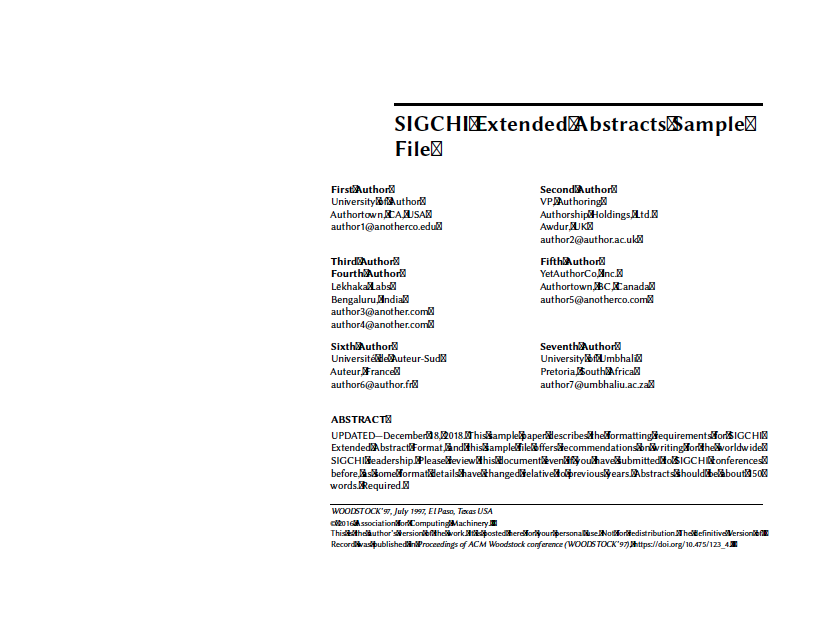 Test_EA-pdfLaTeX.pdf
PDF generated with XeLaTeX after "Add Tags to Document" (PDF contains dummy alt text):
 Test_EA-XeLaTeX.pdf