

 bootandy
[feat request]: command to open an interactive file manager and dust
dust is awesome, but not dynamic like a file manager. One can take advantage of both if:
- one terminal window shows the dust tree
- the other window runs a file manager, that sorts by size is ideal like ncdu
Next is my proposal, though it just works using kitty and zsh.
Request:
- [ ] Improve and provide alike next command in this repo
- [ ] Expand for other shells, terminals and file-managers
#!/usr/bin/env zsh

_du() {

  dust -r

  unset answer_du && echo -n "Navigate dirs with ncdu? (y/N):  "
  read answer_du
  answer_du=${answer_du:-n} # Default to 'n' if no input is provided
  echo
  if [[ "$answer_du" == "n" ]]; then
    return
  fi

  _kitty_vwindow_new "dust -r" "_du_ncdu"
}
_du_ncdu() {
  sleep 1
  # flags: https://dev.yorhel.nl/ncdu/man
  ncdu --color dark-bg --show-percent --show-itemcount --follow-symlinks --confirm-delete
}
_kitty_vwindow_new() {
  if [ $# -lt 1 ]; then
    echo "Error: Missing arguments"
    echo "Usage: x_kitty_vwindow_new <right_cmd> <left_cmd>"
    return 1
  fi
  local right_cmd="$1"
  local left_cmd="$2"

  # Create new window
  kitty @ launch\
    --type=window \
    --keep-focus \
    --hold zsh -c "source ~/.zshrc && cd $PWD && $right_cmd; exec zsh"

  # Run left command if any
  if [ -n "$left_cmd" ]; then
    $left_cmd
  fi
}


Thanks for answering!
Sorry if duplicated issue, I searched file manager on any issue (including closed) and I found nothing alike: link.
Maybe this can be:
- [ ] added to a TODO list
- [ ] or added to an advises list
- [ ] or added to a how to use guide
- ...
And there just link to this issue, so anyone can further expand (adding comments or repo links) with new solutions. Because iterate all requires a lot of effort, it's a 3 dimensional issue:
- shells (bash, zsh, fish,...)
- terminals (gnome-terminal, kitty, Alacritty, WezTerm,...)
- and file-managers like
ncdu, NNN, broot,...
Well, actually the file-manager command it's easy to customize for each user needs, but that's still a O(n^2) (Shells × Terminals) job!
Once there are several solutions (for various Shells × Terminals) then one could try to unify all them under a script (create a PR). But if this task gets too big/dirty then there is no need to accomplish it, just let the user copy what needed. This is just my humble opinion how to approach it. If you agree then this issue should be kept open for a while.
https://github.com/bootandy/dust/issues/159 I'm thinking about implementing this currently
Make each program do one thing well. - Unix philosophy
- dust does one thing very well: tree show where my disk is being used
- I use NNN for most file manager tasks
- Excepts when I need to find a file (if no clue about the path) by name , its content or its size. Also to check for big disk usage. For those I use FZF, broot and ncdu
Also, I would not try to add an interactive mode like NCDU has as you comment in #159 (btw thanks to point me to the original issue I could not find). I think:
- The effort is enormous
- It's quasi duplicate job, since other terminal file managers with lot of features are already coded
- My proposal to just collect multi-terminal-window scripts it's easier
Actually dust remember me a lot to br --whale-spotting
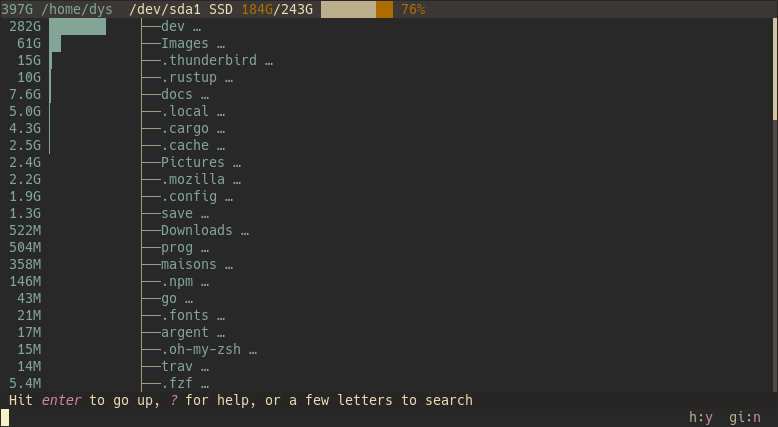 ...which sadly does not allow to show tree depth in this mode, i.e. --max-depth flag is not compatible with whale mode. In contrast the normal tree mode does yes show several depths [and the sizes].
So my proposal is, to apply your experience to further develop broot enabling depths in whale mode, alike dust already does [but it does it not interactive].
But who am I to judge? No one hehe. You have coded dust, and I have not coded it nor broot. So maybe making dust interactive it's not so hard as I think, and people will not asks for terminal-file-managers features once you accomplish it.
Make each program do one thing well. - Unix philosophy
dust does one thing very well: tree show where my disk is being used
Yes that was exactly my thinking originally.
However, when I have the time I'd like to see if I can fit an interactive mode in there, ( I don't know if its possible or sensible - but I'm curious to try).
For your integration script and any future extensions - I think you should host that in a separate repo, and I'm happy to add a link in the README of dust.