
react-rnd
 react-rnd copied to clipboard
 bokuweb
onDrag and onDragStop callbacks get different (x, y) coordinates
Overview of the problem
I'm using react-rnd 10.2.2
My browser is:
I am sure this issue is not a duplicate
Reproduced project
https://codesandbox.io/s/jolly-goldwasser-5m0n9?file=/src/index.js
Description
The callback functions for props onDrag and onDragStop get different values for the coordinates of the element. It seems like the issue is that the two return coords from different reference points, since there is always a fixed offset.
Steps to Reproduce
- Drag an element, check the coords sent to onDrag callback
- Stop dragging, check the coords sent to onDragStop callback
Expected behavior
They should ideally be getting the same coords.
Actual behavior
The coords are offset by some arbitrary amount (16px in the codesandbox).
This is a screenshot of the console output from the codesandbox:
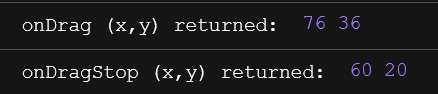


This offset is the height of the non-drag area of the page, So, the solution I'm going to solve for now is x, Y in onDrag fixed minus the size around the drag area
The implementation code is as follows
	const onDrag: Props["onDrag"] = (e, d) => {
                // gridLinesRef  is container
		const { width, height } = gridLinesRef.current.getBoundingClientRect();
		const realX = +(d.x).toFixed(5) - Math.max(window.innerWidth - width, 0);
		const realY = +(d.y).toFixed(5) - Math.max(window.innerHeight - height, 0);
		console.log(+realX.toFixed(5), +realY.toFixed(5))
	}
I meet the question too, the method I using is just to set the position of parent absolute. Then you can get the same coordinates.
<div className='StreamPictureCanvas-box-wrapper' style={{ position: 'absolute' }}>
  <Rnd />
</div>
