

 bogde
bogde
How to get kilogram from hx711? and the proper calibration.
Hi! Can someone please explain how to get kilogram from xh711? and also how to properly calibrate it. I am using arduino mega, hx711 and 4pcs of 50kg load cell (the one you see inside the bathroom scale).. please i need it for my project. and also, please do not use jargon words, for im just a beginner.. consider it like explaining to a child =D

You need to just use a bit of math, so it will depend on how good your inner child is at math. You use the standard formula for slope and intersection: y = mx + b ... or m = (y - b)/x Here
- y is the actual weight in whatever units you want (g, kg, oz, etc)
- x is the raw value from the HX711 - from
scale.read_average() - m is your slope (multiplier)
- b is your intersection (offset) - also from
scale.read_average()but with no weight, orusing scale.tare()
So say you have a raw value of 10000 for 0 weight (tare) and 20000 for 1000g, and want readings in g First, your offset (b) is 10000 To calculate your multiplier (m) just substitute into the formula 1000 = m * 20000 + 10000 ... or m = (1000 - 10000) / 20000 Thus m = -0.45
Your numbers will be completely different, but the method is the same.
You then put these values into your sketch via scale.set_scale(m) and scale.set_offset(b)
Even better if you don't hard-code them but allow them to be calculated/updated on demand, as they may change over time due to various reasons.
The example sketch that comes with the library partially shows this process.

@electrokean thank you for answering. Ive tried your solution and here are the results (please see attached image). y is hard coded. now my question, how am i going to get kilogram from these results..
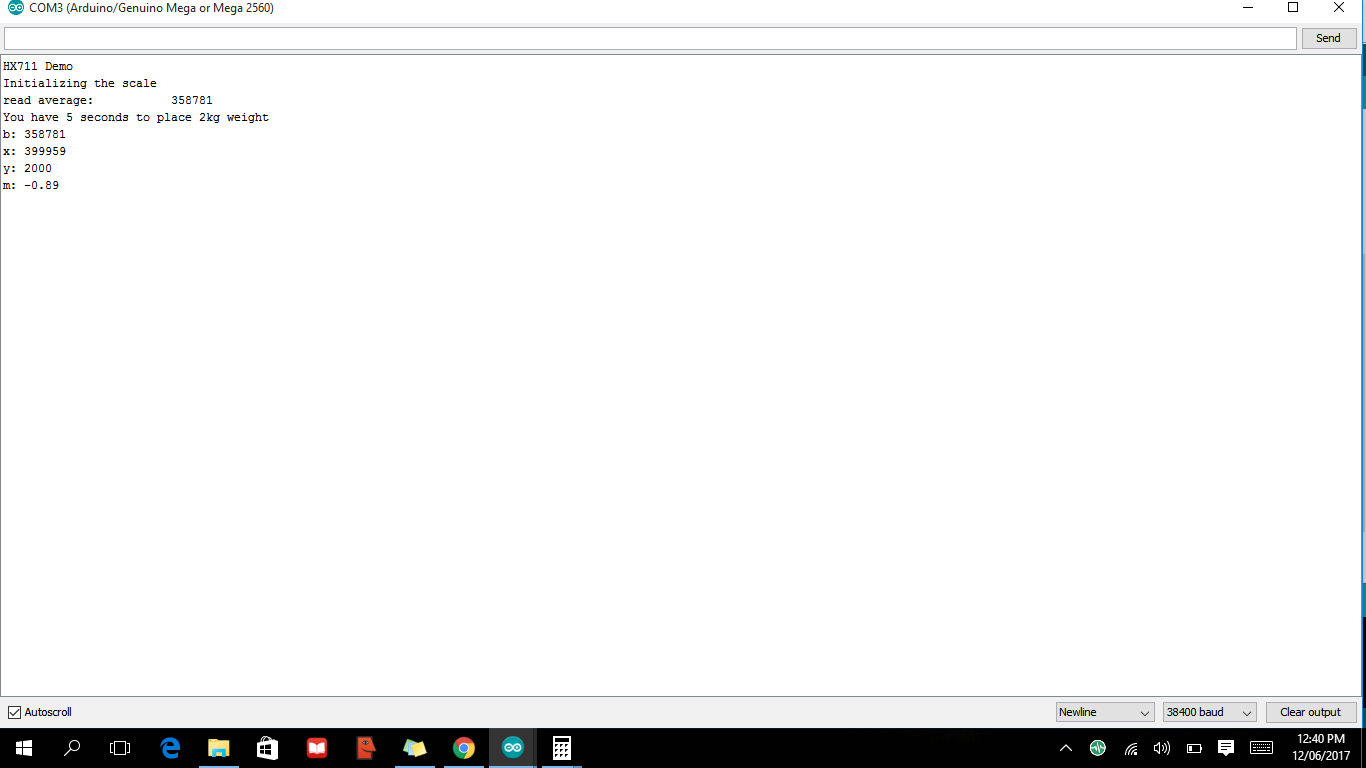
You use those calculated values in scale.set_scale(m) and scale.set_offset(b). Then you can start using scale.get_units() to get the value in grams (or kg depending on how you did your calibration)
Note read the comments in HX711.h - it explains the difference between all the read and get functions
@electrokean heres my code for calibration

where should i put the scale.set_scale(m) and scale.set_offset(b)? should i put it inside the calibration() which is called by setup()? or should i put it inside the loop()? and what should be put first? the scale.set_scale(m) or scale.set_offset(b)? Sorry if i have too many questions. Im a total newbie..
You only call set_scale() and set_offset() once - usually in your setup() function with some pre-calculated and saved values.
You can also just call them from the calibrate() function if you call that from setup() - although you then have to manually calibrate every time you restart the Arduino.
You don't need to call scale.tare() if using scale.set_offset() - they do basically the same thing.
Please read the code written by bogde and try to understand it! It is very small, and most is quite easy to follow.
Also, please don't include screenshots of code. You should copy and paste them inside a markdown code block (surrounded by back-quotes)
The hx711 outputs a value corresponding to the ratio of difference voltage divided by the voltage applied to the load cell. This ratio is factored by the gain. Full scale output is 800000 to 7FFFFF in hexadecimal and corresponds to 0.5 to - 0.5 difference ratio V/V. The load cell calibration certificate tells me the output at a particular voltage with a defined load applied. My certificate says 1.996 mV at 5 V with 50 kg applied. The difference ratio is then 0.0003992 V/V at 50 kg. I am using a gain of 128 so this difference ratio becomes 0.0511 V/V. This is then 10.2 % of the full scale 0.5 V and will correspond to 800000 x 10.2 % in hexadecimal. This will be a decimal value of 857275 for 50 kg. The sensitivity is therefore 17145 per kg.

my hx711 output value is flactuating from 1000-4000 up and down, is it normal?
4000 is 0.047 % of full scale. So don't worry about it. Take an average over more readings if you want a steady value. I suspect that this is normal.
I found that was a factor of 2 out. The gain of my setup is 8573 /kgf. Does anyone know what's this is. I will let you know if I can figure it out.
The load cell I have has a sensitivity of 1.966 mV/V at 50kg. This is then amplified to 0.2555 V/V. This is then 0.511 of the Hx711 half scale output of 0.5 V/V. The digital output is therefore 0.511 x 800000 in hexadecimal. This will be 4286579 in decimal for 50 kg. The sensitivity is then 85731 per kg.
I have 2 50kg load cells and the following code, `#include "HX711.h"
HX711 scale;
void setup() { Serial.begin(38400); Serial.println("HX711 Demo");
Serial.println("Initializing the scale"); // parameter "gain" is ommited; the default value 128 is used by the library // HX711.DOUT - pin #A1 // HX711.PD_SCK - pin #A0 scale.begin(A1, A0);
Serial.println("Before setting up the scale:"); Serial.print("read: \t\t"); Serial.println(scale.read()); // print a raw reading from the ADC
Serial.print("read average: \t\t"); Serial.println(scale.read_average(20)); // print the average of 20 readings from the ADC
Serial.print("get value: \t\t"); Serial.println(scale.get_value(5)); // print the average of 5 readings from the ADC minus the tare weight (not set yet)
Serial.print("get units: \t\t"); Serial.println(scale.get_units(5), 1); // print the average of 5 readings from the ADC minus tare weight (not set) divided // by the SCALE parameter (not set yet)
scale.set_scale(2280.f); // this value is obtained by calibrating the scale with known weights; see the README for details scale.tare(); // reset the scale to 0
Serial.println("After setting up the scale:");
Serial.print("read: \t\t"); Serial.println(scale.read()); // print a raw reading from the ADC
Serial.print("read average: \t\t"); Serial.println(scale.read_average(20)); // print the average of 20 readings from the ADC
Serial.print("get value: \t\t"); Serial.println(scale.get_value(5)); // print the average of 5 readings from the ADC minus the tare weight, set with tare()
Serial.print("get units: \t\t"); Serial.println(scale.get_units(5), 1); // print the average of 5 readings from the ADC minus tare weight, divided // by the SCALE parameter set with set_scale
Serial.println("Readings:"); }
void loop() { Serial.print("one reading:\t"); Serial.print(scale.get_units(), 1); Serial.print("\t| average:\t"); Serial.println(scale.get_units(10), 1);
scale.power_down(); // put the ADC in sleep mode
delay(5000);
scale.power_up();
}`
I don't really understand how this code works. It gives values that are not even close to the required values.
please guide me on how to connect and use the two load cells and the hx711, my situation is desperate.
Thank you.
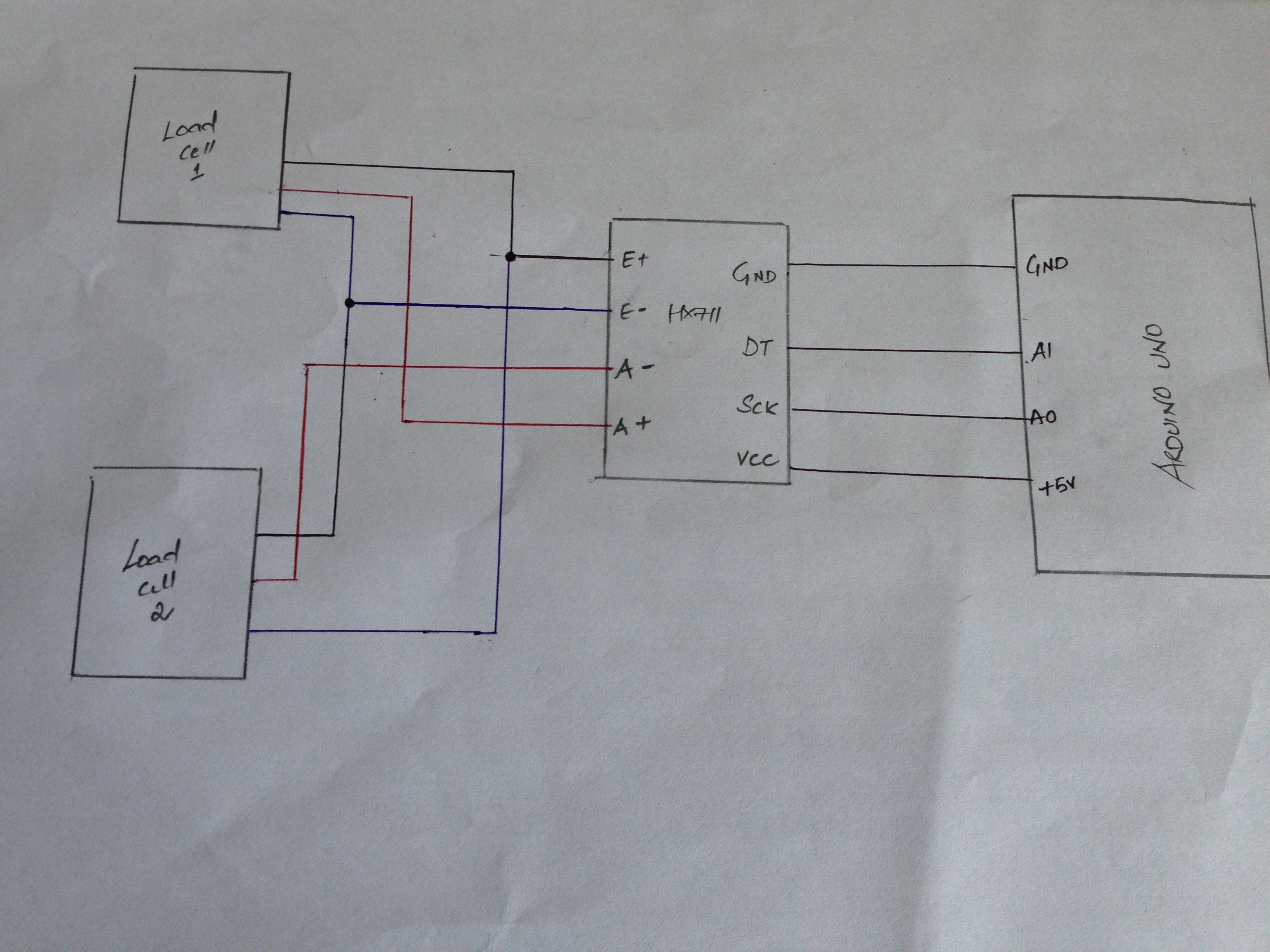

You need to read the README file and make use of tare() and set_scale() functions.
The value you pass to set_scale() (e.g. 2280.f in the above) will be your calibration factor to convert raw values to your units of choice (mg, g, kg, lb, etc)
Read through HX711.h, the examples, and various other open/closed issues for plenty more details.
The first thing I notice is that you should have four wires from each load cell. You should start by reading each load cell separately. As I explained earlier in this thread you should have a sensitivity value for the load cell. Use this to set the gain as I described. I suggest that if you want to sum up the readings you should read both cells independently and then you can add the values. Let me know if this makes sense.
You appear to have an apostrophe at the beginning of your #include statement. I guess that this is not in the code. I see you are using A1 and A2. This will work but remember that the signals from the hx711 are digital so using analogue inputs is a little perverse.
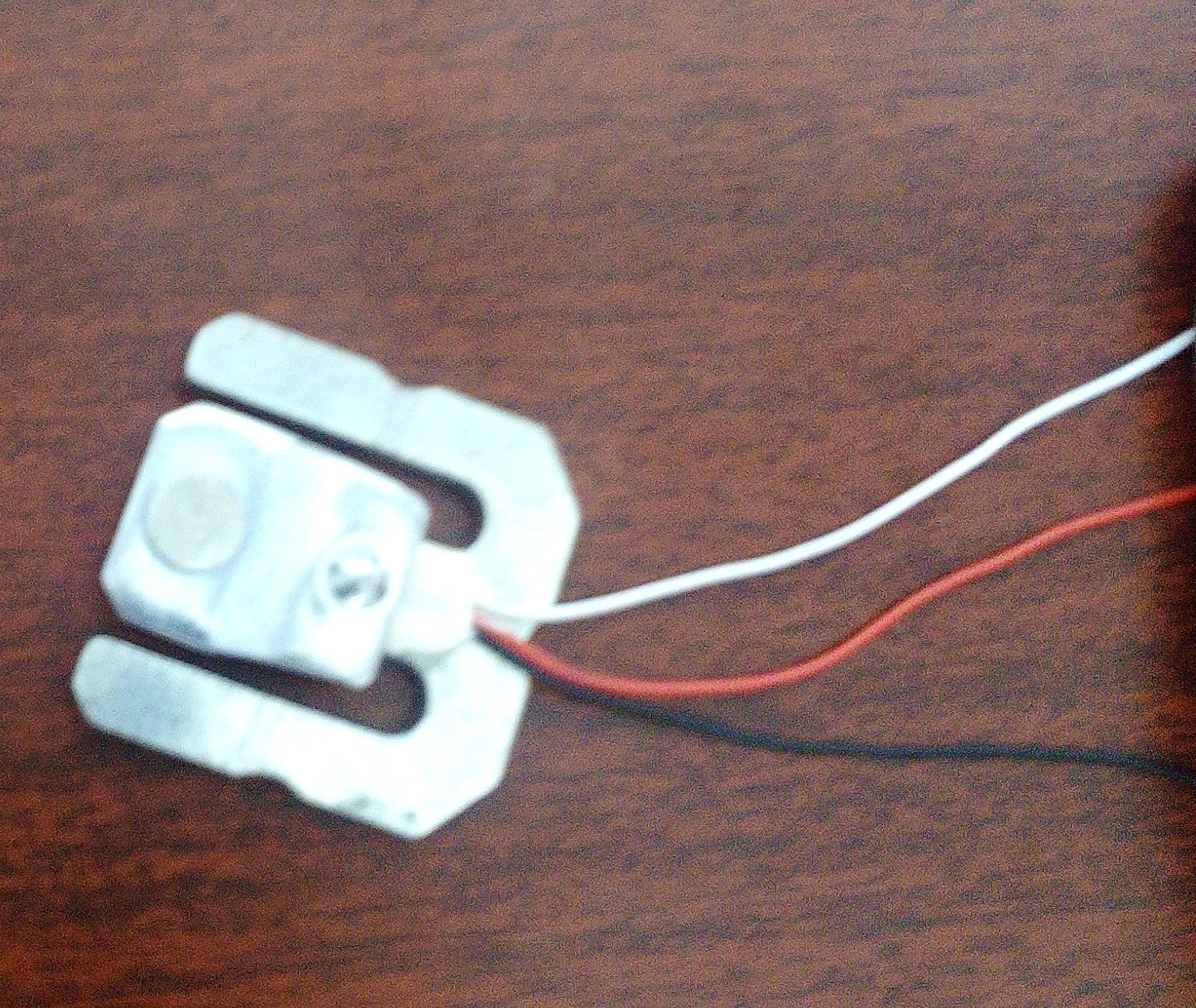
Okay. The two sensors are actually two half bridges that need to be measured as a pair.
I don't exactly know how to find it. can you tell me the steps to find those values?
The load cell I have has a sensitivity of 1.966 mV/V at 50kg. This is then amplified to 0.2555 V/V when the 128 gain of the hx711 is applied. This is then 51.1 % of the Hx711 half scale output of 0.5 V/V. The digital output is therefore 0.511 x 800000 in hexadecimal. This will be 4286579 in decimal for 50 kg. The sensitivity is then 85731 per kg.
or is there any device or code which i can use to find the sensitivity value. I didn't get any certificate details with the product.
Then determine the output for a couple of weights that you trust. The values will be high. Tell me what output you get for these known weights.
/* Example using the SparkFun HX711 breakout board with a scale By: Nathan Seidle SparkFun Electronics Date: November 19th, 2014 License: This code is public domain but you buy me a beer if you use this and we meet someday (Beerware license).
This is the calibration sketch. Use it to determine the calibration_factor that the main example uses. It also outputs the zero_factor useful for projects that have a permanent mass on the scale in between power cycles.
Setup your scale and start the sketch WITHOUT a weight on the scale Once readings are displayed place the weight on the scale Press +/- or a/z to adjust the calibration_factor until the output readings match the known weight Use this calibration_factor on the example sketch
This example assumes pounds (lbs). If you prefer kilograms, change the Serial.print(" lbs"); line to kg. The calibration factor will be significantly different but it will be linearly related to lbs (1 lbs = 0.453592 kg).
Your calibration factor may be very positive or very negative. It all depends on the setup of your scale system and the direction the sensors deflect from zero state This example code uses bogde's excellent library: https://github.com/bogde/HX711 bogde's library is released under a GNU GENERAL PUBLIC LICENSE Arduino pin 2 -> HX711 CLK 3 -> DOUT 5V -> VCC GND -> GND
Most any pin on the Arduino Uno will be compatible with DOUT/CLK.
The HX711 board can be powered from 2.7V to 5V so the Arduino 5V power should be fine.
*/
#include "HX711.h"
#define DOUT 8 #define CLK 7
HX711 scale(DOUT, CLK);
float calibration_factor = 8875; //-7050 worked for my 440lb max scale setup
void setup() { Serial.begin(38400); Serial.println("HX711 calibration sketch"); Serial.println("Remove all weight from scale"); Serial.println("After readings begin, place known weight on scale"); Serial.println("Press + or a to increase calibration factor"); Serial.println("Press - or z to decrease calibration factor");
scale.set_scale(); scale.tare(); //Reset the scale to 0
long zero_factor = scale.read_average(); //Get a baseline reading Serial.print("Zero factor: "); //This can be used to remove the need to tare the scale. Useful in permanent scale projects. Serial.println(zero_factor); }
void loop() {
scale.set_scale(calibration_factor); //Adjust to this calibration factor
Serial.print("Reading: "); Serial.print(scale.get_units()*0.453592, 3); Serial.print(" kg"); //Change this to kg and re-adjust the calibration factor if you follow SI units like a sane person Serial.print(" calibration_factor: "); Serial.print(calibration_factor); Serial.println(); delay(1000);
if(Serial.available()) { char temp = Serial.read(); if(temp == '+' || temp == 'a') calibration_factor += 10; else if(temp == '-' || temp == 'z') calibration_factor -= 10; } }
I have used this code and the value that i have got for 500g is 700g and for 3.4kg the values are fluctuating between 3.4 and 4.5
500 g is one percent of full scale so it is not a suitable value for calibration of your load cell. The 3.4 kg is a bit better but you need to get a steady reading using average function of the hx711 library.