

 blinksh
Blink 13 on iPadOS + external display
This is not actually an issue. I've only tried it few times, but never worked for long time, guys could you comment your experience with Blink + external display:
- with ipad pro + USB-C HDMI cable;
- with regular iphone + lighting HDMI converter
I am mostly curious in native resolution on full screen + comfortable font size and how do you deal with other apps switching to them.

I’m trying to use it (USB-C hub by Kingston to HDMI->DVI on my monitor) and continue to hit bugs with keys not registering...or maybe the UI not updating on the external monitor.
I’m using mosh to get into the server, then logging back into a tmux session. Sometimes the control key doesn’t register so I can’t change between tmux panes (Ctrl+b) sometimes escape doesn’t register, either on Capslock or on the actual escape key so I can’t exit vim to continue working.
Font sizes are great for me on an older Dell 24” UltraSharp (1920X1080). I came here looking for existing bug reports.

I'm unable to get 4K output from my 2018 iPad pro, but that may be an issue with the adapter I use. (Though I get 4k from the same cable on my MacBook 12"). If anyone can recommend a working 4K adapter for the iPad Pro 2018 with power pass through and USB, please do.
Also, if I just "unplug" my cable, it seems I sometimes "lose" my sessions that were on my external monitor?

I'm unable to get 4K output from my 2018 iPad pro, but that may be an issue with the adapter I use. (Though I get 4k from the same cable on my MacBook 12"). If anyone can recommend a working 4K adapter for the iPad Pro 2018 with power pass through and USB, please do.
Also, if I just "unplug" my cable, it seems I sometimes "lose" my sessions that were on my external monitor?
For 4K you’re going to need something that does DisplayPort+ like the CalDigit USB C Pro dock or you’re going to need to go USB C directly from your iPad into a USB C monitor.
Thanks much for the info - I ended up buying a 4K Apple TV (which is about 2x the cost of a working physical adapter), and that is giving me beautiful 4K terminals. I don’t even need a home WiFi network post setup - airplay magically figures it all out.
On Tue, Jan 7, 2020 at 9:20 AM Curtis McHale [email protected] wrote:
I'm unable to get 4K output from my 2018 iPad pro, but that may be an issue with the adapter I use. (Though I get 4k from the same cable on my MacBook 12"). If anyone can recommend a working 4K adapter for the iPad Pro 2018 with power pass through and USB, please do.
Also, if I just "unplug" my cable, it seems I sometimes "lose" my sessions that were on my external monitor?
For 4K you’re going to need something that does DisplayPort+ like the CalDigit USB C Pro dock or you’re going to need to go USB C directly from your iPad into a USB C monitor.
— You are receiving this because you commented. Reply to this email directly, view it on GitHub https://github.com/blinksh/blink/issues/849?email_source=notifications&email_token=AAYY3X64H7NJHLQN6SUIFGTQ4SFSFA5CNFSM4JHACC3KYY3PNVWWK3TUL52HS4DFVREXG43VMVBW63LNMVXHJKTDN5WW2ZLOORPWSZGOEIJAF3Y#issuecomment-571605743, or unsubscribe https://github.com/notifications/unsubscribe-auth/AAYY3X2XZB4XCUVMSP55TCTQ4SFSFANCNFSM4JHACC3A .
I’m on iOS 13.4 with iPhone 11 Pro. I don’t have display issues with other apps but Blink gets stuck 99% of the time. cmd+O does not help

I have the same problem. Blink gets stuck on external display if I switch focus to another app. I can switch focus back with cmd+O, but keys are not registering. I'm also using mosh.

My main issue with the external display is that mosh seems to have a partial implementation of dual screen support which is app-based in IOS. When I open it I get a different window on my iPad and a different one on my display. The mouse defaults to the ipad screen. If I get stuck in that window by clicking the mouse I need to Apple-O to move to the window on the external display. My main issue with this is that all iOS apps have the ability to do split screen now with the 3 dots in the upper corner. This is really handy with blink since i can have a browser window and i terminal open at side-by side. However, on the external monitor blink starts full screen without any mouse support so I can’t activate the split screen. Still trying to figure out how to fix that.

You may need screen mirror option.
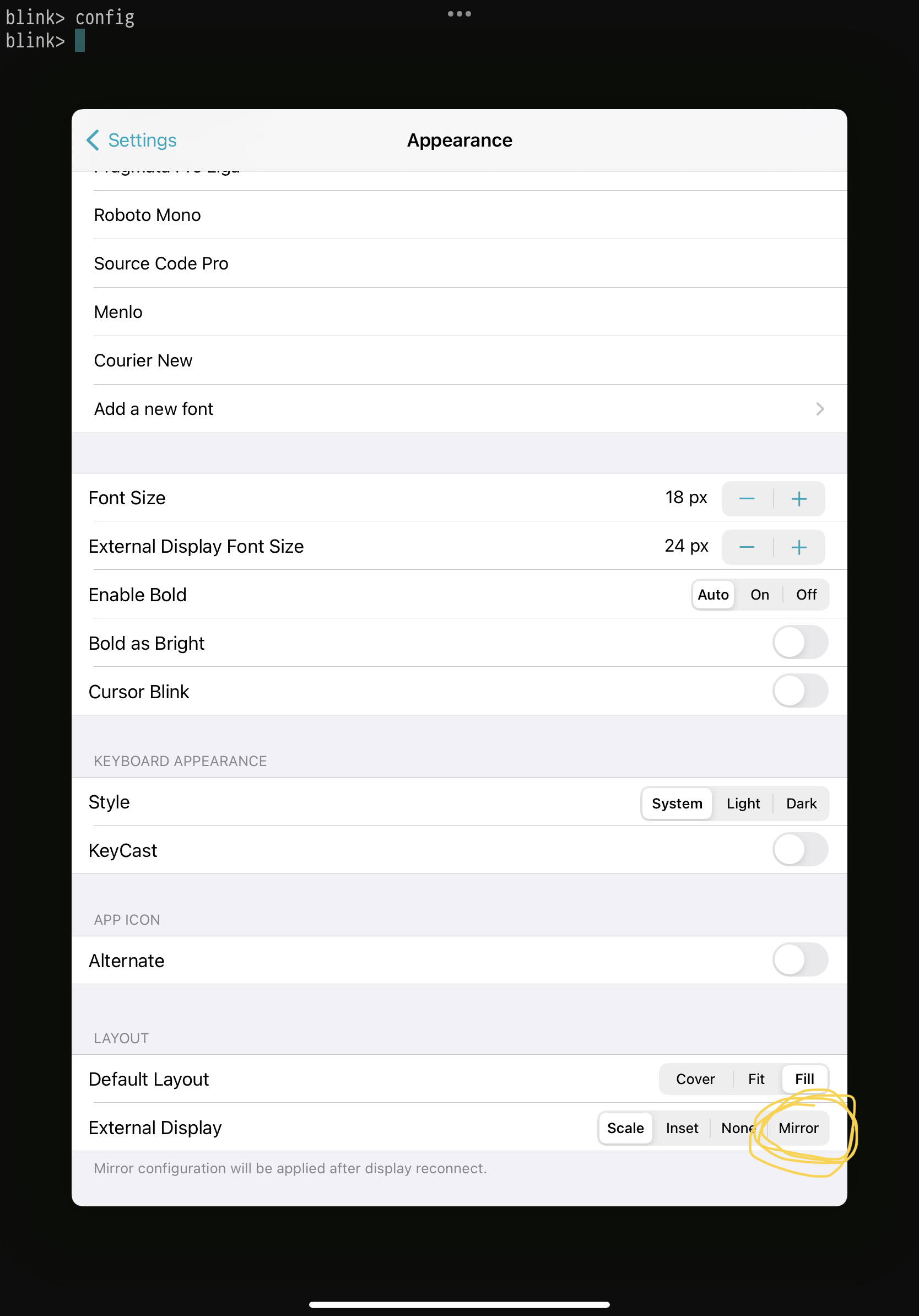
That way external display will be mirror of your main display.

Thanks! I just found that commit from another issue just before you posted. It works and allows split screen, but because it is mirrored, it is letterboxed and doesn’t use the full monitor. Is there any way, based on the IOS external monitor configuration, to have mouse support in full-screen so I can use the three dots at the top to enable full-screen, split screen? Looks like smaller work area and split screen, or full screen with no split, but not both.