
ngx-uploader
 ngx-uploader copied to clipboard
 bleenco
How to accept the server returns the response?


ok,after the files uploaded to the background,Server side forward pass a result, the result in the response, But I don't know how to use this plug-in to receive the response。 Like this:This is sends a POST request to the background,But I don't know how to receive the background the returned result。
startUpload(): void { const event: UploadInput = { type: 'uploadAll', url: 'localhost:8080/servie/upload', method: 'POST', data: { foo: 'bar' } };
this.uploadInput.emit(event);
}
hi. you need to "catch" events that are emitted like its done here. when you got response from server it should have output.type === 'done', just console.log(output); to see which values are available and you will know how to proceed.
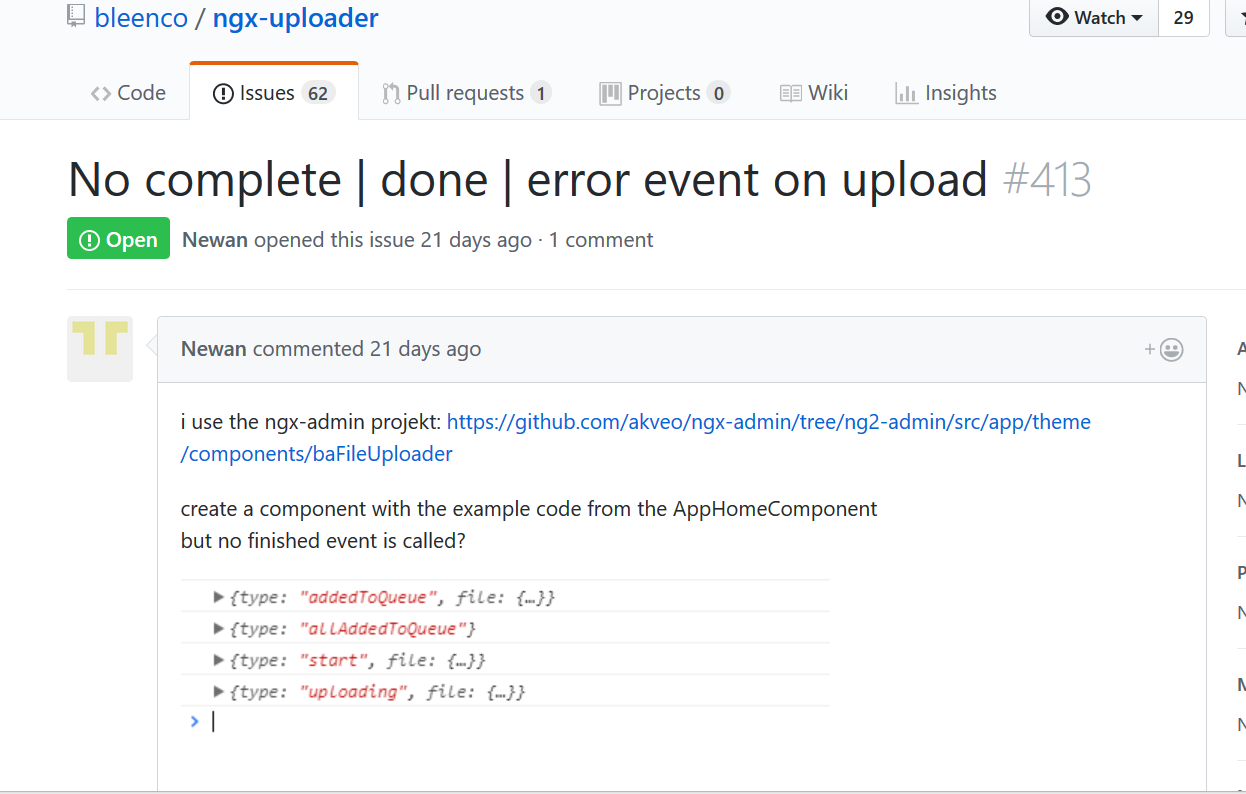
Well, Thank you for your answer, but the problem hasn't solved,add this code to onUploadOutput(output: UploadOutput): else if (output.type === 'done') { this.files.forEach(file => { console.log(file.response); }); } But in onUploadOutput this method, To track the upload process,“output.type”’ respectively:addedToQueue、allAddedToQueue、start、uploading,then this method is over,how should I do?
When the upload is completed,no longer automatically invoke onUploadOutput ,that is “else if (output.type === 'done')” never be executed,what reason is this?I didn't see similar problems on stack overflow ,this is my code:
onUploadOutput(output: UploadOutput): void { if (output.type === 'allAddedToQueue') { .... }else if(...){... }else if (output.type === 'done') { .... } }
Yes, I read it,and all the upload process of mine is successful,and has been through a browser to see the server returned results.Hm,I mean, In my "onUploadOutput" method,from beginning to end,“output.type” doesn't have ‘done’ state
Yes, I sent an email to you, there is a screenshot about this problem, you received?
I didn't. You can attach screenshot here, just drag&drop into textarea field.
by the way... are you using pace.js in your application? some users reported that it doesn't work in a combination with ngx-uploader module.




https://github.com/bleenco/ngx-uploader/blob/master/src/ngx-uploader/classes/ngx-uploader.class.ts#L187 use number 4 replace XMLHttpRequest.DONE if (xhr.readyState === 4)

Facing the same issue here.
Can someone please explain how to properly catch the server response after uploading?
@sgyy I really don´t want to change any code from inside the node_modules.

@Matze-Schmitt Unfortunately, the source of this bug is likely https://github.com/HubSpot/pace/issues/261 and manifests in ngx-uploader as describe in https://github.com/bleenco/ngx-uploader/issues/408. Bottom line is pace needs to be fixed, not necessarily ngx-uploader (which is not the only component that's affected). Pace is breaking a pretty basic component in their override of xmlhttprequest.

I don't use pace for my application, this worked for me:
In your onUploadOutput function: Add else if(output.type === 'done') { //output.file.response }
Added my entire onUploadOutput function incase of any confusion.
Good luck =)
onUploadOutput(output: UploadOutput): void {
    if (output.type === 'allAddedToQueue') {
      let token = this.authService.getToken();

      const event: UploadInput = {
        type: 'uploadAll',
        url: this.config.apiEndpoint + '/api/v1/attachments/upload',
        method: 'POST',
        headers: { 'Authorization': token }
      };
      this.uploadInput.emit(event);

    } else if (output.type === 'addedToQueue' && typeof output.file !== 'undefined') { // add file to array when added
      this.files.push(output.file);
    } else if (output.type === 'uploading' && typeof output.file !== 'undefined') {
      this.uploading = true;
      // update current data in files array for uploading file
      const index = this.files.findIndex(file => typeof output.file !== 'undefined' && file.id === output.file.id);
      this.files[index] = output.file;
    } else if (output.type === 'removed') {
      // remove file from array when removed
      this.files = this.files.filter((file: UploadFile) => file !== output.file);
    } else if (output.type === 'dragOver') {
      this.dragOver = true;
    } else if (output.type === 'dragOut') {
      this.dragOver = false;
    } else if (output.type === 'drop') {
      this.dragOver = false;
    } else if(output.type === 'done') {
      this.addFile(output.file.response);
    } else if(output.type === 'rejected') {
      console.log('Rejected', output);
    }
  }
- Angular 6.1.7
- ngx-uploader 6.0.2

I had the same issue, fact is that the output variable is bound to the
<input type="file">`
If you hide the input with *ngIf right after starting the upload, you also destroy the variable output, and will never catch the "done" event
