

 bleachbit
"Make chaff" closes the application
To reproduce
- Open application (either with admin permissions or not)
- Click the application menu
- Choose the Make Chaff option
What happens
- Application immediately closes
- No error message in GUI
- Nothing printed to console (bleachbit_console.exe)
System
- Build 2310 (new Python 3.10)
- Windows 10

Apparently this issue occurs in Build 2310 and not in the corresponding source branch or in the prior build 2275. It seems that the dependent files for "Make Chaff" are missing in Build 2310.
Please ignore the above comments as this issue is with the code in mkhon-python310 branch, whereas Build 2275 is for the master branch.

Below is the error in the Appveyor build log - [00:00:57] g_module_open() failed for C:\projects\bleachbit\x86-windows\tools\python3\pixbufloader-svg.dll: 'C:\projects\bleachbit\x86-windows\tools\python3\pixbufloader-svg.dll': The specified module could not be found.
While debugging - the error is (bleachbit.py:5828): Gtk-WARNING **: 21:52:50.253: Could not load a pixbuf from /org/gtk/libgtk/theme/Adwaita/assets/check-symbolic.svg. This may indicate that pixbuf loaders or the mime database could not be found. (bleachbit.py:5828): GLib-GIO-ERROR **: 21:52:57.678: No GSettings schemas are installed on the system
Yes, I see that in the log (with context):
x86-windows\tools\python3\..\..\tools\glib\gspawn-win32-helper.exe
1 File(s) copied
g_module_open() failed for C:\projects\bleachbit\x86-windows\tools\python3\pixbufloader-svg.dll: 'C:\projects\bleachbit\x86-windows\tools\python3\pixbufloader-svg.dll': The specified module could not be found.
if (-not (Test-Path upx.zip)) { Start-FileDownload "https://github.com/upx/upx/releases/download/v3.96/upx-3.96-win64.zip" -FileName upx.zip}
Downloading upx.zip (468,845 bytes)...100%
A few lines above the file is copied
x86-windows\tools\python3\..\..\bin\pixbufloader-svg.dll
1 File(s) copied
The file pixbufloader-svg.dll is included in the portable zip file with the size 10240 bytes.
The error seems to come from the windows/python-gtk3-fixup.bat file and this line
%gtk3dir%\tools\gdk-pixbuf\gdk-pixbuf-query-loaders --update-cache %PYTHON_HOME%\pixbufloader-svg.dll
My guess is that solution for the pixbuf error is to make sure the dll is in the path (on the build machine, not end user machine) when running this command.
This command looks like it is to build cache for loading images, such as icons, which generally work as seen on the application toolbar, so why do you think this error is related to the "make chaff" crash? @sanjaykaria
@az0 I have followed all the steps in the appveyor.xml on my local machine and the output on the Appveyor build machine and my local matches. The error starts from the line you have highlighted, as below
%gtk3dir%\tools\gdk-pixbuf\gdk-pixbuf-query-loaders --update-cache %PYTHON_HOME%\pixbufloader-svg.dll
The file pixbufloader-svg.dll is in place on my local machine but a dependency of pixbufloader-svg.dll i.e. kernel32.dll is missing a dependent DLL "ext-ms-win-oobe-query-l1-1-0.dll", as per attached screenshot.
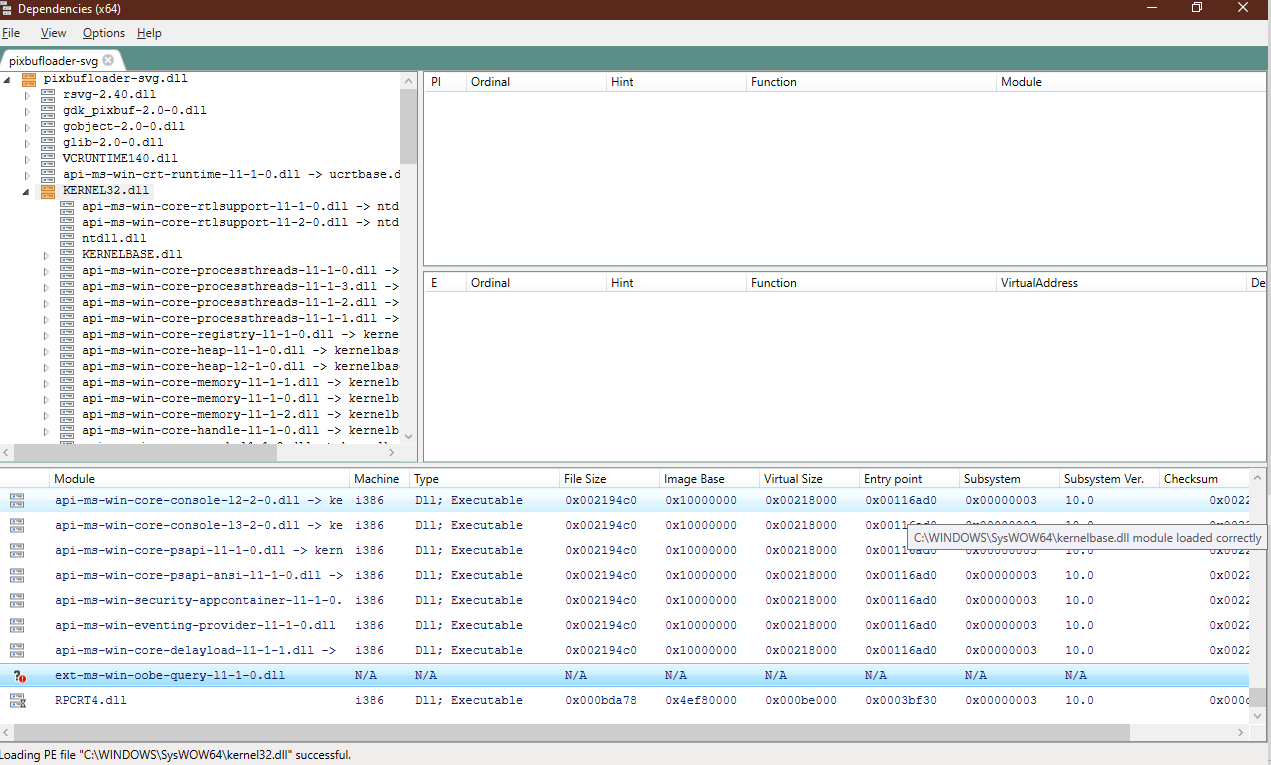
I have seen this exact error while running BB from source, very initially, but do not recall how exactly it got resolved. Although I am sure that I had not copied/replaced the missing DLL, highlighted in the screenshot.
This command looks like it is to build cache for loading images, such as icons, which generally work as seen on the application toolbar, so why do you think this error is related to the "make chaff" crash? @sanjaykaria
@az0 When I debug Bleachbit, and click the "Make Chaff" button, the app crashes with the below message in the debugger -
(bleachbit.py:1084): Gtk-WARNING **: 11:13:14.731: Could not load a pixbuf from /org/gtk/libgtk/theme/Adwaita/assets/check-symbolic.svg.
This may indicate that pixbuf loaders or the mime database could not be found.

(bleachbit.py:1084): GLib-GIO-ERROR **: 11:13:22.401: No GSettings schemas are installed on the system
This error seems to be related to the above error of building the image caches, I think
This command looks like it is to build cache for loading images, such as icons, which generally work as seen on the application toolbar, so why do you think this error is related to the "make chaff" crash? @sanjaykaria
When the "Make Chaff" is invoked, BB tries to load the image for the destination folder button from GTK. So, if we remove/comment the below lines from GuiChaff.py, the crash will not occur. But this is obviously not the solution, as the issue seems to be with loading the images.
        folder_box = Gtk.Box(orientation=Gtk.Orientation.HORIZONTAL)
        folder_box.add(Gtk.Label(_("Select destination folder")))
        self.choose_folder_button = Gtk.FileChooserButton()
        self.choose_folder_button.set_action(     #<---- remove this line
             Gtk.FileChooserAction.SELECT_FOLDER)   #<---- remove this line
        import tempfile
        self.choose_folder_button.set_filename(tempfile.gettempdir())
        folder_box.add(self.choose_folder_button)
        box.add(folder_box)
Related to this issue : https://gitlab.gnome.org/GNOME/gdk-pixbuf/-/issues/141
@az0
It seems that this issue is open from quite some time and there might be more similar issues.
However the gdk-pixbuf issue does not occur when running BleachBit with GTK3 binaries from Msys2.
Is using GTK3 binaries from Mysys2 for the BB build an option?
Is using GTK3 binaries from Mysys2 for the BB build an option?
@mkhon
Would this be a good solution for this issue?