

 blakeblackshear
[Config Support]: Object detected correctly but zoning not applied to event
Describe the problem you are having
I have been playing with Frigate for a couple of weeks with good results, and my TPU is en-route from Amazon. However I have an issue that I don't think will be solved by TPU.
I have got this running quite well with config tweaks and filters but I am still having issues with persons sometimes being detected correctly at the front of the house, but without the zone being applied to the event. Especially when the person does not walk onto the driveway from the street.
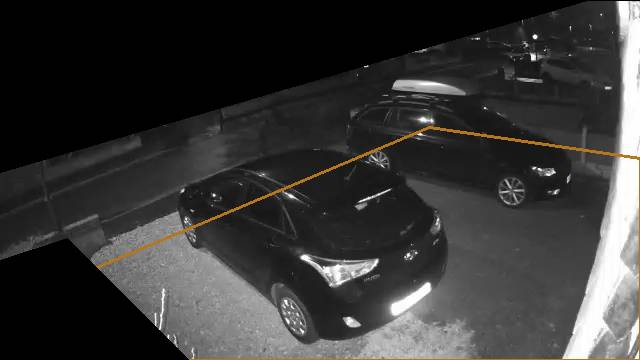
Here you can see the only zone configured (front_garden)
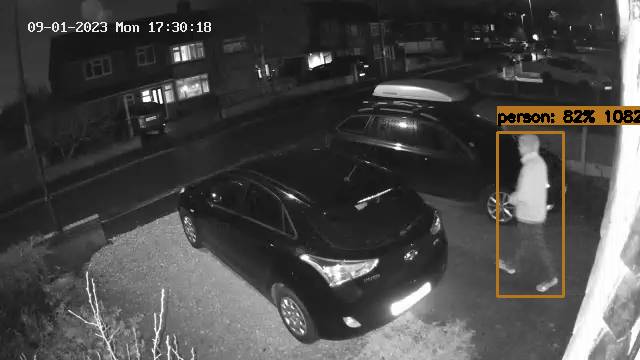
And here is an event snapshot showing me completely in the zone after leaving the house, but the event is zoneless.
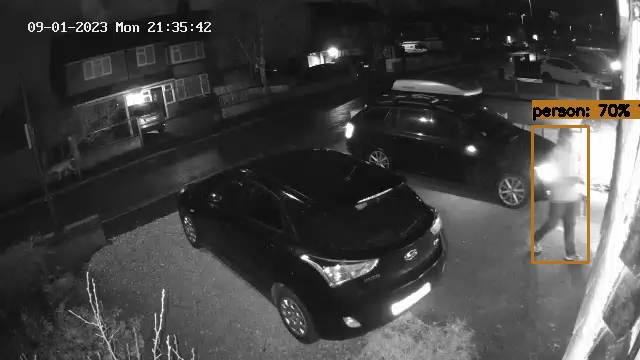
A similar issue here when I just got out of the car and walked to the house:
Any ideas about how I can solve this one please? I saw other comments about this behaviour when bounding boxes extend beyond the image boundaries but this doesn't seem to apply here. I am conscious that in both these examples the person never crosses into the zone, but appears for the first time within the zone boundaries. Could that be a factor? I don't see how I can avoid that when parking my car on my driveway and walking to the house.
Any help appreciated, thanks in advance.
Version
0.11.1-2EADA21
Frigate config file
mqtt:
  host: 192.168.111.88
  user: homeassistant
  password: [REDACTED]
  topic_prefix: frigate
  client_id: frigate

birdseye:
  enabled: False

motion:
  improve_contrast: True

record:
  enabled: True
  retain:
    days: 5
    mode: motion
  events:
    retain:
      default: 14
      mode: active_objects

snapshots:
  enabled: True

timestamp_style:
  position: "tl"
  format: "%d/%m/%Y %a %H:%M:%S"

cameras:
  Front:
    ffmpeg:
      inputs:
        - path: rtsp://[REDACTED]@192.168.111.70:554/Streaming/Channels/2
          roles:
            - detect
            - rtmp
        - path: rtsp://[REDACTED]@192.168.111.70:554/
          roles:
            - record
    detect:
      width: 640
      height: 360
      fps: 6
    motion:
      mask:
        - 640,0,587,0,0,172,0,0
        - 0,260,67,238,189,360,0,360
    objects:
      track:
        - person
        - cat
      filters:
        person:
          min_area: 250
          threshold: 0.5
          mask:
            - 268,104,390,74,544,43,640,42,640,0,0,0,0,193
            - 512,74,516,57,610,0,640,0,640,90
        cat:
          threshold: 0.5
    zones:
      front_garden:
        coordinates: 0,308,429,127,640,158,640,360,0,360
        filters:
          person:
            min_area: 750
    ui:
      order: 1

  Garage:
    ffmpeg:
      inputs:
        - path: rtsp://[REDACTED]@192.168.111.54:554/Streaming/Channels/2
          roles:
            - detect
            - rtmp
        - path: rtsp://[REDACTED]@192.168.111.54:554/
          roles:
            - record
    motion:
      mask:
        - 640,0,640,62,0,54,0,54,0,0
    detect:
      width: 640
      height: 480
      fps: 6
    objects:
      track:
        - person
        - cat
        - fox
      filters:
        person:
          min_area: 2000
          max_area: 80000
          threshold: 0.6
          mask:
            - 413,223,340,280,279,195,320,117
            - 200,256,240,255,218,50,198,56
        cat:
          threshold: 0.6
        fox:
          threshold: 0.6
    zones:
      side_of_house:
        coordinates: 0,60,342,133,640,286,640,480,0,480
      side_of_no26:
        coordinates: 340,0,343,108,640,245,640,0
    ui:
      order: 3

  Back:
    ffmpeg:
      inputs:
        - path: rtsp://[REDACTED]@192.168.111.91:554/Streaming/Channels/2
          roles:
            - detect
            - rtmp
        - path: rtsp://[REDACTED]@192.168.111.91:554/
          roles:
            - record
    motion:
      mask:
        - 640,0,640,80,393,95,340,67,0,95,0,0
        - 606,155,640,102,640,93,640,360,506,360
    detect:
      width: 640
      height: 360
      fps: 6
    objects:
      track:
        - person
        - cat
      filters:
        person:
          threshold: 0.6
          mask:
            - 511,360,640,360,640,125,616,124,522,228,585,220
        cat:
          threshold: 0.6
    zones:
      Back_Garden:
        coordinates: 0,60,25,55,166,33,313,54,393,88,452,83,456,112,535,91,633,102,619,122,607,162,528,360,0,360
    ui:
      order: 2
Relevant log output
No errors seen in logs
Frigate stats
{
"Back": {
"camera_fps": 6.1,
"capture_pid": 230,
"detection_fps": 0,
"pid": 217,
"process_fps": 6.1,
"skipped_fps": 0
},
"Front": {
"camera_fps": 6,
"capture_pid": 220,
"detection_fps": 0,
"pid": 213,
"process_fps": 6.1,
"skipped_fps": 0
},
"Garage": {
"camera_fps": 6.1,
"capture_pid": 226,
"detection_fps": 0,
"pid": 216,
"process_fps": 6.1,
"skipped_fps": 0
},
"detection_fps": 0,
"detectors": {
"cpu": {
"detection_start": 0,
"inference_speed": 422.57,
"pid": 209
}
},
"service": {
"latest_version": "unknown",
"storage": {
"/dev/shm": {
"free": 64.5,
"mount_type": "tmpfs",
"total": 67.1,
"used": 2.6
},
"/media/frigate/clips": {
"free": 1728221.6,
"mount_type": "cifs",
"total": 5957486.5,
"used": 4229264.9
},
"/media/frigate/recordings": {
"free": 1728221.6,
"mount_type": "cifs",
"total": 5957486.5,
"used": 4229264.9
},
"/tmp/cache": {
"free": 998.2,
"mount_type": "tmpfs",
"total": 1000,
"used": 1.8
}
},
"temperatures": {},
"uptime": 28347,
"version": "0.11.1-2eada21"
}
}
Operating system
Debian
Install method
Docker Compose
Coral version
CPU (no coral)
Any other information that may be helpful
No response

while watching the live debug view the zone will appear thickened when it considers the object to be in it. Can you show a screenshot of the events page which doesn't show any zones?
Odds are some zone filtering somewhere is going on, you could also use MQTT Explorer to watch the /events topic which would be helpful

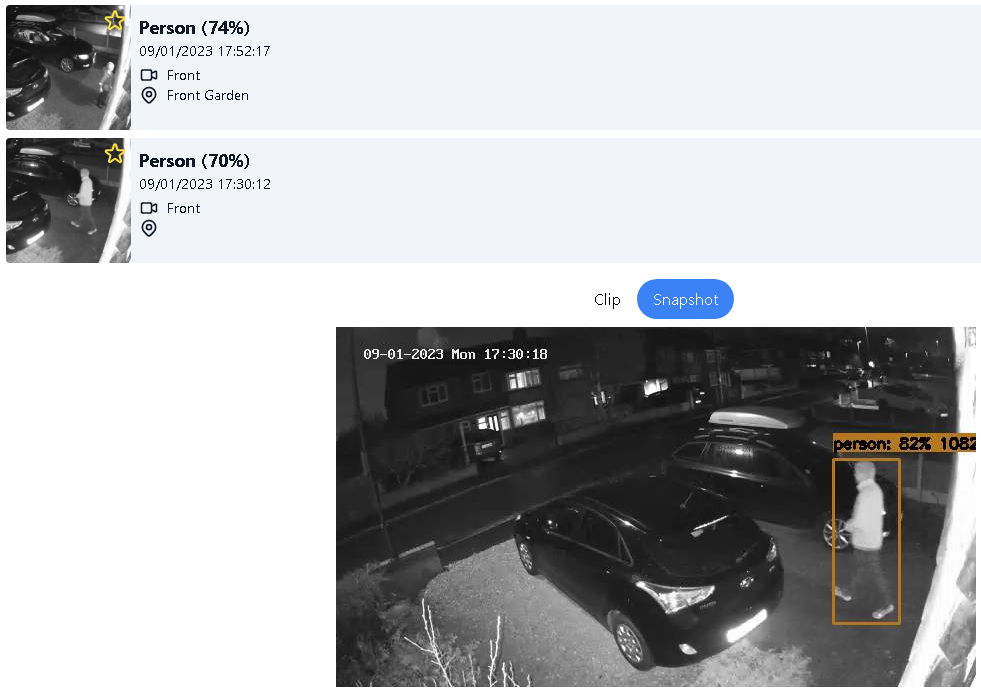
Thanks for the quick reply. Yes here is a screenshot showing the event. Notice the previous event is zoned correctly.
I just did as you suggested and checked with the live debug view. If I walk quickly through the zone, it tracks a person object but the zone does not change to a thick line. If I walk slowly it does the same, but the zone changes to a thick line.
I thought that once it had identified the person, most of the hard work is done working out the zoning would be easy - maybe I am just asking too much and need my TPU to arrive so that everything can be done quicker. If I am only in shot for a few seconds maybe it is all over too quickly and the zone is never applied.
Yes, I think that will solve this. Most likely you are having frames that are being skipped.
another thing is
      front_garden:
        coordinates: 0,308,429,127,640,158,640,360,0,360
        filters:
          person:
            min_area: 750
is probably causing issues, 750 is pretty close to a real person detection in your screenshot and I imagine if you stood in front of the back car you would be filtered out, that's probably also a factor (along with the high inference time)
OK thanks, i'll play with the min area and wait another week for my TPU to arrive. Thanks for your help, i've sent you some beer money.
OK thanks, i'll play with the min area and wait another week for my TPU to arrive. Thanks for your help, i've sent you some beer money.
Much appreciated, let me know if you have any other questions
This issue has been automatically marked as stale because it has not had recent activity. It will be closed if no further activity occurs. Thank you for your contributions.
![github-actions[bot] avatar](https://avatars.githubusercontent.com/in/15368?v=4 "Published by a pub.dev verified publisher")