

 blakeblackshear
[Config Support]:
Describe the problem you are having
Clips for an event also include video of other events. for example i go to events tab, then select an event to view its clip. that clip begins 20 mins before the actual event that was stored in the "events" tab.
Version
0.12 Beta 2
Frigate config file
mqtt:
  host: secret
  user: xxxx
  password: xxxx


# Optional: Restream configuration
# NOTE: Can be overridden at the camera level
restream:
  # Optional: Enable the restream (default: True)
  enabled: True
  # Optional: Force audio compatibility with browsers (default: shown below)
  force_audio: True
  # Optional: Video encoding to be used. By default the codec will be copied but
  # it can be switched to another or an MJPEG stream can be encoded and restreamed
  # as h264 (default: shown below)
  video_encoding: "copy"
  # Optional: Restream birdseye via RTSP (default: shown below)
  # NOTE: Enabling this will set birdseye to run 24/7 which may increase CPU usage somewhat.
  birdseye: False

ffmpeg:
  hwaccel_args: -c:v h264_cuvid


cameras:
  driveway_cam:
    ffmpeg:
      inputs:
        - path: rtsp://
          roles:
            # - clips
            - record
            - restream
            - detect
    detect:
      width: 1920
      height: 1080
      fps: 5
    objects:
      # Optional: list of objects to track from labelmap.txt (default: shown below
      track:
        - person
        - car
        - dog
        - cat
      filters:
        dog:
          threshold: 0.7
        cat:
          threshold: 0.7
        car:
          min_score: 0.5
          threshold: 0.7
        person:
          # Optional: minimum score for the object to initiate tracking (default: shown below)
          min_score: 0.5
          # Optional: minimum decimal percentage for tracked object's computed score to be considered a true positive (default: shown below)
          threshold: 0.7
    snapshots:
      enabled: True
      bounding_box: True
      retain:
        default: 7
      required_zones:
        - driveway_entrance
        - side_yard
        - front_yard
        - driveway
    motion:
      # 1080
      mask: 21,1053,510,1051,510,1006,21,1005

    record:
      enabled: True
      retain:
        days: 7
        mode: motion
      events:
        required_zones:
          - driveway_entrance
          - side_yard
          - front_yard
          - driveway
        retain:
          default: 14
          mode: active_objects
    zones:
      driveway_entrance:
        # 1920x1080
        coordinates: 1079,242,1233,254,1355,266,1321,225,1221,212,1125,205
        objects:
          - person
          - dog
          - cat
          - car
      driveway:
        coordinates: 0,1080,1920,1080,1920,753,1920,689,1880,650,1859,615,1834,583,1801,543,1779,516,1756,497,1738,473,1708,458,1693,441,1673,424,1687,401,1681,383,1645,373,1605,363,1563,352,1529,345,1495,333,1455,324,1424,314,1396,300,1373,283,1050,247,952,259,877,266,810,280,769,297,711,331,656,359,541,429,451,485,360,545,232,640,147,706,0,831
        objects:
          - person
          - dog
          - cat
      side_yard:
        coordinates:  0,784,52,753,102,719,141,680,174,657,259,596,316,551,367,514,422,483,472,452,524,425,564,400,605,380,637,355,672,336,713,318,737,298,776,281,828,264,884,253,920,247,968,249,997,246,1044,239,1077,233,1105,218,1116,202,1088,196,1051,194,1021,192,983,188,920,179,886,189,802,216,722,239,574,291,446,343,321,390,178,469,95,517,0,499
        objects:
          - person
          - dog
          - cat
      front_yard:
        coordinates: 1574,267,1630,280,1669,291,1695,300,1724,305,1721,325,1704,365,1683,372,1654,366,1616,357,1584,349,1553,342,1520,333,1483,321,1452,312,1423,302,1396,292,1376,275,1362,261,1349,247,1345,225
        objects:
          - person
          - dog
          - cat
  front_Door_cam:
    ffmpeg:
      inputs:
        - path: rtsp://
          roles:
            # - clips
            - record
            - restream
            - detect
    detect:
      width: 1920
      height: 1080
      fps: 5
    objects:
      # Optional: list of objects to track from labelmap.txt (default: shown below
      track:
        - person
        - car
        - dog
        - cat
      filters:
        dog:
          threshold: 0.7
        cat:
          threshold: 0.7
        person:
          # Optional: minimum score for the object to initiate tracking (default: shown below)
          min_score: 0.5
          # Optional: minimum decimal percentage for tracked object's computed score to be considered a true positive (default: shown below)
          threshold: 0.7
    snapshots:
      enabled: True
      bounding_box: True
      retain:
        default: 7
      required_zones:
        - front_yard
    motion:
      mask: 1887,0,1883,40,1348,39,1345,0


    record:
      enabled: True
      retain:
        days: 7
        mode: motion
      events:
        required_zones:
          - front_yard
        retain:
          default: 14
          mode: active_objects
    zones:
      front_yard:
        coordinates: 572,1080,1920,1080,1920,780,1270,666,1276,640,1084,613,1001,618,898,625,841,625,794,623,749,630,697,634,586,635,593,682
        objects:
          - person
          - dog
          - cat
detectors:
  tensorrt:
    type: tensorrt
    device: 0 #This is the default, select the first GPU

model:
  path: /trt-models/yolov7-tiny-416.trt
  input_tensor: nchw
  input_pixel_format: rgb
  width: 416
  height: 416
Relevant log output
None
Frigate stats
No response
Operating system
Debian
Install method
Docker Compose
Coral version
Other
Any other information that may be helpful
No response

This sounds like an issue with false positives that are lingering.
Maybe a specific example would be more helpful, but this sounds like there was a false positive which started the event and then an object came and left which caused the event to end. The event will start playing based on when the event began.

yeah, it difficult to describe without the clip to show. do you have any suggestions on how i could gather more info to help describe it to you?
Does the start time showed next to the thumbnail match when the clip started playing? (And how do they compare)
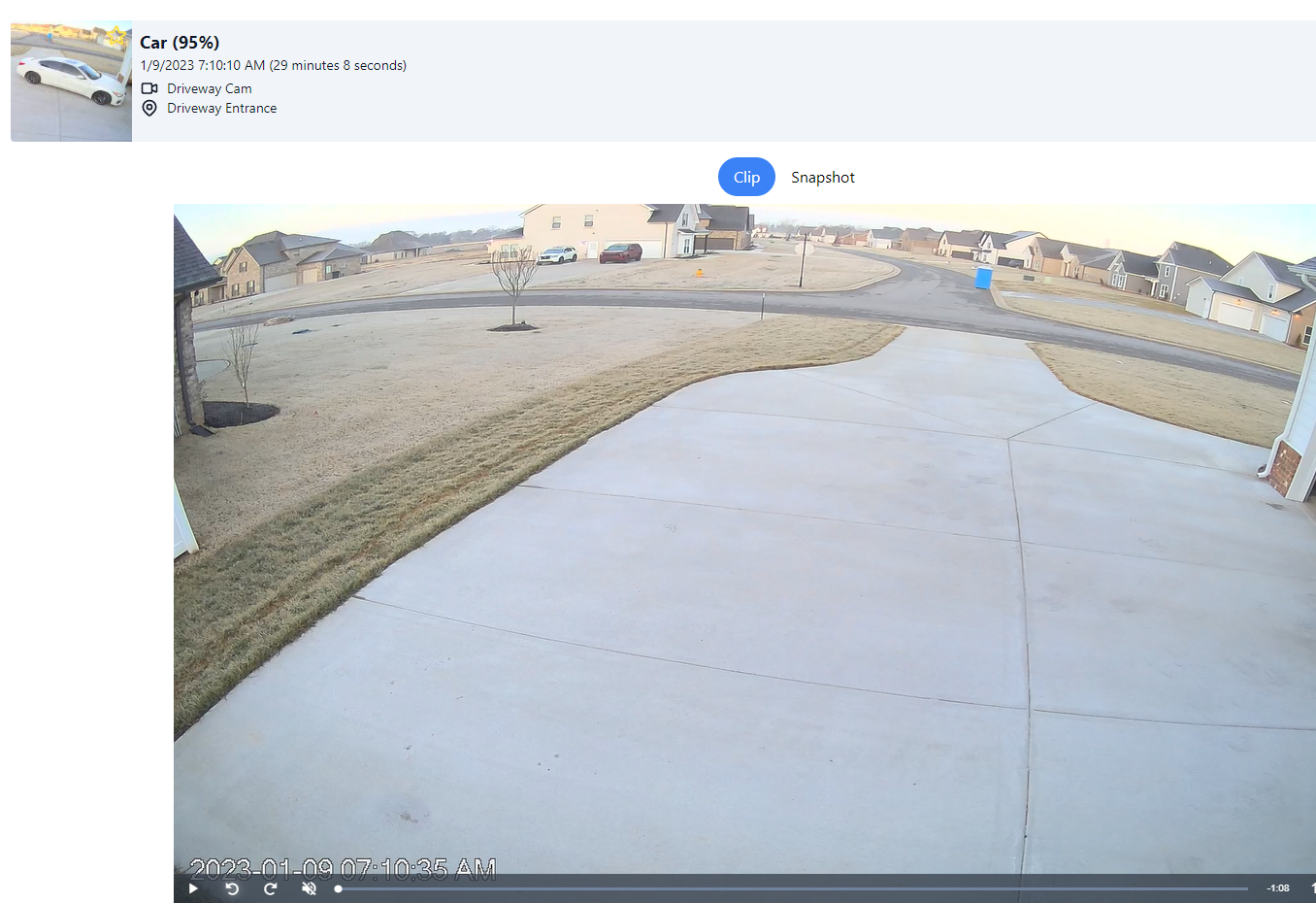
Okay then this is going to be an issue if a false positive or a car that entered the zone unexpectedly due to an incorrect bounding box. The event says it started at that time and it's pulling up the relevant recording footage so I think this is working as expected.
Recommend watching the debug view and seeing what is detected with bounding boxes enabled. If this doesn't happen again then probably nothing to worry about.
so you think that a bounding box is entering a required zone causing the start of the event and it didnt end until my car entered the driveway 20 mins later?
something like that, the event started at that time, it's not the case the event started at 7:30 but recordings from 7:10 come up. This means that frigate started the event at that time because it saw a car and that car remained in the frame (again this is a "car" as it may have never been a car and could be a false positive).
Has this happened before?
yes, i have another event that lasted almost 8 hours lol and ended with me entering the drive way again. looks like a car drove in the street that may have started the event. but i would have thought when that car leaves the frame the event would end right?
but i would have thought when that car leaves the frame the event would end right?
yes but again as I am saying there is a false positive. Frigate sees the car, the actual car leaves but frigate still thinks it sees that car somewhere. Then your car arrives, frigate sees that and thinks it is the same car that has been there all day and continues the event with it.
what if there is a car that drove by starting the event and a stationary car ('doesn't leave the frame') that's not in the required zones? sounds like the scenario your describing?
what if there is a car that drove by starting the event and a stationary car ('doesn't leave the frame') that's not in the required zones? sounds like the scenario your describing?
yes, frigate's tracking does not currently consider things like direction of travel, color, etc. so if it sees 1 car in frame A and then 1 car in Frame B it assumes it is the same car. This can mean a car was in the required zone and left the frame but another car was there and was assumed to be the same car.
it is also worth mentioning that similar issues can happen when using motion masks that are too large. These cause the motion of the car leaving to be ignored which means the car gets stuck inside the motion mask. I can't tell from the config if your motion mask is large or not
make sense, the motion mask it only over the time stamp. any thoughts on how to get around this?
Like I said it depends what exactly is happening as there are multiple possibilities, best way is to look at the debug camera view with bounding boxes enabled while one of these events is ongoing (or manually try to recreate the scenario) and see what it sees
the other option is to just set detect -> stationary -> interval to a nonzero number which will make frigate challenge stationary objects on that interval to ensure they are still there even if motion has not been seen around that object
ill try to recreate it and report back. not sure what im looking for exactly lol i have a feeling ill see the my car leave/enter the zone and the event still showing in process with these cars in the background lol
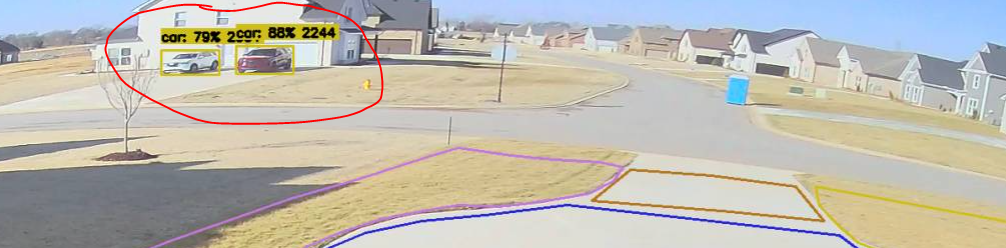
is there a way to get the bounding boxes on the clips. that would be helpful.
You can do it like: https://docs.frigate.video/development/contributing#2-create-a-local-config-file-for-testing
but you need to understand a few things:
- It is only an approximation and not an exact representation of what happened during the actual detection
- You need to set this up exactly the same as your actual camera (same resolution, same zones, same filters, etc.)
can i just duplicate the docker container, name it "dev" and map an other folder to contain the mp4 files to use for the path? seems like that would work.
yes just make sure it isn't pointed at the same database or they will conflict
so playing the MP4 im not seeing the bounding box of the car enter my zone at the end of the driveway. that would have to have happened for the event to have started right?
so playing the MP4 im not seeing the bounding box of the car enter my zone at the end of the driveway. that would have to have happened for the event to have started right?
- It wouldn't have needed to happen if it was your car leaving and your car and another cars event ids were swapped.
- Even then like I said it's an approximation of what happened, just because it doesn't happen playing back doesn't mean it happened that way originally
maybe these are helpful?
the car that start the event:
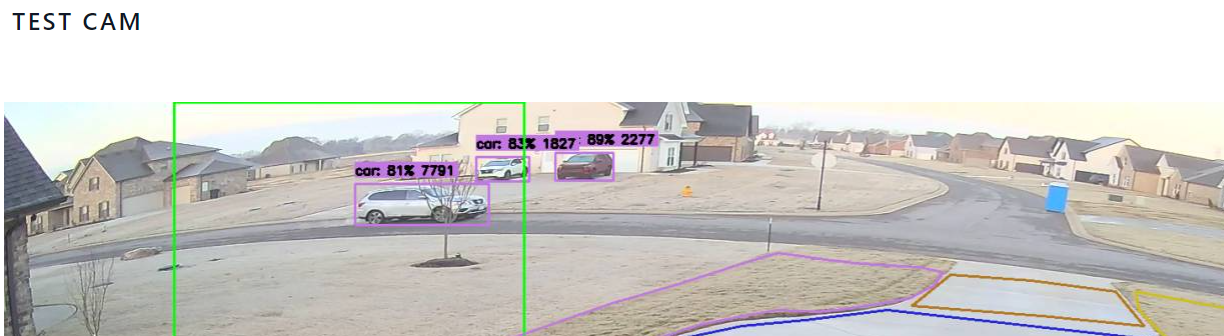
after the car passing:
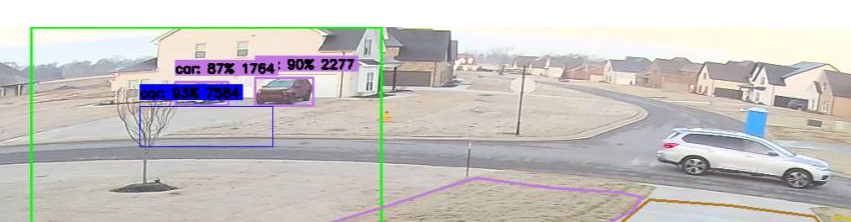
hmm interesting, seems like it lost the car somehow, and then yes it would make sense that the IDs swap. I'm not sure if maybe this is an issue with the trt yolov7 model or something else.
In any case I'd recommend using a car object mask to block out those neighbor cars. We typically don't recommend blocking out true positive objects but the ID switching is the exception.
and to be clear an improved tracking which handles this is on the roadmap
after i masked out the car objects in the neighbors drive way. the model follows the car across the entire frame. it defiantly seems to get confused when the moving car passes in front of stationary cars.
how do you link the objects in the frame to an event? i would assume that when a positive detect happens a event it created with a unique ID but i have no idea how that object is tracked across the frame and still linked to the same ID. that seems very difficult unless the yolov7 model provides an ID of each object it detects.
how do you link the objects in the frame to an event? i would assume that when a positive detect happens a event it created with a unique ID but i have no idea how that object is tracked across the frame and still linked to the same ID. that seems very difficult unless the yolov7 model provides an ID of each object it detects.
I'm not really sure what you're asking. The object detector (tensorrt with yolov7) just takes an input image and gives back data. Frigate does all the handling of assigning IDs, keeping tracking of them as the object moves across the frame, and eventually leaves the frame.
and yes it is difficult, which is why this issue can happen. Like I said we are hoping to improve this in the future by improving the tracking.
it was an attempt to understand how it works in the background. me being familiar with DBs and not object detectors (or what data they return), i was asking if the object detector is generating the ID for each object in the frame and frigate is updating entries in the DB to link that object ID to an event or is frigate generating the object ID and the event ID.
but you read between the lines enough to answer my question though lol
I haven't worked on that part of frigate so I can't really give much info on how it works other than that it does. But yes frigate assigns an ID when an event starts and that event has a lifecycle for when the object is visible in the frame.
It's a simple approach that matches the bounding box with the closest center in the next frame.
