

 blakeblackshear
[Support]: Missed detection after upgrade
Describe the problem you are having
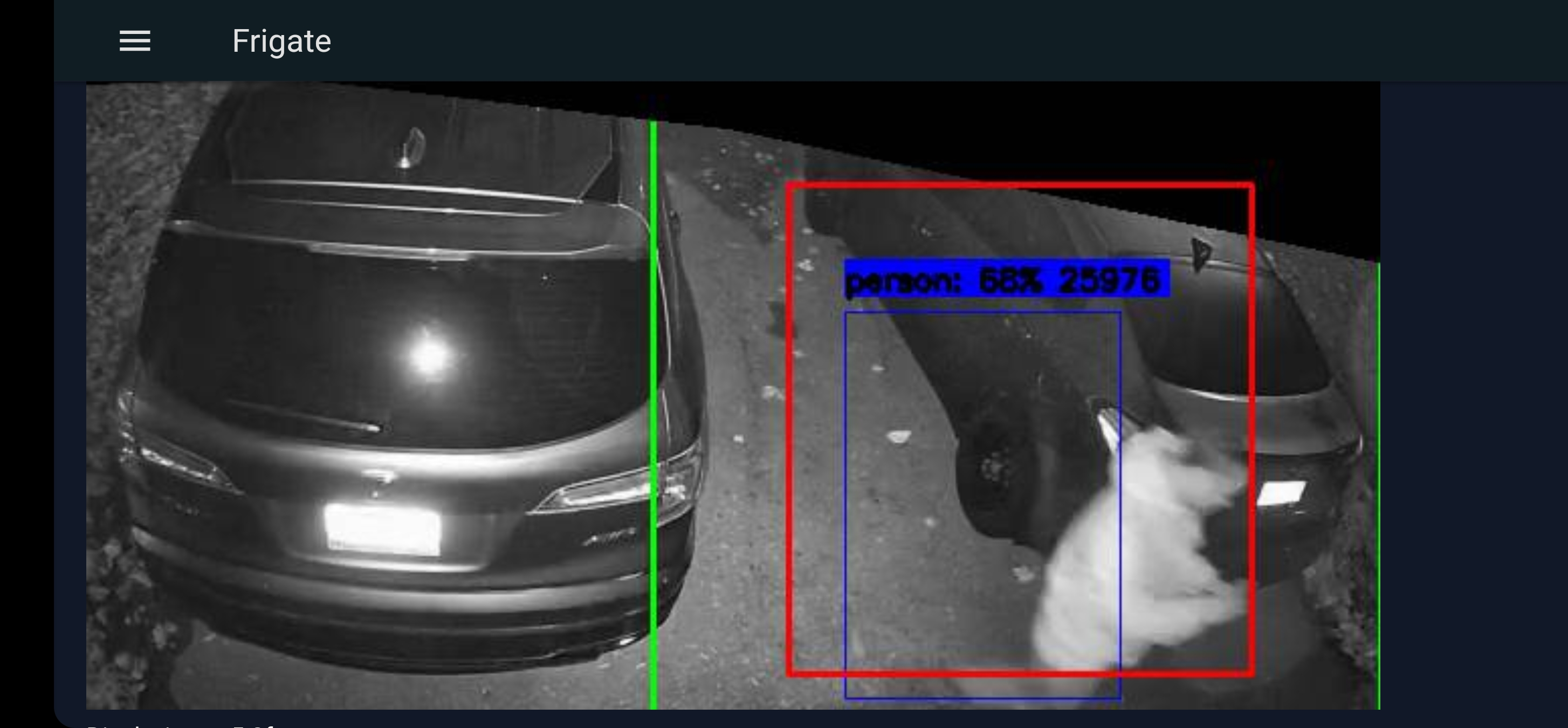
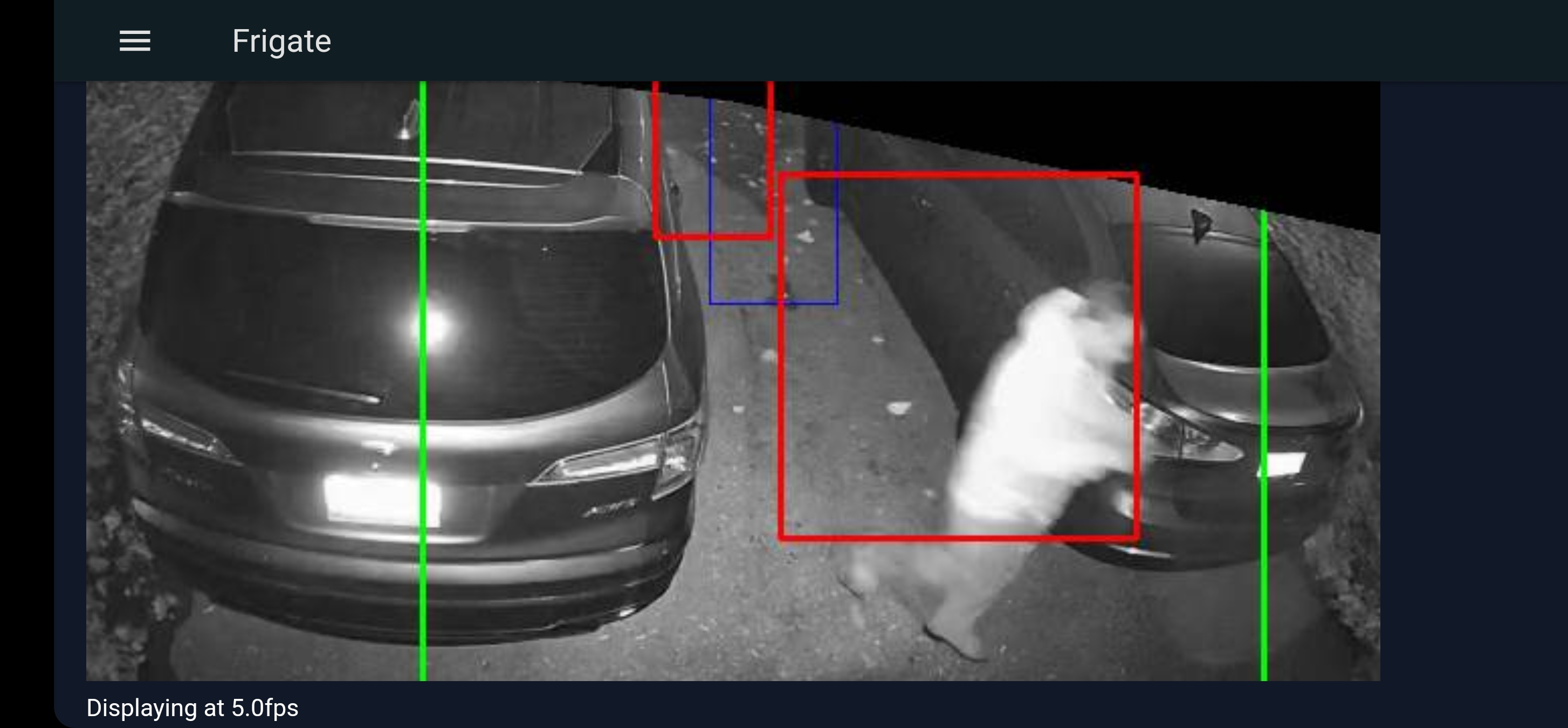
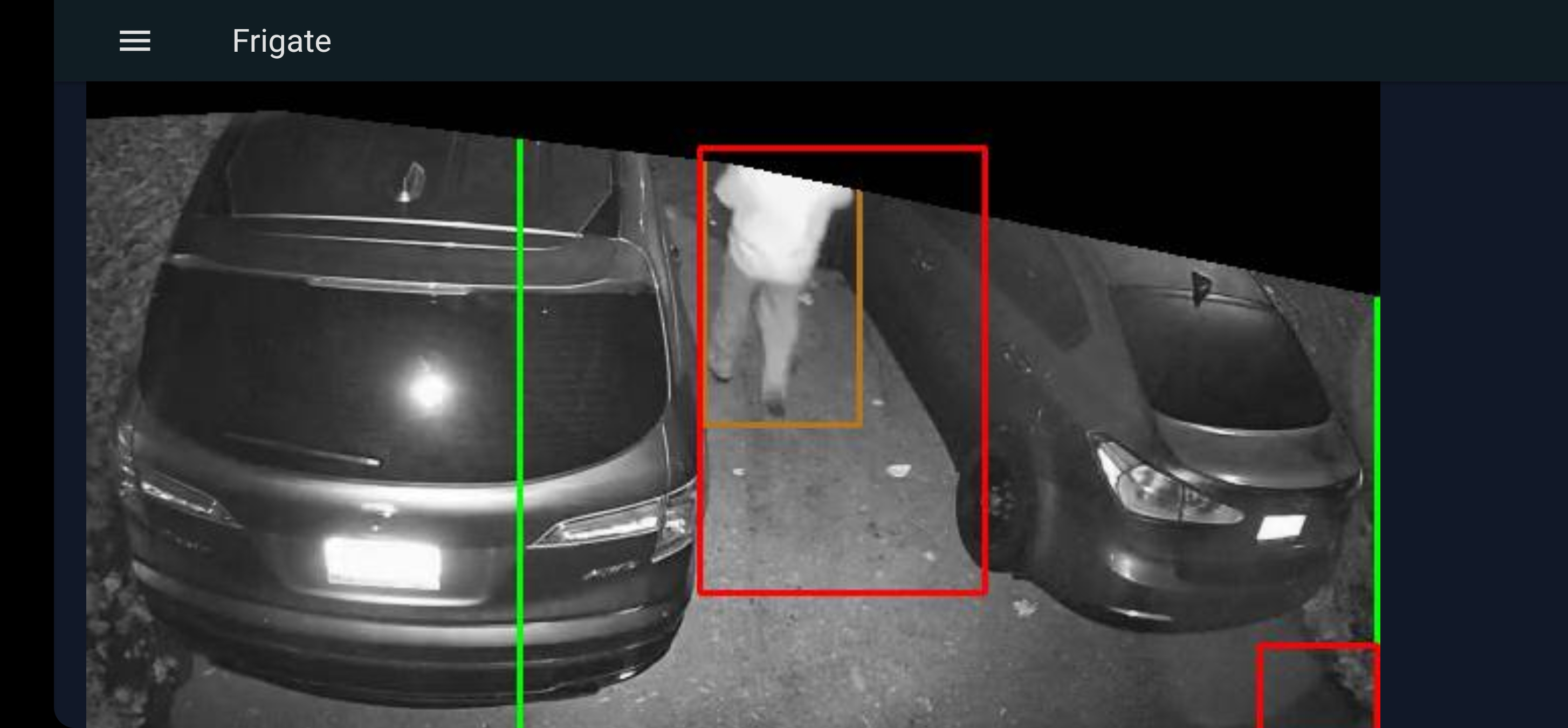
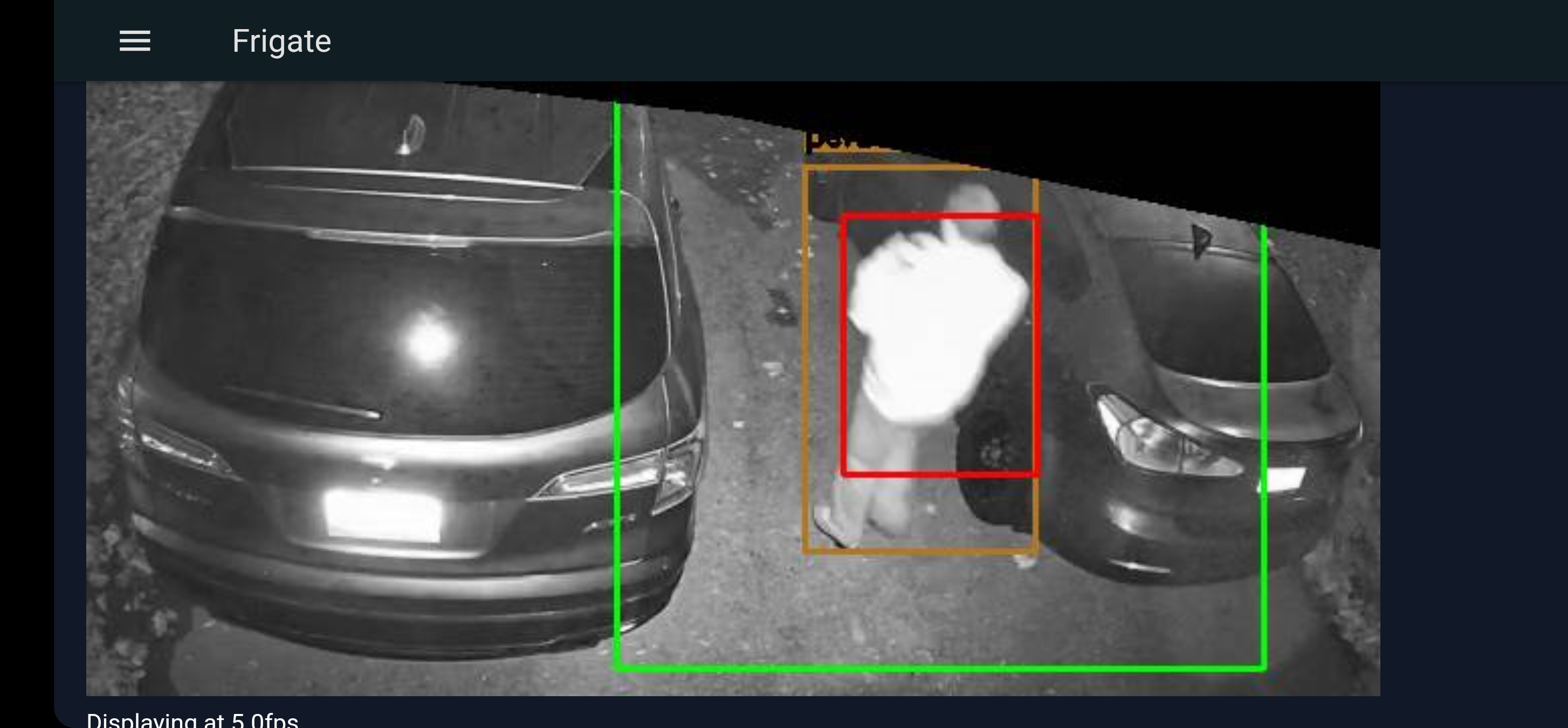
Detection has been hit and miss recently after upgrading to the latest version. I am using the exact same configuration. Looking at the debug I see the boxes but the person is not detected at the end.
Version
0.11.1-2eada21
Frigate config file
# frigate.yml
detectors:
  cpu1:
    type: cpu
mqtt:
  # Required: host name
  host: caha.duckdns.org
  # Optional: port (default: shown below)
  port: 1883
  # Optional: topic prefix (default: shown below)
  # WARNING: must be unique if you are running multiple instances
  topic_prefix: frigate
  # Optional: client id (default: shown below)
  # WARNING: must be unique if you are running multiple instances
  client_id: frigate
  # Optional: user
  user: frigate
  # Optional: password
  # NOTE: Environment variables that begin with 'FRIGATE_' may be referenced in {}.
  #       eg. password: '{FRIGATE_MQTT_PASSWORD}'
  password: Fr1g@te21
  # Optional: interval in seconds for publishing stats (default: shown below)
  stats_interval: 60
rtmp:
  enabled: false

motion:
  contour_area: 100
  delta_alpha: 0.2
  frame_alpha: 0.2
  frame_height: 80
  threshold: 25

birdseye:
  # Optional: Enable birdseye view (default: shown below)
  enabled: True
  # Optional: Width of the output resolution (default: shown below)
  width: 1280
  # Optional: Height of the output resolution (default: shown below)
  height: 720
  # Optional: Encoding quality of the mpeg1 feed (default: shown below)
  # 1 is the highest quality, and 31 is the lowest. Lower quality feeds utilize less CPU resources.
  quality: 8
  # Optional: Mode of the view. Available options are: objects, motion, and continuous
  #   objects - cameras are included if they have had a tracked object within the last 30 seconds
  #   motion - cameras are included if motion was detected in the last 30 seconds
  #   continuous - all cameras are included always
  mode: continuous

cameras:
  driveway:
    objects:
      track:
        - person
      filters:
        person:
          mask:
            - 95,38,317,64,640,130,640,0,0,0,0,42
#          min_score: 0.49
#          threshold: 0.54
#          min_area: 1000
    ffmpeg:
      inputs:
        - path: rtsp://admin:pass@ip140/2
          roles:
            - detect
        - path: rtsp://admin:pass@ip140/1
          roles:
            - record
    detect:
      width: 640
      height: 352
      fps: 5
    motion:
      mask:
        - 95,38,317,64,640,130,640,0,0,0,0,42
    record:
      enabled: true
      retain:
        days: 0
      events:
        retain:
          default: 5
          mode: motion
#    clips:
#      enabled: true
#      retain:
#        default: 5
    snapshots:
      enabled: True
      bounding_box: True
      timestamp: True
      retain:
        default: 7
################################################
  front_porch_camera:
    objects:
      track:
        - person
      filters:
        person:
          mask:
            - 148,348,171,122,173,12,377,8,518,57,640,80,640,0,0,0,0,352
    ffmpeg:
      inputs:
        - path: rtsp://admin:pass@ip141/2
          roles:
            - detect
        - path: rtsp://admin:pass@ip141/1
          roles:
            - record
    detect:
      width: 640
      height: 352
      fps: 5
    motion:
      mask:
        - 148,348,171,122,173,12,377,8,518,57,640,80,640,0,0,0,0,352
    record:
      enabled: true
      retain:
        days: 0
      events:
        retain:
          default: 5
          mode: motion
    snapshots:
      enabled: True
      bounding_box: True
      timestamp: True
      retain:
        default: 7
Relevant log output
[2022-11-23 19:47:52] ws4py                          INFO    : Managing websocket [Local => 127.0.0.1:8082 | Remote => 127.0.0.1:36338]
[2022-11-23 19:47:54] ws4py                          INFO    : Terminating websocket [Local => 127.0.0.1:8082 | Remote => 127.0.0.1:36338]
[2022-11-23 19:48:49] ws4py                          INFO    : Terminating websocket [Local => 127.0.0.1:5002 | Remote => 127.0.0.1:45430]
[2022-11-23 19:48:59] ws4py                          INFO    : Managing websocket [Local => 127.0.0.1:5002 | Remote => 127.0.0.1:51312]
[2022-11-23 19:49:18] ws4py                          INFO    : Terminating websocket [Local => 127.0.0.1:5002 | Remote => 127.0.0.1:51312]
[2022-11-23 19:49:18] ws4py                          INFO    : Managing websocket [Local => 127.0.0.1:5002 | Remote => 127.0.0.1:60514]
[2022-11-23 19:49:19] ws4py                          INFO    : Managing websocket [Local => 127.0.0.1:8082 | Remote => 127.0.0.1:51084]
[2022-11-23 19:49:20] ws4py                          INFO    : Terminating websocket [Local => 127.0.0.1:8082 | Remote => 127.0.0.1:51084]
[2022-11-23 19:50:22] ws4py                          INFO    : Terminating websocket [Local => 127.0.0.1:5002 | Remote => 127.0.0.1:60514]
[2022-11-23 19:50:39] ws4py                          INFO    : Managing websocket [Local => 127.0.0.1:5002 | Remote => 127.0.0.1:34426]
[2022-11-23 19:50:41] ws4py                          INFO    : Managing websocket [Local => 127.0.0.1:8082 | Remote => 127.0.0.1:46356]
[2022-11-23 19:50:42] ws4py                          INFO    : Terminating websocket [Local => 127.0.0.1:8082 | Remote => 127.0.0.1:46356]
[2022-11-23 19:50:51] ws4py                          INFO    : Managing websocket [Local => 127.0.0.1:8082 | Remote => 127.0.0.1:33772]
[2022-11-23 19:50:52] ws4py                          INFO    : Terminating websocket [Local => 127.0.0.1:8082 | Remote => 127.0.0.1:33772]
[2022-11-23 19:53:36] ws4py                          INFO    : Terminating websocket [Local => 127.0.0.1:5002 | Remote => 127.0.0.1:34426]
[2022-11-23 19:54:45] ws4py                          INFO    : Managing websocket [Local => 127.0.0.1:8082 | Remote => 127.0.0.1:54270]
[2022-11-23 19:55:00] ws4py                          INFO    : Managing websocket [Local => 127.0.0.1:5002 | Remote => 127.0.0.1:50224]
[2022-11-23 19:56:36] ws4py                          INFO    : Terminating websocket [Local => 127.0.0.1:5002 | Remote => 127.0.0.1:50224]
[2022-11-23 20:07:56] ws4py                          ERROR   : Failed to receive data
Traceback (most recent call last):
  File "/usr/local/lib/python3.9/dist-packages/ws4py/websocket.py", line 394, in once
    b = self.sock.recv(self.reading_buffer_size)
ConnectionResetError: [Errno 104] Connection reset by peer
[2022-11-23 20:07:56] ws4py                          INFO    : Terminating websocket [Local => 127.0.0.1:8082 | Remote => 127.0.0.1:54270]
[2022-11-23 23:51:57] ws4py                          INFO    : Managing websocket [Local => 127.0.0.1:5002 | Remote => 127.0.0.1:54268]
[2022-11-23 23:53:39] ws4py                          INFO    : Terminating websocket [Local => 127.0.0.1:5002 | Remote => 127.0.0.1:54268]
[2022-11-23 23:58:32] ws4py                          INFO    : Managing websocket [Local => 127.0.0.1:5002 | Remote => 127.0.0.1:48578]
[2022-11-23 23:58:57] ws4py                          INFO    : Terminating websocket [Local => 127.0.0.1:5002 | Remote => 127.0.0.1:48578]
FFprobe output from your camera
ffprobe version 4.4.2 Copyright (c) 2007-2021 the FFmpeg developers
  built with gcc 11 (GCC)
  configuration: --prefix=/usr --bindir=/usr/bin --datadir=/usr/share/ffmpeg --docdir=/usr/share/doc/ffmpeg --incdir=/usr/include/ffmpeg --libdir=/usr/lib64 --mandir=/usr/share/man --arch=x86_64 --optflags='-O2 -flto=auto -ffat-lto-objects -fexceptions -g -grecord-gcc-switches -pipe -Wall -Werror=format-security -Wp,-D_FORTIFY_SOURCE=2 -Wp,-D_GLIBCXX_ASSERTIONS -specs=/usr/lib/rpm/redhat/redhat-hardened-cc1 -fstack-protector-strong -specs=/usr/lib/rpm/redhat/redhat-annobin-cc1 -m64 -mtune=generic -fasynchronous-unwind-tables -fstack-clash-protection -fcf-protection' --extra-ldflags='-Wl,-z,relro -Wl,--as-needed -Wl,-z,now -specs=/usr/lib/rpm/redhat/redhat-hardened-ld -specs=/usr/lib/rpm/redhat/redhat-annobin-cc1 ' --extra-cflags=' -I/usr/include/rav1e' --enable-libopencore-amrnb --enable-libopencore-amrwb --enable-libvo-amrwbenc --enable-version3 --enable-bzlib --enable-chromaprint --disable-crystalhd --enable-fontconfig --enable-frei0r --enable-gcrypt --enable-gnutls --enable-ladspa --enable-libaom --enable-libdav1d --enable-libass --enable-libbluray --enable-libbs2b --enable-libcdio --enable-libdrm --enable-libjack --enable-libfreetype --enable-libfribidi --enable-libgsm --enable-libilbc --enable-libmp3lame --enable-libmysofa --enable-nvenc --enable-openal --enable-opencl --enable-opengl --enable-libopenjpeg --enable-libopenmpt --enable-libopus --enable-libpulse --enable-librsvg --enable-librav1e --enable-librtmp --enable-librubberband --enable-libsmbclient --enable-version3 --enable-libsnappy --enable-libsoxr --enable-libspeex --enable-libsrt --enable-libssh --enable-libsvtav1 --enable-libtesseract --enable-libtheora --enable-libtwolame --enable-libvorbis --enable-libv4l2 --enable-libvidstab --enable-libvmaf --enable-version3 --enable-vapoursynth --enable-libvpx --enable-vulkan --enable-libglslang --enable-libwebp --enable-libx264 --enable-libx265 --enable-libxvid --enable-libxml2 --enable-libzimg --enable-libzmq --enable-libzvbi --enable-lv2 --enable-avfilter --enable-avresample --enable-libmodplug --enable-postproc --enable-pthreads --disable-static --enable-shared --enable-gpl --disable-debug --disable-stripping --shlibdir=/usr/lib64 --enable-lto --enable-libmfx --enable-runtime-cpudetect
  libavutil      56. 70.100 / 56. 70.100
  libavcodec     58.134.100 / 58.134.100
  libavformat    58. 76.100 / 58. 76.100
  libavdevice    58. 13.100 / 58. 13.100
  libavfilter     7.110.100 /  7.110.100
  libavresample   4.  0.  0 /  4.  0.  0
  libswscale      5.  9.100 /  5.  9.100
  libswresample   3.  9.100 /  3.  9.100
  libpostproc    55.  9.100 / 55.  9.100
Frigate stats
No response
Operating system
HassOS
Install method
HassOS Addon
Coral version
CPU (no coral)
Network connection
Wireless
Camera make and model
Chortau
Any other information that may be helpful
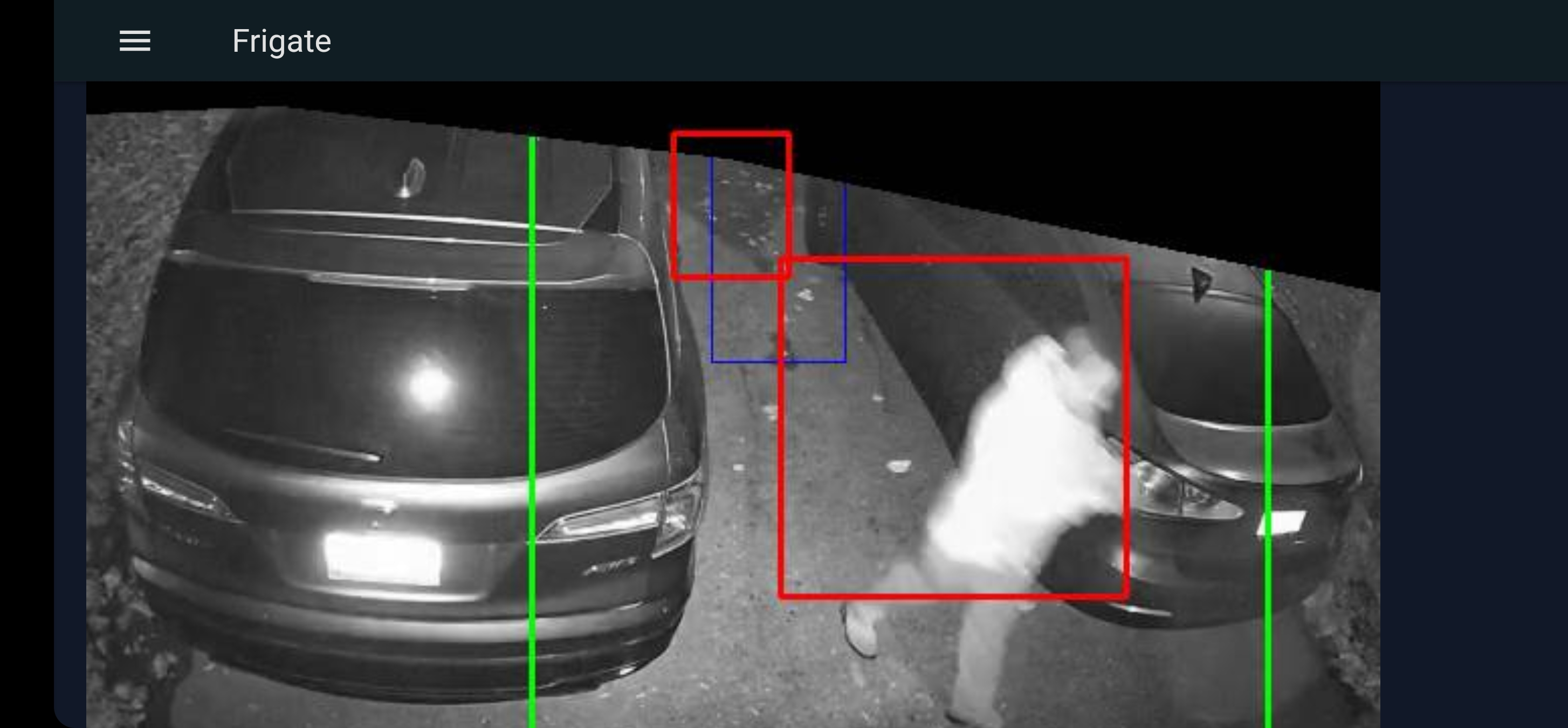


I was on 3.1 Today I had a bunch of missed detections, people walk on my driveway (undetected) and get detected by my front porch camera when they walk that way
There weren't any code changes related to the model or detection between those versions.
Thank you for that, any idea why this happening now ?. What should I look for ?
I don't see anything obvious. If something else is using more CPU, then it could be skipping more frames since you are using a CPU detector.
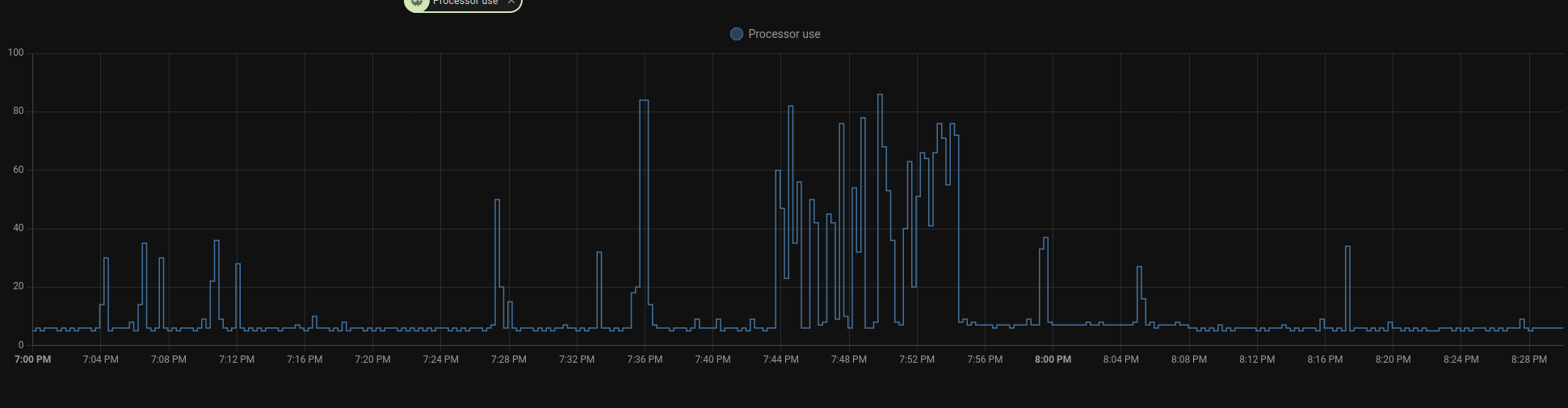 This is my CPU at the time (the 7:44p mark)
I am pretty sure it's not the cpu now. This is mostly happening with the driveway camera. If it was cpu then people wouldn't get detected at the next camera when you they are going from the driveway to the front but they are detected at the front
I can't think of any reason this would have changed since there isn't any difference in the code or model for motion or object detection.
I have been doing more testing and my observation is that if the person moves a little fast, they don't get detected. I was moving with my phone in my hand and open on the debug view of this camera and if I move quickly the box (blue) shows person with 50-60% but never gets registered as a person and if I stand for a couple of second it gets registered.
You would likely be significantly more blurry when moving fast at night. I would expect the same behavior on the previous version.
I agree on the blurry part but it wasn't the case before, detection at night was fast. Why is it showing person in the blue box but not detecting at the end?. Maybe tuning?
Blue indicates that the object is no longer detected, then waits detect -> max_disappeared before ending the detection.

Here are my settings for the camera, am using stream 2 for detection, any suggestions ?
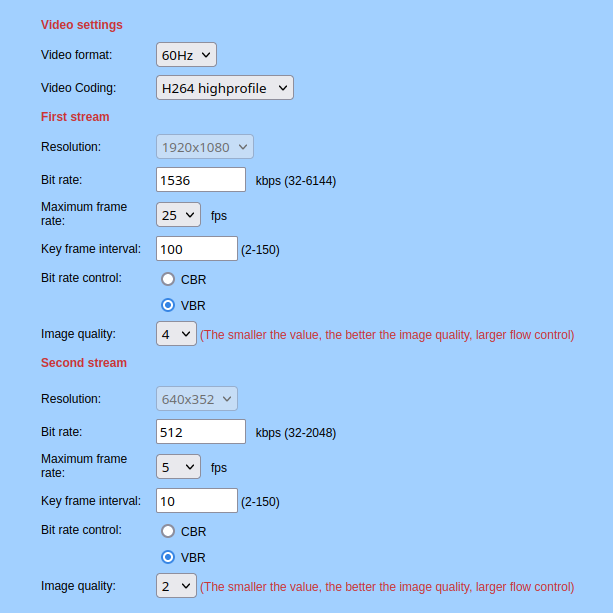
set key frame interval to same as fps, better image quality, maybe try using constant bit rate instead of variable
I was on CBR before and changed it when I had the issue. I will set it back on the second stream. The key frame setting for both streams or the detection one ?
so 25 for stream 1 and 5 for stream 2 ? Would it make any difference on the detection accuracy ?
so 25 for stream 1 and 5 for stream 2 ?
yes
Would it make any difference on the detection accuracy ?
not necessarily, but it may help create a more clear image
I am interested in the detection side, would increasing the bit rate make detection better and what would be the max?
Your camera settings show you the max and again it's difficult to say, it may help give a more clear image and that may help improve detection. I'd suggest just trying things out and seeing how it goes
How much different is the lighting in the footage from before when it used to work good vs now? What about the motion blur, was it the same?
For me the nights are darker so my cameras are preforming more poorly causing ton of motion blur. And the sunsets are causing people on the road to be detected on the yard because of their massive shadows.

There should be no difference, the camera has always been in the dark without lights. I couldn't tell about blur as it has always been blurry at night (the second stream used for detection is low res.)
This issue has been automatically marked as stale because it has not had recent activity. It will be closed if no further activity occurs. Thank you for your contributions.
![github-actions[bot] avatar](https://avatars.githubusercontent.com/in/15368?v=4 "Published by a pub.dev verified publisher")