

 bitwarden
Firefox browser extention does not automatically or manually lock anymore
Steps To Reproduce
- Restart Firefox
- Unlock Bitwarden
- Use the browser a bit
- Try to lock Bitwarden
Expected Result
Expected the extention to lock and require password/PIN.
Actual Result
Does not do anything.
Screenshots or Videos
No response
Additional Context
When I try to to it manually in the Settings in the extension it also does nothing.
Operating System
macOS
Operating System Version
12.5.1
Web Browser
Firefox
Browser Version
104.0.2
Build Version
2022.8.0

I am also having issues with the Firefox extension not locking after 30 minutes as I have it setup. I'll update this comment with more os / build details
@timharek the browser version you listed is a link to a book on goodreads. I think you pasted the wrong information
Edit: Operating System Arch Linux
Operating System Version 5.15.53-1-lts
Web Browser Firefox
Browser Version 102.0.1
Build Version 2022.8.0

@timharek the browser version you listed is a link to a book on goodreads. I think you pasted the wrong information
Thanks for letting me know, for some reason I can't copy my browser version from the settings 😅
Hi @timharek and @mrlinuxfish, thank you for your reports.
Is it possible a popped out window of the extension was open or Bitwarden was open in the Firefox sidebar? If one of those were the case then this has previously been reported with https://github.com/bitwarden/clients/issues/854
If not, then it's possibly a duplicate of https://github.com/bitwarden/clients/issues/3274
Please close this issue, if its a duplicate to one of the mentioned issues.

Thanks for the reply!
Is it possible a popped out window of the extension was open or Bitwarden was open in the Firefox sidebar?
No, I regularly quit my browser and this happens every time now. It may be a duplicate of #3274, but I don't know for sure.
@djsmith85 I have closed my browser a few times and I definitely don't have bitwarden open in the sidebar or a floating window
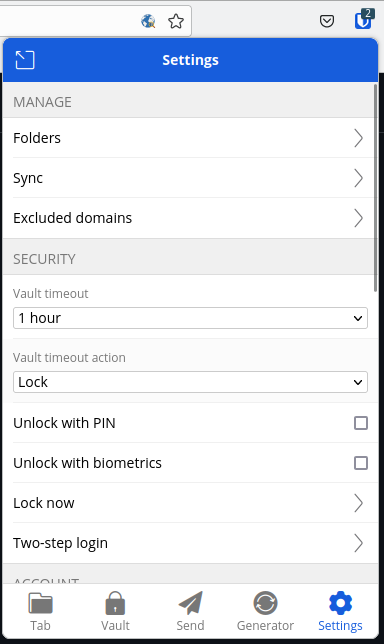
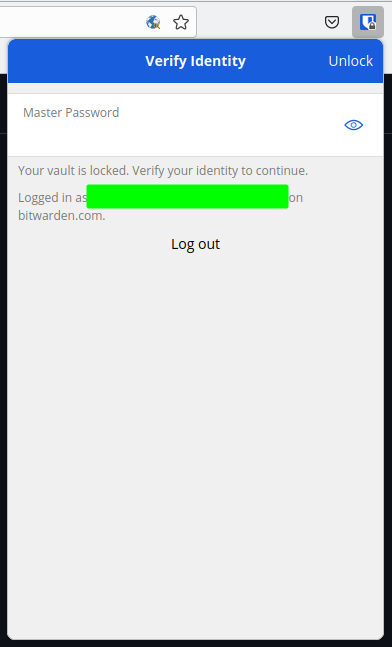

My vault is also permantly unlocked despite having a vault timeout of "1 minute", and vault timeout action of "Lock". Even pressing on the "Lock Now" does nothing. Wonderful security.
OS: macOS Monterey 12.4 Browser: Firefox 104.0.2 Extension: 2022.9.1

It works for me on (I will edit my message later to add the version of the browser on windows): Firefox 105.0 + Ubuntu 20.04.5 LTS Firefox + Windows 10 Edge + Windows 10
Be careful, being arrogant like this may make people not want to help anymore. Have you tried re-installing the extension? What about logout as a timeout action, does it work?
Restarting the browser entirely has solved the issue for me. However if its possible to put the extension in this state it seems like a siginificant security vulnerability (hence my sarcastic comment, I apologise for this it was inappropriate).
I get the same problem from time to time on Firefox 106.0.5 on NixOS 22.05. I have my timeout set to 15 minutes but it happens that is does not lock. If I try "Lock Now", it does not work either. I have to quit the browser and start it again. Then the extension is locked and I can unlock it. Now the "Lock Now" option is working.
I don't have a way to reproduce this problem consistently.

I've had this same issue occur twice on Firefox on macOS. The automatic lock (set to 5 minutes in my case) doesn't work, nor does the manual "Lock Now" option in the menu. Restarting the browser fixes the issue. Haven't figured out how to reproduce this on demand yet, but if I do I'll share here. In the meantime, is there any useful debugging info us users can collect?
It's disconcerting to open my laptop and see my vault is still unlocked from the last time I used it, hours ago.
Operating System macOS
Operating System Version 10.15.7
Web Browser Firefox
Browser Version 106.0.2
Build Version 2022.10.1

Me and at least one other person are able to consistently reproduce this behaviour on Firefox 107 on Linux by doing the following:
- Open the extension as a pop-over thing and log-in
- Start the process of creating a new login
- Cause Firefox window to lose focus (e.g. by alt-tabbing to a different window), which in turn causes the pop-over thing to dismiss in the middle of creating a new login
After this, even trying to manually lock the vault will not work.

@nortti0 good job finding this. Same behaviour on windows. With this, I guess someone will be able to figure out where the problem is coming from. But beware: being in the middle of creating a new login is probably ONLY ONE of the triggers which can lead to this tricky situation.
I can confirm @nortti0 's steps work on macOS - well done! Specifically, this is how I do it:
- Ensure the Bitwarden extension is logged into a vault, but is locked
- Browse to a page with a URL that doesn't have a vault entry associated with it, e.g., Firefox's new tab page
- Click the toolbar button to open the Bitwarden popup
- Enter the master password to unlock the vault
- Click the "Add a Login" button
- Command-Tab away from Firefox to a different application that's running, causing the popup to close
- Command-Tab back to Firefox
- Click the toolbar button again to re-open the Bitwarden popup
- In the popup, click Settings -> Lock Now and observe that the vault does not lock
Echoing @Camusensei's point, I don't recall the circumstances that caused me to stumble upon this issue originally, so I can't say for sure if this is the only way to induce it.
As of now, I'm using:
- Firefox 107.0.1
- Bitwarden extension 2022.10.1
- macOS 10.15.7