

 bitwarden
Extension auto-fills Wordpress page title field
Steps To Reproduce
- Log in to a Wordpress site as an editor
- Editor must be Classic (not Gutenberg), which is accomplished via the "Classic Editor" plugin
- Go to edit a page
- Allow the session to timeout (or immediately) click auto-fill
- The Title field is replaced with your WP username
Expected Result
Your username is inserted only into the username field of the session timeout popup.
Actual Result
Your username is inserted into the Title field, as well as the username field of the session timeout popup. This can cause users to accidentally change the post title.
Screenshots or Videos
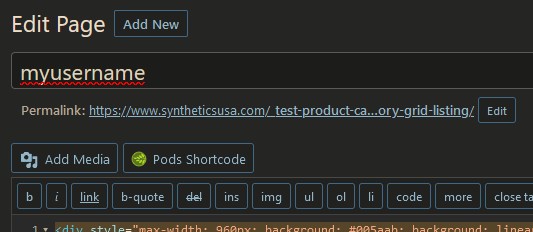
Additional Context
Field is marked as autocomplete="off". Full HTML is as follows.
<div id="titlewrap">
    <label class="screen-reader-text" id="title-prompt-text" for="title">Add title</label>
    <input type="text" name="post_title" size="30" value="[your page title]" id="title" spellcheck="true" autocomplete="off">
</div>
Wordpress 6.0.1. Seems to happen in the Classic editor, rather than Gutenberg. Also reported in Mar 2020, here: https://github.com/bitwarden/clients/issues/1190
Operating System
Windows
Operating System Version
10.0.19043 Build 19043
Web Browser
Firefox
Browser Version
103.0.1
Build Version
2022.8.0

Hello! I was able to reproduce this bug and am putting it into our queue for fixing -- great catch and thanks for reporting!

@shadowsofthesun With some very recent large changes to how autofill works, is this still an issue?

We need more information before we can help you with your problem. As we haven’t heard from you recently, this issue will be closed.
If this happens again or continues to be an problem, please respond to this issue with the information we’ve requested and anything else relevant.
![github-actions[bot] avatar](https://avatars.githubusercontent.com/in/15368?v=4 "Published by a pub.dev verified publisher")
@shadowsofthesun With some very recent large changes to how autofill works, is this still an issue?
Sorry, been busy...
Yes, still happening in the browsers I tested: Firefox 124 and Brave 1.63.174 (Chromium 122.0.6261.128) with BW 2024.2.1