bitshares-ui
 bitshares-ui copied to clipboard
 bitshares
Failed to Download account History
Failed to download the account history, please try again
Steps-
B Tab, activity Tab
Next to fill order dropdown is DOWNLOAD HISTORY, click.
Enter your desired elastic search instance and click the report type.
DOWNLOAD HISTORY for .CSV file, I choose every option under dd.
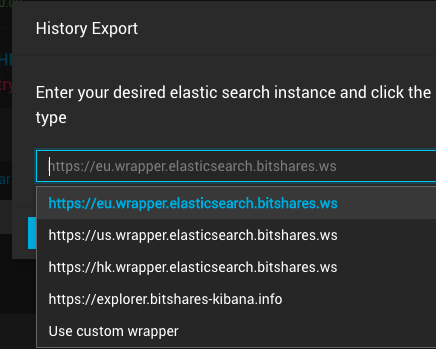
I click both Cointracker.info report and full report options get error -
Failed to download the account history, please try again.
I suppose a .CSV would be downloaded somehow.

Desktop (please complete the following information):
- OS: 10.11.6 (15G22010)
- Browser BITSHARES APP
- Version 3.3.191120 (3.3.191120.2891)


FWIW my ES server and Kibana server is working and open to public (note: only read access to bitshares-* and objects-* indexes):
- https://es.bts.mobi/
- https://kibana.bts.mobi/
However I'm not running an explorer-api wrapper (https://github.com/bitshares/bitshares-explorer-api) so far.