
bitsdojo_window
 bitsdojo_window copied to clipboard
 bitsdojo
Window resize drag location is inside the window
Tested in Ubuntu 20.04.3 LTS.
The borders used for resizing the window are inside the window so any widget which is near the edges of the window can't interact with mouse events.
The window should be re-sizable only when the mouse is near but outside of the visible window.

 I modified this to reduce the edge.
So, @j787701730 is actually moving in the right direction here. @shujaatak the fix is below
tl;dr : scroll down for the fix, window is big and we make window smaller
The Explination
The red border on this image are the areas where the resizing cursor is displayed (Currently inside the application)
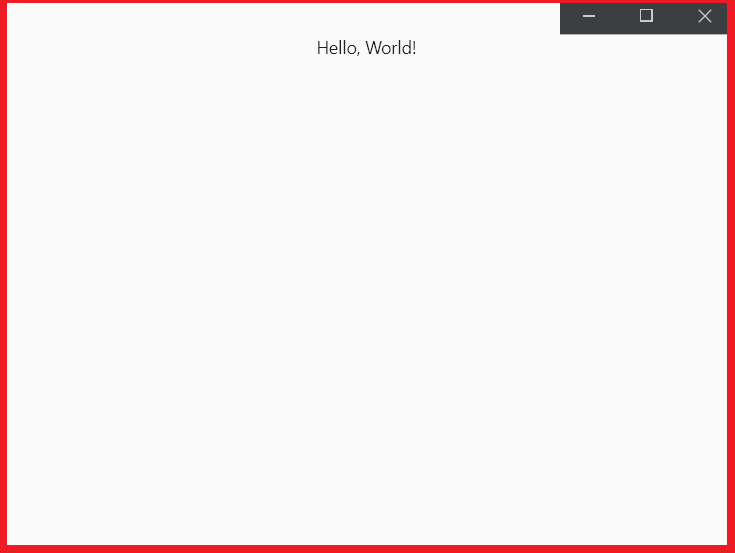
Since that is currently inside the application, we need a way to move it out. Well, you cant really extend the window out past its original size without just making the window larger itself, and by doing that you continue to resize WM_NCHITTEST as well.
The way to fix this is by editing NCCALCSIZE_PARAMS from lparam.
What this essentially does is make the acutal window smaller, and creates an invisible area around the window which is used to scale the application. It's similar to WS_THICKFRAME from: https://docs.microsoft.com/en-us/windows/win32/winmsg/window-styles
The Fix
Inside of bitsdojo_window.cpp, similar to how @j787701730 was explaining, you should edit it as such(notice the + and - 9)
        if (pt.x < resizeMargin - 9)
        {
            return HTLEFT;
        }
        if (pt.x > (rc.right - resizeMargin + 9))
        {
            return HTRIGHT;
        }
also, inside the handle_nccalcsize method add the following code underneath params->rgrc[0].top -= 1; which is in the methods last else statement
params->rgrc[0].left += 8;
params->rgrc[0].right -= 8;
Adding this in resolves the issue mentioned:
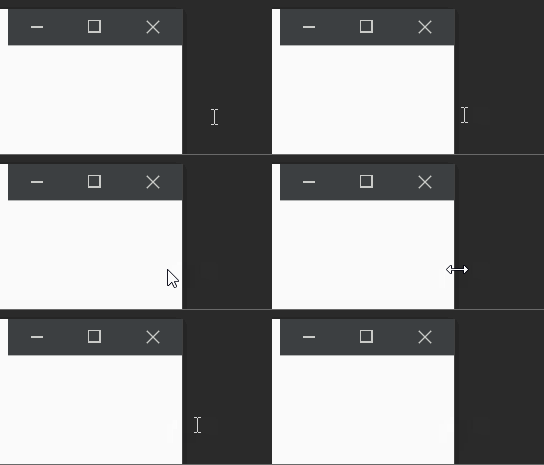
Small issues
This will not fix resizing for the top/ bottom/corners since I didn't change the HTBOTTOM and HTTOP. I am however confident that with the information I've provided you will be able to figure out the rest. You will also have to modify params->rgrc[0].bottom -= 8; to get the bottom to work.
I would like to mention that if you modify params->rgrc[0].top -= 1; to be larger, you will start to see the origional windows: minimize, maximize, and close buttons. I know that WS_POPUP removes the frame but haven't messed around with it. You would add styles like that to this line: style = style | WS_CLIPCHILDREN | WS_POPUP;
For me, there is a 1px padding on the right hand side of the window between the window buttons and the edge of the window(Not seen in the above gif because it goes away when the window isn't active) . This is due to incorrect sizing (the hardcoded ints: 8 and 9). What we should really be doing here is scaling the NCCALCSIZE_PARAMS off of the DPI.
Good luck!

@hBurt What an awesome comment! I would definitely try your suggestions soon!
My solution:
# bitsdojo_window/bitsdojo_window_windows/windows/bitsdojo_window.cpp
@@ -150,8 +150,14 @@
         DwmExtendFrameIntoClientArea(hwnd, &margins);
     }

+    double getScaleFactor(HWND window) {
+        UINT dpi = GetDpiForWindow(window);
+        return dpi / 96.0;
+    }
+
     LRESULT handle_nchittest(HWND window, WPARAM wparam, LPARAM lparam)
     {
+        double scaleFactor = getScaleFactor(window);
         bool isMaximized = IsZoomed(flutter_window);
         if (isMaximized)
             return HTCLIENT;
@@ -162,33 +168,33 @@
         int resizeMargin = getResizeMargin(window);
         if (pt.y < resizeMargin)
         {
-            if (pt.x < resizeMargin)
+            if (pt.x < resizeMargin - (int)ceil(scaleFactor * 5))
             {
                 return HTTOPLEFT;
             }
-            if (pt.x > (rc.right - resizeMargin))
+            if (pt.x > (rc.right - resizeMargin + (int)ceil(scaleFactor * 5)))
             {
                 return HTTOPRIGHT;
             }
             return HTTOP;
         }
-        if (pt.y > (rc.bottom - resizeMargin))
+        if (pt.y > (rc.bottom - resizeMargin + (int)ceil(scaleFactor * 7)))
         {
-            if (pt.x < resizeMargin)
+            if (pt.x < resizeMargin - (int)ceil(scaleFactor * 5))
             {
                 return HTBOTTOMLEFT;
             }
-            if (pt.x > (rc.right - resizeMargin))
+            if (pt.x > (rc.right - resizeMargin + (int)ceil(scaleFactor * 5)))
             {
                 return HTBOTTOMRIGHT;
             }
             return HTBOTTOM;
         }
-        if (pt.x < resizeMargin)
+        if (pt.x < resizeMargin - (int)ceil(scaleFactor * 5))
         {
             return HTLEFT;
         }
-        if (pt.x > (rc.right - resizeMargin))
+        if (pt.x > (rc.right - resizeMargin + (int)ceil(scaleFactor * 5)))
         {
             return HTRIGHT;
         }
@@ -250,11 +256,6 @@
         }
     }

-    double getScaleFactor(HWND window) {
-        UINT dpi = GetDpiForWindow(window);
-        return dpi / 96.0;
-    }
-
     LRESULT handle_nccalcsize(HWND window, WPARAM wparam, LPARAM lparam)
     {
         auto params = reinterpret_cast<NCCALCSIZE_PARAMS*>(lparam);
@@ -286,7 +287,10 @@
         }
         else
         {
-            params->rgrc[0].top -= 1;
+            params->rgrc[0].top -= (int)ceil(scaleFactor * 1);
+            params->rgrc[0].bottom -= (int)ceil(scaleFactor * 6);
+            params->rgrc[0].left += (int)ceil(scaleFactor * 4);
+            params->rgrc[0].right -= (int)ceil(scaleFactor * 4);
         }

         return 0;

@PeterNjeim, in your implementation there was still a white border around the app which looked bad in dark-mode.
I have raised #139, looking for any review.

@PeterNjeim, in your implementation there was still a white border around the app which looked bad in dark-mode.
I have raised #139, looking for any review.
I have no white border in my app.
@PeterNjeim, in your implementation there was still a white border around the app which looked bad in dark-mode. I have raised #139, looking for any review.
I have no white border in my app.
Possibly you're just testing Windows 11.
@PeterNjeim, in your implementation there was still a white border around the app which looked bad in dark-mode. I have raised #139, looking for any review.
I have no white border in my app.
Possibly you're just testing Windows 11.
You're right, just installed it on Windows 10 and it has a white border on the left, right, and bottom.