

 bitgapp
Bug: eqMac fails to load correctly when MacBook is restarted and eqMac is set to start on login
- [x] I have checked for a similar issue and sure it hasn't been reported before.
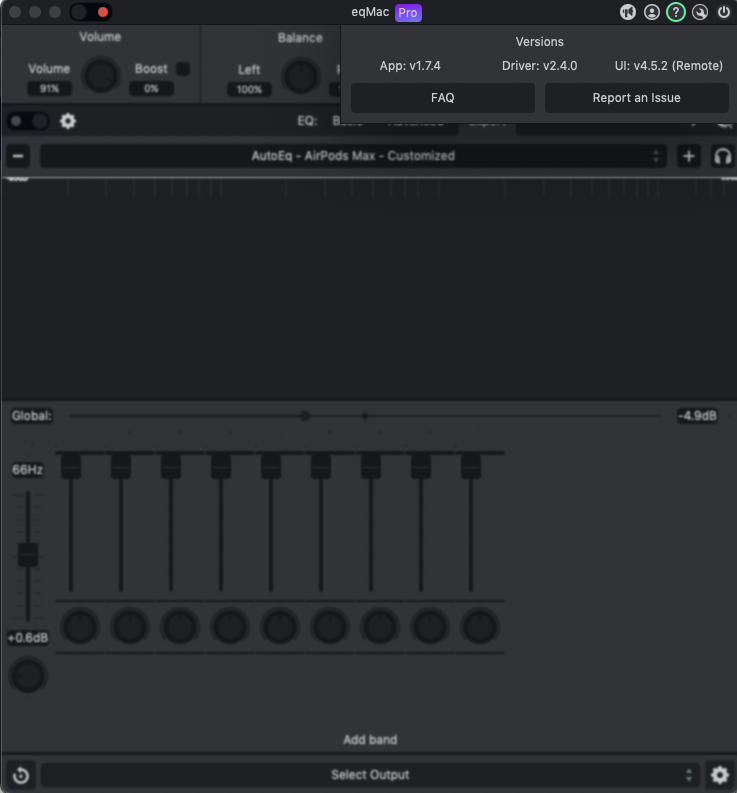
Describe the bug When eqMac is set to startup on login and I restart my computer, when the application tries to load, the UI gets caught in various bad states (screenshot of one such state attached–the other was an all-white Electron window with the typical Mac three buttons at the top left, but no content).
Oddly enough, the app will still connect to an audio device and function, the UI is just in a bad state and unresponsive.
Steps to Reproduce Steps to reproduce the behaviour (feel free to change the placeholder as you need):
- Make sure eqMac is set to start on login
- Restart your M2 MacBook
- Click on eqMac icon in the dock
- See that the application UI is in a bad state.
Expected behaviour I expect that eqMac's UI will not crash on startup
Setup information:
- Audio device used for playback: AirPods Max
- Audio transmission interface: Bluetooth
- macOS Version: 12.6.3
- eqMac Version 1.7.4
- eqMac UI Version 4.6.0
Screenshots or Console.app logs
Additional information The app functions normally if I restart but didn't have it set to start up on login.

