

 bitfocus
[BUG][V3] Stuck on Unknown, waiting for webserver for very long same after Revo & clean install + long GUI loading
Is this a bug in companion itself or a module?
- [X] I believe this to be a bug in companion
Is there an existing issue for this?
- [X] I have searched the existing issues
Describe the bug
When I launch companion, the little launcher window comes up and it stays on "Unknown, waiting for webserver" for a solid 3min,
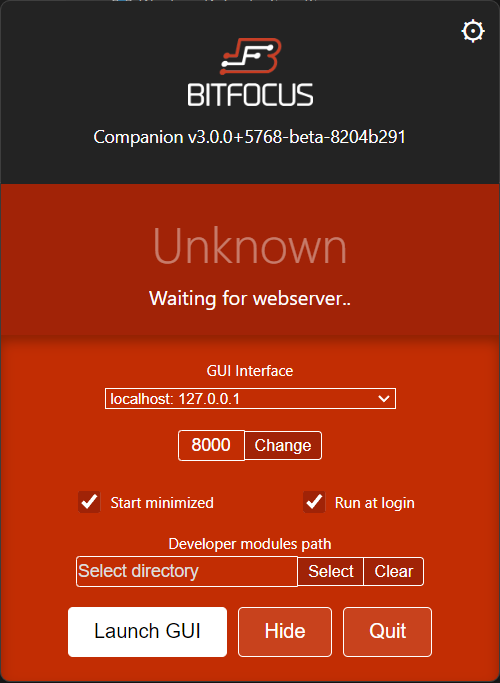
Then it says Running, but when clicking "launch GUI", the page loads for a very long time (more than a minute)

This is obviously a pain for module dev, but I've tried on a clean install with no "dev modules path" and it's the same.
On top of that, I'm not sure if this is wanted behaviour, but the only way to trigger a restart after a change in a module is to reselect the dev modules path
This wasn't like that a few weeks ago
Steps To Reproduce
- Launch companion
- See that it's stuck on Unknown
- Wait 3 minutes for it to be "Running"
- Launch GUI
- Wait 1 min
- Test your module then make a change
- Observe as your changes did not trigger a webserver restart
- Reselect the dev modules path
- go to 2.
Expected Behavior
Having this process happen almost instantly like it used to be, and a change in the code inside the dev modules folder trigger a webserver restart
Environment (please complete the following information)
- OS:Windows 11 Pro 22H2
- Browser: Brave v1.49.132 with Chromium 111.0.5563.147
- Companion Version: 3.0.0+5768-beta-8204b291
Additional context
I had 2.4.2 running before, I installed 3 and the problems started. So I uninstalled, then reinstalled, no change. Uninstall with revo, delete everything in appdata, restart, reinstall, no chance.

Let me add that I'm starting from scratch as well, no module loaded, since I deleted roaming/companion and all related reg keys
Update: After another full revo uninstall + reg & appdata clean, it's still the same problem. May I add that quitting the app while it's in the unknown state takes age, or straight up doesn't work
possibly related: #2382 I've not seen this at least with macOS 10.15 and windows 10

I believe I've had this for a while and several versions, but it's really on and off, no obvious reason at all, and it's happening right now as I nuked everything, so clean install with 0 modules
Are you using any antivirus software? If so, could you try pausing/disabling that to see if it helps?
I can't reproduce this on Windows 10, Ubuntu 22.04 or Windows 11 (21H2, the machine won't update to newer builds)

Nope, just the windows default one I guess, but right now companion opens instantly, as I said it's seemingly random
@Julusian "Windows 11 (21H2, the machine won't update to newer builds)" Make a USB drive with RUFUS and do the update from it. It will work just fine :-) .

@stevespaw Microsoft won't let me download an iso, so I can't use Rufus. And using the windows media creation tool also fails because unsupported cpu.
I might be able to try with running windows in a vm though
For a while this stopped happening but since I updated to 3 RC1 today on windows, it's happening again, exact same symptoms
@Julusian . Similar issue as also in #2382 is back. Maybe a memory leak involved also? The performance on 3.0 is not near as good as V2 for me but the last few builds it gets slower and slower over run time until it finally is unusable.

Build 5975 is unusable after only a few minutes…trying out the hopeful fix for a vmix issue and unable access the GUI after a short while.
Had a power outage, restarting does it again on a brand new install of windows
I'm also running into this similar issue with Companion v3.1.2 on my Macbook Pro 2023 w/ Apple M2 chip running macOS 13.5.2
I'm able to open sometimes on the admin profile but sometimes gets hung up that Unknown message. If I switch the GUI interface sometimes that helps it reconnect but is inconsistent.
Also, I'm trying to run it from another profile on this laptop for users I don't want to have access to the Admin profile and the app won't even open on that regular profile. I've tried uninstalling, restarting and installing the new stable version with no luck.
Thanks in advance if anyone has any insight.

Could someone with this issue share the log file with me? Perhaps there is an indication in there of what it is spending a long time doing
We are having the same issue when trying to update from Companion 2.4.2 to 3.3.1 on one of our windows 10 machines. I have never been able to get to go past the "Unknown Waiting for webserver...". I tried to update with version 3.1, 3.2 and now 3.3 with the same results. Looking for help. At a second facility I updated from 2.4.2 to 3.2 with out issue. Same specs for the PC as well. That machines runs without issue. not sue what is going on with this windows machine.

We are having the same issue when trying to update from Companion 2.4.2 to 3.3.1 on one of our windows 10 machines. I have never been able to get to go past the "Unknown Waiting for webserver...".
Could you share the log file with me? Hopefully that will give an indication of what the problem is. You can click on the tray icon and use the open config folder option, the log files are somewhere around there