

 bitfocus
Buttons don't display arabic or hebrew letters
Is this a bug in companion itself or a module?
- [X] I believe this to be a bug in companion
Is there an existing issue for this?
- [X] I have searched the existing issues
Describe the bug
I'm trying to set up a Companion setup for someone who doesn't do well with english, and per the "Text input" wiki page the buttons should support UTF-16, however when I try to add the text to the buttons I get blank space where the arabic or hebrew text should be.
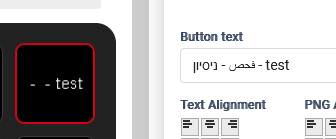
I'm running the latest build on windows 10.
Steps To Reproduce
add any arabic or hebrew text to any button text
Expected Behavior
Expect the button to show the text as inputed, considering it's well within the scope of UTF-16
Environment (please complete the following information)
- OS: windows 10
- Browser: firefox 102.0
- Companion Version: 2.2.2 (2.2.2+4454-v2-2.2-be663609)
Additional context
No response

The character set available for the 7pt font is very limited as the characters have to be manually converted. But they should work in other sizes. #1775 #1316 #910
We will happily accept a pr to add the characters

I actually tried this 14pt font, but I'll test again just to be sure.
I'm not entirely sure how to fix this myself, my js skills aren't quite there lol, but if you can direct me to where the character definition is for the buttons I'll gladly try to fix it.
Oh yeah, it doesnt work for any font size. I dont know what those larger sizes was generated from, that was done 4 years ago and I cant find the pngs used. @dnmeid it looks like you added most of the sizes, its a long shot but any ideas?
The js part of this is definitely generated from pngs, so if you can create pngs for each of the characters for each font size 7px, 14px, 18px, 24px, 30px, 44px. I think the widths are flexible, but Im not 100% sure. I vaguely remember someone saying that the current font is based on Arial, so please try to keep to that rough style. I think that the 14px and larger were generated from a real font, so you can do the same, I dont know how best to do that. The pngs should be solid black on transparent, you can look at the 7px files in https://github.com/bitfocus/companion/tree/master/font as a reference, and naming them with their character codes would be ideal too.
Once you have those send them over, and I can figure out how to get them imported. Feel free to do one character as a test so we can check it is correct before doing the rest.
okay I exported pngs of the letter א (char 1488) to start with, I'll attach them here. The one issue I see coming up is that there's usually a bit of a curve on the letters that translates into slightly opaque pixels, and I see that's not an option in the code (as far as I understand the insane font object in the ./lib/font.js file), so I hope the letters will look coherent in the screen.
@dnmeid it looks like you added most of the sizes, its a long shot but any ideas?
Yes, I made all the characters from PNGs. First made all the PNGs and then converted them to the the compressed bitmap font object. Technically it wouldn't be a problem to also include greek, hebrew, arabic, kyrillic, chinese, japanese, korean, thai and so on. But that would generate a huge amount of data, increasing the size of companion and slowing load times. Also by the time of writing that stuff it already has been obvious that bitmap fonts can't be the way for the future. It has been a makeshift ever since. As you mentioned there is no anti-aliasing to enhance compression and to make drawing easier. We always chickened out of doing the big rewrite to use a vector based system. That is nothing you can implement with vanilla javascript and use of compiled tools is a pain when you want to maintain multi platform compatibility.
