

 bitdump
Feature request - BLHeli_32 Suite for non Windows based PC
Hi,
There are a lot of other operating systems besides Windows platform. Why won't create additional versions of BLHeli_32 Suite for MacOS and Linux...

@TheMrJahn: The problem is that the BLHeli_32 Suite seems to be written in Delphi, which has little to no portability to anything outside of Windows. So it would need a complete rewrite.
And unfortunately, the maintainers of BLHeli_32 refuse to open source their API, so other projects like @diehertz's BLHeli Configurator are prevented from jumping to the users' aid...

BLHeliSuite32 is indeed written in Delphi, and it is not that easy to do a port, but it hopefully is not a complete rewrite required. There are already steps taken on the way, but there still also remain a lot of work to get all things running on MacOS and Linux.

So in addition to MacOS and Linux versions of BLHeliSuite32 being in the works, we are also working on an Android version of a BLHeli_32 tool. Here is what the prototype currently looks like:


We are working hard on the first beta version for Linux. Although there is no release date yet, it should not be too long. Hopefully this month.


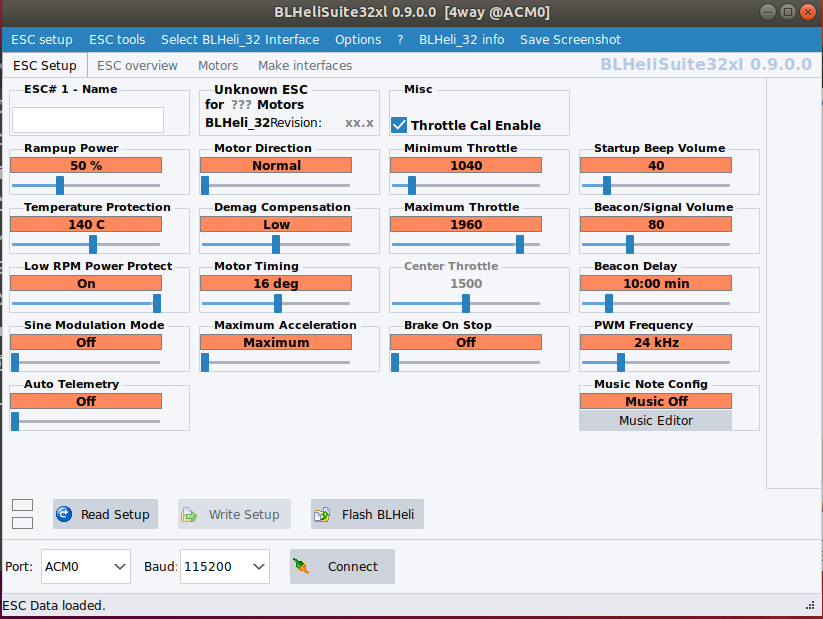 Here a first beta for Linux.
Tested with Ubuntu 18.04.2 LTS.
Here a first beta for Linux.
Tested with Ubuntu 18.04.2 LTS.
[Edit] updated beta version 0.9.0.3 BLHeliSuite32xLinux64_Beta_0903.zip

Actually I found a bug. The music editor seems to break. It worked once and now I always get this:
 and then when trying a second time
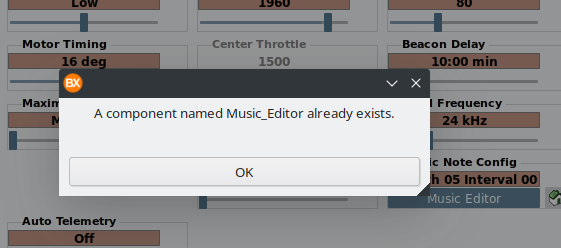
Thanks, I will try to reproduce. [Edit] I could not reproduce it here till now... Did a restart of the app help? {Edit2] OK found something ;) Need to dig into it ...
great to see a Linux version! I tried it on ubuntu 18.04 against a KakuteF4 running ArduPilot. Works nicely for config. When I try to flash an updated fw I get:
 any idea what ssl library I need?

@sskaug: Looks like there are some issues with library dependencies not being met. It's probably best in the long term to roll the linux app into .deb and .rpm installable packages for release, and have these packages declare the dependencies they require (VLC, openSSL). This will allow 95% of users to install the package without having to worry about dependencies.
@tridge: Openssl 1.0.x is the right version. 1.1.x is not supported yet. @mikeller: I don't know, if packages will be possible, using Delphi FMX.
@sskaug: You could always build the executable with Delphi FMX, and then take the files and build the packages in a second step. We use gulp to build .deb and .rpm packages for Betaflight configurator, which might not be the best choice for you as it is geared towards JavaScript builds, but if you decide to go down that route I am happy to help.
@RicBent please try updated version 0.9.0.1. Music editor close exception should be fixed now.
@4712 I still get the same errors with the access violation address changed to 0x6AC888. Just like with 0.9.0.0 the music editor worked for the first ESC but opening it a second time fails. Restarting the app alone has no effect but power cycling my quad and restarting the app allows using the editor a single time again.
@RicBent now I got it, I usually edit music for the ESCs all together... but now I found the bug hopefully fixed it in rev 0.9.0.2. Also fixed an openssl lib load issue.
OK so I almost embarassed to ask this but ... Trying to run the BLHeli32 Linux app on my Chromebook, don't own PC, only a Mac and a Chromebook. How do I start the Linux app from the Terminal window in Chromebook Linux VM?
Thanks Robert

@TheFrisco: I suspect this won't work - while Chromebooks are running linux, what they are running is an extremely cut down version, with everything that is not needed to run Chrome removed - this most likely means that libraries that are part of every 'normal' linux distribution and are required by the BLHeli32 app aren't present on the Chromebook.
@TheFrisco: I suspect this won't work - while Chromebooks are running linux, what they are running is an extremely cut down version, with everything that is not needed to run Chrome removed - this most likely means that libraries that are part of every 'normal' linux distribution and are required by the BLHeli32 app aren't present on the Chromebook.
Thanks for the quick response, and you are probably right but WHAT COMMAND would I even run from the Terminal app to start BLHeliSuite32?
@TheFrisco:
<path to wherever you installed it>/BLHeliSuite32xl
oh gosh that worked, just needed to be outside the folder and voila ... now I need to see if anything connects LOL
THANKS A LOT!!!