

 bit-team
No timed Backups
For ~ the past 2 weeks BIT has not taken any backups that are scheduled daily at 03:00. I can start a backup with backintime backup from konsole just fine though.
This is on Debian Unstable with Plasma Desktop. I use backintime-qt 1.3.2-0.1 and rsync 3.2.6. The cronjob is correct. Looking at the journal, I get:
Sep 24 03:00:01 blue python3[4072933]: backintime (ft/1): INFO: Lock
Sep 24 03:00:02 blue python3[4072933]: backintime (ft/1): INFO: Take a new snapshot. Profile: 1 Hauptprofil
Sep 24 03:00:02 blue python3[4072933]: backintime (ft/1): ERROR: /media/ft/mini-ssd1/backintime/backintime/blue/devil/home does not exist
…
ep 24 03:00:33 blue python3[4072933]: backintime (ft/1): ERROR: /media/ft/mini-ssd1/backintime/backintime/blue/devil/home does not exist
Sep 24 03:00:33 blue python3[4072933]: backintime (ft/1): WARNING: Can't find snapshots folder!
The folder clearly exists, see attached screenshot. Also, manualy started backups go to that folder without a problem.
 I have no clue why BIT does not see the folder. If you need any more information, just ask. Thanks for looking at this.

Oh my. We've recently had #1302, which sounds very similar. Could you check the information there (it's a lot, sorry) to see if your case is similar?
This is beginning to smell like some overzealous security-related encapsulation failure. Your snapshots folder obviously exists, but maybe systemd (or something) doesn't allow backintime to access it when running from the crontab. But I might be wrong there.

I read #1302 before I started this thread. I opened a new one because even though it is similar in that timed backups don't work, but manual ones do, there are differences in the installed versions as well as in the output of journalctl.
Well done, thanks a lot :) We're in the middle of re-starting maintenance on Back In Time, and our capacities are still limited. But this is clearly important, so I'm marking the Issue as https://github.com/bit-team/backintime/labels/High. We'll get back to you as soon as we can!
Dear @fethomm , thanks for the report.
What is /media/ft?
Maybe it is an USB device? I've never used a USB drive for BIT and I'm not experienced with that. But maybe BIT does something (un)mounting in the background without asking.

I use removable drives with backintime often, and I haven't seen such a problem. I don't think backintime unmounts anything unless you specifically instruct it to. But @fethomm might check if the drive stays mounted when a scheduled backintime run occurs from the crontab.
Thanks for looking into this. /ft is just my username. The backups go to a external NVMe-Disk, which worked fine for a long time. If the drive was umounted, I should be able to see that in the journal, so I doubt that is what happens here.
I'm not sure if this works, but you might try the following:
- close the backintime GUI
- modify your crontab to add
--debugand remove>/dev/nullfrom your backintime crontab entry
There should be lots of debug output, but I can't tell you for certain where it goes. It might end up in the journal, or be mailed to your system account (is that even still a thing with crontabs these days?).
@fethomm Could you please check via crontab -l (small "L" meaning "list") and sudo crontab -l under which user your backintime backup session is started by cron?

Strange enough, BIT did a timed Backup at 03:00 tonight. The only thing I really changed was adding --old-args. Other than that, I was just playing with manual backups. I will keep watching this. The journal is clean, the only line that grabs attention is: Sep 25 03:00:09 blue nice[1167324]: PermissionError: [Errno 13] Permission denied: '/tmp/backintime.lock'. The backup is fine though.
Strange enough, BIT did a timed Backup at 03:00 tonight. The only thing I really changed was adding
--old-args. Other than that, I was just playing with manual backups.
How is the drived mounted? Via a fstab during boot-up or manually (via console or by clicking in file browser in the GUI)?
I could imagine that a user-(triggered) mount could cause the effects.
PermissionError: [Errno 13] Permission denied: '/tmp/backintime.lock'`. The backup is fine though.
The backintime.lock is used to ensure that only one backup instance is running at any given time:
https://github.com/bit-team/backintime/blob/b14a98fc8aa24c6e51be0c7cd167b24a298da28a/common/snapshots.py#L57 The file https://github.com/bit-team/backintime/blob/b14a98fc8aa24c6e51be0c7cd167b24a298da28a/common/snapshots.py#L1745-L1760
The error must happen here since the open() is the only place in the code where the file is written (and permissions set).
I have no idea so far what could cause this "PermissionError" and only the --debug could help to narrow down this issue.
The drive is mounted automagically by Plasma desktop in system settings. And I have changed nothing in at least 2 years and it worked fine until 2 weeks ago. I triied to set the --debug option, but neither as root nor with sudo was I able to do change the cron line (no permission). Since that made my brain swell, I gave up after a couple of tries :)
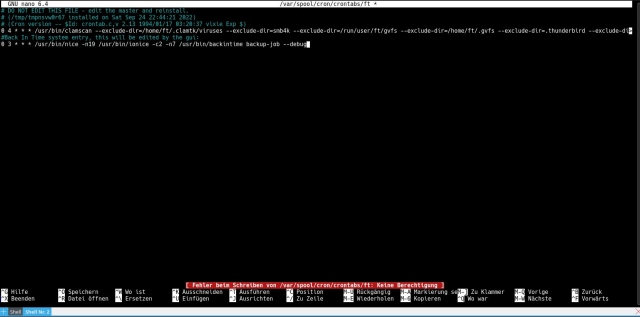
Sorry to have to come back to this. Timed backups worked fine for 2 days, then again stopped. The errors in Journal are the same, while the debug option brought in some new ones:
Sep 29 03:00:32 blue python3[1233154]: backintime (ft/1): WARNING: [common/snapshots.py:681 Snapshots.backup] Can't find snapshots folder!
Sep 29 03:00:34 blue python3[1233154]: backintime (ft/1): DEBUG: [common/tools.py:829 keyringSupported] No appropriate keyring found. 'keyring.backends.chainer' can't be used with BackInTime
Sep 29 03:00:34 blue python3[1233154]: backintime (ft/1): DEBUG: [common/mount.py:73 Mount.__init__] pw-cache is not running
Sep 29 03:00:34 blue python3[1233154]: backintime (ft/1): DEBUG: [common/mount.py:81 Mount.__init__] Call command: /usr/bin/backintime pw-cache start
Sep 29 03:00:34 blue python3[1233154]: backintime (ft/1): DEBUG: [common/snapshots.py:1767 Snapshots.flockRelease] Release flock /tmp/backintime.lock
Sep 29 03:00:34 blue python3[1233154]: backintime (ft/1): INFO: [common/snapshots.py:739 Snapshots.backup] Unlock
Sep 29 03:00:34 blue python3[1233154]: backintime (ft/1): DEBUG: [common/tools.py:1208 unInhibitSuspend] Release inhibit Suspend
I don't quite understand the keyring. The drive is mounted and I can perform a manual backup just fine.
Hmh, BiT caches passwords and supports many keyring tools (if installed). Is one of these tools installed?
SecretService, Gnome Keyring, kwallet kring, kwallet DBusKeyring, KDEKWallet?
I don't know the exact package names of Debian but if you start the keyring App from your Plasma Desktop you can find the name via ps ax.
Gnome-Keyring is installed. KWallet works as expected (even though I could not find a specific keyring for that). SecretService is also installed.
DEBUG: [common/tools.py:829 keyringSupported] No appropriate keyring found. 'keyring.backends.chainer' can't be used with BackInTime
*Keyring is installed
~Strange. Maybe the keyring package of Python is not installed, could you please check this with your package manager?
But this is not the main issue here I think that prevents taking snapshots.~
-> Fixed with #1321
I still suspect an KDE/Plasma automount issue.
I have set up a virtual machine (not with Debian Unstable but 12 - this should be good until it should be a bug of unstable) but I need more input to reproduce this:
- Is the external device permanently attached and switched-on (when booting)?
- Which interface do you use to attach the external device? USB 2, 3 eSATA...?
- Could you please post the mount settings when attached (
mount | grep -i "/media/ft/mini-ssd1"should do that)? - Does mounting the external drive require a password?
- What is the computer state when the scheduled backup is started by cron? Logged in, Logged-in but locked, logged out, logged in as another user, logged-in in a non-KDE desktop environment...?
- Is
automount/autofsactive (tryautofs statusandautomount -m- if the commands are not found automount is not used) - Is any application or the file browser using a folder or file on the external device while the backup fails (with "snapshot not found")?
- Which settings are enabled in "Removable Drives and Media" > "Storage" > "Removable Storage" (open the app via KDE Search)?
- Open "Removable Devices" in KDE via Search or by right-clicking on the "Most recent Device" Icon in the lower right corner: Which Automount Settings are enabled for your and all known devices in "Removable Devices"?
- Check the Power Management / Energy Savings: Does the computer suspend or switch off energy (for computer or external devices or USB...)?
I know, a lot of questions.... (and udev not even touched ;-)
@fethome I have created a log-only user-callback script that you can use to diagnose automount issues:
https://github.com/aryoda/user-callback/blob/PR/diagnostics/user-callback.diagnostics
You can install this script via backintime-qt > "Settings" > "Edit user-callback":
- Make a backup of your existing user-callback script (if any is used)
- Copy the content of above diagnostics user-callback script into the BiT-user-callback window
- Uncomment (enable) the lines to check if your snapshot folder can be accessed: https://github.com/aryoda/user-callback/blob/6130d0532b07c67d36a304adac42a21cef50beb9/user-callback.diagnostics#L83-L89
- Enter your snapshot folder into line 84: testFolder="/media/ft/mini-ssd1/backintime/backintime/blue/devil/home"
The observe the log entries that are created in the file ~/backintime_usercallback_diagnostics.log.
@aryoda Thanks for your commitment to get to the bottom of this. I have not had time to get the answers to your questions, work is a bit wild at the moment. I will try the script first as it seems less time-consuming and come back to you with the results.
work is a bit wild at the moment. I will try the script first as it seems less time-consuming
Totally OK! Please replace the commented lines in the linked script with this part (checking if the paths are OK in your case), so we will see if the mount times out or disappear for some reason...
        # Check if a mount point is in the list of mounted devices
        mountPoint="/media/ft/mini-ssd1"   # insert your mount folder here
        printLog "Mount point status: $(mount | grep '$mountPoint')"  # empty if not mounted!

        # Check if a folder does exist and is readable (eg. the snapshot target folder)
        testFolder="/media/ft/mini-ssd1/backintime/backintime/blue/devil/home"                  # insert your path to check here
        if [[ -r $testFolder ]]; then
            printLog "Folder exists and can be read..."
        else
            printLog "Folder does not exist or cannot be read (missing permissions?)"
        fi
Just looking into a similar issue I have a new suspect:
https://github.com/bit-team/backintime/issues/1167#issuecomment-1272149554
The password for cron jobs is only cached in-memory via a daemon process.
So if you restart your computer the password is lost and you have to re-enter it in BiT GUI, at least according to the documentation (I have to check the code to verify this).
If the password was stored in the keyring (password safe) it would be persistent but only available as long as the user is logged-in (which unlocks the password safe/keyring)...
The permission problem with /tmp/backintime.lock is known and should be fixed by 75175213125cd5b6ce156e6702c84cbf2aab2894.
Are you sure that cron runs? Look at ps -A | grep cron
But his issue seems to be complex and mixing up several problems. Usually I don't but here I would suggest you upgrade to the latest release or the latest development release of BIT and lets see if the problem might be fixed. Your iniitally reported BIT version 1.3.2 is quit outdated today.
There's been no new information since 2022, suggest we close unless we learn something new.