

 biolab
Changing attributes when there are two database connectors.
What's wrong?
My file has two SQL Table elements for PorstreSQL and MsSQL database.
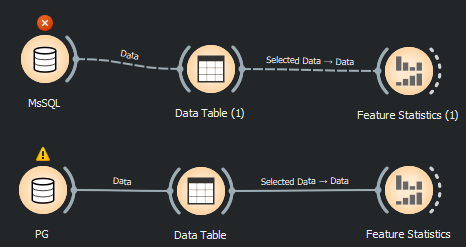
I'm setting up data SQL Table. Everything works well.
But if I save the file and reopen. Scientist data become the same.
MsSQL Userame == PostgresSQL Userame MsSQL Password == PostgresSQL Password ...
What's your environment?
Operating system: win11 Orange version: '3.35.0.dev0+3cc58b4' How you installed Orange: from source code

Thanks for reporting this.
The problem here is that widget does not save this in the usual place (workflow, settings) but in a safer keychain in the computer. A widget could choose a random id every time it's run and store the username and password related to this id, but this would pollute the keychain because we wouldn't know when to remove it.
We came to this solution: the widget would store the database and the username in the (unsafe) workflow settings, but the corresponding password for this specific database and username would be stored safely.

@Mikhaylov-yv, I was trying to reproduce your error today, but I cannot. If I understand correctly, you successfully set up the workflow (as in the image) and connected two databases with two SQL widgets (with two different usernames and passwords). Then you saved the workflow, and when you reopened it, the same username and password appeared in both widgets.
As Janez mentioned, the SQL widget stores credentials in safe storage on the operating system. Credentials are saved under the database server address and port key. Is it possible (by any chance) that both databases have the same server address (the value you enter in the first field)? Currently, this is the only idea I have.
