

 bigskysoftware
Dynamically adding hx-disable to element doesn't disable htmx actions on element
Adding hx-disable to an element (e.g. myElement.setAttribute("hx-disable", ""); htmx.process(myElement)) doesn't disable the element.
Using htmx.logAll.() I didn't see any events triggered after running htmx.process(...).
I think that when the htmx.process(myElement) is run, it sees that the element has "hx-disable" and stops processing it, instead of removing all triggers.
Why Add hx-disable Dynamically?
I feel like adding "hx-disable" more is more inline with hypermedia principles than doing evt.preventDefault() inside an htmx:confirm event when i want to prevent an event. For example, when I click a dropdown button when the dropdown menu is already visible, I don't want to re-fetch the menu.

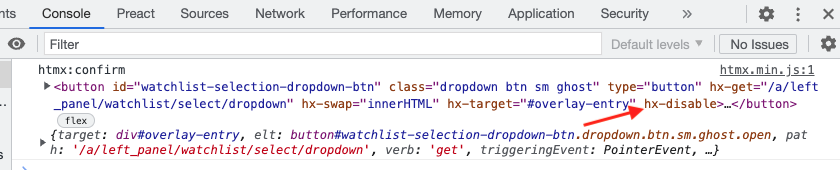
Here is a picture of the htmx:confirm event in the console, notice how the element has the hx-disable attribute, so htmx:confirm shouldn't even be firing (I ran htmx.process() too)
any update on this issue? I tried execute ele.setAttribute("hx-disable","") and I can see htmx still updating this element.

It would be great to know if this is something you'd consider implementing — or whether i should look for other solutions. Thanks a lot! 🙏
