

 bigbluebutton
SSO with O365 uses wrong callback URL (double /u in path)
Describe the bug
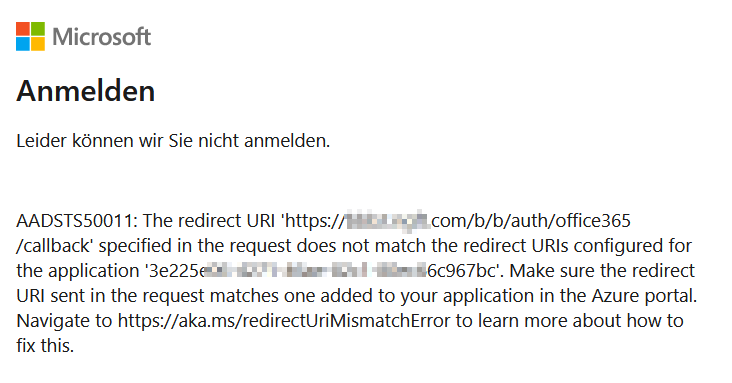
When using SSO via O365 accounts, the login fails, because the callback goes to https://bbb.host.com/b/b/auth/office365/callback instead of https://bbb.host.com/b/auth/office365/callback
To Reproduce
- We have a bbb server with greenlight running stable since many months
- The url for greenlight was always
https://bbb.host.com/b - Now we did try to add O365 SSO Logins and did follow the https://docs.bigbluebutton.org/greenlight/gl-config.html#office365-oauth2 guide
- The login with Microsoft button is schon correctly on the greenlight signin page
- On clicking on that button I can sign in to O365 sucessfully
- But then the O365 signin service shows an error mentioning that the requested callback uri
https://bbb.host.com/b/b/auth/office365/callbackdoes not match the configured on https://bbb.host.com/b/auth/office365/callback - So the signin fails
- Adding the
https://bbb.host.com/b/b/auth/office365/callbackdoes not help, since then greenlight does not handle that url
Additional context
- Greenlight 2.13.0 on Ubuntu 18.04.6 LTS
- In the .env file we have this
RELATIVE_URL_ROOT=/b-The/etc/bigbluebutton/nginx/greenlight-redirect.nginxfile is
location = / {
  return 307 /b;
}
- The
/etc/bigbluebutton/nginx/greenlight.nginxis
# Routes requests to Greenlight based on the '/b' prefix.
# Use this file to route '/b' paths on your BigBlueButton server
# to the Greenlight application. If you are using a different
# subpath, you should change it here.

location /b {
  proxy_pass          http://127.0.0.1:5000;
  proxy_set_header    Host              $host;
  proxy_set_header    X-Forwarded-For   $proxy_add_x_forwarded_for;
  proxy_set_header    X-Forwarded-Proto $scheme;
  proxy_http_version  1.1;
}

location /b/cable {
  proxy_pass          http://127.0.0.1:5000;
  proxy_set_header    Host              $host;
  proxy_set_header    X-Forwarded-For   $proxy_add_x_forwarded_for;
  proxy_set_header    X-Forwarded-Proto $scheme;
  proxy_set_header    Upgrade           $http_upgrade;
  proxy_set_header    Connection        "Upgrade";
  proxy_http_version  1.1;
  proxy_read_timeout  6h;
  proxy_send_timeout  6h;
  client_body_timeout 6h;
  send_timeout        6h;
}

# Allow larger body size for uploading presentations
location ~ /preupload_presentation$ {
  client_max_body_size 30m;

  proxy_pass          http://127.0.0.1:5000;
  proxy_set_header    Host              $host;
  proxy_set_header    X-Forwarded-For   $proxy_add_x_forwarded_for;
  proxy_set_header    X-Forwarded-Proto $scheme;
  proxy_http_version  1.1;
}

# Only needed if using presentations and deployed at a relative root (ex "/b")
# If deploying at "/", delete the section below

location /rails/active_storage {
  return 301 /b$request_uri;
}

Hi there,
if you need a workaround for this issue (until it's fixed):
- add the "wrong" callback url to azure ad, e.g.
https://bbb.host.com/b/b/auth/office365/callback - edit
/etc/nginx/sites-enabled/bigbluebuttonand add the following line before the lineinclude /etc/bigbluebutton/nginx/*.nginx;:
rewrite ^/b/b/(.*) https://bbb.host.com/b/$1;
The resulting lines will look like this:
  # BigBlueButton landing page.
  location / {
    root   /var/www/bigbluebutton-default;
    index  index.html index.htm;
    expires 1m;
  }

  rewrite ^/b/b/(.*) https://bbb.host.com/b/$1;
  # Include specific rules for record and playback
  include /etc/bigbluebutton/nginx/*.nginx;
- Reload nginx
service nginx reload
Now you should be able to login over office365 sso

Please note: Greenlight v3 has been released. With this new version, many of the issues and bugs that were present in v2 have been resolved.
As a result, we will no longer be providing updates or support for v2 (except for major security issues), and we will be closing any outstanding bug reports / feature requests related to v2. While we understand that some of you may still be using v2, we highly encourage you to upgrade to v3 to take advantage of the improved features and stability. If your request/bug still applies to v3, please open a new issue for it
