

 bigbluebutton
Error running wget -qO- command https://ubuntu.bigbluebutton.org/bbb-install.sh | bash -s -- -v bionic-240 -s bbb.example.com -e [email protected] -a -w
When running the big blue button installation command I get the following output: `Hit:1 https://download.docker.com/linux/ubuntu bionic InRelease Ign:2 https://repo.mongodb.org/apt/ubuntu bionic/mongodb-org/4.2 InRelease Hit:3 http://br.archive.ubuntu.com/ubuntu bionic InRelease Err:4 http://ppa.launchpad.net/bigbluebutton/support/ubuntu bionic InRelease 503 Service Unavailable [IP: 185.125.190.52 80] Hit:5 http://br.archive.ubuntu.com/ubuntu bionic-updates InRelease Hit:6 http://br.archive.ubuntu.com/ubuntu bionic-backports InRelease Hit:7 http://br.archive.ubuntu.com/ubuntu bionic-security InRelease Hit:8 https://repo.mongodb.org/apt/ubuntu bionic/mongodb-org/4.2 Release Hit:9 https://deb.nodesource.com/node_12.x bionic InRelease Hit:10 https://ubuntu.bigbluebutton.org/bionic-240 bigbluebutton-bionic InRelease Hit:11 http://ppa.launchpad.net/certbot/certbot/ubuntu bionic InRelease Hit:13 http://ppa.launchpad.net/libreoffice/ppa/ubuntu bionic InRelease Hit:14 http://ppa.launchpad.net/rmescandon/yq/ubuntu bionic InRelease Reading package lists... Done W: Failed to fetch http://ppa.launchpad.net/bigbluebutton/support/ubuntu/dists/bionic/InRelease 503 Service Unavailable [IP: 185.125.190.52 80] W: Some index files failed to download. They have been ignored, or old ones used instead. Warning: apt-key output should not be parsed (stdout is not a terminal) LS_COLORS=rs=0:di=01;34:ln=01;36:mh=00:pi=40;33:so=01;35:do=01;35:bd=40;33;01:cd=40;33;01:or=40;31;01:mi=00:su=37;41:sg=30;43:ca=30;41:tw=30;42:ow=34;42:st=37;44:ex=01;32:.tar=01;31:.tgz=01;31:.arc=01;31:.arj=01;31:.taz=01;31:.lha=01;31:.lz4=01;31:.lzh=01;31:.lzma=01;31:.tlz=01;31:.txz=01;31:.tzo=01;31:.t7z=01;31:.zip=01;31:.z=01;31:.Z=01;31:.dz=01;31:.gz=01;31:.lrz=01;31:.lz=01;31:.lzo=01;31:.xz=01;31:.zst=01;31:.tzst=01;31:.bz2=01;31:.bz=01;31:.tbz=01;31:.tbz2=01;31:.tz=01;31:.deb=01;31:.rpm=01;31:.jar=01;31:.war=01;31:.ear=01;31:.sar=01;31:.rar=01;31:.alz=01;31:.ace=01;31:.zoo=01;31:.cpio=01;31:.7z=01;31:.rz=01;31:.cab=01;31:.wim=01;31:.swm=01;31:.dwm=01;31:.esd=01;31:.jpg=01;35:.jpeg=01;35:.mjpg=01;35:.mjpeg=01;35:.gif=01;35:.bmp=01;35:.pbm=01;35:.pgm=01;35:.ppm=01;35:.tga=01;35:.xbm=01;35:.xpm=01;35:.tif=01;35:.tiff=01;35:.png=01;35:.svg=01;35:.svgz=01;35:.mng=01;35:.pcx=01;35:.mov=01;35:.mpg=01;35:.mpeg=01;35:.m2v=01;35:.mkv=01;35:.webm=01;35:.ogm=01;35:.mp4=01;35:.m4v=01;35:.mp4v=01;35:.vob=01;35:.qt=01;35:.nuv=01;35:.wmv=01;35:.asf=01;35:.rm=01;35:.rmvb=01;35:.flc=01;35:.avi=01;35:.fli=01;35:.flv=01;35:.gl=01;35:.dl=01;35:.xcf=01;35:.xwd=01;35:.yuv=01;35:.cgm=01;35:.emf=01;35:.ogv=01;35:.ogx=01;35:.aac=00;36:.au=00;36:.flac=00;36:.m4a=00;36:.mid=00;36:.midi=00;36:.mka=00;36:.mp3=00;36:.mpc=00;36:.ogg=00;36:.ra=00;36:.wav=00;36:.oga=00;36:.opus=00;36:.spx=00;36:.xspf=00;36: LESSCLOSE=/usr/bin/lesspipe %s %s LANG=en_US.UTF-8 SUDO_GID=1004 OLDPWD=/home USERNAME=root SUDO_COMMAND=/bin/su USER=root PWD=/home/sejus HOME=/root SUDO_USER=sejus DEBIAN_FRONTEND=noninteractive SUDO_UID=1003 MAIL=/var/mail/root TERM=xterm SHELL=/bin/bash SHLVL=2 LOGNAME=root PATH=/usr/local/sbin:/usr/local/bin:/usr/sbin:/usr/bin:/sbin:/bin:/usr/games:/usr/local/games:/snap/bin LESSOPEN=| /usr/bin/lesspipe %s _=/usr/bin/env 'universe' distribution component is already enabled for all sources. /usr/sbin/nginx Waiting for port 443 to clear
/usr/sbin/nginx main: line 451: 20915 Terminated nc -l -p 443 > /dev/null 2>&1 Warning: apt-key output should not be parsed (stdout is not a terminal) Warning: apt-key output should not be parsed (stdout is not a terminal) Warning: apt-key output should not be parsed (stdout is not a terminal) Warning: apt-key output should not be parsed (stdout is not a terminal) Warning: apt-key output should not be parsed (stdout is not a terminal) deb [ arch=amd64 ] https://repo.mongodb.org/apt/ubuntu bionic/mongodb-org/4.2 multiverse Warning: apt-key output should not be parsed (stdout is not a terminal) /usr/bin/docker 11-jre-buster: Pulling from library/openjdk Digest: sha256:d1cd77c3e2f40560e6146a5918aefd9fbb0203e25519b41de6a87d2f9e2024bc Status: Image is up to date for openjdk:11-jre-buster docker.io/library/openjdk:11-jre-buster /usr/lib/ruby/vendor_ruby/rubygems/defaults/operating_system.rb:10: warning: constant Gem::ConfigMap is deprecated /usr/lib/ruby/vendor_ruby/rubygems/defaults/operating_system.rb:10: warning: constant Gem::ConfigMap is deprecated /usr/lib/ruby/vendor_ruby/rubygems/defaults/operating_system.rb:29: warning: constant Gem::ConfigMap is deprecated /usr/lib/ruby/vendor_ruby/rubygems/defaults/operating_system.rb:30: warning: constant Gem::ConfigMap is deprecated /usr/lib/ruby/vendor_ruby/rubygems/defaults/operating_system.rb:10: warning: constant Gem::ConfigMap is deprecated /usr/lib/ruby/vendor_ruby/rubygems/defaults/operating_system.rb:10: warning: constant Gem::ConfigMap is deprecated /usr/lib/ruby/vendor_ruby/rubygems/defaults/operating_system.rb:29: warning: constant Gem::ConfigMap is deprecated /usr/lib/ruby/vendor_ruby/rubygems/defaults/operating_system.rb:30: warning: constant Gem::ConfigMap is deprecated /usr/lib/ruby/vendor_ruby/rubygems/defaults/operating_system.rb:10: warning: constant Gem::ConfigMap is deprecated /usr/lib/ruby/vendor_ruby/rubygems/defaults/operating_system.rb:10: warning: constant Gem::ConfigMap is deprecated Successfully installed bundler-2.1.4 Parsing documentation for bundler-2.1.4 Done installing documentation for bundler after 4 seconds 1 gem installed update-alternatives: error: no alternatives for mozilla-javaplugin.so update-java-alternatives: plugin alternative does not exist: /usr/lib/jvm/java-8-openjdk-amd64/jre/lib/amd64/IcedTeaPlugin.so Hit:1 http://br.archive.ubuntu.com/ubuntu bionic InRelease Hit:2 http://br.archive.ubuntu.com/ubuntu bionic-updates InRelease Hit:3 https://download.docker.com/linux/ubuntu bionic InRelease Hit:4 http://br.archive.ubuntu.com/ubuntu bionic-backports InRelease Hit:5 http://br.archive.ubuntu.com/ubuntu bionic-security InRelease Hit:6 https://deb.nodesource.com/node_12.x bionic InRelease Err:7 http://ppa.launchpad.net/bigbluebutton/support/ubuntu bionic InRelease 503 Service Unavailable [IP: 185.125.190.52 80] Ign:8 https://repo.mongodb.org/apt/ubuntu bionic/mongodb-org/4.2 InRelease Hit:9 https://repo.mongodb.org/apt/ubuntu bionic/mongodb-org/4.2 Release Hit:10 https://ubuntu.bigbluebutton.org/bionic-240 bigbluebutton-bionic InRelease Hit:11 http://ppa.launchpad.net/certbot/certbot/ubuntu bionic InRelease Hit:13 http://ppa.launchpad.net/libreoffice/ppa/ubuntu bionic InRelease Hit:14 http://ppa.launchpad.net/rmescandon/yq/ubuntu bionic InRelease Reading package lists... Done W: Failed to fetch http://ppa.launchpad.net/bigbluebutton/support/ubuntu/dists/bionic/InRelease 503 Service Unavailable [IP: 185.125.190.52 80] W: Some index files failed to download. They have been ignored, or old ones used instead. Reading package lists... Done Building dependency tree Reading state information... Done Calculating upgrade... Done 0 upgraded, 0 newly installed, 0 to remove and 0 not upgraded. Reading package lists... Building dependency tree... Reading state information... Some packages could not be installed. This may mean that you have requested an impossible situation or if you are using the unstable distribution that some required packages have not yet been created or been moved out of Incoming. The following information may help to resolve the situation:
The following packages have unmet dependencies: bigbluebutton : Depends: bbb-config but it is not going to be installed E: Unable to correct problems, you have held broken packages. failed to load external entity "/opt/freeswitch/conf/vars.xml" failed to load external entity "/opt/freeswitch/conf/vars.xml" main: line 819: bbb-conf: command not found 'universe' distribution component is already enabled for all sources. Hit:1 http://br.archive.ubuntu.com/ubuntu bionic InRelease Hit:2 http://br.archive.ubuntu.com/ubuntu bionic-updates InRelease Hit:3 https://download.docker.com/linux/ubuntu bionic InRelease Hit:4 https://deb.nodesource.com/node_12.x bionic InRelease Hit:5 http://br.archive.ubuntu.com/ubuntu bionic-backports InRelease Hit:6 http://br.archive.ubuntu.com/ubuntu bionic-security InRelease Err:7 http://ppa.launchpad.net/bigbluebutton/support/ubuntu bionic InRelease 503 Service Unavailable [IP: 185.125.190.52 80] Ign:8 https://repo.mongodb.org/apt/ubuntu bionic/mongodb-org/4.2 InRelease Hit:9 https://repo.mongodb.org/apt/ubuntu bionic/mongodb-org/4.2 Release Hit:10 https://ubuntu.bigbluebutton.org/bionic-240 bigbluebutton-bionic InRelease Hit:11 http://ppa.launchpad.net/certbot/certbot/ubuntu bionic InRelease Hit:13 http://ppa.launchpad.net/libreoffice/ppa/ubuntu bionic InRelease Hit:14 http://ppa.launchpad.net/rmescandon/yq/ubuntu bionic InRelease Reading package lists... Done W: Failed to fetch http://ppa.launchpad.net/bigbluebutton/support/ubuntu/dists/bionic/InRelease 503 Service Unavailable [IP: 185.125.190.52 80] W: Some index files failed to download. They have been ignored, or old ones used instead. Warning: apt-key output should not be parsed (stdout is not a terminal) Hit:1 http://br.archive.ubuntu.com/ubuntu bionic InRelease Hit:2 http://br.archive.ubuntu.com/ubuntu bionic-updates InRelease Hit:3 https://download.docker.com/linux/ubuntu bionic InRelease Hit:4 http://br.archive.ubuntu.com/ubuntu bionic-backports InRelease Hit:5 https://deb.nodesource.com/node_12.x bionic InRelease Hit:6 http://br.archive.ubuntu.com/ubuntu bionic-security InRelease Err:7 http://ppa.launchpad.net/bigbluebutton/support/ubuntu bionic InRelease 503 Service Unavailable [IP: 185.125.190.52 80] Ign:8 https://repo.mongodb.org/apt/ubuntu bionic/mongodb-org/4.2 InRelease Hit:9 https://repo.mongodb.org/apt/ubuntu bionic/mongodb-org/4.2 Release Hit:10 http://ppa.launchpad.net/certbot/certbot/ubuntu bionic InRelease Hit:11 https://ubuntu.bigbluebutton.org/bionic-240 bigbluebutton-bionic InRelease Hit:13 http://ppa.launchpad.net/libreoffice/ppa/ubuntu bionic InRelease Hit:14 http://ppa.launchpad.net/rmescandon/yq/ubuntu bionic InRelease Reading package lists... Done W: Failed to fetch http://ppa.launchpad.net/bigbluebutton/support/ubuntu/dists/bionic/InRelease 503 Service Unavailable [IP: 185.125.190.52 80] W: Some index files failed to download. They have been ignored, or old ones used instead. failed to load external entity "/opt/freeswitch/conf/sip_profiles/external.xml" main: line 919: /etc/bigbluebutton/bigbluebutton-release: No such file or directory failed to load external entity "/opt/freeswitch/conf/sip_profiles/external.xml" Reading package lists... Done Building dependency tree Reading state information... Done 0 upgraded, 0 newly installed, 0 to remove and 0 not upgraded. Unit freeswitch.service could not be found. main: line 1138: /etc/bigbluebutton/bbb-conf/apply-config.sh: No such file or directory chmod: cannot access '/etc/bigbluebutton/bbb-conf/apply-config.sh': No such file or directory main: line 403: bbb-conf: command not found main: line 412: bbb-conf: command not found`
When looking at the output I think the main problems encountered in the installation are: 'Err:4 http://ppa.launchpad.net/bigbluebutton/support/ubuntu bionic InRelease 503 Service Unavailable [IP: 185.125.190.52 80]'
'failed to load external entity "/opt/freeswitch/conf/vars.xml"'
'failed to load external entity "/opt/freeswitch/conf/sip_profiles/external.xml" main: line 919: /etc/bigbluebutton/bigbluebutton-release: No such file or directory failed to load external entity "/opt/freeswitch/conf/sip_profiles/external.xml" Reading package lists... Done Building dependency tree Reading state information... Done 0 upgraded, 0 newly installed, 0 to remove and 0 not upgraded. Unit freeswitch.service could not be found. main: line 1138: /etc/bigbluebutton/bbb-conf/apply-config.sh: No such file or directory chmod: cannot access '/etc/bigbluebutton/bbb-conf/apply-config.sh': No such file or directory main: line 403: bbb-conf: command not found main: line 412: bbb-conf: command not found'
What is happening?

What happens if you do
wget http://ppa.launchpad.net/bigbluebutton/support/ubuntu/dists/bionic/InRelease

When i run wget http://ppa.launchpad.net/bigbluebutton/support/ubuntu/dists/bionic/InRelease i have the following output:
--2022-07-29 15:50:28-- http://ppa.launchpad.net/bigbluebutton/support/ubuntu/dists/bionic/InRelease Resolving ppa.launchpad.net (ppa.launchpad.net)... 185.125.190.52, 2620:2d:4000:1::3e Connecting to ppa.launchpad.net (ppa.launchpad.net)|185.125.190.52|:80... connected. HTTP request sent, awaiting response... 503 Service Unavailable 2022-07-29 15:50:29 ERROR 503: Service Unavailable.
Looks like a smaller version of the above error to me.
You should get
$ wget http://ppa.launchpad.net/bigbluebutton/support/ubuntu/dists/bionic/InRelease
--2022-07-31 12:32:52--  http://ppa.launchpad.net/bigbluebutton/support/ubuntu/dists/bionic/InRelease
Resolving ppa.launchpad.net (ppa.launchpad.net)... 2620:2d:4000:1::3e, 185.125.190.52
Connecting to ppa.launchpad.net (ppa.launchpad.net)|2620:2d:4000:1::3e|:80... connected.
HTTP request sent, awaiting response... 200 OK
Length: 15908 (16K)
Saving to: ‘InRelease’

InRelease                     100%[=================================================>]  15.54K  --.-KB/s    in 0.08s

2022-07-31 12:32:52 (193 KB/s) - ‘InRelease’ saved [15908/15908]
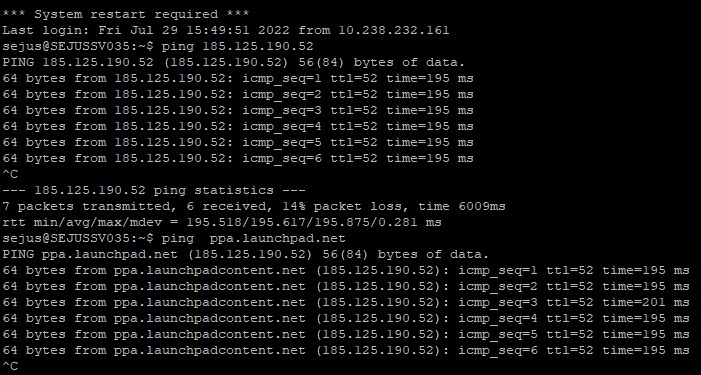
Is the server you are installing BigBlueButton blocked from accessing ppa.launchpad.net?
I ping the server where I'm installing BigBlueButton to check if access to both DNS and IP is blocked and I get a response from both.
I would recommend reaching out to your service provider (or try a different virtual server). You'll need to be able to download files from ppa.launchpad.net.