

 bgrabitmap
Fails to start on NixOS - Unhandeled exception: Access violation
Currently I'm trying to package lazpaint 7.2 together with latest bgrabitmap (11.5.1) and bgracontrols (7.6) https://github.com/NixOS/nixpkgs/pull/181093 When trying to start lazpaint I get an empty Window and an error message popup
Unhandled exception!

Exception class: EAccessViolation
Message: Access violation
To get more information, use the debug version.

It is recommended to save a backup of your image and restart the application.
What is the best way to debug this?
Best regards Jonas

Hello! I would begin to change the build mode (in project options/compiler options) to 'Debug'. And I would start LazPaint from a terminal.

This would give indeed more detail on the error.
You can start the program from Lazarus, this may give you even more information.

Hello, I've tried a virtual machine on VirtualBox, but I don't know how to install packages. I tried the command "nix-env -qaP" but doesn't show anything and gets stuck

Thank you for trying to investigate. This is what you can do:
git clone [email protected]:onny/nixpkgs.git
cd nixpkgs
git checkout lazpaint
nix build -f . lazpaint
This will build lazpaint including its dependencies from this PR https://github.com/NixOS/nixpkgs/pull/181093
Thanks but I need to install Lazarus to debug the program. I don't understand how to use NixOS, maybe it doesn't work on my VirtualBox. It is very slow, maybe that's why it gets stuck?
@onny I tried to do the method your suggest, but it doesn't recognize "git" command:
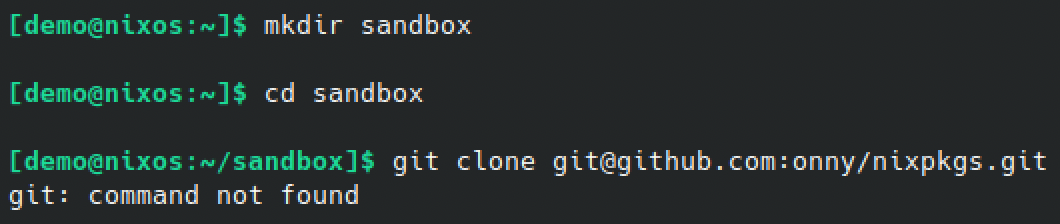
Trying to install git does nothing, it gets stuck until I press Ctrl-C or Ctrl-Z:

Oh I found how to install package. To get the command you need to go to the website https://search.nixos.org/packages
There you can type the name and in the "nix-env" tab, there is the command to install:
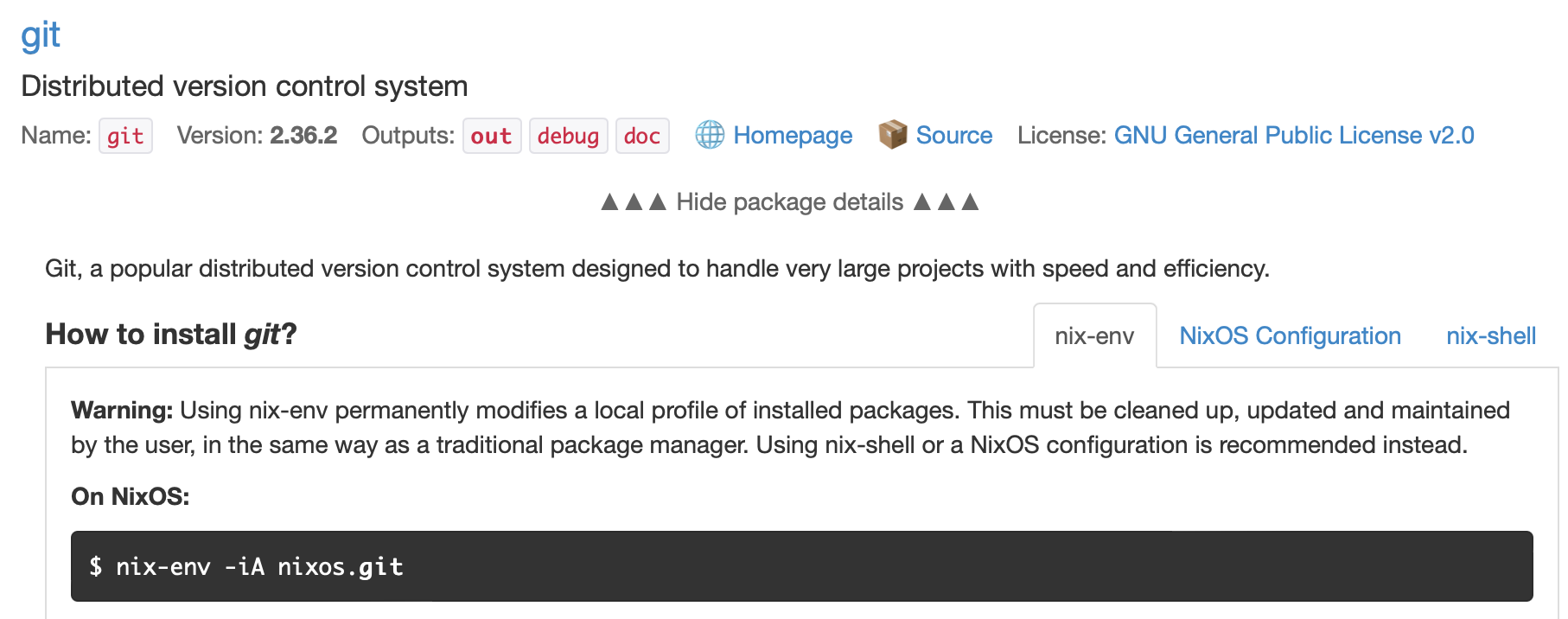
There is also Lazarus 2.0.12.
I was not able to reproduce the exception by compiling it with Lazarus 2.0.12 and running it in debug mode.
I thought I would try with the debug version I made recently: https://github.com/bgrabitmap/lazpaint/releases/download/v7.2.2/lazpaint7.2.2_linux64_gtk2_debug.tar.gz
Though from the file explorer, double-clicking or choosing Launch on the binary "lazpaint" has no effect.
From the command line, it doesn't work either:

Same for me, Debian trixie, 7.2.2-2. Debian provides lazpaint-gtk2 and lazpaint-qt5. Can reproduce with QT5 version. No error with GTK2.

Hello @nyx191, thanks for popping by.
It could help pinpoint exactly where there error happens by running the program in debug mode, either with debug binaries (though I've had no luck doing so) or from the development environment (Lazarus): https://wiki.freepascal.org/LazPaint#Compilation_of_latest_version
Regards
Hello @circular17, thanks for the guide. I'm trying to build lazpaint with dpkg-buildpackage, but can't figure out how to build debug version (default build mode works). Maybe you can give me some pointers?
I tried to replace ReleaseQt5 with DebugQt5 in debian/Makefile, but no luck. I'm building with standard debian tools because it's way to produce as much as possible similar package, ideally I need debian package with only one change - debug symbols are present. makedeb.sh script fails with mising dependencies.
UPD0: Actually DebugQt5 produces files in lazpaint/debug, there is even lazpaint/debug/x86_64-linux-qt5-3.2.2.nosync/lazpaint which is non-stripped binary! Copying it directly to /usr/bin/lazpaint and running produces following error:
Unhandled exception!
Exception class: EObjectCheck
Message: Object reference is Nil
Stacktrace:
    $00000000004D4197  GETTOOLMANAGER,  line 976 of lazpaintmainform.pas
    $00000000004E0253  TIMERUPDATETIMER,  line 2699 of lazpaintmainform.pas
    $000000000081C113  DOONTIMER,  line 179 of customtimer.pas
    $000000000081BFF4  TIMER,  line 151 of customtimer.pas
    $0000000000861926  SIGNALTIMEOUT,  line 4730 of qt5/qtobjects.pas
    $00007FFFF6505FCD
    $00007FFFF650A2CE
    $00007FFFF7362F32
Application behaves same otherwise, it opens, but with this message.
UPD1: What really happens is SEGV, some context for faulty PID:
[pid  1384] mprotect(0x7f7544000000, 135168, PROT_READ|PROT_WRITE) = 0
[pid  1384] futex(0x7f754e5fef18, FUTEX_WAKE_PRIVATE, 2147483647) = 0
[pid  1384] eventfd2(0, EFD_CLOEXEC|EFD_NONBLOCK) = 4
[pid  1384] eventfd2(0, EFD_CLOEXEC|EFD_NONBLOCK) = 5
[pid  1384] futex(0x7f754e5fef18, FUTEX_WAKE_PRIVATE, 2147483647) = 0
[pid  1384] prctl(PR_SET_NAME, "QXcbEventQueue") = 0
...
[pid  1383] socket(AF_UNIX, SOCK_STREAM, 0) = 6
[pid  1383] getsockopt(6, SOL_SOCKET, SO_SNDBUF, [212992], [4]) = 0
[pid  1383] uname({sysname="Linux", nodename="localhost", ...}) = 0
[pid  1383] connect(6, {sa_family=AF_UNIX, sun_path=@"/tmp/.ICE-unix/550"}, 21) = 0
[pid  1383] fcntl(6, F_SETFD, FD_CLOEXEC) = 0
[pid  1383] write(6, "\0\1\0\0\0\0\0\0", 8) = 8
[pid  1383] read(6, "\0\1\0f\0\0\0\0", 8) = 8
...
[pid  1383] socket(AF_UNIX, SOCK_STREAM|SOCK_CLOEXEC|SOCK_NONBLOCK, 0) = 10
[pid  1383] connect(10, {sa_family=AF_UNIX, sun_path="/var/run/nscd/socket"}, 110) = -1 ENOENT (No such file or directory)
[pid  1383] close(10)                   = 0
[pid  1383] newfstatat(AT_FDCWD, "/etc/nsswitch.conf", {st_mode=S_IFREG|0644, st_size=552, ...}, 0) = 0
[pid  1383] newfstatat(AT_FDCWD, "/", {st_mode=S_IFDIR|0755, st_size=4096, ...}, 0) = 0
[pid  1383] openat(AT_FDCWD, "/etc/nsswitch.conf", O_RDONLY|O_CLOEXEC) = 10
[pid  1383] newfstatat(10, "", {st_mode=S_IFREG|0644, st_size=552, ...}, AT_EMPTY_PATH) = 0
[pid  1383] read(10, "# /etc/nsswitch.conf\n#\n# Example"..., 4096) = 552
[pid  1383] read(10, "", 4096)          = 0
[pid  1383] newfstatat(10, "", {st_mode=S_IFREG|0644, st_size=552, ...}, AT_EMPTY_PATH) = 0
[pid  1383] close(10)                   = 0
[pid  1383] openat(AT_FDCWD, "/etc/passwd", O_RDONLY|O_CLOEXEC) = 10
[pid  1383] newfstatat(10, "", {st_mode=S_IFREG|0644, st_size=1813, ...}, AT_EMPTY_PATH) = 0
[pid  1383] lseek(10, 0, SEEK_SET)      = 0
[pid  1383] read(10, "root:x:0:0:root:/root:/bin/bash\n"..., 4096) = 1813
[pid  1383] close(10)                   = 0
[pid  1383] write(6, "\1\f\1\0\10\0\0\0\1\0\0\0\0\0\0\0\6\0\0\0UserID\0\0\0\0\0\0"..., 72) = 72
[pid  1383] write(6, "\1\f\1\0\23\0\0\0\1\0\0\0\0\0\0\0\16\0\0\0RestartComma"..., 160) = 160
[pid  1383] write(6, "\1\r\1\0\4\0\0\0\1\0\0\0\0\0\0\0\16\0\0\0DiscardComma"..., 40) = 40
[pid  1383] write(6, "\1\f\1\0\10\0\0\0\1\0\0\0\0\0\0\0\20\0\0\0RestartStyle"..., 72) = 72
[pid  1383] write(6, "\1\10\1\0\0\0\0\0", 8) = 8
[pid  1383] write(5, "\1\0\0\0\0\0\0\0", 8) = 8
[pid  1383] --- SIGSEGV {si_signo=SIGSEGV, si_code=SEGV_MAPERR, si_addr=NULL} ---
[pid  1383] rt_sigprocmask(SIG_UNBLOCK, [SEGV], NULL, 8) = 0
[pid  1383] rt_sigreturn({mask=[]})     = 0
[pid  1383] write(5, "\1\0\0\0\0\0\0\0", 8) = 8
[pid  1383] write(5, "\1\0\0\0\0\0\0\0", 8) = 8
[pid  1383] write(5, "\1\0\0\0\0\0\0\0", 8) = 8
[pid  1383] write(5, "\1\0\0\0\0\0\0\0", 8) = 8
[pid  1383] write(5, "\1\0\0\0\0\0\0\0", 8) = 8
[pid  1383] write(5, "\1\0\0\0\0\0\0\0", 8) = 8
UPD2: While running under gdb, some symbol names appeared in Stacktrace, updated! UPD3: We're not getting SIGSEGV in debug build, also error message differs because we're checking against Nil prior to accessing Nil value.
Hi @nyx191
Thanks for taking the time to compile the program. It seems you've encountered errors along the way.
From the stack trace, I gather that a timer is triggered too soon. I've applied a fix to prevent that on the master branch. This won't be included in the zip file in the release folder, but the master branch is basically the latest version.
About the errors you got during the compilation, the Makefile indeed is not designed to build the debug version. It will indeed consider that it fails because it won't find the binary in the release folder.
To make the debug version, I usually open Lazarus development environment and choose the build mode from there. Though it is possible to do that using the command line, as you actually did by tweaking the Makefile.
The actual command to make the debug binaries is:
lazbuild -B -r --build-mode=$(BUILDMODE) $(FOREIGN_PACKAGES) lazpaintcontrols/lazpaintcontrols.lpk lazpaint/lazpaint.lpi
Where
-
$BUILDMODEisDebug,DebugQt5or"Debug macOS"when applicable. -
$FOREIGN_PACKAGESis the full path of BGRABitmapPack and BGRAControls when those packages are not already known by lazbuild.
This will put the resulting binary in a subfolder of the debug folder as you found out.
I understand the challenges of managing the build process via the command line. Your perseverance in navigating through these issues is commendable. Don't hesitate to reach out if you encounter any more hurdles or have further questions.
Warm regards
Tested your patch, it works. Hope it will eventually get into Debian, with next release I guess. Thank you very much for the fix! Saved convenient command, so now I am able to build things with Lazarus. I think that issue can now be closed.
That's great to hear.
I like the idea of saving the build command, for future versions or for other applications made with Lazarus.
I've pushed the change into the upstream repository and contacted the Debian maintainer. This is not a new release as such. https://github.com/bgrabitmap/lazpaint-upstream
I will make a new release at some point for various reasons, and of course the fix will be included.
Thanks again for your detailed feedbacks.