

 bevyengine
UI Image Rotation
Objective
Enable 90-degree rotations of UiImages.
Solution
Add an orientation field to UiImage that controls the uv order of the texture.
Changelog
- added
Orientationenum - removed
flip_xandflip_yfields fromUiImageandExtractedUiNode - added
orientationfield toUiImageandExtractedUiNode - changed
prepare_uinodeto use a match statement onextracted_uinode.orientationto select the uv order - added the example "ui_image_symmetries"

Wouldn’t be enums cool? Like 180 degrees rotation = rotate and flip_x, or whatever. It’s a bit confusing but with an enum and bits in a u8 you could store everything from normal over rotate 90 180 270 to flip_x and flip_y readable and easy AND only use 8 bits?

Wouldn’t be enums cool? Like 180 degrees rotation = rotate and flip_x, or whatever. It’s a bit confusing but with an enum and bits in a u8 you could store everything from normal over rotate 90 180 270 to flip_x and flip_y readable and easy AND only use 8 bits?
Yes that was my original plan, but I just can't think of a good name for the enum or its variants :cry:
Wouldn’t be enums cool? Like 180 degrees rotation = rotate and flip_x, or whatever. It’s a bit confusing but with an enum and bits in a u8 you could store everything from normal over rotate 90 180 270 to flip_x and flip_y readable and easy AND only use 8 bits?
Yes that was my original plan, but I just can't think of a good name for the enum or its variants 😢
ImageModifier
FlipHorizontally = 100
Rotate90 = 001
Rotate180 = FlipHorizontally | FlipVertically
Something in this way?
Or UVModifier because that’s what you said
and shift the uv-coords to the left in prepare_uinodes if it is set to true.
. FlipRotate90 sounds a little bit scary.
ImageOrientation::Rotate90 | ImageOrientation::FlipXwould be better in my eyes.
This was the first thing I considered too, but the problem is that bitwise operations are commutative.
That is ImageOrientation::Rotate90 | ImageOrientation::FlipX == ImageOrientation::FlipX | ImageOrientation::Rotate90,
but a rotation followed by a reflection isn't equal to a reflection followed by a rotation:

. FlipRotate90 sounds a little bit scary.
ImageOrientation::Rotate90 | ImageOrientation::FlipXwould be better in my eyes.This was the first thing I considered too, but the problem is that bitwise operations are commutative. That is
ImageOrientation::Rotate90 | ImageOrientation::FlipX == ImageOrientation::FlipX | ImageOrientation::Rotate90, but a rotation followed by a reflection isn't equal to a reflection followed by a rotation:
yeah but with the old system with booleans it wasn't either
I think we can clarify the API by talking about which way the image is "pointing". Instead of ImageOrientation::Rotate270, we can simply have Orientation::PointingLeft.
I agree with your point about commutativity, but I really think that keeping these as separate fields will be more reliable in practice. Just clearly document that we flip first, then rotate.

I think we can clarify the API by talking about which way the image is "pointing". Instead of
ImageOrientation::Rotate270, we can simply haveOrientation::PointingLeft.I agree with your point about commutativity, but I really think that keeping these as separate fields will be more reliable in practice. Just clearly document that we flip first, then rotate.
that sounds reasonable
I think we can clarify the API by talking about which way the image is "pointing". Instead of
ImageOrientation::Rotate270, we can simply haveOrientation::PointingLeft.
As this is in UI context, maybe LeftToRight and RightToLeft?

Well, IMO, using the enum variants directly has confusing and unergonomic usability. You have to think about how your desired flip and rotation combine in order to pick the correct enum variant. I don't think "PointingLeft"/"PointingRight" would make things any better, it seems even more confusing to me. It adds the confusion of "what does it mean for my image to point a certain way?".
I think we should just expect (and teach) users to use the methods to produce their desired effect:
ImageOrientation::default().rotate_ccw().flip_y()
This way of using the API seems much easier to reason about. You can produce the correct value without much cognitive overhead. That's what we should show in examples and teach to users.
I don't think there is a way to make directly using the enum variants themselves intuitive. They are fine as they are.

Well, IMO, using the enum variants directly has confusing and unergonomic usability. You have to think about how your desired flip and rotation combine in order to pick the correct enum variant. I don't think "PointingLeft"/"PointingRight" would make things any better, it seems even more confusing to me. It adds the confusion of "what does it mean for my image to point a certain way?".
I think we should just expect (and teach) users to use the methods to produce their desired effect:
ImageOrientation::default().rotate_ccw().flip_y()This way of using the API seems much easier to reason about. You can produce the correct value without much cognitive overhead. That's what we should show in examples and teach to users.
I don't think there is a way to make directly using the enum variants themselves intuitive. They are fine as they are.
Yes, that's exactly how I intended the API to be used. I should have explained myself better.
I think the orientation should be just one value with 8 variants. It only represents one distinct concept, the order of the image's UVs when it is rendered.
Also with a representation like
struct UiImage {
  texture: Handle<Image>,
  direction: Direction,
  flip_x: bool,
}
methods like flip_y() would have to be implemented on the whole UiImage struct, rather than just the enum. And with both flip_x and flip_y values and a direction enum you have redundant information. Neither of which seems very pleasant.
I replaced counter-clockwise and clockwise with left and right and Rotate90 / Rotate270 with RotatedLeft and RotatedRight. These seem much better, I especially disliked Rotate270.
I don't think there is a more intuitive and concise way to describe a half-turn than Rotate180 though.
I like it! 👍 I don’t know if it needs any tests, but you may include one that calls multiple Orientation functions and then asserts them. Just to make sure when somebody messes around there nobody messes things up?
Also you might wanna make functions like
rotate_leftand soconst:)
Yep, good points, made both changes.
It should now be time for @alice-i-cecile to review it and then add Final Review to it.
I would prefer to keep something similar to Sprite, with flip_x and flip_y bools, and rotation being handled by the Transform
I would prefer to keep something similar to
Sprite, withflip_xandflip_ybools, and rotation being handled by theTransform
hmm 🤔 that would also be possible.. but i dont know how it behaves with Pivot Points or smth like that.. with that you could also argue why even use flip_x when you could rotate the sprite in the other directions for 180 degrees...
why even use flip_x when you could rotate the sprite in the other directions for 180 degrees...
Because rotating by 180° is not the same as flipping on x? It could be done by settings the scale on x as -1.0, but that's not natural, while handling rotation with the existing rotation part of a transform is
why even use flip_x when you could rotate the sprite in the other directions for 180 degrees...
Because rotating by 180° is not the same as flipping on x? It could be done by settings the scale on x as -1.0, but that's not natural, while handling rotation with the existing rotation part of a transform is
Rotating a sprite with 180 degrees around the y axis (the axis that goes up) would have the same effect, wouldn't it?
Ha right, I really avoid thinking about rotating on other axes than z on 2d/ui.
But same that for scale, thinking about scale / rotation on y is not the natural thing you're looking for when trying to flip an image. Rotation feels much more natural when looking to rotate.
Hmm, I am not sure the Transform can be used for rotating UI images? Doesn't everything that is part of a UI hierarchy have its transforms managed by Bevy internals (based on layout calculations)?
Layout only updates the translation, you can update other parts of the transform if you need to.
Layout only updates the translation, you can update other parts of the transform if you need to.
Only if the nodes have no children. ImageBundles maybe shouldn't have any children, but there is nothing stopping people from spawning them at the moment.
We could rotate the quad coordinates in the prepare function or something, but the extra work doesn't really make any sense unless it's that you want to support arbitrary rotations, not just by 90 degrees.
Only if the nodes have no children. ImageBundles maybe shouldn't have any children, but there is nothing stopping people from spawning them at the moment.
What do you mean?
This renders the same in Bevy and in HTML: https://jsfiddle.net/xy01u4rc/
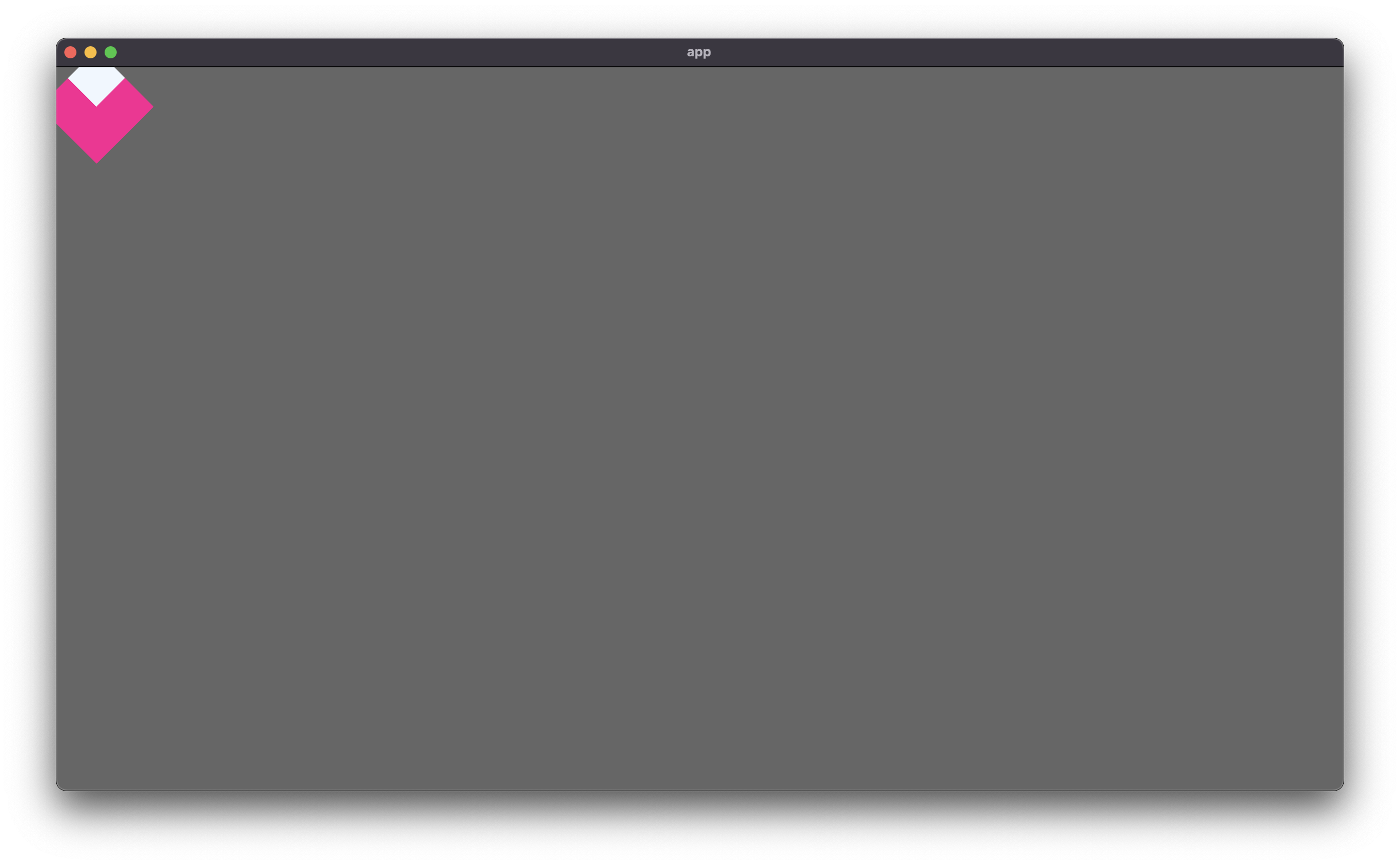
Bevy code
use std::f32::consts::FRAC_PI_4;

use bevy::prelude::*;

fn main() {
    App::new()
        .add_plugins(DefaultPlugins)
        .add_startup_system(setup)
        .run();
}

fn setup(mut commands: Commands) {
    commands.spawn(Camera2dBundle::default());
    commands
        .spawn(NodeBundle {
            style: Style {
                size: Size::new(Val::Px(80.0), Val::Px(80.0)),
                ..default()
            },
            background_color: BackgroundColor(Color::PINK),
            transform: Transform::from_rotation(Quat::from_rotation_z(FRAC_PI_4)),
            ..default()
        })
        .with_children(|parent| {
            parent.spawn(NodeBundle {
                style: Style {
                    size: Size::new(Val::Px(40.0), Val::Px(40.0)),
                    ..default()
                },
                background_color: BackgroundColor(Color::ALICE_BLUE),
                ..default()
            });
        });
}
That's actually a good point, all UI nodes can be rotated, not just images.
Ah, we're talking about different things.
This PR doesn't just rotate the image, it also adjusts the layout. So if you create an ImageBundle with a 50 wide by 100 high image and then you rotate it by 90 degrees the image's width and height are swapped and the layout will be changed depending on the style settings etc.
I agree with this PR. I think there should be a way to flip and rotate-by-90° UI images in a way that also affects the layout. This could be important for correctly laying out the content for some UIs.
Rotating via the Transform is a separate use case (I can see it being used for eye-candy/animations and such), where you want all the other UI/layout to stay in place.
The cardinal names are clear if you have an image orientated North but if your image is orientated South then the directions get reversed and it isn't so intuitive anymore. This PR has been blocked over the enum names forever though. As Inodentry said, the intended way to use the API is with composition of the methods anyway, not the enums.
So I don't mind anymore. If everyone really wants cardinal directions, let's just go with it :joy:
You added a new example but didn't add metadata for it. Please update the root Cargo.toml file.
![github-actions[bot] avatar](https://avatars.githubusercontent.com/in/15368?v=4 "Published by a pub.dev verified publisher")
You added a new example but didn't add metadata for it. Please update the root Cargo.toml file.
@inodentry @mockersf I'd like to move this PR forward. Are both of you on board with this feature existing + content enough with this as an initial API?
I really don't like the "cardinal direction" names. They require you to think about an alternate concept (a compass) that has nothing to do with the images you are working with, to understand the analogy / what they mean.
The old names are relative to the original image, and therefore it feels much easier for me to understand what that means. I know my image's original orientation and what that looks like. When you say that something is flipped, or rotated, I can imagine what that looks like. The only source of confusion might be if I don't immediately know the direction of rotation (clockwise or anticlockwise).
Again, this is why I would personally only use the methods in practice, and recommend other people do so too. The names of the enum variants don't matter as much IMO, but I am a person who has now put a lot of thought into this problem. 😆 Someone who encounters the API for the first time, might very well not get the memo, and think they are supposed to use the enum variants directly. (Though a mention in the docs to direct them to using the methods, would be nice.)
Therefore, I think we should care that they are understandable. And IMO naming the operations after what is being done to the image, is easier to understand, than naming them after an analogy to a different concept.
All that said, I would also love for this PR to move forward. I want this functionality in Bevy. And, at this point, I think bikeshedding the enum variant names is counterproductive. We could discuss them indefinitely. So, I'm inclined to just say, go ahead. :)